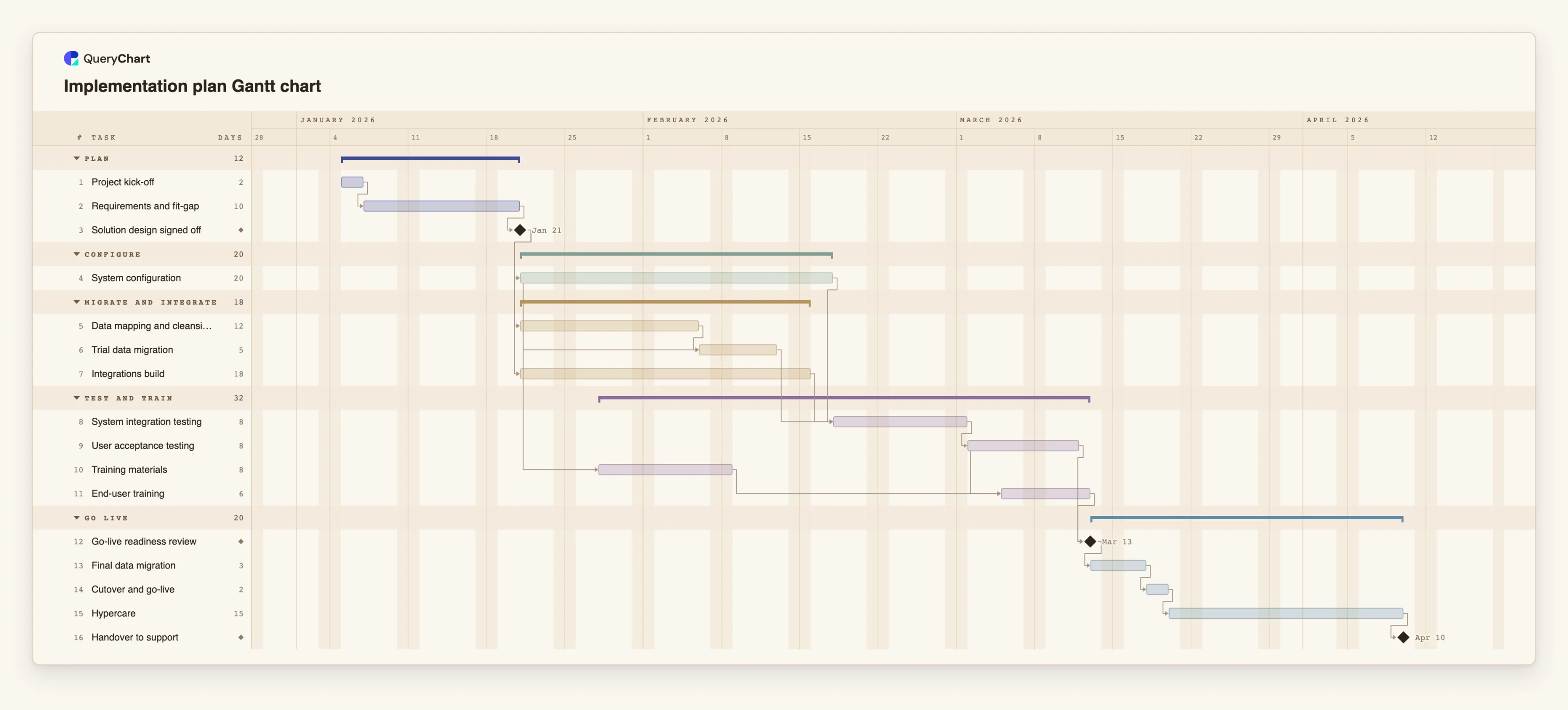
Implementation plan Gantt chart template for system rollouts
An editable implementation plan Gantt chart: requirements, configuration, data migration, integration, testing, training, cutover and hypercare, with dependencies and milestones. Change a duration and the dates follow.
What the implementation plan gantt chart template for system rollouts process is
A system implementation is a bundle of workstreams that finish together or not at all. Configuration alone does nothing without migrated data, integrations to the systems around it, and people who know how to use it. Plans that treat these as a sequence overrun, because they are mostly parallel, and plans that treat them as independent overrun because the join at go-live is where they collide.
This template has five phases: Plan, Configure, Migrate and integrate, Test and train, and Go live. After "Solution design signed off", configuration, data mapping and integrations all begin. The trial data migration starts partway through configuration, so the target structures exist, and it waits for the data mapping. System testing waits for the trial migration, the integrations and the configuration. Training materials begin while configuration is still under way, and end-user training starts a few days into user acceptance testing.
"Go-live readiness review" waits for acceptance testing and training. Its job is to say no. After it come the final migration, the cutover and a hypercare period before the handover to support. The plan is generic; the durations are examples. The longest tasks in a real rollout are usually data cleansing and testing, so test what happens when they double.
For a software-specific view of the same work, see the enterprise software implementation process at /templates/enterprise-software-implementation-process, which draws the decisions inside the plan.
What this flowchart covers
In this template
- Five phases, Plan, Configure, Migrate and integrate, Test and train and Go live, with 16 tasks and three milestones: "Solution design signed off", "Go-live readiness review" and "Handover to support".
- Three workstreams after design: "System configuration", "Data mapping and cleansing" and "Integrations build" all wait only for "Solution design signed off".
- A trial migration that starts mid-configuration: "Trial data migration" begins ten days into "System configuration" and waits for "Data mapping and cleansing".
- Training in step with testing: "Training materials" starts five days into configuration, and "End-user training" starts three days into "User acceptance testing".
- A readiness gate and a long tail: "Go-live readiness review", "Final data migration", "Cutover and go-live" and "Hypercare".
When to use this template
- You are planning a rollout of ERP, CRM or another business system and need a plan to agree with the vendor.
- A vendor's plan shows a go-live date and you want to see what it depends on.
- Data migration or integrations are late and you need to see the effect on go-live.
- You want a standard plan to adapt to each implementation.
The plan, task by task
Every task in the chart with its length in working days and what it waits for. A dependency is a step number; SS is start-to-start, FF is finish-to-finish, and +n is a lag in working days.
| # | Task | Group | Working days | Depends on |
|---|---|---|---|---|
| 1 | Project kick-off | Plan | 2 | |
| 2 | Requirements and fit-gap | Plan | 10 | 1 |
| 3 | Solution design signed off | Plan | Milestone | 2 |
| 4 | System configuration | Configure | 20 | 3 |
| 5 | Data mapping and cleansing | Migrate and integrate | 12 | 3 |
| 6 | Trial data migration | Migrate and integrate | 5 | 4SS+10, 5 |
| 7 | Integrations build | Migrate and integrate | 18 | 3 |
| 8 | System integration testing | Test and train | 8 | 4, 6, 7 |
| 9 | User acceptance testing | Test and train | 8 | 8 |
| 10 | Training materials | Test and train | 8 | 4SS+5 |
| 11 | End-user training | Test and train | 6 | 9SS+3, 10 |
| 12 | Go-live readiness review | Go live | Milestone | 9, 11 |
| 13 | Final data migration | Go live | 3 | 12 |
| 14 | Cutover and go-live | Go live | 2 | 13 |
| 15 | Hypercare | Go live | 15 | 14 |
| 16 | Handover to support | Go live | Milestone | 15 |
How it works
Separate the workstreams
Keep configuration, data, integrations, testing and training as their own tasks with owners.
Gate the build with a signed design
Link every workstream to "Solution design signed off" so changes after it are visible as changes to the plan.
Overlap with start-to-start links
Start the trial migration and training materials partway through configuration, with a lag in working days.
Make the readiness review a real gate
Define the criteria in advance. It should be able to postpone go-live.
Plan the cutover in detail
The final migration and cutover are short tasks with large consequences. Break them down in a separate chart if needed.
Include hypercare
Keep a support period and a handover milestone, and staff them.
Frequently asked questions
How do I create an implementation plan?
List the workstreams from requirements to hypercare, give each task a length in working days and link it to what it depends on. This template does that for a generic business system.
What is the critical path of an implementation?
Usually the chain through design, configuration or data, testing and the readiness review. The chart shows it when you switch it on in the View menu.
Does it work for ERP and CRM?
Yes, as a skeleton. Rename and add tasks for the modules and integrations you have.
Can the vendor and I share it?
Yes. Share the chart with edit or view access.