Use a flowchart and a Gantt chart together: from process to schedule
A workflow for turning an agreed process into a schedule: map it as a flowchart, agree it, add the implementation tasks, duplicate it as a Gantt chart and type in durations. What carries over, and what does not.
Mapping a process and scheduling the work to change it are different jobs, and doing them in order makes both easier. This guide walks through the sequence in QueryChart, from the first flowchart to a Gantt chart with dates.
The short version
- Agree the process in a flowchart or swimlane diagram before scheduling it.
- Duplicate as a Gantt chart: steps become tasks, arrows become dependencies, swimlanes become groups.
- People, fills, comments and links carry over. Durations and start dates do not; you type them.
- Resolve decisions and loops in the flowchart; a Gantt chart does not branch.
- Mind maps and org charts do not convert to a Gantt chart; use them to prepare, then type or paste the tasks.
Process first, schedule second
The common mistake is to start with dates. A plan built on an unsettled process gets reworked every time someone realises a step is missing or in the wrong order. The more reliable order is to draw the process as a flowchart, with swimlanes if people disagree about who does what, and get it agreed. Decisions, loops and hand-offs belong there. Only when the steps are stable do they become tasks with lengths.
The conversion is one action: duplicate the flowchart as a Gantt chart. Every step becomes a task, every arrow becomes a finish-to-start dependency, and each swimlane becomes a group. The people on the steps, the fill colours, the comments and the links come with them. What does not come is time. No task has a start or a duration, and the new plan opens with a notice that it has no durations. That is deliberate: the lengths are your estimates and nobody else can copy them for you. The original flowchart is left untouched.
Two things need your attention on the way. First, a flowchart is allowed to loop and branch, while a Gantt chart is not, so a step that comes after a decision becomes a task that depends on the decision's step, and a loop-back arrow is detected and drawn dashed rather than used for scheduling. Tidy those before you start estimating. Second, the flowchart often describes how the work runs, not the work of changing it. For an implementation, add the tasks that are about the change itself, such as configuration, data migration, testing and training, either in the flowchart before you convert or directly in the Gantt sheet.
Mind maps and org charts are not part of this conversion. A mind map is a good place to collect ideas before you know the order, and an org chart is a place to see who owns what, but there is no automatic route from either into a Gantt chart. Type the tasks in, or paste them from a spreadsheet. The example below is an implementation plan, the kind of schedule you arrive at at the end of this workflow.
The schedule at the end of the workflow
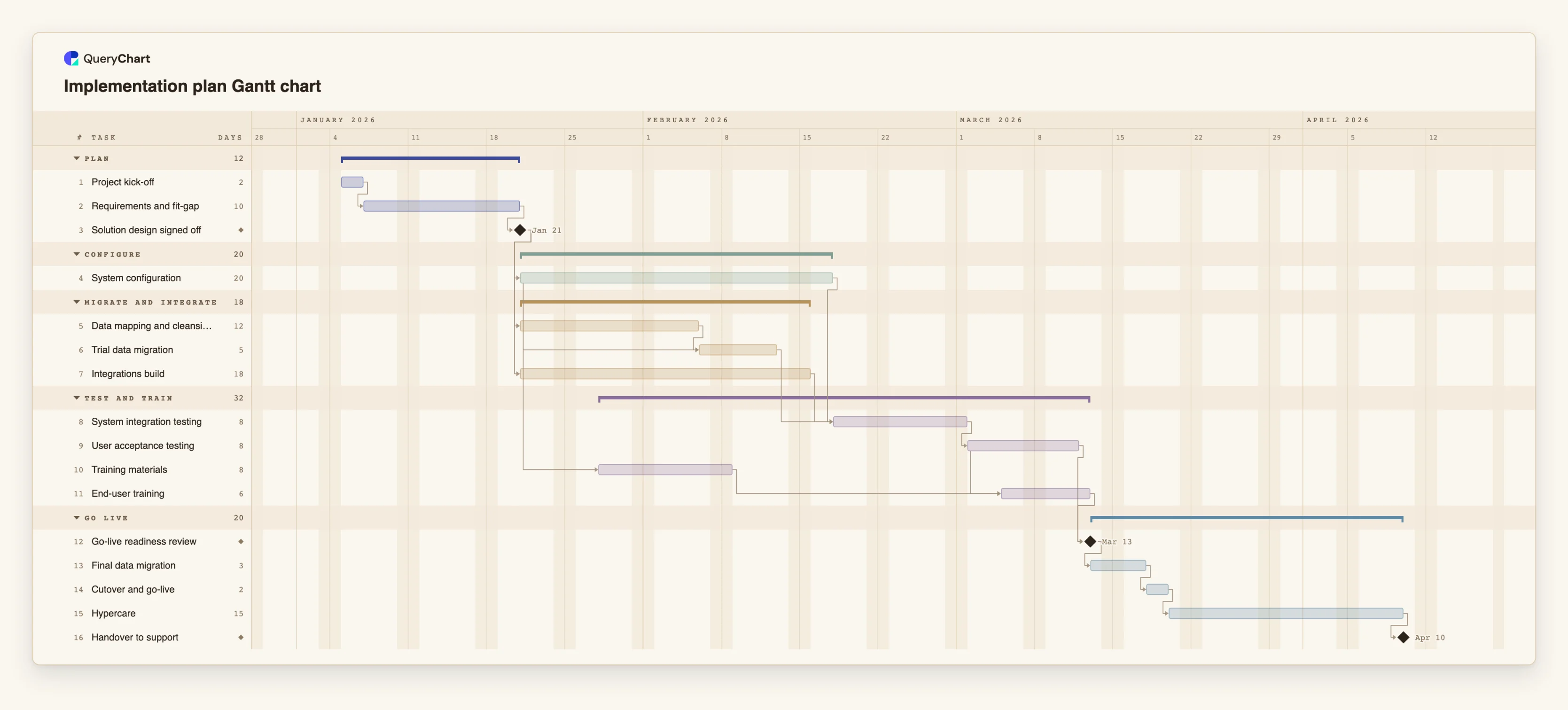
An implementation plan with 16 tasks in five groups, as it might look once the process is agreed and durations are typed in.
The groups are the swimlanes
"Project kick-off", "Requirements and fit-gap" and "Solution design signed off" sit in the first group. If these had come from a swimlane flowchart, the lane would have become the group, and the arrows would be the links.
Estimates added by the reader
"System configuration" is 20 working days, "Data mapping and cleansing" 12 and "Integrations build" 18. These numbers are illustrative; the conversion copies none of them. "Trial data migration" starts 10 working days after configuration starts and also waits for the data work.
Tasks added for the change itself
"System integration testing", "User acceptance testing", "Training materials" and "End-user training" describe the work of rolling the change out, not a business process. They are the sort of tasks you add on top of the converted steps.
Milestones mark the agreements
"Go-live readiness review" and "Handover to support" have a length of 0, so they are milestones. "Cutover and go-live" (2 working days) and "Hypercare" (15) are the last tasks between them.
How it works
Map the process as a flowchart
Draw the steps, the decisions and the hand-offs. Use swimlanes if ownership matters. Keep it to the work as it should happen.
Agree it before scheduling
Share the chart as a link and collect comments. Settle disagreements about order and owners here, while a change is one box moved rather than a rebuilt plan.
List the implementation tasks
Add the tasks about delivering the change: setup, migration, testing, training, go-live. Add them as steps in the flowchart, or, if you prefer, directly in the Gantt sheet after converting.
Duplicate it as a Gantt chart
Use the duplicate option to create a Gantt chart. Steps become tasks, arrows become finish-to-start links, swimlanes become groups, and the people, fills, comments and links stay.
Resolve what a Gantt chart cannot hold
Look for dashed loop-back links and tasks that follow a decision. Remove or rework them so each task has a clear predecessor.
Type the durations
Enter each task's length in working days. Add start-to-start or finish-to-finish links with a lag where work genuinely overlaps, mark milestones with a length of 0, and pin a start date only where one is fixed.
Mistakes to avoid
Expecting the dates to arrive with the conversion
No task has a duration after duplication. The plan shows a banner saying so. Until you enter lengths, there is no schedule to read.
Converting a flowchart that is still changing
If the process is unsettled you will do the estimating twice. Finish the discussion in the flowchart first.
Keeping every loop and branch
A Gantt chart follows one path. Keep the main route, and record rework loops and exceptions in the flowchart or in the task notes.
Treating the converted plan as finished
The arrows only give finish-to-start links. Look for work that really overlaps and change those links to start-to-start or finish-to-finish with a lag.
Open the implementation plan
Open the implementation plan as your own chart, and compare it with a flowchart of your own process before you duplicate that one as a Gantt chart.
Related guides
Frequently asked questions
What exactly carries over when I duplicate a flowchart as a Gantt chart?
Every step becomes a task and every arrow a finish-to-start dependency, with the arrow's label kept. Swimlanes become groups. People, the step's fill colour, comments and links are kept, and a text note stays a note rather than a task.
Are durations copied?
No. No task has a start or a duration after the conversion. You type the lengths yourself in the sheet.
Does the original flowchart change?
No. Duplicating creates a new chart and leaves the original as it was.
Can I convert a mind map or an org chart?
No. There is no conversion from a mind map or an org chart to a Gantt chart. Use them to collect ideas or see ownership, then type or paste the tasks into a Gantt sheet.
Can I go back from the Gantt chart to a flowchart?
Yes, by duplicating it as a flowchart. The tasks, links, groups, people and fills come across; the schedule does not. Dependency types and lags are dropped.