Flowchart vs Gantt chart: which to use, and what each cannot show
A flowchart shows steps, decisions and who does what; a Gantt chart shows how long tasks take and when they happen. How to choose between them, what each leaves out, and when you need both.
A flowchart and a Gantt chart can describe the same piece of work and still answer different questions. The first says how the work goes. The second says how long it takes and when each part happens.
The short version
- A flowchart answers "how does the work go?": steps, decisions, owners. It has no time scale.
- A Gantt chart answers "how long and when?": durations, dependencies, milestones and a finish date. It has no decisions.
- Branches and loops belong in a flowchart; dates and the critical path belong in a Gantt chart.
- Use a flowchart for repeatable processes and a Gantt chart for one-off work with an end date.
- A flowchart can be duplicated as a Gantt chart and back, but only the structure travels, not the schedule.
Two charts, two questions
A flowchart is about the order and the logic of work. Its boxes are steps, its arrows say what follows what, a diamond is a decision with a labelled answer on each branch, and with swimlanes you can see who does each step. It has no time scale. A box does not get wider because the step takes longer, and an arrow does not say how many days pass before the next step starts. A Gantt chart is the reverse: its bars sit on a calendar, their length is the time the task takes, and its dependencies decide the start dates. It has no diamonds that route work down different paths.
Choose by the question you need answered. "What happens if the invoice is rejected?" is a flowchart question, because it involves a branch. "Who approves it?" is a swimlane flowchart question. "Can we finish before the end of the quarter?" is a Gantt question, because it needs durations. "Which task is holding up the launch?" is also a Gantt question, answered by the critical path. "Is this process the same every time?" points to a flowchart; "is this a one-off piece of work with a finish date?" points to a Gantt chart.
What each cannot show is as useful to know as what it shows. A flowchart cannot tell you a finish date, how much slack a step has, or which steps can overlap in time. A Gantt chart cannot show a decision or a loop: a task either depends on another or it does not, and a dependency that loops back is flagged and drawn dashed rather than followed. It also has no way to say "if the test fails, go back to design". If your work has real branches, a Gantt chart will quietly flatten them into one straight plan.
Most real projects need both, at different moments. Draw the process as a flowchart while you are still agreeing how the work should go, and build a Gantt chart once you know the steps and need to put them on a calendar. QueryChart can turn one into the other: duplicating a flowchart as a Gantt chart makes every step a task and every arrow a dependency. The example below is an implementation plan, which is the kind of plan that lives in the Gantt chart but began as a process.
An implementation plan: the same work seen as a schedule
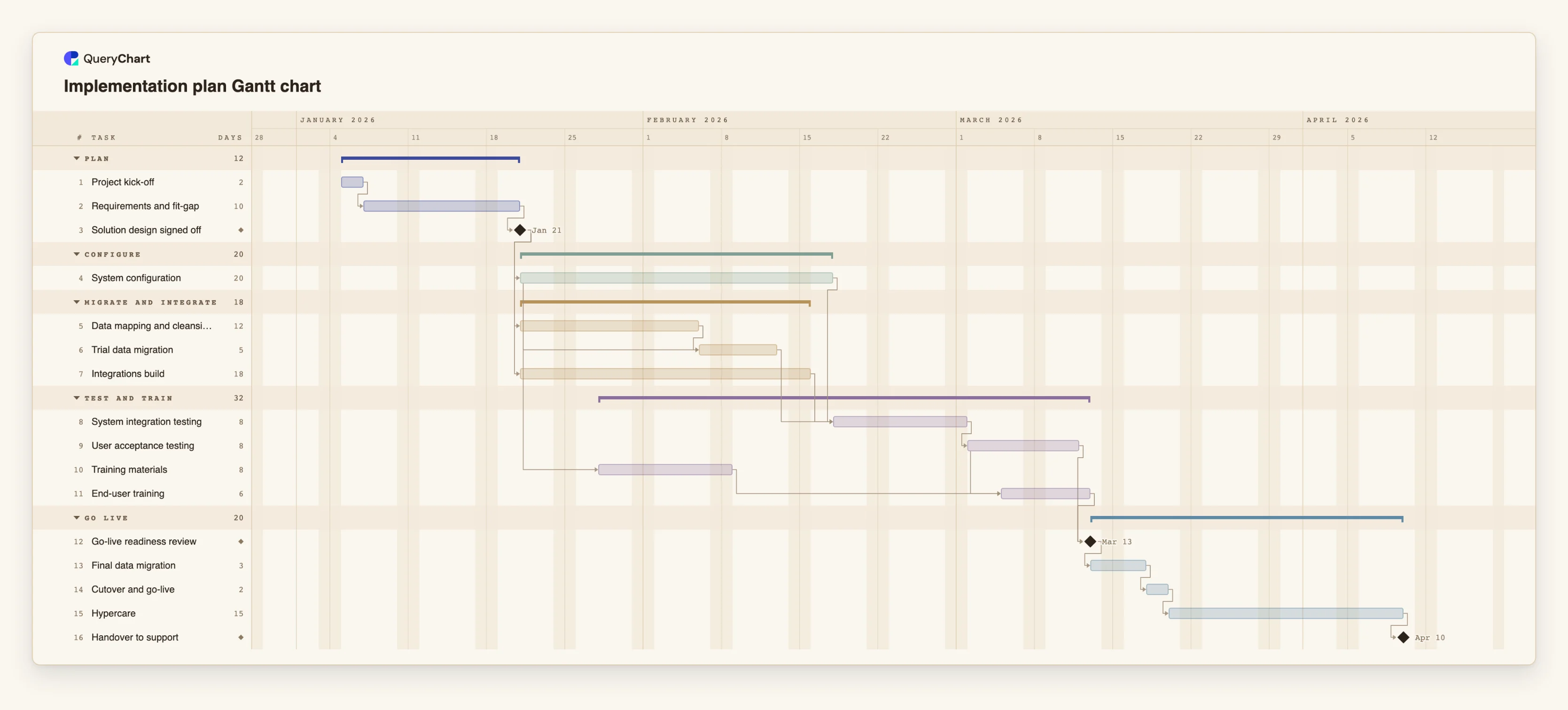
Sixteen tasks in five groups. Everything here is about time; none of it is about decisions. Open the spreadsheet panel to see the durations and dependencies.
Order, but now with lengths
"Project kick-off" takes 2 working days and "Requirements and fit-gap" 10. "Solution design signed off" has a length of 0, so it is a milestone. A flowchart could show the same three steps in the same order, but not that the middle one takes five times as long as the first.
Overlap a flowchart cannot draw
"System configuration" runs 20 working days. "Data mapping and cleansing" starts at the same milestone, and "Trial data migration" begins 10 working days after configuration starts (a start-to-start link with a lag) and also waits for the data work. That overlap is the kind of thing a flowchart's arrows do not express.
Where the time goes
"System integration testing" waits for configuration and for "Integrations build", which runs 18 working days. "User acceptance testing" is followed by "End-user training", which may begin 3 working days after UAT starts and also waits for "Training materials".
A finish date comes out
"Go-live readiness review" is a milestone, then "Final data migration" (3), "Cutover and go-live" (2) and "Hypercare" (15) run in a line to "Handover to support". A flowchart has no finish date to give; here the dates are calculated from the lengths and links.
How it works
Write down the question
Before choosing a chart, write the question in one sentence. If it contains "if", "who" or "what happens", start with a flowchart. If it contains "when", "how long" or "by what date", start with a Gantt chart.
Draw the process first if it is not agreed
If people still disagree about the steps, draw a flowchart or a swimlane diagram and settle it there. It is cheaper to move a box than to rework a schedule built on the wrong sequence.
Check that the work is a plan, not a process
A Gantt chart suits work that happens once, with a start and a finish. If the same steps repeat for every order, ticket or claim, the flowchart is the useful artefact and a schedule adds little.
Turn the agreed steps into tasks
Duplicate the flowchart as a Gantt chart, or type the tasks into the Gantt sheet. Then add a length in working days to each task and add dependencies where the order matters.
Keep the two charts for different readers
Share the flowchart with the people doing the work and the Gantt chart with those who need dates. Neither has to carry the other's information.
Mistakes to avoid
Putting decisions in a Gantt chart
A task cannot branch. If the plan depends on a decision, show the decision in a flowchart and schedule the path you expect, noting the alternative in the task's notes.
Reading arrows as time in a flowchart
The length of an arrow in a flowchart means nothing. If a reader needs to know how long something takes, that information belongs in a Gantt chart, not in a longer line.
Duplicating a flowchart and expecting a schedule
When a flowchart is duplicated as a Gantt chart, the steps, the arrows and the swimlanes carry over, but no durations or start dates do. The plan opens with a notice that it has no durations, and you type them in yourself.
Maintaining two charts that disagree
Once the process changes, update both. Treat the flowchart as the source for the sequence and the Gantt chart as the source for the dates.
Open the implementation plan
Open the implementation plan as your own chart, then duplicate it as a flowchart to see what the same tasks look like without the schedule.
Related guides
Frequently asked questions
Is a Gantt chart a type of flowchart?
No. Both use boxes or bars joined by links, but a flowchart shows logic and a Gantt chart shows time. A Gantt chart has dependencies but no decisions or loops.
Can I show a decision in a Gantt chart?
Not as a branch. You can add a milestone such as "Go / no-go" that later tasks wait for, but the chart will not follow different paths. Use a flowchart to show the paths.
Can I turn a flowchart into a Gantt chart in QueryChart?
Yes. Duplicating a flowchart as a Gantt chart turns each step into a task, each arrow into a finish-to-start dependency and each swimlane into a group. Durations and start dates are not copied; you add them.
And the other way round?
A Gantt chart can be duplicated as a flowchart. Its dependencies become arrows, but the schedule (start dates, durations, progress) is dropped, and a task with more than four links in and out draws only four.
Which should I make first?
If the steps are not yet agreed, the flowchart. If they are agreed and you need dates, the Gantt chart.