Turn a flowchart into a Gantt chart: what carries over and what you add
How to use Duplicate as Gantt Chart to turn a flowchart into a schedule: steps become tasks, arrows become dependencies, and you add the durations. What is kept, what is left behind, and what to check.
A flowchart shows what happens and in what order; a Gantt chart shows how long it takes. QueryChart can turn one into the other in a click, but the conversion gives you the structure, not the schedule.
The short version
- Open the File menu in the chart header and choose Duplicate as Gantt Chart; the original stays as it is.
- Steps become tasks, lines become finish-to-start dependencies, swimlanes become groups.
- People, fill colours, comments and links are kept; durations and starts are not copied.
- You enter the durations, then add overlaps and the tasks the flowchart never had.
- Decisions and loops do not suit a schedule; check them before you trust the dates.
What the conversion gives you, and what it leaves for you
Duplicate as Gantt Chart makes a new chart from a swimlane flowchart; the original is not changed. Every step becomes a task and every line between steps becomes a finish-to-start dependency, so the order of the process is already in the Depends on column. The swimlane a step sat in becomes its Group, and the people on a step, the step's fill colour, its comments and its link are kept. A text note stays a note rather than becoming a task.
What does not come across is the time. No task has a duration or a start, because a flowchart has no such thing. The new chart opens with a banner saying that no task has a duration yet, and until you add them every bar is drawn one day long. Dates are an output of durations and dependencies, so the work of the conversion is entering a length in working days for each task, not drawing anything. Line labels are kept, but the line styling is dropped, and a line cannot yet be a start-to-start or finish-to-finish link until you change it.
The conversion is not always the right move. A flowchart of a repeating process, with decisions and loops, does not translate into a one-off schedule: a loop is reported and its closing link is ignored, and a decision's branches become parallel tasks that both appear in the plan. It works best for a flowchart of a project-like sequence, such as a redesigned process whose rollout you now have to plan, and it is a good starting point for the order even when you add many tasks that were never steps in the flowchart.
Going the other way also works: a Gantt chart can be duplicated as a flowchart. The schedule is dropped, as are dependency types and lags, and the arrows come back as plain lines.
From an agreed process to its rollout plan
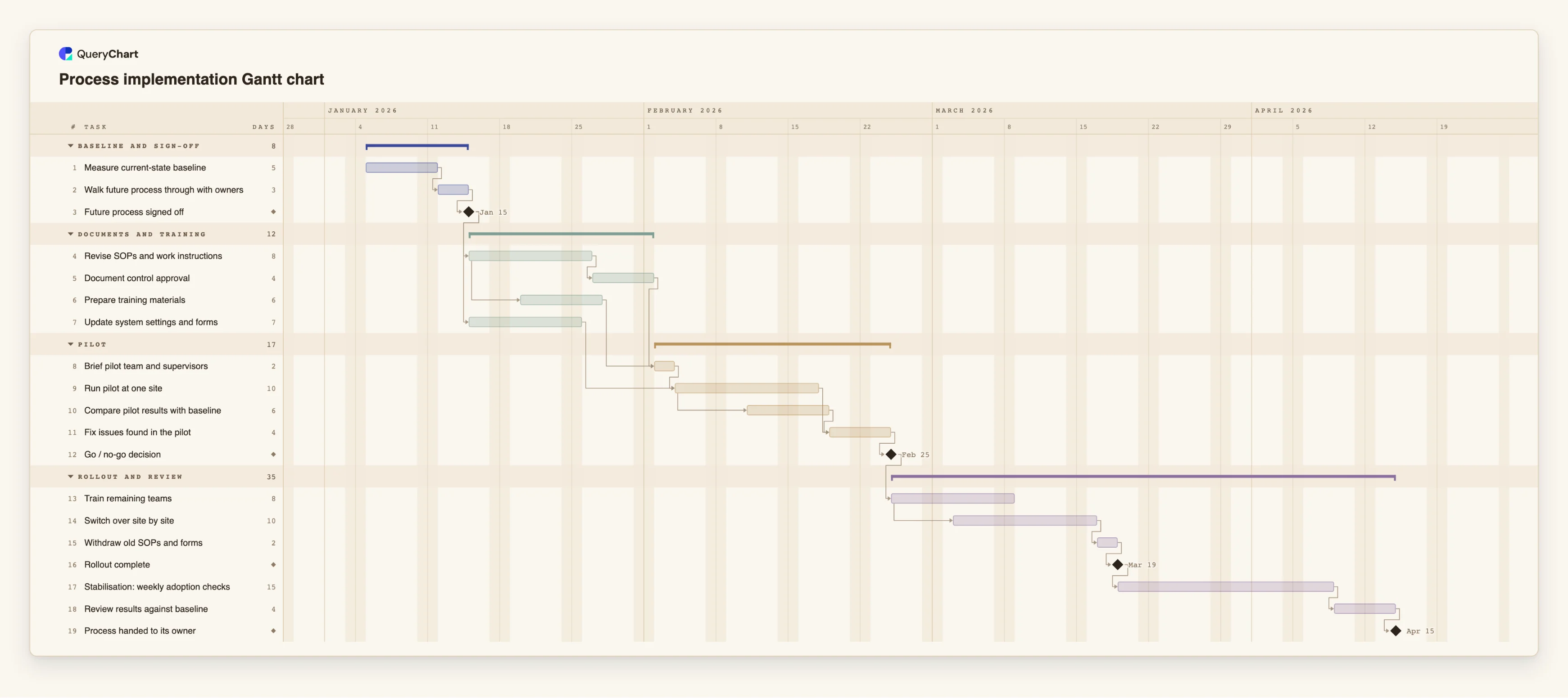
A redesigned process is approved as a flowchart; the rollout plan is its Gantt chart. The durations are illustrative.
The order comes across
After conversion each step is a task in a chain. "Measure current-state baseline", "Walk future process through with owners", "Future process signed off" and "Revise SOPs and work instructions" each wait for the one before. Only the milestone has a length of 0; the others need their durations typed.
You add the overlaps
A flowchart draws every line as finish to start. Here "Prepare training materials" starts 3 working days into "Revise SOPs and work instructions", and "Run pilot at one site" waits for both "Brief pilot team and supervisors" and "Update system settings and forms".
You add the gates and checks
"Compare pilot results with baseline" starts 5 working days into the pilot. "Go / no-go decision" is a milestone of length 0 that the rollout tasks wait for. A flowchart would draw it as a decision diamond with two branches; in the schedule it holds back the work that follows.
You add the tail
"Switch over site by site" starts 4 working days into "Train remaining teams". "Stabilisation: weekly adoption checks" takes 15 working days and ends in the milestone "Process handed to its owner" after "Review results against baseline". None of these were steps of the process itself.
How it works
Tidy the flowchart first
Make sure every step has a name, that it is a swimlane flowchart and that it holds no sub-processes; a chart with an empty canvas or a sub-process is not offered the conversion. Remove steps that are not work, such as a symbol that only marks a page break.
Choose Duplicate as Gantt Chart
Open the File menu in the chart header and pick Duplicate as Gantt Chart. A new chart opens in Gantt mode; the flowchart is untouched.
Read the banner and enter durations
The banner says that no task has a duration yet. Type a length in whole working days for each task in the Duration column, and use 0 for a decision point you want drawn as a milestone.
Check the dependencies
Each flowchart line is now a finish-to-start dependency. Where work really overlaps, change the link to a start-to-start type with a lag, for example 6SS+3.
Replace decisions and loops
A decision's branches both appear as tasks. Keep the branch that is the plan, or turn the decision into a milestone. A loop is reported, and its closing link is not used for scheduling.
Add what the flowchart never showed
Add the tasks a process drawing leaves out, such as approvals, training, a pilot and a review, and link them in. Pin a Start only for a date that is genuinely fixed.
Mistakes to avoid
Expecting dates after the conversion
No durations are copied, so the new chart cannot know when anything finishes. Until you type them, every bar is one day long.
Converting a repeating process
A flowchart of something that happens every day does not describe a one-off project. Use the conversion for a sequence you will carry out once, such as a rollout.
Trusting decision branches as a plan
Both branches of a decision become tasks in the schedule, so the plan may include work that will never happen. Decide which branch is real.
Forgetting the conversion is one-way in detail
Converting back to a flowchart drops the durations, starts, progress and the dependency types. Keep the Gantt chart as the schedule and the flowchart as the process.
Open the rollout plan
Open the process implementation plan as your own chart to see a converted flowchart after durations, overlaps and gates have been added.
Related guides
Frequently asked questions
Where is Duplicate as Gantt Chart?
In the File menu of the chart's header, next to Duplicate, when the open chart is a swimlane flowchart. It is not offered for an empty chart or one that holds sub-processes.
Does the original flowchart change?
No. The conversion makes a new chart and leaves the flowchart as it was.
What is kept from the flowchart?
The steps and their order, line labels, swimlanes as groups, people, fill colours, comments and links. Shapes, positions, line styling and sub-process links are not kept.
Can I convert a Gantt chart back into a flowchart?
Yes, with Duplicate as flowchart. The arrows come back as lines, and the schedule, progress and dependency types are dropped.
Is there a better starting point for a rollout?
The process implementation template already holds the usual rollout tasks. See /guides/process-implementation-timeline for how its order works.