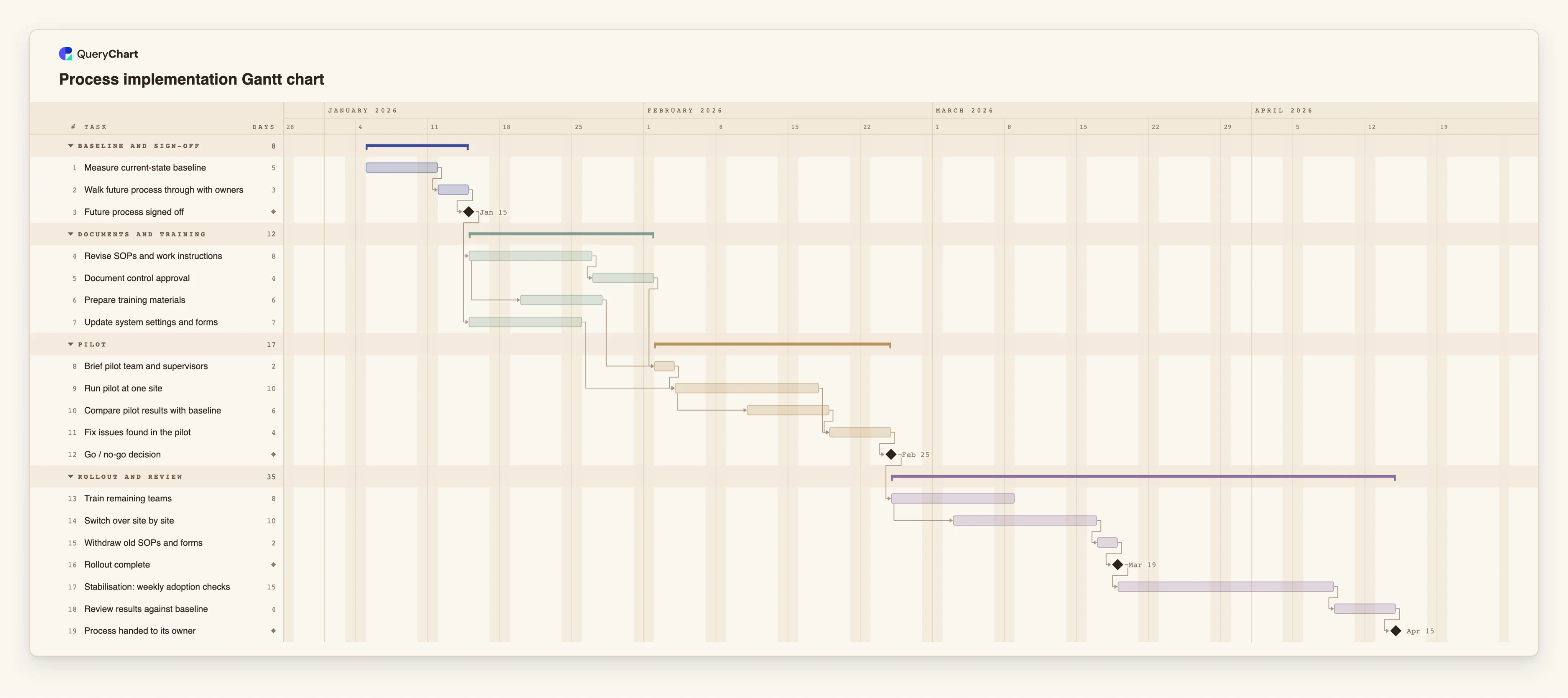
Process implementation Gantt chart template: pilot, go/no-go, rollout
An editable Gantt chart for putting a redesigned process into use: baseline, sign-off, SOP updates, training, a pilot, a go/no-go gate, rollout and stabilisation. Change a duration and the dates follow.
What the process implementation gantt chart template: pilot, go/no-go, rollout process is
A redesigned process usually exists first as a flowchart that people have agreed is better. The plan that follows is where many redesigns stall, because the order of work is less obvious than it looks. The documents cannot be finalised before the design is signed off. Training needs the documents. A pilot needs both, plus the system changes the new steps depend on. And the rollout should wait for evidence from the pilot, not for the calendar.
This template has 19 tasks in four groups: Baseline and sign-off, Documents and training, Pilot, and Rollout and review. "Measure current-state baseline" comes first, so there is something to compare the pilot with. "Future process signed off" is a milestone that both "Revise SOPs and work instructions" and "Update system settings and forms" wait for. "Prepare training materials" starts three working days into the SOP revision rather than after it, because the trainers can begin on the sections that are settled.
"Run pilot at one site" waits for "Brief pilot team and supervisors" and for the system changes. "Compare pilot results with baseline" starts five working days into the pilot, so early findings are not left until the end, and "Fix issues found in the pilot" waits for both. "Go / no-go decision" is a milestone with a real answer: no rollout task can start until it has passed. After it, "Train remaining teams" and "Switch over site by site" overlap, and the plan ends with "Stabilisation: weekly adoption checks", "Review results against baseline" and the milestone "Process handed to its owner".
The durations are illustrative. A rollout across ten sites, or one that needs a system change from another department, will look quite different, so treat the chart as a skeleton. A schedule also does not make a process compliant or safe: where an SOP is regulated, the approvals in "Document control approval" are done by the people who hold that authority, and the chart only shows when they are needed. For the change request that usually precedes this work, see /templates/change-control-process and /templates/sop-change-control-process, and for a rollout of software rather than a process, /templates/implementation-plan-gantt-chart.
What this flowchart covers
In this template
- Four groups, Baseline and sign-off, Documents and training, Pilot, and Rollout and review, with 19 tasks and four milestones: "Future process signed off", "Go / no-go decision", "Rollout complete" and "Process handed to its owner".
- A baseline before the change: "Measure current-state baseline" takes 5 working days and "Walk future process through with owners" follows it, so the sign-off rests on numbers as well as opinions.
- Documents and training in step: "Document control approval" waits for "Revise SOPs and work instructions", while "Prepare training materials" starts 3 working days into the SOP revision.
- A pilot with early evidence: "Compare pilot results with baseline" starts 5 working days into "Run pilot at one site", which lasts 10 working days, and "Fix issues found in the pilot" waits for both.
- An overlapping rollout and a tail: "Switch over site by site" starts 4 working days into "Train remaining teams"; "Withdraw old SOPs and forms", "Stabilisation: weekly adoption checks" (15 working days) and "Review results against baseline" follow.
When to use this template
- A process has been redesigned and approved as a flowchart, and you need a rollout plan with an order people can agree on.
- You want a pilot at one site or team before changing everyone, and a clear gate that decides whether to go on.
- SOPs, forms and training must be ready before the new process can start, and you want to see what each one waits for.
- You want the plan to include a review against the starting point, not just the go-live date.
The plan, task by task
Every task in the chart with its length in working days and what it waits for. A dependency is a step number; SS is start-to-start, FF is finish-to-finish, and +n is a lag in working days.
| # | Task | Group | Working days | Depends on |
|---|---|---|---|---|
| 1 | Measure current-state baseline | Baseline and sign-off | 5 | |
| 2 | Walk future process through with owners | Baseline and sign-off | 3 | 1 |
| 3 | Future process signed off | Baseline and sign-off | Milestone | 2 |
| 4 | Revise SOPs and work instructions | Documents and training | 8 | 3 |
| 5 | Document control approval | Documents and training | 4 | 4 |
| 6 | Prepare training materials | Documents and training | 6 | 4SS+3 |
| 7 | Update system settings and forms | Documents and training | 7 | 3 |
| 8 | Brief pilot team and supervisors | Pilot | 2 | 5, 6 |
| 9 | Run pilot at one site | Pilot | 10 | 7, 8 |
| 10 | Compare pilot results with baseline | Pilot | 6 | 9SS+5 |
| 11 | Fix issues found in the pilot | Pilot | 4 | 9, 10 |
| 12 | Go / no-go decision | Pilot | Milestone | 11 |
| 13 | Train remaining teams | Rollout and review | 8 | 12 |
| 14 | Switch over site by site | Rollout and review | 10 | 13SS+4 |
| 15 | Withdraw old SOPs and forms | Rollout and review | 2 | 14 |
| 16 | Rollout complete | Rollout and review | Milestone | 15 |
| 17 | Stabilisation: weekly adoption checks | Rollout and review | 15 | 16 |
| 18 | Review results against baseline | Rollout and review | 4 | 17 |
| 19 | Process handed to its owner | Rollout and review | Milestone | 18 |
How it works
Measure the baseline first
Record how the current process performs before anything changes, so the pilot has something to be compared with. Keep it short; this template gives it 5 working days.
Put a sign-off between design and documents
Link the SOP revision and the system changes to "Future process signed off". Changes after it then show up as changes to the plan.
Overlap training with documents
Use a start-to-start link with a lag so "Prepare training materials" begins while the SOPs are still being revised, and keep the approval as a separate task.
Size the pilot to produce evidence
Choose one site or team, state what you will compare in advance, and start the comparison part way through the pilot rather than after it.
Make the go / no-go decision able to say no
Write the criteria before the pilot. If the decision can only be yes, the milestone is decoration. If it is no, the rollout tasks move with it.
Plan the tail
Withdraw the old SOPs and forms, keep a stabilisation period with named checks, and finish with a review against the baseline and a handover to the process owner.
Frequently asked questions
How long should a process pilot be?
Long enough to see the process run through its normal cycle at least once, including the awkward cases. The 10 working days in this template are an illustration; change the duration to fit your cycle and the later dates follow.
Why compare with a baseline?
Without a measurement taken before the change, the pilot can only be judged by impressions. The baseline task gives you the numbers to check the pilot and the final review against.
Does this plan make the new process compliant?
No. A timeline shows the order and timing of the work. Whether an SOP or process meets a regulation or standard is decided by the people with that responsibility, and the chart only shows when their approvals are needed.
Can I start from the flowchart of the new process?
Yes. A flowchart can be duplicated as a Gantt chart, with each step becoming a task and each arrow a dependency. You then add durations. See /guides/turn-flowchart-into-gantt-chart.
How do I sequence the rollout itself?
See /guides/process-implementation-timeline for the order of baseline, documents, training, pilot, gate and rollout, and where each overlap is safe.