Change management Gantt chart template: people, comms, training, rollout
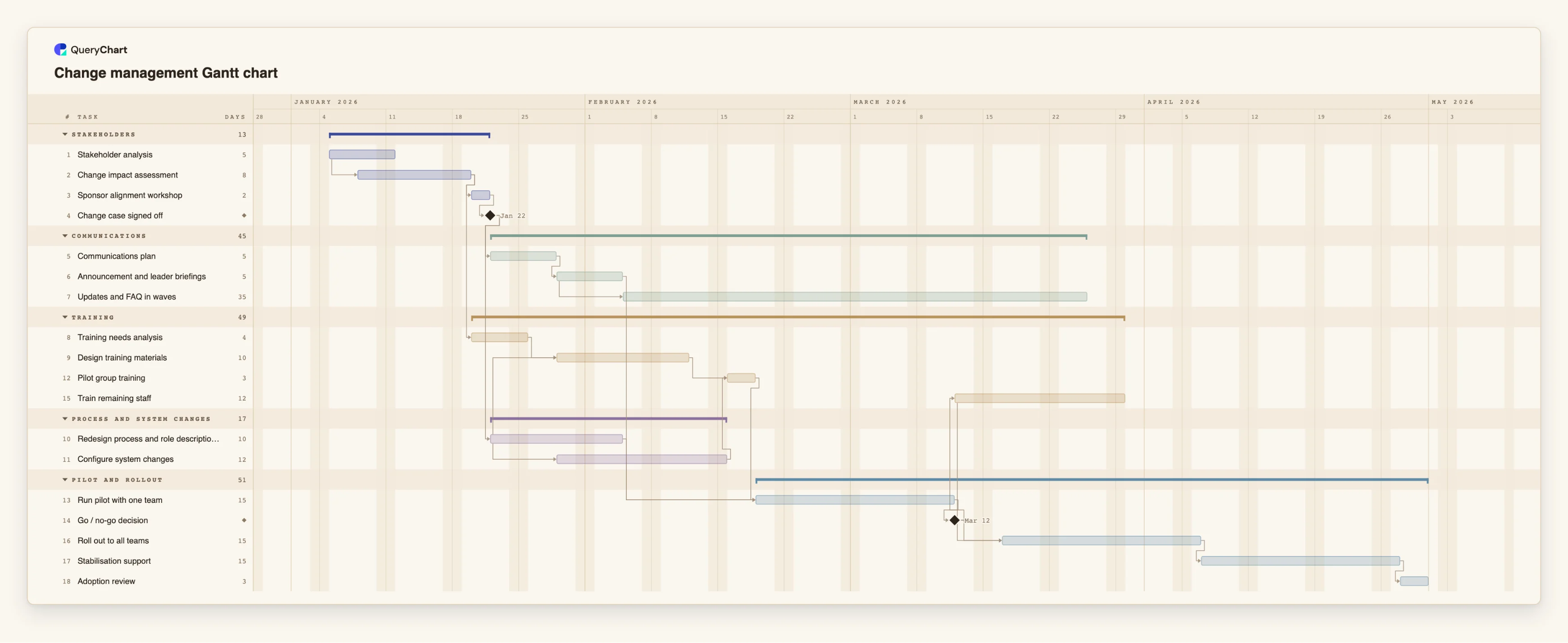
An editable change management plan on one timeline: stakeholder analysis, communications, training, process and system changes, a pilot, a go/no-go and stabilisation. Edit a duration and the dates follow.
What the change management gantt chart template: people, comms, training, rollout process is
Organisational change usually fails to fit on a single plan because it is run as several: the project team schedules the system, communications schedules announcements, HR or a training team schedules courses. Each plan looks sensible alone. The trouble is in the joins, such as training that is ready before the process it teaches has been decided, or an announcement that goes out before leaders have been briefed. Putting all the workstreams on one timeline makes those joins visible.
This template starts with the stakeholders. "Stakeholder analysis" begins, and "Change impact assessment" starts three working days into it, so the two overlap. Next come "Sponsor alignment workshop" and the milestone "Change case signed off". Everything else waits for that milestone: the "Communications plan", and "Redesign process and role descriptions". "Configure system changes" starts five working days into the process redesign, and "Design training materials" also starts five days into it, once "Training needs analysis" is done.
The workstreams meet at the pilot. "Run pilot with one team" waits for "Pilot group training", for the redesigned process and for "Announcement and leader briefings". "Go / no-go decision" is a milestone after the pilot. After it, "Train remaining staff" and "Roll out to all teams" begin, with the rollout starting three days into the training. "Updates and FAQ in waves" runs alongside, and "Stabilisation support" and "Adoption review" close the plan.
The durations are illustrative and the tasks are generic, so rename them for your change. Treat the plan as a way to see order and overlap. It does not predict how people will react, and it does not measure whether a change has been adopted. That takes conversations and data from your own organisation, which the "Adoption review" task is there to make room for. The template does not follow any named change framework, and you can add or drop workstreams as your change needs.
This one plan covers the communication-plan and training-plan variants of the same work as separate workstreams. If the training is the main event, such as a course programme, the training plan template at /templates/training-plan-gantt-chart is a better start. For a new hire's first weeks see /templates/employee-onboarding-gantt-chart. If the question is how a change request is approved, which is a process rather than a schedule, see /templates/change-control-process, and for a system rollout with data migration and cutover see /templates/implementation-plan-gantt-chart.
What this flowchart covers
In this template
- Five workstreams as groups, Stakeholders, Communications, Training, Process and system changes, and Pilot and rollout, with 18 tasks and two milestones: "Change case signed off" and "Go / no-go decision".
- An assessment that overlaps the analysis: "Change impact assessment" starts three days into "Stakeholder analysis", and "Sponsor alignment workshop" follows it.
- A gate before the workstreams fan out: "Communications plan" and "Redesign process and role descriptions" both wait for "Change case signed off".
- Training built alongside the design: "Training needs analysis" follows the impact assessment, and "Design training materials" starts five days into "Redesign process and role descriptions".
- A pilot that needs three things: "Run pilot with one team" waits for "Pilot group training", "Redesign process and role descriptions" and "Announcement and leader briefings".
- A staged rollout: after the go / no-go, "Roll out to all teams" starts three days into "Train remaining staff", with "Updates and FAQ in waves", "Stabilisation support" and "Adoption review" around it.
When to use this template
- You are introducing a new process, system or way of working and need the people side planned with the technical side.
- Communications, training and the project team keep working from separate schedules and you want one view.
- You want a pilot and a go / no-go in the plan before a full rollout.
- A sponsor asks when staff will be told, trained and supported, and you need an answer that follows from the plan.
- You want a starting plan to adapt to each change, rather than a blank page.
The plan, task by task
Every task in the chart with its length in working days and what it waits for. A dependency is a step number; SS is start-to-start, FF is finish-to-finish, and +n is a lag in working days.
| # | Task | Group | Working days | Depends on |
|---|---|---|---|---|
| 1 | Stakeholder analysis | Stakeholders | 5 | |
| 2 | Change impact assessment | Stakeholders | 8 | 1SS+3 |
| 3 | Sponsor alignment workshop | Stakeholders | 2 | 2 |
| 4 | Change case signed off | Stakeholders | Milestone | 3 |
| 5 | Communications plan | Communications | 5 | 4 |
| 6 | Announcement and leader briefings | Communications | 5 | 5 |
| 7 | Updates and FAQ in waves | Communications | 35 | 6SS+5 |
| 8 | Training needs analysis | Training | 4 | 2 |
| 9 | Design training materials | Training | 10 | 8, 10SS+5 |
| 10 | Redesign process and role descriptions | Process and system changes | 10 | 4 |
| 11 | Configure system changes | Process and system changes | 12 | 10SS+5 |
| 12 | Pilot group training | Training | 3 | 9, 11 |
| 13 | Run pilot with one team | Pilot and rollout | 15 | 6, 10, 12 |
| 14 | Go / no-go decision | Pilot and rollout | Milestone | 13 |
| 15 | Train remaining staff | Training | 12 | 14 |
| 16 | Roll out to all teams | Pilot and rollout | 15 | 14, 15SS+3 |
| 17 | Stabilisation support | Pilot and rollout | 15 | 16 |
| 18 | Adoption review | Pilot and rollout | 3 | 17 |
How it works
Name the change and the people it touches
Start with "Stakeholder analysis" and "Change impact assessment". List who is affected, how, and by when they need to know. These two tasks overlap, so link them start to start with a lag.
Gate the rest on a signed case
Keep "Change case signed off" as a milestone and make the communications and process work depend on it. Changes after it then show as changes to the plan.
Run the workstreams in parallel, with overlaps
Give communications, training and the process and system work their own groups. Start training design partway through the process redesign with a start-to-start link, because the content cannot be finished before the process is.
Use the pilot as the join
Make the pilot depend on trained pilot staff, the redesigned process and the first briefings. Whatever is not ready then shows up as a delay to the pilot.
Decide before you roll out
Agree the criteria for "Go / no-go decision" before the pilot starts. A gate that can only say yes is not a gate.
Plan the support period
Keep "Stabilisation support" and "Adoption review" in the plan, with people assigned. Update progress as work happens and, if you wish, switch on the critical path in the View menu.
Frequently asked questions
Is this a template for a specific change management framework?
No. It is a generic sequence of stakeholder, communications, training, process and rollout work. Rename the tasks to match whatever framework or vocabulary your organisation uses.
Where is the communication plan and the training plan?
They are workstreams in this chart: the Communications and Training groups. If you need a plan that is mostly about one of them, start from a more specific template and use this one to see how it fits with the rest.
Can I add dates?
Yes. The chart has no fixed dates, so it starts on the day it is created. Pin a start date on a task where the date is truly fixed, such as a go-live date or a company event.
Does the chart show whether people have adopted the change?
No. A Gantt chart shows tasks and time. The "Adoption review" task is a place in the plan to look at evidence you collect elsewhere.
Can I share it with the sponsor?
Yes. Share the chart as a link with view or edit access, or export it as a PDF.