Change control process flowchart
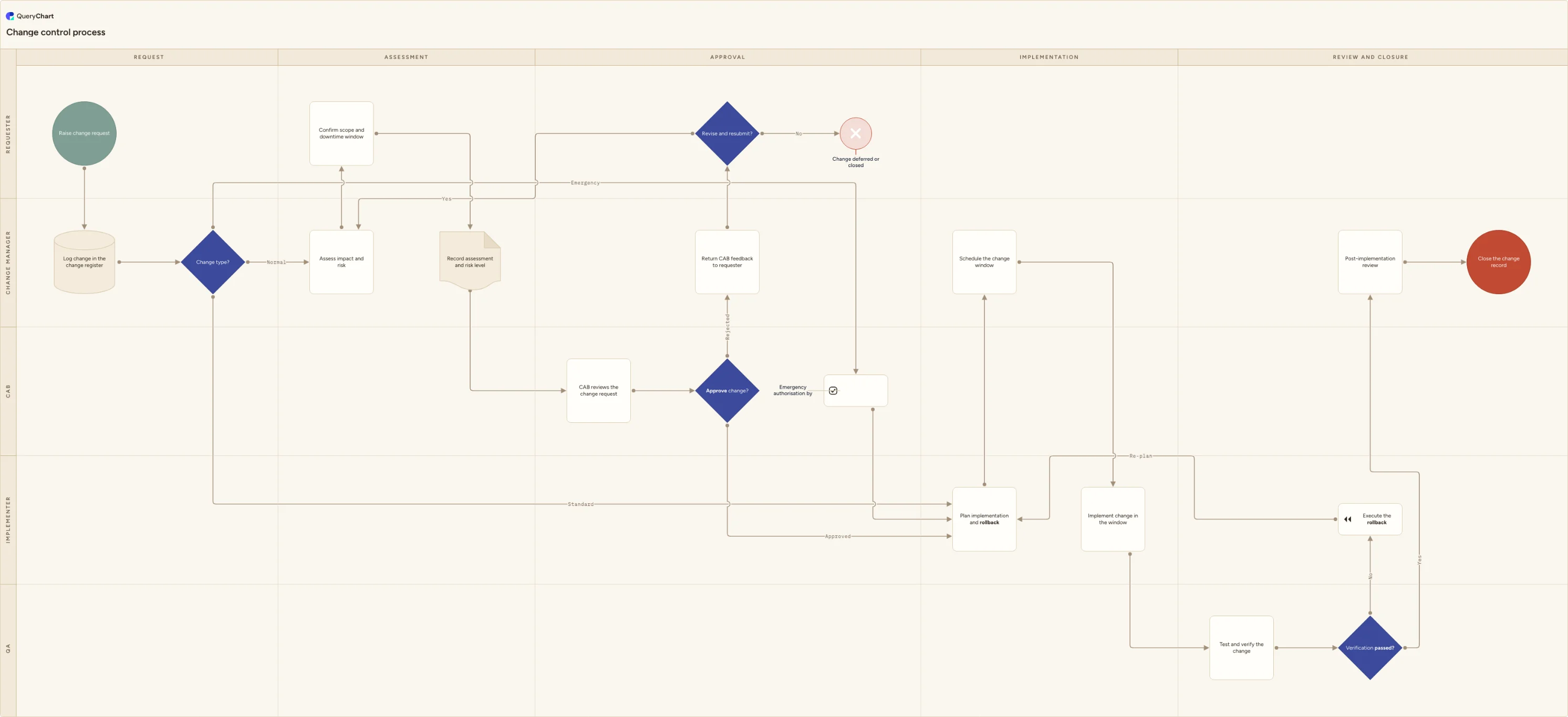
A change control process flowchart covering request, impact assessment, CAB approval, implementation, verification and closure, plus an emergency route.
What the change control process is
Change control is the set of gates between "someone wants to change something" and "the change is live". Each gate produces a record: what was requested, what the impact assessment found, who authorised it, when it ran, whether verification passed, and what the review concluded. In IT and engineering teams this is usually run as ITIL-style change management with a CAB; in a regulated quality system it is the controlled-change procedure that keeps validated processes from drifting. The shape of the process is the same in both.
Most change control failures are handoff failures, not process failures. The requester does not know what detail the assessment needs, the CAB reviews a ticket thread instead of an assessment record, the implementer builds a plan with no rollback, and nobody closes the record afterwards. That is why this template is drawn as swimlanes: Requester, Change manager, CAB, Implementer and QA each own specific steps, and the diagram makes it obvious where work changes hands.
The two branches teams most often leave undocumented are also the two that cause the most argument later: the emergency route, and what happens to a rejected change. This chart includes both. Emergency changes get expedited authorisation from the CAB chair and rejoin the same implementation and review path, so they are never unrecorded. Rejected changes go back to the requester with CAB feedback and a decision point that either loops into reassessment or closes the request as deferred.
For a released part, drawing or BOM, use the engineering change request template’s illustrative ECR-014: engineering and quality assessment, board authority, ECN/ECO, effective lot and authorised old-stock disposition. Physical products cannot simply use an IT rollback route. Hand approved record changes to document change control and return release evidence before closure.
Engineering decisions and document release
What this flowchart covers
In this template
- Intake and triage across the Requester and Change manager lanes: raise change request, log it in the change register, then a three-way triage decision routing standard changes straight to implementation planning, normal changes into impact assessment and CAB review, and emergency changes to the CAB chair.
- Assessment: assess impact and risk, confirm scope and the downtime window with the requester, and capture the outcome in a single assessment record so the CAB reviews one document rather than a comment thread.
- The CAB decision point: CAB reviews the request, then approves it into implementation planning or rejects it back to the change manager.
- The rejected and deferred branch: CAB feedback returns to the requester, who either revises and resubmits (looping back into impact assessment) or closes the request as deferred.
- The emergency branch: urgent changes skip the standing CAB agenda via emergency authorisation from the CAB chair, then rejoin the identical planning, implementation and review path.
- Implementation and verification: plan implementation and rollback, schedule the change window, implement, then QA tests and verifies. A failed verification triggers the rollback plan and loops back to planning; a pass goes to post-implementation review and closure of the change record.
When to use this template
- Documenting an ITIL-style change management procedure for an IT operations or platform team, including who sits on the CAB and what they see before deciding.
- Writing a controlled-change SOP for a quality system, where changes to a validated process or product need a documented impact assessment and a named approver.
- Onboarding new change managers, CAB members or on-call engineers who need to know which changes need approval and which do not.
- Settling who authorises what before you configure it as a workflow in Jira, ServiceNow or a QMS, so the tool encodes an agreed process rather than inventing one.
- Answering a customer or auditor asking how changes are approved, tested and rolled back.
How it works
Rename the lanes to your real roles
Replace Requester, Change manager, CAB, Implementer and QA with the roles and teams you actually have. If one person is both change manager and CAB chair, merge those lanes rather than pretending they are separate. Keep the lane count at or below five so the chart stays readable.
Define your change categories at the triage decision
The triage decision already splits standard, normal and emergency. Write down what qualifies for each in your organisation and put those thresholds next to the decision. Set them by risk and blast radius rather than ticket size, and keep the pre-approved standard change list short enough that someone actually maintains it.
Name the change authority and its cadence
At the CAB review step, record who the approvers are, how often they meet, and the cut-off for getting on the agenda. Add the emergency authority separately, since the person who can approve an out-of-hours fix is usually not the whole board.
Specify what the assessment record must contain
Turn the assessment step into a real checklist: affected services and users, downtime window, risk rating, dependencies, test approach and rollback approach. The CAB decision is only as good as this record, and it becomes the audit trail for the change.
Set the rollback and verification rules
Decide who executes a rollback, how long it takes, and what triggers the call. Then define what verification means for your changes: smoke test, regression suite, sign-off by the service owner. Adjust the failed-verification loop if your policy is to roll back immediately rather than re-plan.
Publish it and keep it versioned
Share the diagram where the work happens, next to the change request form or in the runbook. Review it after any change that went badly, and keep the earlier versions so you can show when the procedure changed and why.
Frequently asked questions
What is the difference between change control and change management?
Change control is the narrow, procedural part: how a specific proposed change is requested, assessed, authorised, implemented, verified and closed, with a record at each step. Change management is broader and includes the strategy, categories, roles, communication and the ongoing improvement of the process itself. This flowchart is the change control procedure, which is normally the first thing you document because it is what people follow day to day.
Who should approve a change, and does everything need a full CAB?
No. Running every change past a full board creates a queue and pushes people to work around the process. Most teams use three tiers: pre-approved standard changes with a documented procedure that need no review, normal changes that go to the CAB, and emergency changes authorised by a single named authority such as the CAB chair or on-call manager. Set the thresholds by risk and blast radius, not by ticket size, and write them next to the triage decision.
How do emergency changes fit without undermining the process?
An emergency change compresses the approval, it does not remove it. In this chart the emergency branch skips the standing CAB agenda but still gets explicit authorisation, still goes through implementation planning with a rollback, and still lands in post-implementation review and closure. The practical rule most teams adopt: authorise verbally within minutes, but write the change record the same day, and review every emergency change at the next CAB to check the category was justified.
What happens to changes the CAB rejects or defers?
They need an explicit ending, otherwise they reappear as unrecorded work. In this template the change manager returns the CAB's reasoning to the requester, who then hits a decision: revise and resubmit, which loops back into impact assessment and a second review, or accept the outcome and close the request as deferred. Recording the reason matters as much as the decision, because deferred changes usually come back once the blocking dependency clears.
Where this process fits
In most operations this process follows CAPA process flowchart (corrective and preventive action) and hands off to Corrective action effectiveness process flowchart.
It is one step in Nonconformance to CAPA.
Step 4: CAPA process flowchart (corrective and preventive action)
A CAPA process flowchart in five swimlanes: log and grade the issue, contain it, investigate the root cause, correct and prevent, then verify before closure.
Step 5: Change control process flowchart You are here
A change control process flowchart covering request, impact assessment, CAB approval, implementation, verification and closure, plus an emergency route.
Step 6: Corrective action effectiveness process flowchart
An editable corrective action effectiveness workflow for defining the intended outcome, reviewing follow-up evidence, identifying recurrence or shortfall, revising action plans and recording review results.