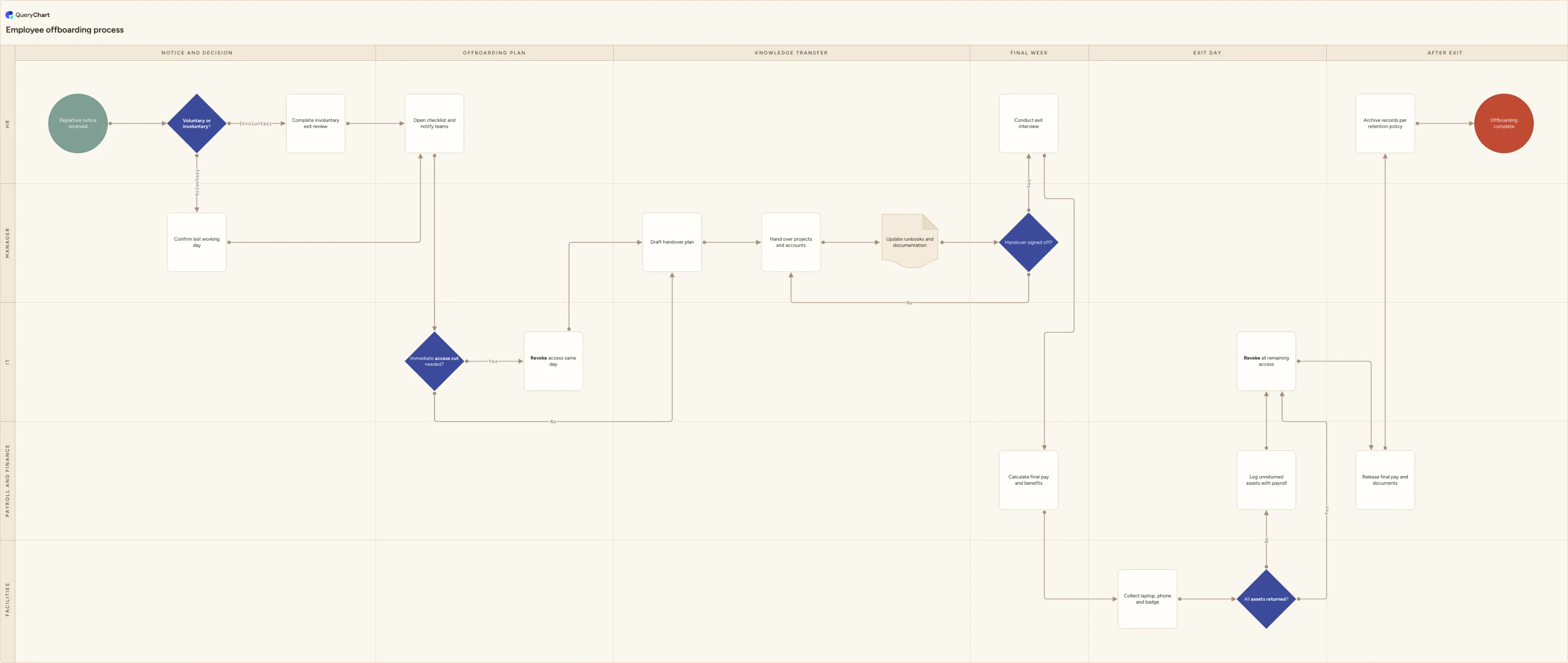
Employee offboarding process flowchart
A cross-functional offboarding flowchart with HR, manager, IT, payroll and facilities lanes: notice, handover, exit interview, access revocation, final pay.
What the employee offboarding process is
Employee offboarding is the set of steps that turn a departure notice into a clean exit: the last working day is agreed, work is handed over, access is removed, company property comes back, final pay goes out, and the employment record is archived. It is a coordination problem more than a task list. HR receives the notice, but the manager owns the handover, IT owns the accounts, payroll owns the money and facilities owns the laptop and the badge. Nobody sees all of it, which is why the parts that fall between teams are the parts that fail.
Two failures are common and both are expensive. The first is dormant access: an account that stays live for weeks after the person has gone, which shows up in the next access review as an audit finding and, occasionally, as an incident. The second is knowledge loss: an undocumented recurring task or a system nobody else can log into, discovered a month later when it breaks. A written process fixes both by giving each step a named owner and a deadline, and by forcing the handover to be signed off rather than assumed.
Voluntary and involuntary exits look similar on paper but diverge in practice. A resignation gives you a notice period to work with, so revocation happens on the last day and the handover can be paced. A dismissal usually needs HR and legal review before anything is announced, and access often has to be cut the same day the conversation happens. This flowchart branches on that decision early, then brings both paths back to the same checklist, so you maintain one process instead of two.
What this flowchart covers
In this template
- A voluntary versus involuntary branch immediately after the notice is received: resignations go to the manager to confirm a last working day, while involuntary exits run through an HR exit review first. Both paths rejoin at a shared offboarding checklist so the rest of the process stays identical.
- Five swimlanes for the teams that actually do the work, HR, Manager, IT, Payroll and finance, and Facilities, laid out across six phases: notice and decision, offboarding plan, knowledge transfer, final week, exit day, and after exit.
- A dedicated 'Immediate access cut needed?' decision in the IT lane, so involuntary and privileged-access exits get same-day revocation rather than waiting for the last working day. The step carries a note on what to disable and in what order.
- A handover loop rather than a single box: draft the handover plan, hand over projects and accounts, update runbooks and documentation, then a 'Handover signed off?' gate that sends incomplete work back to the manager instead of letting it slide to the exit date.
- Exit-day asset return with an 'All assets returned?' check that routes unreturned laptops, phones and badges to payroll for follow-up before IT revokes all remaining access.
- Closing steps that most checklists forget: release of final pay and employment documents, and archiving the personnel record against your retention policy before the process is marked complete.
When to use this template
- You are writing or rewriting an offboarding SOP and need a starting structure that already covers the cross-functional handoffs, not just the HR steps.
- Access reviews keep turning up accounts belonging to people who left, and you need to show where in the process revocation happens and who triggers it.
- Departures are handled from memory by one or two people, and the process breaks whenever those people are on holiday or leave themselves.
- A new HR generalist, office manager or team lead needs to run their first exit without a walkthrough from someone more senior.
- You are preparing for a security questionnaire, certification audit or customer due diligence request that asks how employee access is removed on termination.
How it works
Rename the lanes to your real owners
The template ships with HR, Manager, IT, Payroll and finance, and Facilities. Replace them with the teams that actually exist in your organisation. If IT and security are separate, split the lane. If a single office manager handles both assets and building access, merge Facilities into HR and delete the empty lane.
Set the phase columns to your notice period
The columns run Notice and decision, Offboarding plan, Knowledge transfer, Final week, Exit day, After exit. If your standard notice is three months, add a column between the plan and the handover for the long middle period. If most exits are two weeks, collapse the plan and knowledge transfer columns into one.
Write down your access revocation rule
Decide what triggers the 'Immediate access cut needed?' branch: involuntary exits, anyone with admin or production credentials, anyone with payment approval rights. Put the actual trigger in the node comment and add your target time, for example within one hour of notification, so the diagram states a commitment rather than a preference.
List the assets and systems you actually issue
Replace 'Collect laptop, phone and badge' with your real issue list, and attach the full system inventory to the revocation step. Most missed accounts are the ones bought on a team credit card and never registered with IT, so include a step or a note that tells the manager to name any tool the leaver used that IT does not manage.
Confirm final pay and retention with payroll
Final pay timing, holiday balance payout, benefits end dates and how long personnel records must be kept all depend on your jurisdiction and contracts. Check the 'Calculate final pay and benefits' and 'Archive records per retention policy' steps with payroll and legal before you publish, and record the retention period in the node comment so nobody has to look it up again.
Publish it, assign owners, and review it after real exits
Share the chart with HR, IT, payroll and managers so everyone works from one version rather than a personal checklist. After the next few departures, walk back through the diagram and add the steps that were missed. Version history makes it easy to see what changed and when, which matters when the process is used as evidence in an access review.
Frequently asked questions
What is the difference between voluntary and involuntary offboarding?
A voluntary exit starts with a resignation, so the notice period is known and the process can be sequenced calmly: the manager confirms the last working day, the handover runs over several weeks, and access is usually revoked on the final day. An involuntary exit (dismissal, redundancy, end of contract) needs an HR review before anything is announced, often involves legal or works council input, and frequently requires access to be cut the moment the conversation ends rather than at the end of the notice period. In the chart these are two branches off a single decision, and they rejoin at the shared offboarding checklist so the rest of the process stays the same.
When should we revoke system access during offboarding?
Set two rules and write them into the process. For standard voluntary exits, revocation happens at the end of the last working day, covering SSO, email, VPN, badge, shared mailboxes and any third-party SaaS bought outside IT. For involuntary exits and anyone with privileged access (admins, finance approvers, production credentials), revocation happens the same day the decision is communicated, ideally within the hour. Transfer document and mailbox ownership before disabling the account, otherwise files can become orphaned. The chart makes this an explicit decision in the IT lane so nobody has to guess which rule applies.
Who owns the employee offboarding process?
HR normally owns the process end to end, because HR receives the notice, runs the exit interview and holds the records. But HR cannot execute most of the steps. The manager owns the handover plan and the sign-off that the work has actually been transferred, IT owns account revocation and data transfer, payroll owns final pay and benefits, and facilities owns physical assets and building access. The point of a swimlane diagram is to make each of those owners visible, so the steps that regularly fall through the gap (unreturned laptops, dormant accounts, an undocumented recurring task) have a named owner instead of a shared assumption.
What should an exit interview cover, and when should it happen?
Hold it three to five days before the last working day: late enough that the person is candid, early enough that they still care about being accurate and are still reachable. Cover why they are leaving, what they were offered elsewhere, what would have kept them, what slowed their work day to day, and anything undocumented that the team should know. Keep it separate from the handover meeting, and report findings to managers in aggregate rather than verbatim, otherwise the next five people will give you polite answers. Note in the chart that the exit interview sits on the main path, not as an optional side step, so it does not get skipped when the last week gets busy.
Where this process fits
In most operations this process follows Employee disciplinary process flowchart template and hands off to Payroll Process Flowchart Template: Review, Approval and Payment.
It is one step in Employee lifecycle.
Step 1: Recruitment process flowchart: vacancy to offer accepted
Step 3: Employee performance review process flowchart template
A swimlane flowchart of the employee performance review process, from cycle launch through self-assessment and calibration to rating, appeal and outcome.
Step 4: Employee offboarding process flowchart You are here
A cross-functional offboarding flowchart with HR, manager, IT, payroll and facilities lanes: notice, handover, exit interview, access revocation, final pay.