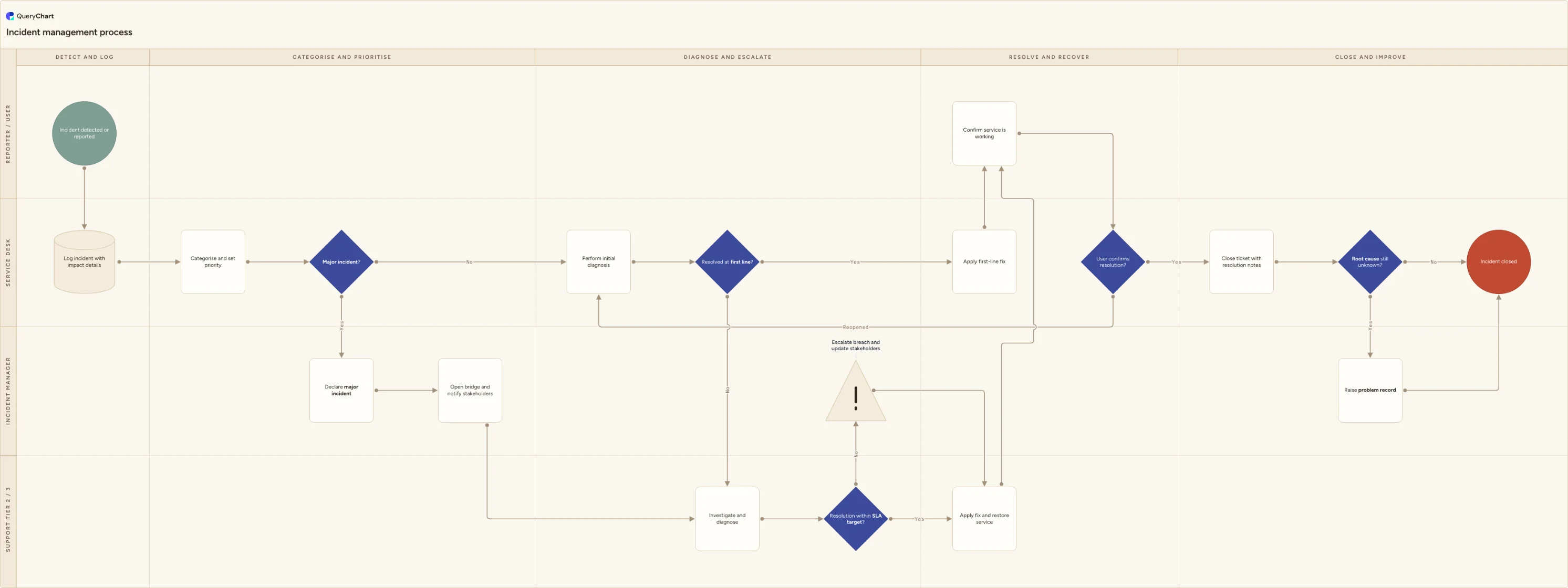
Incident management process flowchart
A cross-functional incident management process flowchart covering logging, prioritisation, major incident escalation, SLA breach, resolution and closure.
What the incident management process is
Incident management is the process for restoring normal service as quickly as possible after something breaks. Its goal is deliberately narrow: get the user working again. Finding and permanently removing the underlying cause is problem management, which this process hands off to rather than absorbs. Keeping that boundary clear is what stops a service desk from holding tickets open for weeks while an engineer chases a root cause.
Most incident processes fail at the handoffs rather than at the technical work. A ticket is logged without enough impact detail to prioritise it. A major incident is recognised twenty minutes late because nobody agreed the trigger in advance. An escalation to Tier 2 sits unclaimed. An SLA target is missed and the customer hears about it afterwards instead of before. A ticket is closed on the engineer's word without the user confirming the service actually works. Drawing the process as swimlanes makes each of those handoffs visible and assigns it an owner.
This template maps the flow across four lanes: Reporter / User, Service Desk, Incident Manager, and Support Tier 2 / 3. It includes the two branches teams most often leave out of their documentation, the major incident declaration and the SLA breach escalation, plus a reopen loop for when the user says the problem is still there and a closure branch that raises a problem record when the cause is still unknown.
What this flowchart covers
In this template
- Four swimlanes with a named owner for every step: Reporter / User, Service Desk, Incident Manager, and Support Tier 2 / 3, arranged across five phases from detection to closure.
- Detection and logging, where 'Incident detected or reported' feeds 'Log incident with impact details' before any triage begins, so the ticket carries affected service, scope and symptoms.
- Categorisation and prioritisation followed by the 'Major incident?' decision, whose yes branch runs 'Declare major incident' and 'Open bridge and notify stakeholders' in the Incident Manager lane before rejoining the technical work.
- The first-line versus escalation split: 'Resolved at first line?' either goes to 'Apply first-line fix' or hands the ticket to Tier 2 / 3 for 'Investigate and diagnose'.
- The SLA breach path: 'Resolution within SLA target?' routes a no to 'Escalate breach and update stakeholders', so the customer is told before the clock runs out, then returns to 'Apply fix and restore service'.
- User confirmation and closure, including a reopen loop from 'User confirms resolution?' back to initial diagnosis, and a 'Root cause still unknown?' branch that raises a problem record before 'Incident closed'.
When to use this template
- Writing or refreshing the service desk runbook so new agents can see where a ticket goes and who owns each stage.
- Agreeing the major incident trigger and the escalation timings in advance, rather than improvising them during an outage.
- Configuring an ITSM tool: the categories, priority matrix, SLA timers and escalation rules in the chart map directly onto the fields you have to set up.
- Aligning a small team with ITIL practice without adopting the full vocabulary, using plain step names people will actually say out loud.
- Running a post-incident review of the process itself, tracing where a specific ticket stalled against the intended path.
How it works
Rename the lanes to your real roles
Replace Reporter / User, Service Desk, Incident Manager and Support Tier 2 / 3 with the roles that exist in your organisation. Small teams often merge Incident Manager into the Service Desk lane; teams with a NOC add a monitoring lane above the reporter.
Define your priority matrix
Attach your impact and urgency definitions to the 'Categorise and set priority' step. Write down what P1 through P4 mean in terms of users affected and business impact so priority is derived, not negotiated per ticket.
Set the major incident trigger
Decide what makes the 'Major incident?' decision a yes: a revenue-affecting service down, a named critical system, a customer count threshold. Name who can declare it and what happens immediately after, such as opening a bridge and starting a fixed update cadence.
Wire in your SLA targets and breach escalation
Put your response and resolution targets on the 'Resolution within SLA target?' decision, and state who is notified on the breach branch and how far ahead of the deadline. The point of the branch is early warning, not after-the-fact reporting.
Agree the closure and problem management rules
Define what counts as confirmed by the user, how long a ticket stays in resolved before auto-closing, and the criteria on 'Root cause still unknown?' that push an incident into problem management. Recurring symptoms and every major incident are the usual triggers.
Walk it with each lane, then publish a versioned copy
Review the chart with the people in each lane and correct the steps they actually perform. Once it is agreed, publish it as the current version with a sign-off, so anyone reading it later knows which revision was in force.
Frequently asked questions
What is the difference between incident management and problem management?
Incident management restores service. Problem management removes the cause so the incident stops recurring. They run on different clocks: an incident is measured against an SLA in minutes or hours, while a problem record can stay open for weeks of investigation. In this chart the two connect at closure, where 'Root cause still unknown?' raises a problem record without holding the incident open. Mixing them is the most common failure, and it shows up as tickets that stay open long after the user is working again.
When should an incident be declared a major incident?
When the impact justifies breaking the normal queue: a business-critical service is unavailable, a large group of users is blocked, or there is a safety, financial or reputational exposure. The trigger should be written down before you need it and be objective enough that a first-line agent can apply it at 2am. Once declared, the process changes shape rather than just speeding up. A named incident manager takes ownership, a bridge opens, and stakeholder updates go out on a fixed schedule regardless of whether there is news.
What happens when an incident is going to breach its SLA?
The breach branch is a hierarchic escalation, not a technical one. The work continues, but the incident manager is pulled in to reset expectations with the customer, reassign resources if needed, and record why the target is being missed. The important detail is timing: the branch should fire before the deadline passes, based on a threshold such as 75 percent of the remaining time, so the conversation with the customer happens ahead of the breach rather than as an apology afterwards.
Who closes the incident, and what counts as resolved?
Resolution and closure are two different states. An engineer marks an incident resolved when the fix is applied and the service is back. It is only closed once the reporter confirms the service works for them, which is why this chart routes through 'Confirm service is working' in the Reporter lane and a 'User confirms resolution?' decision before closure. If the user says the problem persists, the ticket reopens to initial diagnosis rather than starting a new one. Most teams also set an auto-close window, typically three to five working days of no response.
Where this process fits
In most operations this process follows Customer support escalation process flowchart (tier 1 to tier 2) and hands off to Service recovery process flowchart (restoration to customer trust).
It is one step in IT service management.
Step 1: Incident management process flowchart You are here
A cross-functional incident management process flowchart covering logging, prioritisation, major incident escalation, SLA breach, resolution and closure.
Step 2: Change management process flowchart (ITIL)
An ITIL change management process flowchart covering RFC intake, standard, normal and emergency triage, CAB approval, scheduling, rollout and rollback.