How to create an SOP flowchart
How to create an SOP flowchart: one procedure per chart, numbered steps, decision points with stated criteria, and an approved version under change control. With a worked incident-response example.
An SOP flowchart is a standard operating procedure drawn as a flow: numbered steps someone can follow under pressure, decisions with stated criteria, and a single approved version.
The short version
- One procedure per chart. Two start points means two SOPs.
- Steps are numbered and short enough to read aloud under pressure.
- Every decision states its criteria, or names the role who decides.
- Escalation and reopen paths are drawn, not implied.
- An SOP is only controlled if it has an approved version, an owner and a review date.
What makes an SOP different from a process map
An SOP flowchart is read in a different situation from a process map. A process map is read in a meeting; an SOP is read at two in the morning by someone who has never handled this before and needs to know what to do next. That difference drives every design decision: short steps, numbered so they can be spoken over a phone, decisions with criteria written on them, and no branch left to judgement unless a named role is making the call.
Scope it to one procedure. The most common defect in SOP flowcharts is that they are really three procedures sharing a page, which makes them long enough that people stop opening them. If your chart has two starts, or a section that only applies to one team, split it. Cross-references between SOPs are cheap; a twenty-page SOP nobody reads is not.
The other half of an SOP is control. A procedure without an approval record, a version and a review date is a suggestion, and in a regulated environment, an unversioned SOP is a finding on its own. The example below is an incident management procedure with a major-incident branch, an SLA escalation and a reopen loop, plus the procedure text generated from the same rows.
An SOP as a flowchart
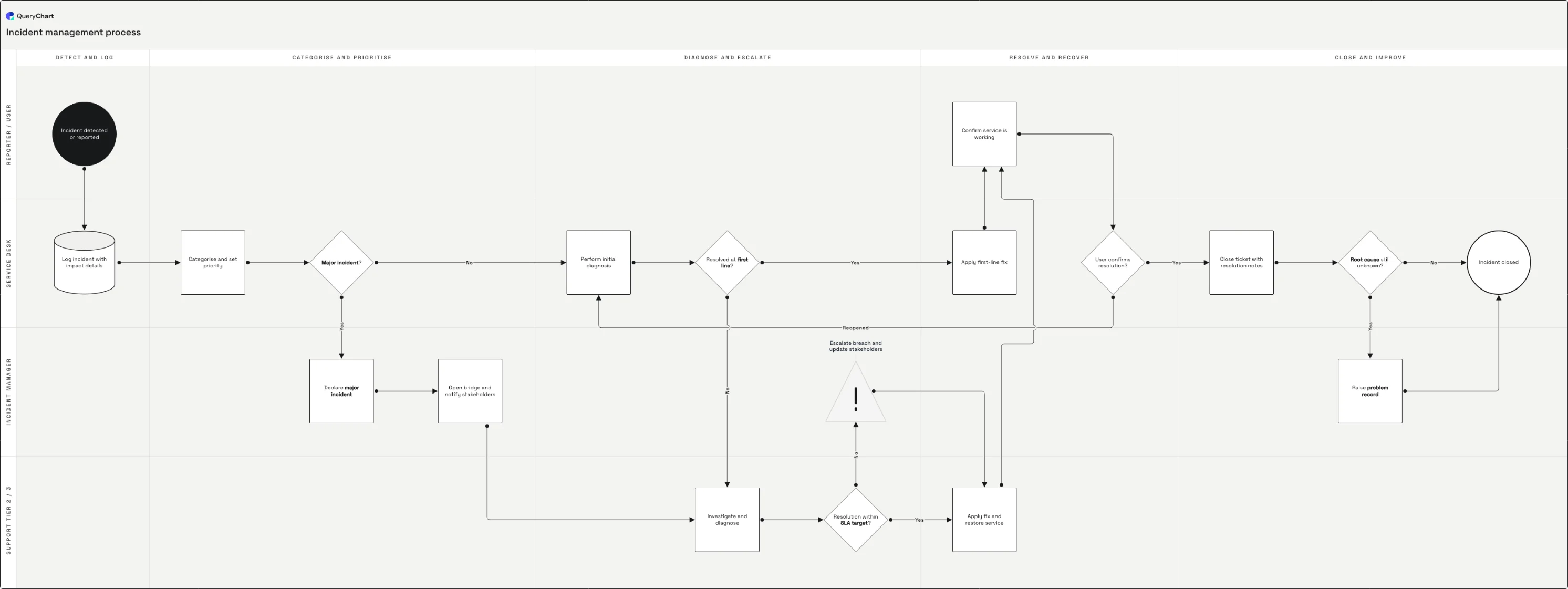
An incident management procedure, built up in four stages. The numbered procedure text beneath comes from the same rows as the diagram.
Log it before you diagnose it
Detected, logged with impact, categorised and prioritised. An SOP starts at the moment the person reading it is standing in, and for incidents that is before anyone knows what is wrong, which is why logging comes before diagnosis.
Branch at the severity call
"Major incident?" splits the procedure: declare, open a bridge, notify stakeholders, or carry on with first-line diagnosis. The criteria for that call belong on the decision itself, because it is made under time pressure by whoever is on shift.
Escalate on a rule, not a feeling
Second-line investigation, an explicit SLA check with a breach-escalation branch, then restore and confirm with the user. Note the reopen path: an unconfirmed fix goes back to diagnosis rather than being closed hopefully.
Close it, and feed what you learned back
Closure notes, then a decision on whether the root cause is still unknown; if it is, a problem record is raised. An SOP that ends at "service restored" loses the one output that stops the same incident recurring.
How it works
Scope it to a single procedure
Write the trigger in one sentence: "an incident is detected or reported". If the trigger needs an "or" that covers a genuinely different situation, that is a second SOP. Keeping each chart to one procedure is what keeps it short enough to be opened in an emergency.
Write the steps as instructions
Verb first, one action each, addressed to the person doing it: "Log incident with impact details", not "Incident is logged". Passive phrasing hides the owner, and an SOP whose steps have no owner is the reason two people do the same step and a third does none of it.
Put the criteria on the decisions
"Major incident?" needs a definition next to it: number of users affected, service tier, revenue impact, whatever your organisation uses. Use the step's comment field for the rule. Decisions without criteria are made differently by every person who reads the chart, which defeats the word "standard".
Add the escalation and reopen paths
Draw what happens when the SLA is about to breach, when the fix does not hold, and when the person who normally does this is unavailable. These are the paths an SOP is consulted for. Each one either rejoins the flow or ends in its own terminator.
Assign the lanes, then walk it with the on-call team
Put each step in the lane of the role that performs it (service desk, incident manager, second line) and read it through with the people who will use it. Ask them where they would hesitate. Every hesitation is a step that needs either a criterion or a split.
Approve it, version it, and set a review
Route the chart through the approval workflow so the current version has a reviewer and a date, and put a review trigger on it: after any major incident, and at least annually. In QueryChart the approval and the change history live with the chart, so "which version was in force in March" has an answer.
Mistakes to avoid
An SOP that is really three
Two start points, or a section that applies only to one team, means the chart should be split. Length is what stops an SOP being opened at the moment it matters.
Judgement calls with no criteria
"Escalate if serious" is not a standard operating procedure. Write the threshold, or name the role who decides: those are the only two ways to make the call repeatable.
No unhappy paths
The happy path is the one people already know. An SOP that omits the breach, the reopen and the unavailable-owner cases is silent exactly where it was needed.
Unversioned
Without an approved version and a change history, nobody can show which procedure was in force when something went wrong, and in a regulated environment that is a finding in its own right.
Create your own SOP flowchart
Open the incident management example as your own chart, or start blank and write your procedure into the rows.
Related guides
Frequently asked questions
What is the difference between an SOP and a process flowchart?
An SOP is a controlled instruction for performing a specific task: numbered, owned, approved, versioned, written for the person doing the work. A process flowchart is a picture of how work flows, often across several roles, and it may be descriptive rather than mandatory. Drawing an SOP as a flowchart gives you both (the readability of a diagram with the control properties of a procedure) as long as the approval and version history come with it.
Should an SOP be a flowchart or written text?
Both, from one source. A flowchart is faster to follow under pressure and makes gaps in the branching visible; text carries the detail a diagram cannot hold, such as exact field values or safety warnings. The failure mode is keeping them as two separate documents, because they drift. Generate the procedure text from the same rows as the diagram, so a change to one is a change to both.
How long should an SOP flowchart be?
Short enough to fit on one screen at a readable size: in practice fifteen to twenty-five steps. Beyond that, look for a natural handoff and split it into two procedures that reference each other. Long SOPs are not more thorough; they are less likely to be opened, and an SOP nobody opens provides exactly as much control as no SOP at all.
Who approves an SOP?
The process owner, plus whoever is accountable for the risk it controls, often quality, compliance or the service owner. What matters procedurally is that the approval is recorded against a specific version with a name and a date, so there is no ambiguity about which text was in force at any point in the past. That record is what turns a document into a controlled one.