SOP Version Control: Numbering, Approval and Revision History
Control SOP versions with a named owner, revision numbers, approval, effective dates and withdrawal of old copies. Follow a worked change-control example.
SOP version control gives each released procedure an identifiable revision, an owner, an approval and an effective date. The change record explains what changed; the release process makes sure people use the approved copy.
The short version
- Number every SOP revision and print it on every page: the number is what a training record and an audit trail both point at.
- Route safety-critical changes through a documented safety impact assessment and hands-on retraining, not read-and-acknowledge.
- A signed competency checklist is evidence of retraining; a read receipt is only evidence someone opened the file.
- The two review paths (safety-critical and standard) still converge on one step: mark the previous revision superseded.
- QueryChart's Change Log and Compare Versions view (/features/version-control) show who changed what field, without a separate register.
A revision number is only part of the record
| Revision | Change | Release evidence |
|---|---|---|
| 1.0 | First approved issue | Owner and approver recorded; effective date agreed; users trained |
| 1.1 | Clarify wording without changing the task | Reason and reviewer recorded; replace the superseded copy |
| 2.0 | Change a safety-critical operating step | Impact assessment, approval and required training completed before the effective date |
Build the revision record
The safety-critical fork, stage by stage
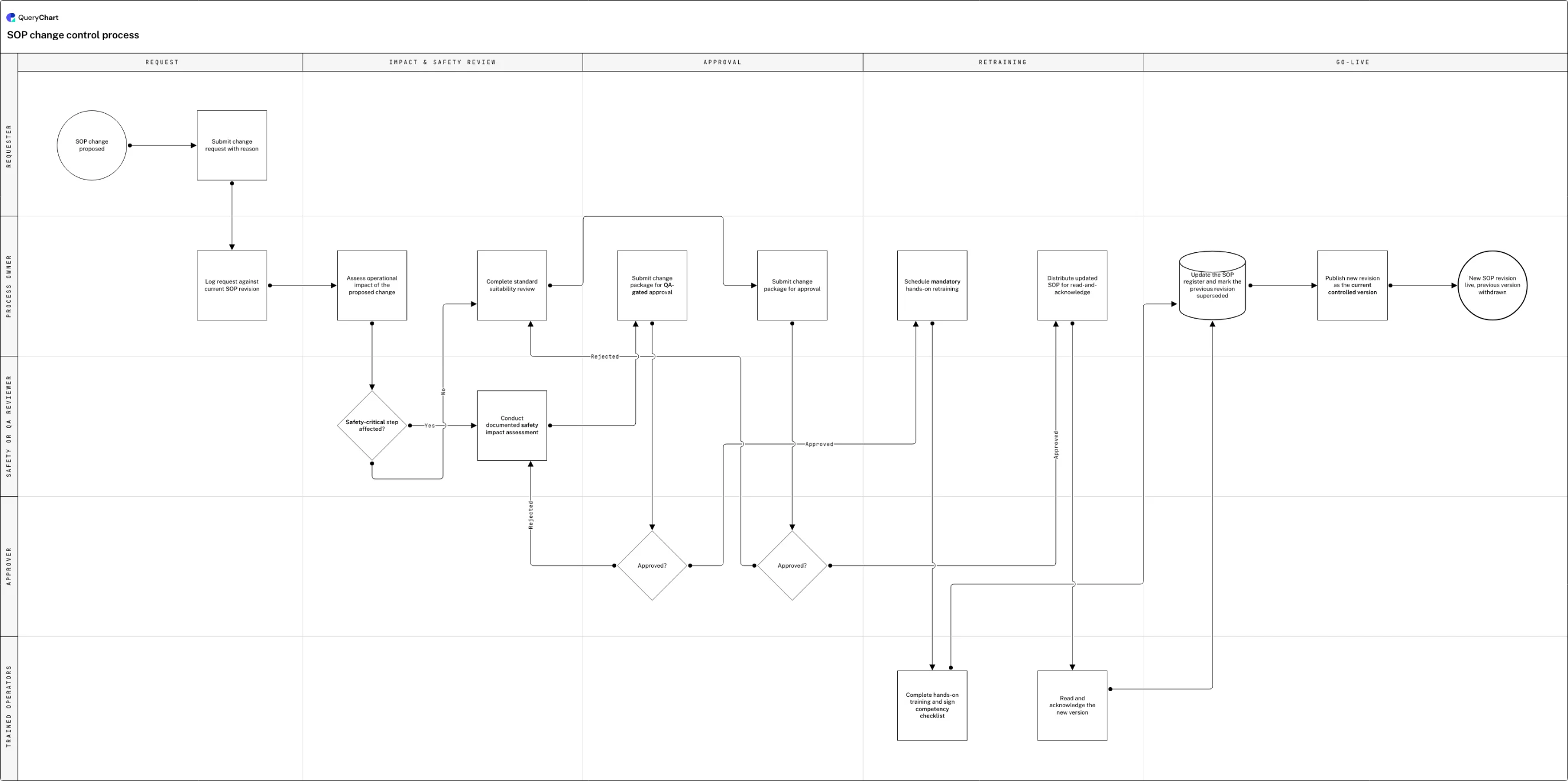
An SOP change moving from request through the decision that sends it into either a safety review and hands-on retraining, or a standard review and a read receipt.
A request logged against a revision
"SOP change proposed" starts the chain, then "Submit change request with reason" and "Log request against current SOP revision" tie the request to a specific version before "Assess operational impact of the proposed change" begins: nothing here has judged the change yet, only recorded what it is and what it replaces.
The fork that decides how demanding this gets
"Safety-critical step affected?" forks the process: a Yes answer routes into "Conduct documented safety impact assessment" and then "Submit change package for QA-gated approval", gated by a second "Approved?" decision that rejects straight back into the safety assessment rather than past it.
Hands-on retraining versus a standard review
Approved safety-critical changes move to "Schedule mandatory hands-on retraining" and "Complete hands-on training and sign competency checklist" (a supervised, signed-off run-through, not a read receipt) while the No branch runs "Complete standard suitability review" into its own "Submit change package for approval" and "Approved?" gate.
Both paths converge on one register update
The standard path still ends in "Distribute updated SOP for read-and-acknowledge" and "Read and acknowledge the new version", and both paths meet at "Update the SOP register and mark the previous revision superseded" before "Publish new revision as the current controlled version" makes it current.
A stale SOP is not a filing problem
An SOP is not a record of what should happen in general: it is the exact sequence someone on shift right now is following, which is why version control for an SOP carries a stake that a policy or a spreadsheet template does not. A stale revision of a marketing brief costs someone an afternoon of rework. A stale revision of a lockout-tagout procedure or a batch-release checklist costs someone their hand, or ships a nonconforming lot, because an operator doing exactly what the paper on the wall says is doing exactly what the process asked of them, even when the paper is two revisions behind.
Generic document version control, covered in /guides/version-control-for-documents, asks which file is current and who approved it. SOP version control asks one more question for every change: who has to be retrained before they perform the step differently, and how do you prove they were. A number bumped in a register does not stop an operator running the old method; only a completed, dated, signed training record tied to the new revision number does that, which is why a controlled SOP's approval workflow (see /templates/sop-controlled-sop-template) has to hand off into a retraining step rather than stopping at "approved".
The chart below forks on exactly that judgment ("Safety-critical step affected?") because the two answers demand different evidence. A safety-critical change routes through a documented safety impact assessment, a QA-gated approval, and hands-on retraining with a signed competency checklist; a non-safety-critical change gets a standard suitability review and read-and-acknowledge. Collapsing the two into one path, or treating a read receipt as proof of competency on a safety-critical step, is the audit finding this process exists to prevent. QueryChart's own version history (see /features/version-control) gives a QA team a Change Log and a Compare Versions view to check that every revision actually took this route, without a parallel spreadsheet register that drifts from what the chart says happened.
How it works
Fix the SOP numbering scheme before the first revision
Assign each SOP an identifier and a whole-number revision, printed in the header of every page alongside the effective date and approver. Decide this once, because renumbering later breaks every retraining record and every audit trail that cited the old number.
Log the request against the revision it changes
Open a request with the exact step being changed and the reason (an incident, a near miss, a deviation) before anyone touches the draft. Type it into a chart's Box text column and use Line to to point it at the row that logs the request against the current revision, so the request is tied to a version rather than floating free.
Force the safety-critical decision explicitly
Give the workflow a Decision row asking whether a safety-critical step is affected, with two labelled branches in the Line text column. Route "Yes" into a documented safety impact assessment and "No" into a standard suitability review; never let a requester or approver skip the question by assumption.
Gate the safety-critical path on hands-on retraining, not acknowledgement
After approval, schedule mandatory hands-on training and require a signed competency checklist before the change can go live. A row that only says "read and acknowledge" belongs on the standard path, not the safety-critical one: keep the two as separate rows so the distinction survives a later reorder.
Converge both paths on one register update
Whichever branch a change took, route it into a single File-shaped row that updates the SOP register and marks the previous revision superseded, before publishing the new one as current. One convergence point means one place to check that every path actually reaches retirement of the old copy.
Confirm every affected operator, not just the rostered ones
Before publishing, check off retraining or acknowledgement against every shift and every contractor the step touches, not only the team that happened to be on site when the change was approved. A missed night shift is the finding that recurs every audit cycle.
Mistakes to avoid
Read-and-acknowledge on a safety-critical step
A read receipt proves someone opened the file, not that they can perform the step safely. Route any change to a safety-critical step through hands-on retraining and a signed competency checklist instead, as in "Complete hands-on training and sign competency checklist".
A rejected change re-enters the review, not just the draft
It is tempting to loop "Approved?" straight back to the request step so a rejected change can be reworded and resubmitted. On the safety-critical path, route rejection back to "Conduct documented safety impact assessment" instead (exactly as this chart does), so a revised draft is re-assessed for safety, not just re-typed and resubmitted.
One register entry that does not name the shift
"Update the SOP register and mark the previous revision superseded" is only true once every affected shift and contractor has retrained or acknowledged, not once the day shift has. Name the population the step reaches, or a night-shift crew keeps running the withdrawn version.
Related QueryChart feature
Create your own SOP change control process
Open the SOP change control example as your own chart, set your numbering scheme, and keep the safety-critical fork intact so retraining stays mandatory rather than optional.
Related guides
Frequently asked questions
Is SOP version control different from generic document version control?
Yes, in one specific way: an SOP's version control has to answer who needs retraining before the new revision takes effect, not just which copy is current. Generic document version control (covered in /guides/version-control-for-documents) governs numbering, approval and withdrawal for any controlled document. An SOP adds a competency question underneath that: a bumped revision number does not stop an operator running the old method until they have been retrained on the new one, so the version-control record for an SOP has to carry a training or acknowledgement status alongside the usual approval trail.
How should a safety-critical SOP change be routed differently from a minor one?
A safety-critical change (one where getting the step wrong risks injury, a nonconforming product or a regulatory breach) needs a documented safety impact assessment, a QA-gated approval, and hands-on retraining with a signed competency checklist before it can go live. A non-safety-critical change can go through a standard suitability review, ordinary approval, and read-and-acknowledge. Routing both through the same lightweight path is how a wording tweak and a change to a lockout step end up held to the same evidence standard, which is too little for one and too much for the other.
Is a training record the same thing as version control for an SOP?
No: they answer different questions and an SOP process needs both. Version control tracks which revision is current, who approved it and what it replaced; a training record tracks who has demonstrated competency on that revision. QueryChart's version history at /features/version-control covers the first: a Change Log with per-field diffs, a Compare Versions view and restore. The signed competency checklist a safety-critical change requires, described above, covers the second, and the two need to reference the same revision number or an auditor cannot tell whether the person trained matches the procedure in force.
What is the minimum evidence an auditor expects for an SOP revision?
A revision number and effective date printed on the document, a record of who approved it and when, a documented reason for the change tied to the request that started it, and, for anything safety-critical, a dated, signed competency record naming who was retrained and on what version. For the routing and approval mechanics of the SOP document itself, see the controlled SOP template at /templates/sop-controlled-sop-template; for the narrower question of what changed between two revisions, see /guides/how-to-track-changes-in-an-sop.