How to track changes in a process
How to track changes in a process: QueryChart's Change Log names who edited a decision rule or threshold, the field's previous value, and its current value, so nobody reconstructs an edit from memory.
Tracking changes in a process means keeping a record of exactly which field changed, who changed it, and what value it replaced, not merely that a new version exists.
The short version
- An edit to a decision row's threshold (second approver required above $5,000 raised to above $10,000) becomes a Change Log entry naming who changed it and what value it replaced.
- Every edit is attributed: actor, field, previous value, current value, and a timestamp, not just "chart updated."
- Compare Versions gives the fuller diff when more moved between two revisions than a single Change Log entry covers.
- Restoring an old version undoes the edit outright, rather than asking someone to remember and retype the previous rule.
- Tracking a change is different from controlling one: this is the record an edit leaves, not the approval gate on whether it should happen.
Who moved the threshold, and when
A process owner raises the dollar figure on a decision row from $5,000 to $10,000: one field, one edit, saved in seconds. Three weeks later a $7,000 invoice clears without a second approver, and the question is not whether the rule changed but who changed it, when, and what the old number actually was. Nobody wrote that down anywhere outside the chart itself, because the chart is where the rule lives.
QueryChart keeps that record automatically. Every edit to a chart (a relabeled decision, a moved branch, a changed threshold) writes an entry naming the person who made it, the field they touched, its previous value, and its current one. Open the Change Log on the edit above and it reads exactly that: threshold changed by a named person, from $5,000 to $10,000, at a recorded time. Nobody maintains a separate changelog by hand, and nobody has to trust a memory of what the rule used to say. The mechanism is covered in full at /features/version-control.
Tracking a change is not the same as controlling one. This page is about the record QueryChart keeps once a process has been edited: a fact, after the fact. Change control is the decision process that governs whether an edit should happen at all, usually with a request and a review step; that mechanic is built at /guides/how-to-create-a-change-control-process. And if the document under discussion is a written procedure rather than a decision tree, the same Change Log applies but the walkthrough reads differently; see /guides/how-to-track-changes-in-an-sop for that version.
The approval tree, edited and tracked
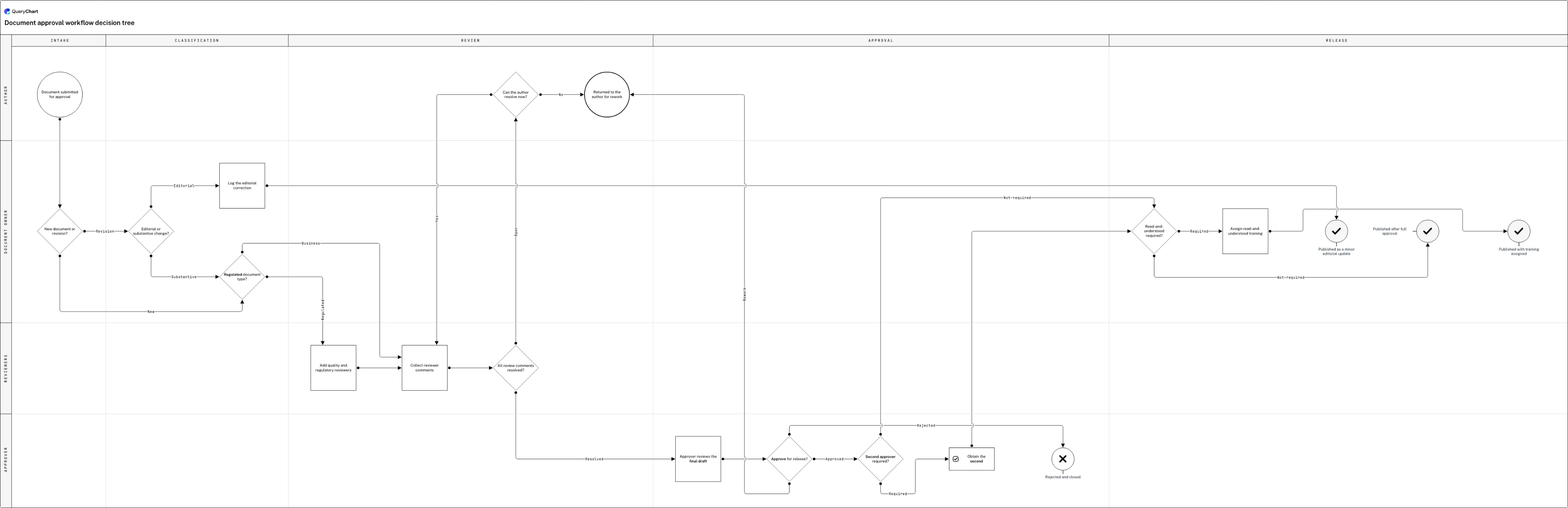
A twenty-row document approval decision tree, staged from intake to release, with the second-approver threshold at its centre: the exact rule the worked example above edits.
Where an edit starts
The chart opens at "Document submitted for approval," then asks "New document or revision?" and, for a revision, "Editorial or substantive change?" before splitting into "Log the editorial correction" or a full "Regulated document type?" check: the branch that decides how much scrutiny a change gets before anyone reviews it.
The review loop that surfaces disagreement
Rows six through nine run the review itself: "Add quality and regulatory reviewers," "Collect reviewer comments," then "All review comments resolved?", which, if not, asks "Can the author resolve now?" before looping back or exiting to rework. Every pass through this loop saves as its own version.
The threshold this guide's example edits
"Approver reviews the final draft" leads to "Approve for release?," then to the row the worked example above is about: "Second approver required?," which routes to "Obtain the second approval" when the answer is yes. Raise that row's threshold and the Change Log records exactly that edit.
Release, and the record it leaves
The Release lane closes the tree three ways: "Published as a minor editorial update," "Published after full approval," or "Published with training assigned" after "Read-and-understood required?", plus "Returned to the author for rework" and "Rejected and closed." Every rule that routed a document to one of these sits in a version Compare Versions can open.
How it works
Open the Change Log after an edit
Every save writes a new version, and the Change Log lists them in order. Open it from the chart's history panel to see which version changed and who saved it: you don't need to know in advance that a threshold moved.
Read the entry: actor, field, previous value, current value
Click into a version and its entry names the person who edited it, the field they touched (a row's label, a branch's condition, a lane assignment) and the value it held before against the value it holds now. That is the whole answer to who changed the second-approver threshold and what it used to say, without opening a single email thread.
Use Compare Versions when one entry isn't the whole story
A single edit's entry is precise but narrow. When several rows moved between the version you trust and the one in front of you, open Compare Versions instead and read the two side by side, the same mechanism, widened to every field that differs.
Restore the prior version if the edit needs to be undone
If a raised threshold turns out to be wrong rather than intentional, restore the version that preceded it. Restoring replaces the current chart with that revision outright, rather than asking someone to retype the old rule from memory.
Name the rule, not just the branch, so the diff stays legible
Write a decision row's label and its branch labels around the actual trigger: "Second approver required?" answered "Required" or "Not required", rather than a bare yes or no. A Change Log entry that names a labelled field is far more useful than one that says an unlabeled box moved.
Mistakes to avoid
Chasing a changed rule through chat and memory
Without a Change Log, a raised threshold gets reconstructed from Slack messages and someone's recollection of the old number, and the two rarely agree. Every field-level edit is already attributed and dated: the reconstruction QueryChart is built to make unnecessary.
Mistaking a recorded edit for an approved one
A Change Log entry proves a threshold changed and who changed it: it does not prove anyone signed off on the new number. If a rule like this is meant to go through review before it takes effect, that gate belongs in the process itself, the kind built at /templates/change-control-process, not in the version history alone.
Assuming the audit trail is already on
QueryChart's built-in version history (the Change Log, Compare Versions, and restore) is free and active on every chart with no setup. A hash-chained audit trail mapped to ISO 27001, SOC 2 or HIPAA controls is a separate, paid capability an organisation turns on deliberately; it is not something every chart carries by default just because edits are being tracked.
Related QueryChart feature
Track your own process changes
Start from the document approval example, edit a decision row's threshold, and watch the Change Log name exactly what changed.
Related guides
Frequently asked questions
What exactly does the Change Log record when a process changes?
For every edit, an entry naming the person who made it, the field they changed (a row's label, a branch condition, a lane assignment) and that field's value before the edit against its value after. Raising a second-approver threshold from $5,000 to $10,000 produces an entry that says precisely that, attributed and timestamped, without anyone maintaining a separate log. The mechanism is covered in full at /features/version-control.
Is tracking process changes the same as change control?
No. Tracking a change is the record QueryChart keeps automatically after an edit happens: who, what field, old value, new value. Change control is the decision process that governs whether an edit should happen at all, usually with a request, a review step and a rollback path. Both matter, but they answer different questions; the mechanics of the second are at /guides/how-to-create-a-change-control-process.
How is this different from tracking changes in an SOP?
The Change Log itself is identical (same actor, field, and before/after values) because a decision tree and a written procedure are both charts under the same version history. The difference is what typically gets edited: a process like this one changes branch conditions and routing, while an SOP more often changes step text and responsibility. See /guides/how-to-track-changes-in-an-sop for that version of the same feature.
Can I see everything that changed between two versions, not just one edit?
Yes: open Compare Versions rather than a single Change Log entry, and it lays two revisions side by side with every differing field marked. That is the tool for a rule that has drifted over several small edits rather than one obvious one.
Does restoring an old version delete the edit that changed the threshold?
No. Restoring makes an older version current again, but the version where the threshold changed still exists in the chart's history: its Change Log entry is not erased, so the record of who raised it and when survives the restore.