Document approval workflow decision tree template
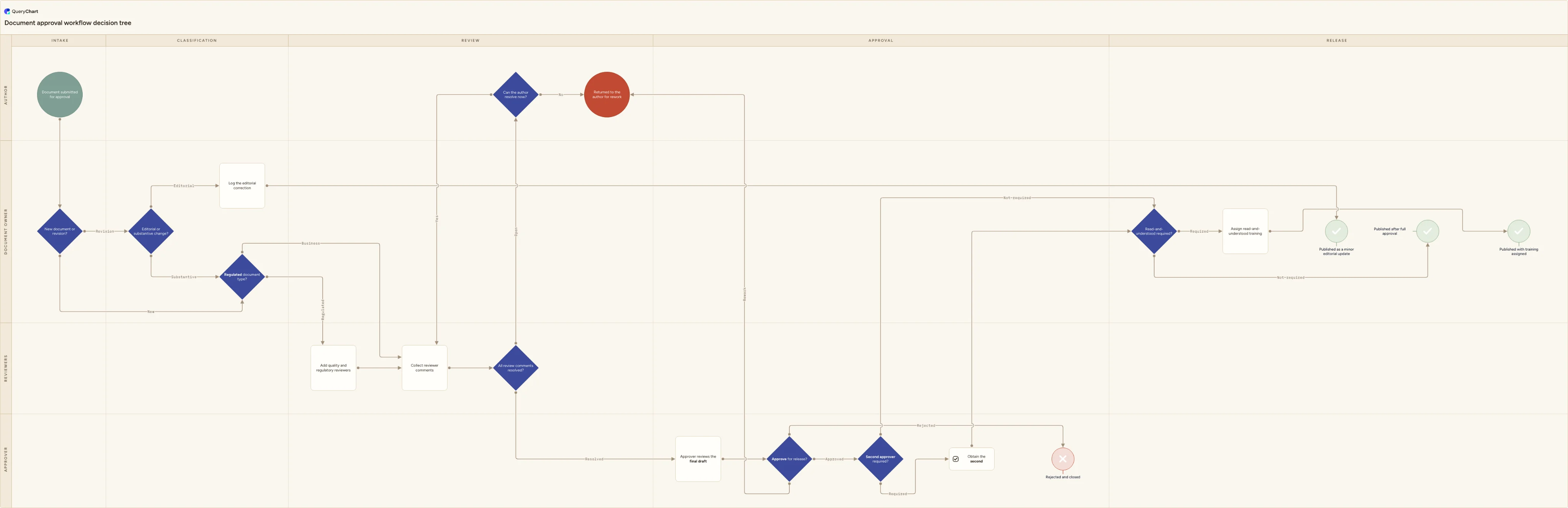
A document approval workflow decision tree: editorial or substantive change, mandatory reviewers by document type, second approver, and training on release.
What the document approval workflow decision tree process is
A document approval workflow is the review-and-approve routing that sits between a finished draft and a released document. It answers a small number of questions: is this a new document or a revision, does the change actually alter what people must do, who has to review it, is anything still open, does it need a second or regulatory approver, and does releasing it oblige anyone to read and acknowledge it. It is deliberately narrower than document control, which also covers version numbering, issue, distribution, withdrawal of superseded copies and periodic review. If you want that end-to-end lifecycle with a document controller lane, use the document control process flowchart; this page is the decision tree that sits inside it.
The two charts answer different questions, and it is worth being blunt about which one you need. A cross-functional process map answers what happens next and who does it: a chain of tasks running left to right through department lanes, ending in one shared finish line. This chart answers which route this document takes and who decides: a chain of eight questions whose branches end in five different named outcomes. An editorial correction, a full approval, a rework return, a rejection and a release with training assigned are separate destinations here, reached by answering the questions above them, not stages of one happy path.
Approval workflows usually fail on undocumented tests rather than missing steps. Everyone agrees there is a fast route for editorial changes, but nobody has written down what counts as editorial, so a substantive change goes through as a typographical fix. The comments on the pivotal decisions carry the criteria: what makes a change editorial, what makes a document type regulated, what triggers a second approver, and when read-and-understood is genuinely required. The swimlanes name who answers each question rather than who does the typing, so the chart doubles as a record of decision rights: Author, Document owner, Reviewers and Approver, across Intake, Classification, Review, Approval and Release.
What this flowchart covers
In this template
- Eight decisions form the spine: new document or revision, editorial or substantive change, regulated document type, all review comments resolved, can the author resolve now, approve for release, second approver required, and read-and-understood required.
- Branch labels are answers rather than next tasks: Revision or New, Editorial or Substantive, Regulated or Business, Resolved or Open, Approved, Rework or Rejected, Required or Not required.
- Five named endpoints instead of one finish line: published as a minor editorial update, published after full approval, published with training assigned, returned to the author for rework, and rejected and closed.
- The editorial short circuit: only a revision can be classified as editorial, and an editorial correction is logged and published without mandatory review or approval, while every new document takes the full route.
- Reviewer selection by document type: a regulated document adds quality and regulatory reviewers before comments are collected, a business document goes to the named process reviewer only.
- Two exits from an unresolved review: comments the author can close now go back for re-review, comments they cannot close end the cycle as a rework return, and the approver can also send an otherwise complete draft back for rework rather than rejecting it outright.
When to use this template
- Your document control procedure lists the steps but never says which changes can skip full review, so a corrected phone number takes the same six weeks as a new safety-critical instruction.
- Approvals stall because nobody can say whether a second or regulatory approver is needed, and the answer is decided per document by whoever happens to be in the room.
- You are configuring approval routing in a document management system and need the branch conditions agreed as written tests before anyone builds them as rules.
- An auditor has asked how you decide that a change is editorial, or how you decide that a release requires read-and-understood, and the current answer is judgement rather than a documented criterion.
- You are briefing a new document owner or approver and want them to see the questions, the criteria behind each one, and exactly where each answer leads.
How it works
Rename the lanes to your real decision rights
The four lanes name who answers each question: Author, Document owner, Reviewers and Approver. Replace them with your own roles, named by role rather than by person so the chart survives leavers and reorganisations. If your quality manager is both the document owner and the approver, merge those lanes rather than pretending the decision is split. If technical and regulatory review are answered by different people, split the Reviewers lane in two.
Write the editorial test in one sentence
The 'Editorial or substantive change?' decision is the one people abuse, because it is the only route that skips review and approval. Write a test anyone can apply: if a reader would do anything differently as a result of the change, it is substantive. Then list the accepted editorial cases explicitly, for example typographical fixes, formatting, a renamed department and corrected cross-references, and state that the document owner, not the author, decides.
Fix the mandatory reviewer set per document type
Turn 'Regulated document type?' into a short table your document register can answer from a field rather than from memory. For each type, name the reviewers who must sign and the ones who are optional. Regulated typically means the document sits inside the scope of a management system, a licence or a safety case; if you cannot decide a document's type from its register entry, the decision will be made inconsistently.
Set the trigger for a second approver
Second approvals should be triggered by a property of the document, not by nervousness. Common triggers are a regulated document type, a legal or safety commitment, and a document outside the first approver's delegated authority. Record the trigger next to the decision and name the role that provides the second approval, so the chart tells people who to send it to rather than only that someone else is needed.
Decide when rework ends the cycle
The 'Can the author resolve now?' decision keeps drafts out of an unbounded review loop. Agree what can be closed in the current round, typically wording, clarification and formatting, and what cannot, typically anything needing new content, new data or a decision the author is not authorised to make. Anything in the second group returns to the author as rework and re-enters at intake rather than looping.
Set the read-and-understood rule and store the evidence
Require read-and-understood where the change alters what someone must actually do in a safety-critical, regulated or customer-facing step, and not for formatting or wording. Decide before release where the acknowledgement is stored and how long it is retained, because that record, not the approval itself, is what demonstrates that people are working to the current revision.
Frequently asked questions
What is a document approval workflow?
It is the routing a draft follows between being written and being released: classifying the change, selecting the reviewers who must see it, resolving their comments, obtaining approval, and deciding what release obliges other people to do. It is a decision structure rather than a task list, because the interesting part is not that a review happens but which review happens and who is entitled to decide. A workflow that always applies the same route to every document is not a workflow; it is a queue.
How is this different from a document control process flowchart?
Scope and shape. The document control process flowchart is a cross-functional process map covering the full lifecycle, including version numbering, issue to a controlled location, withdrawal of superseded copies and scheduled periodic review, and it answers what happens next and who does it. This page is the decision tree for the review-and-approve segment only, and it answers which route a document takes and who decides. If you are writing a procedure, you probably want both: the process map for the lifecycle, and this chart as the routing rules inside its approval stage.
When can a change be approved as editorial and skip full review?
Only when the meaning does not change. Typographical fixes, formatting, a renamed department and corrected cross-references qualify; anything that changes what a person must do, in what order, with what limits or against what acceptance criteria does not, however small the edit looks. Two guards keep the route honest: only a revision to an existing document can be classified as editorial, and the document owner makes the call rather than the author. Record the classification, because it is the first thing an auditor will test.
Do we need two approvers on a document?
No standard requires two approvers as a general rule. ISO 9001:2015 clause 7.5.2 requires documented information to be reviewed and approved for suitability and adequacy before issue, but it does not say by how many people. Sector rules are stricter in specific cases, for example pharmaceutical manufacturing requires the quality unit to approve production and process control procedures. The practical rule is to trigger a second or regulatory approver by document property, such as a regulated type, a legal or safety commitment, or a document outside the first approver's delegated authority.
Does an electronic approval count as a signature?
In most commercial contexts, an auditable approval record naming the approver, the version and the date is sufficient. In FDA-regulated contexts, 21 CFR Part 11 sets specific conditions: a signed electronic record has to show the printed name of the signer, the date and time of signing and the meaning of the signature, such as review or approval, and the signature must be linked to its record so it cannot be excised, copied or transferred. Confirm which regime applies before you assume a click-through approval is enough.
Where this process fits
In most operations this process follows Document version control template and hands off to Document change control workflow flowchart.
It is one step in Document control.
Step 2: Document version control template
A document version control template showing how a draft moves from minor versions (0.1, 0.2...) through review, gets a whole number only at formal approval, and how later revisions supersede the version they replace.
Step 3: Document approval workflow decision tree template You are here
A document approval workflow decision tree: editorial or substantive change, mandatory reviewers by document type, second approver, and training on release.
Step 4: Document change control workflow flowchart
A document change control workflow flowchart covering minor/major classification, reviewer impact assessment, approval, version stamping, distribution list updates and formal supersession of the previous version.
Step 5: Policy review and approval process flowchart (trigger to attestation)