Customer support escalation flowchart (decision tree)
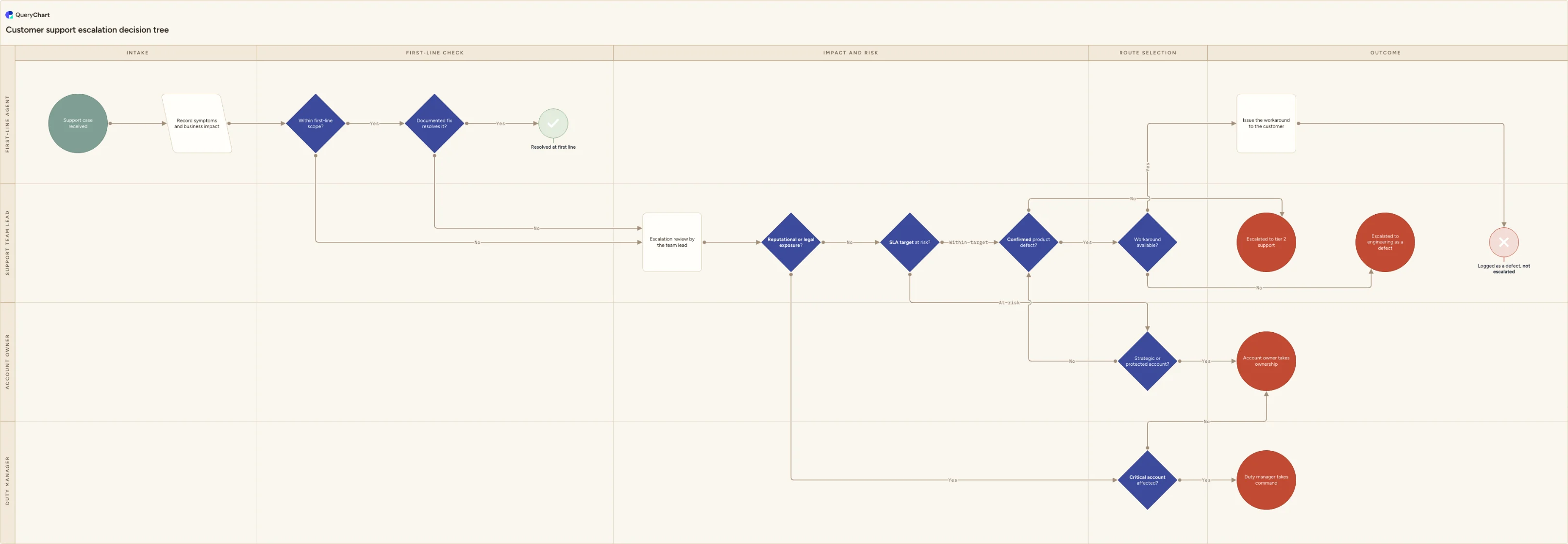
Customer support escalation flowchart: a decision tree of eight tests routing a case to first line, tier 2, engineering, the account owner or a duty manager.
What the customer support escalation flowchart (decision tree) process is
This page is a decision tree, not a process map. A process map answers what happens next and who does it, from logged ticket through to closure. A decision tree answers a narrower and far more contested question that sits inside it: given the case in front of you, does it stay at first line, and if it does not, who takes it? For the end-to-end flow, including logging, prioritisation, major incident handling and closure, use the incident management process flowchart. For dissatisfaction with the service rather than a fault in it, use the customer complaint process flowchart. Use this chart when the argument is about the routing itself.
Escalation goes wrong in two opposite directions and both are expensive. Escalate too readily and tier 2 becomes a second queue for cases first line could have closed, which raises cost per ticket and lengthens the wait for the cases that genuinely need specialist attention. Escalate too rarely and a contractually protected account learns about a missed commitment from its own users. Neither failure is solved by more supervision. It is solved by written tests, eight of them here, each answerable from the ticket and the account record rather than from how the conversation feels.
The lanes name decision rights, not departments. The first-line agent decides scope and whether a documented fix actually works. The support team lead owns the exposure, SLA and defect tests. The account owner answers whether the account is strategic or contractually protected. The duty manager answers a single question, whether a critical account is affected, and only once exposure has already been established. Running the tests in that order means the highest-authority owner wins: a case carrying legal exposure cannot quietly route itself onto an engineering backlog.
What this flowchart covers
In this template
- A first-line gate before any escalation is considered: 'Within first-line scope?' and 'Documented fix resolves it?' both have to answer Yes to reach the 'Resolved at first line' outcome. Either No sends the case to 'Escalation review by the team lead'.
- Exposure is tested first, not last. 'Reputational or legal exposure?' answering Yes goes straight to 'Critical account affected?' in the duty manager lane, whose Yes ends at 'Duty manager takes command' and whose No ends at 'Account owner takes ownership'.
- 'SLA target at risk?' splits At risk from Within target: At risk diverts through the account test before any technical routing, Within target goes directly to the defect question.
- 'Strategic or protected account?' sits in the account owner lane. Yes ends at 'Account owner takes ownership'; No rejoins the technical routing rather than opening a second parallel queue.
- Technical routing through 'Confirmed product defect?': No ends at 'Escalated to tier 2 support', Yes goes on to 'Workaround available?', where No ends at 'Escalated to engineering as a defect'.
- A deliberate no-escalation outcome: when a workaround exists, the agent issues it and the case ends at 'Logged as a defect, not escalated', so the bug joins the normal engineering backlog instead of consuming an escalation.
When to use this template
- Escalation in your team is decided by individual temperament, and two agents handle the same case differently.
- Tier 2 or engineering is pushing back on escalation quality and you need agreed entry criteria rather than a stricter tone.
- Account managers keep hearing about serious cases from the customer before they hear about them internally.
- You are writing or revising an escalation policy and want the tests and decision rights agreed before anyone drafts the prose.
- You are inducting new support staff and need one page that shows when to escalate and to whom, alongside the end-to-end process map.
How it works
Name the four decision-makers
Replace first-line agent, support team lead, account owner and duty manager with the roles that exist in your organisation. Small teams often merge the account owner into the team lead; organisations with out-of-hours cover usually keep the duty manager separate because that role changes by rota. Each lane must be a person who can be reached and who is authorised to make the call, not a department name.
Write down what first-line scope means
'Within first-line scope?' is the test that decides how much of your volume never escalates, so it deserves a written definition. Scope it by capability rather than by effort: a published article, a documented configuration change or a standard account action is in scope; anything requiring code, production data access or a contractual concession is out of scope by definition, however willing the agent is to try.
Set the SLA-risk trigger before the deadline
Decide what proportion of the remaining response or resolution time triggers 'SLA target at risk?', and agree it in advance so the tool can fire it automatically. The whole value of the branch is that it runs while the target can still be met. A trigger set at the deadline itself only tells you the commitment has already been missed.
Define the protected-account list in advance
'Strategic or protected account?' must be answerable from the CRM in seconds. Maintain an explicit list, and record what makes an account protected: named strategic status, or response and resolution commitments written into the agreement. Deciding this case by case is what allows the loudest customer, rather than the most important one, to receive priority handling.
Agree the exposure triggers with legal
'Reputational or legal exposure?' is the branch that overrides every other test, so its criteria should be signed off outside support: personal data exposed, a regulator or auditor involved, a safety risk, a public post or press enquiry, or a contractual penalty in play. Keep the list short enough to recall under pressure and make any single trigger sufficient.
Agree what counts as a confirmed defect and an acceptable workaround
Set an evidence bar for 'Confirmed product defect?', for example reproduced on a supported version with steps another engineer can follow, so unreproduced reports go to tier 2 for diagnosis rather than to engineering. Then decide who judges the workaround acceptable. If that judgement sits only with support, the 'Logged as a defect, not escalated' outcome will be disputed by customers who never agreed to it.
Frequently asked questions
How is this different from a customer support escalation process flowchart?
A process flowchart is a sequence: log the ticket, triage it, work it, resolve it, close it, with lanes showing who performs each step. This chart is a decision tree, so its spine is a chain of questions rather than a chain of tasks, and its branches end in five different named outcomes instead of converging on one closure step. Use the process map to see the whole lifecycle of a case, and use this tree at the single point in that lifecycle where someone has to choose a route. The two are complements: the incident management process flowchart shows where the escalation decision sits, and this chart shows how to make it.
When should a support case be escalated?
When one of a small number of written tests answers yes, not when the case has simply been open a long time. Five of this chart's eight tests decide whether to escalate at all: the case is outside first-line capability, no documented fix resolves it, the SLA target is at risk, the account is strategic or contractually protected, or there is reputational or legal exposure. The remaining three decide where it goes. Elapsed time is a useful trigger for reviewing a case but a poor trigger for escalating it on its own, because it moves work without adding any capability the case actually needed.
What is the difference between escalating to tier 2 and escalating to a manager?
They solve different problems, and ITIL separates them as functional and hierarchic escalation. Functional escalation moves a case to people with more specialist skill or deeper system access, which is what 'Escalated to tier 2 support' and 'Escalated to engineering as a defect' represent here. Hierarchic escalation involves someone with more authority, to reset customer expectations, authorise an exception or commit resources, which is what the account owner and duty manager outcomes represent. A case can need both. Sending a case up the management line when what it actually needs is a specialist wastes a manager's time and does not move the ticket.
Does every confirmed product defect need to be escalated to engineering?
No, and treating every defect as an escalation is how escalation loses its meaning. This chart splits on 'Workaround available?'. With no acceptable workaround the customer is blocked, so the case ends at 'Escalated to engineering as a defect' and carries service-affecting priority. With a workaround the agent issues it and the case ends at 'Logged as a defect, not escalated': the bug still reaches engineering through the normal defect intake and prioritisation route, it simply does not interrupt anyone. That second outcome is a Reject terminator on purpose, because deciding not to escalate is a legitimate result of the assessment and should be recorded as one.
Who is allowed to say no to an escalation?
Whoever owns the test that failed, which is why the lanes in this chart are decision rights rather than departments. The team lead can decline a case that fails the exposure, SLA and defect tests and send it back to first line. The account owner, not support, decides whether an account is protected. The duty manager decides whether an account is critical, and is only asked once exposure has already been established, which keeps that role for genuine command situations. Escalations declined without a recorded reason are the ones that come back, so capture which test failed against the case.