Equipment troubleshooting flowchart (decision tree)
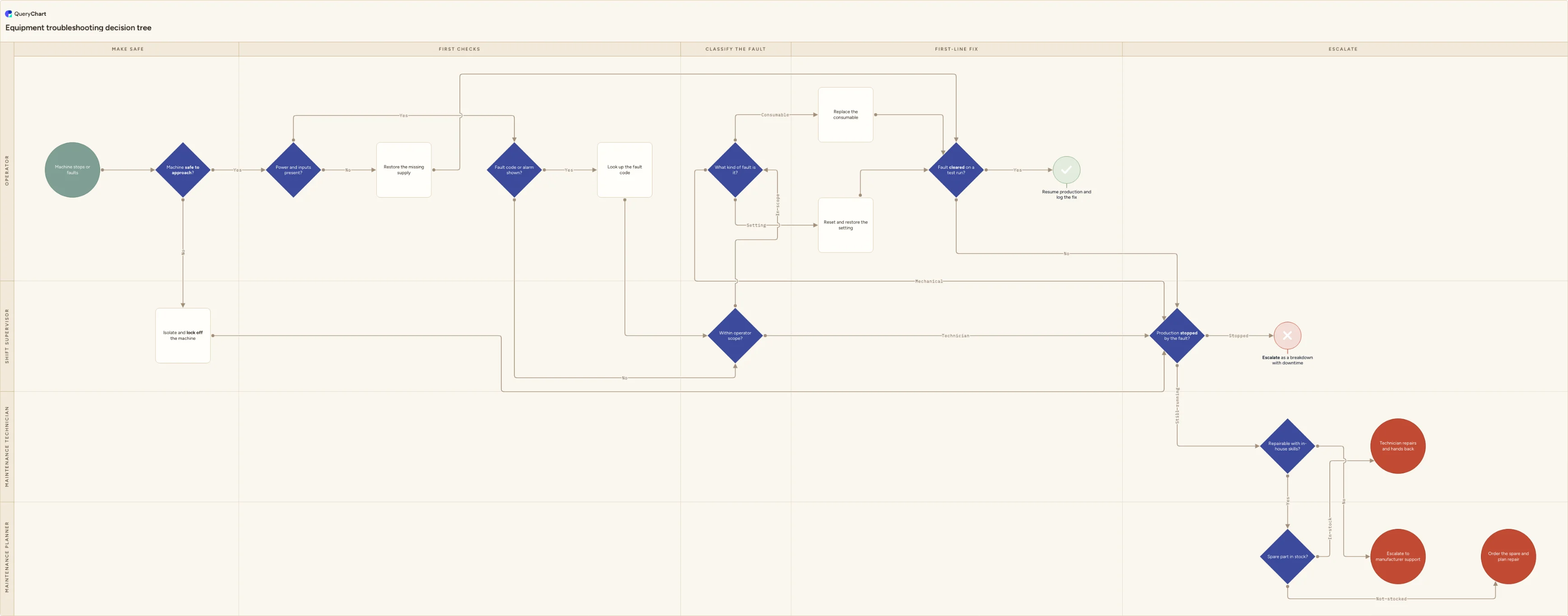
Equipment troubleshooting flowchart: a fault-finding decision tree covering safety and isolation, fault codes, operator scope, first-line fixes and escalation.
What the equipment troubleshooting flowchart (decision tree) process is
Troubleshooting is a sequence of questions, not a sequence of tasks. An operator standing in front of a stopped machine does not need to know who raises the work order or who signs the job off. They need to know what to check first, what they are allowed to touch, and the point at which the fault stops being theirs. A decision tree answers exactly that, because every box is a test with a defined answer and every answer leads somewhere named.
This page is the decision tree, not the process map, and the difference is worth being precise about. This chart answers which option we choose and who decides: is the machine safe to approach, is the fault within operator scope, do we reset or call out, do we wait for a spare or go to the manufacturer. The end-to-end flow that begins once a fault is escalated (raising the work order, assigning and scheduling the technician, recording downtime against the asset, closing the job and updating the asset history) belongs to the equipment breakdown process map. Use that one for what happens next and who does it. Use this one for the choice made at the machine, in the minutes before anyone else is involved. If a fault keeps returning after the tree has run, the root cause analysis process is where it goes next.
The chart below runs from a stopped machine to five distinct endpoints rather than one happy path: production resumed after an operator fix, a technician repair and handback, a spare part order, manufacturer or external service support, and a breakdown escalation with downtime recorded. Nine decisions sit on the spine across four lanes, and the pivotal ones carry their criteria as notes on the node, because a decision tree is only useful if the tests behind the questions are written down.
What this flowchart covers
In this template
- Four lanes naming who answers each question rather than a full department map (Operator, Shift supervisor, Maintenance technician, Maintenance planner) across five stages: Make safe, First checks, Classify the fault, First-line fix and Escalate.
- A safety gate before any diagnosis: "Machine safe to approach?" branches Yes into the first checks and No into isolation and lock-off, which then goes straight to the escalation decision, so nobody troubleshoots a live machine.
- Two evidence checks in the operator lane: "Power and inputs present?" (No routes to restoring the missing supply, then to verification) and "Fault code or alarm shown?", where Yes sends the operator to look up the code before anything is classified.
- A decision-rights gate in the supervisor lane, "Within operator scope?", branching In scope or Technician, followed by "What kind of fault is it?" with three branches (Consumable, Setting and Mechanical) where mechanical faults leave the operator path entirely.
- Verification instead of assumption: "Fault cleared on a test run?" ends either at the Success terminator "Resume production and log the fix" or at escalation, so a fix that did not hold is never treated as a fix.
- Escalation split by evidence, not seniority: "Production stopped by the fault?" separates a logged breakdown with downtime from a routine callout, then "Repairable with in-house skills?" and "Spare part in stock?" produce the technician handback, manufacturer support and spare part order endpoints.
When to use this template
- Operators call maintenance for faults they could clear themselves, and you want the first-line checks and the boundary of operator scope written down rather than negotiated per shift.
- You are writing a machine SOP, a shift handover pack or a laminated card for the machine, and need one page an operator can follow without reading a procedure.
- Downtime figures are unreliable because nobody agrees on when a fault becomes a recorded breakdown or when the clock starts.
- New, agency or cross-trained operators need to follow the same fault-finding sequence as experienced ones, including knowing when to stop.
- You already have an end-to-end maintenance or breakdown process and need the decision layer that feeds it with clean, correctly classified escalations.
How it works
Rename the lanes to your real decision rights
Replace Operator, Shift supervisor, Maintenance technician and Maintenance planner with the roles that actually answer each question in your organisation. The lanes here are deliberately few, because a decision tree shows who decides, not who does the work. If your supervisors do not have the authority to release a callout, move that decision to the lane that does, and delete any lane left with nothing to answer.
Write the safety test rather than the word safe
"Machine safe to approach?" is only answerable if the criteria are on the node: guards intact, machine at rest, stored energy released, isolation and lock-off applied where the task needs it. Point it at your own isolation procedure — in the UK that duty sits under PUWER's requirement for isolation from sources of energy, and in the US under OSHA's lock-out/tag-out standard — and make sure any doubt resolves to No.
List the inputs an operator is authorised to check
Turn "Power and inputs present?" into a real checklist for your equipment: mains and control power, compressed air or hydraulics, material and coolant, guards closed, e-stops released, interlocks made. This is the cheapest branch in the tree and the one that removes the most avoidable callouts, so it should be specific to the machine rather than generic.
Define operator scope in writing
"Within operator scope?" is the decision that decides most escalations, and it drifts unless it is documented. Write the permitted first-line tasks against your training matrix and the machine SOP, then write the exclusions plainly: no guard removal, no electrical enclosures, no parameter changes, nothing the operator is not signed off for. Review it whenever the training matrix changes.
Agree the threshold that makes a fault a breakdown
"Production stopped by the fault?" is what separates a recorded breakdown from a routine callout, and it drives your downtime data. Agree one definition — typically a line that cannot run or is producing off-spec output — and one clock start, at the moment the machine stopped rather than the moment maintenance answered. Apply it identically on every shift, or the numbers cannot be compared.
Check competence, tooling and warranty before repairing in house
"Repairable with in-house skills?" needs a rule behind it: the technician is competent and signed off for the task, the tooling and documentation are available, and the repair will not void a warranty or a service contract. Warranty is the one most often missed, and it is the reason the No branch goes to manufacturer support rather than to a spare part order. Keep the finished chart versioned and approved so every shift is working from the same revision.
Frequently asked questions
What is the difference between an equipment troubleshooting flowchart and a maintenance process map?
They answer different questions. A troubleshooting flowchart is a decision tree: a chain of tests — is it safe, are the inputs there, is there a fault code, is it within operator scope, did the fix hold — that ends in a named outcome. A maintenance or breakdown process map is a cross-functional process: report the fault, raise the work order, assign a technician, repair, record downtime, close the job and update the asset history. The troubleshooting tree normally ends where the process map begins, at the point of escalation, which is why they work better as two charts than as one.
What should an operator check first when equipment stops?
Safety, then supplies, then evidence. Confirm the machine is safe to approach and isolated if the task needs it; nothing else happens before that. Then check the inputs an operator is authorised to check — power, air, material, coolant, guards closed, e-stops released — because a surprising share of callouts end there. Only then read the fault code or alarm and look it up. Checking in that order stops people diagnosing a complex fault that turns out to be an empty hopper or an unreset e-stop.
How do I decide what an operator is allowed to fix?
Base it on competence and risk, and write it down as a list rather than a principle. Permitted first-line tasks are typically consumable changes, clearing accessible jams, resetting alarms and restoring settings the operator already sets in normal running. The usual exclusions are anything behind a guard or an electrical enclosure, anything requiring tooling the operator is not trained on, and any parameter change that affects product quality. Tie the list to your training matrix so the boundary moves when someone is signed off, not when a shift is under pressure.
When does a fault become a recorded breakdown?
When it meets a threshold you have agreed in advance and apply consistently. There is no universal figure; many plants set a duration in minutes, and what matters more than the number is that everyone starts the clock at the same event. Recording downtime from the moment the machine stopped, rather than from the callout or the technician's arrival, is what makes the data comparable between shifts and lines. Put the definition on the decision node so the rule travels with the chart.
What if the first-line fix works and the fault comes back?
That is why this tree verifies rather than assumes. "Fault cleared on a test run?" should be answered on a full cycle at production speed with the first parts checked, not on a dry run, and a fault that returns during the test counts as not cleared and goes to escalation. A fault that keeps recurring across shifts is no longer a troubleshooting problem: it needs the root cause analysis process, where evidence is collected and a cause is verified before another corrective action is written.
Where this process fits
In most operations this process hands off to Equipment breakdown process flowchart (unplanned failure).
Comes after
- Equipment breakdown process flowchart (unplanned failure) — Equipment breakdown process flowchart for unplanned machine failure: safe stoppage, downtime clock, repair-on-site and spares decisions, test and restart.