How to create a document revision history
How to build a document revision history: the columns it needs, why the log is a separate, append-only record from the document it describes, and the verification step most hand-rolled tables skip entirely.
A document revision history is the artifact (a table of version, date, author, description and verifier) that a version control practice produces and keeps accurate.
The short version
- The revision history is the artifact (a table); version control is the practice that keeps it accurate.
- Minimum columns: version, date, author, description, prior-version reference, verified-by.
- Append-only: fix a wrong entry with a new row, never by editing the old one.
- An entry no one checked against the real edit is a claim, not a record.
- QueryChart generates this automatically via its Change Log: see /features/version-control.
The table is a record, not the discipline
A revision history is the table most readers picture immediately: a version number, a date, the name of the person who made the change, a short description of what changed, and often the name of whoever reviewed it. It is an artifact: rows in a table, usually sitting on the document's own cover page. Version control is the different thing that produces those rows: the practice of never editing a controlled document without writing one, never rewriting an entry after the fact, and having someone other than the editor check the entry against the edit. A document can carry a full-looking revision history and still have no real version control behind it, if nobody has ever checked a single row against what actually changed.
Treat the revision history as a separate object from the document it describes, not a section inside it. The document changes; the log only ever grows. Each entry needs a version number, a date, an author, a plain description of what changed and why, a reference to the version it supersedes, and, the column most hand-built tables leave out, who verified the entry against the real edit. Skip that last column and the log is a set of unverified claims: an author's account of their own change, filed by the same person who made it.
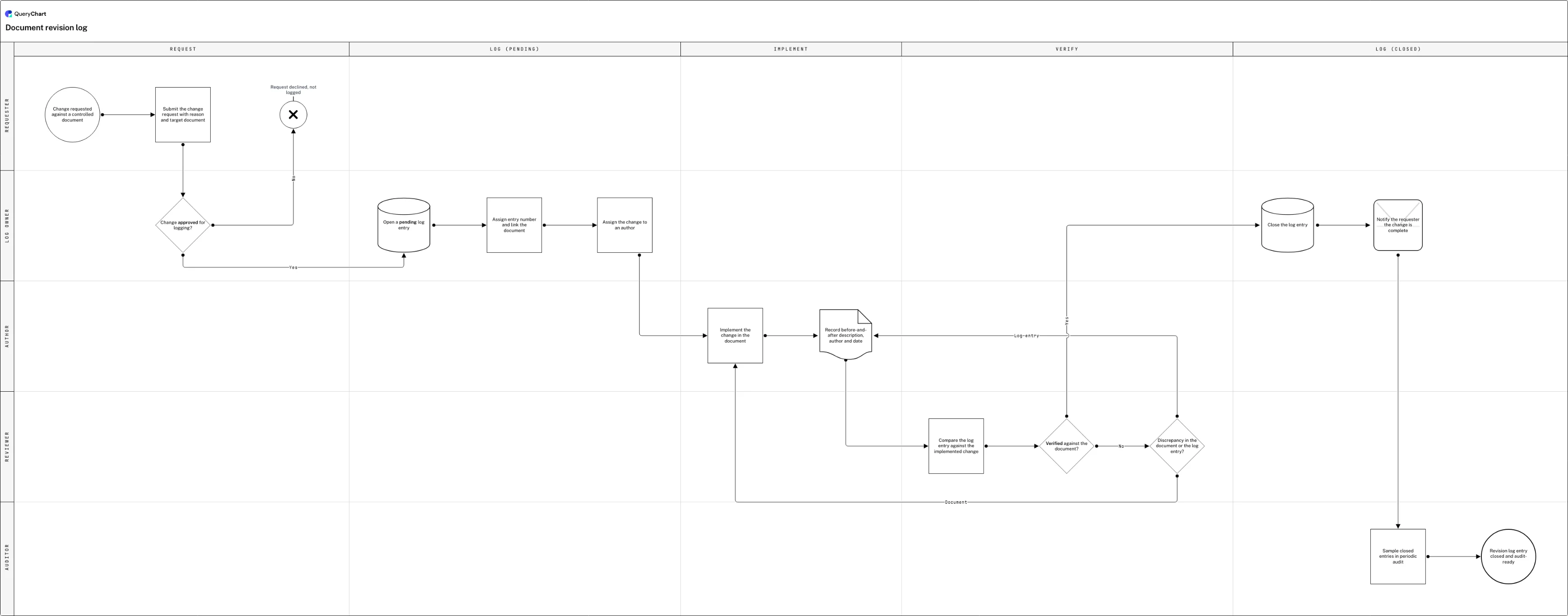
The chart below walks a generic revision-log-entry process (sixteen rows across five lanes) where the thing moving through the process is the log entry itself, not the document. A request opens a pending entry, an author implements the change and files a before-and-after description, a reviewer compares that description against the actual edit before closing anything, and an auditor samples closed entries later. That comparison step is what a hand-rolled spreadsheet almost never has, because there is no one whose job is explicitly to run it. QueryChart replaces the hand-built table entirely: every edit to a chart is captured in a Change Log with per-field before/after values and the editor's name, viewable in a Compare Versions screen, at /features/version-control; nobody has to type the entry, because it's the record of what was actually edited, not a self-report.
Sixteen rows, five lanes, one log entry
Watch a single revision-log entry move from request to a verified, audit-sampled close: the columns a hand-built table usually skips, laid out as a process.
A request, not yet an entry
The Start row is "Change requested against a controlled document" (an event, not a task) followed by "Submit the change request with reason and target document," which names the exact document and reason before anything is logged. "Change approved for logging?" decides whether a pending entry opens at all.
The entry opens before the edit does
Only after approval does "Open a pending log entry" appear, as a File row rather than a note in someone's inbox. "Assign entry number and link the document" and "Assign the change to an author" both happen in the Log owner's lane, before the Author lane starts: the entry exists as a record before a single word of the document changes.
Verification, not just a description
"Implement the change in the document" moves the work into the Author's lane, and "Record before-and-after description, author and date" is filed as its own row rather than folded into the edit. "Compare the log entry against the implemented change" and "Verified against the document?" then require the Reviewer to check the entry's words against the real edit before anyone trusts either.
A mismatch, then closure and audit
"Discrepancy in the document or the log entry?" sends a failed check back to "Implement the change in the document" or "Record before-and-after description, author and date," whichever was wrong. A verified entry reaches "Close the log entry," "Notify the requester the change is complete," and "Sample closed entries in periodic audit" before the End, "Revision log entry closed and audit-ready", with "Request declined, not logged" the other exit, back at the top.
How it works
Separate the log from the document
Put the revision history in its own artifact (a table on the cover page or a standalone register), never as a paragraph buried in the body. The document changes; the log is the only one of the two that is allowed to only grow.
Fix the columns before the first entry
Version number, date, author, a plain description of what changed and why, a reference to the version it replaces, and who verified the entry. Leave off either of the last two and there is no way to tell a checked record from an author's self-report.
Open the entry before the edit, not after
Log a pending entry (number, document link, assigned author) the moment a change is approved, before anyone opens the file. An entry written after the fact is reconstructed from memory, which is exactly the failure mode a log exists to prevent.
Write down what changed, not that something changed
"Updated section 4" is not a description; "changed the approval threshold from $500 to $2,000 in section 4" is. Record the before-and-after in plain terms, the author's name and the date, so a reader can reconstruct the change without opening the document's own history.
Verify the entry against the real edit
Have someone other than the author compare the logged description to what actually changed in the document before the entry is closed. If they disagree, work out whether the document or the entry is wrong: correcting the entry is not always a step backwards for the author.
Sample closed entries, don't review every one
Build a periodic audit that checks a sample of closed entries against their documents, on a schedule that belongs to the audit programme rather than an ad hoc check. This is what makes the log something you can trust without re-verifying it yourself.
Mistakes to avoid
The log as a memory test
Writing the entry days after the edit turns a record into a reconstruction. Open the pending entry when the change is approved, and file the before-and-after description the same day the edit lands, not from what someone remembers weeks later.
Editing history in place
Correcting row three of a spreadsheet to fix a wrong description destroys the very thing a revision history is for: proof of what was recorded when. Append a new row instead; /guides/how-to-track-changes-in-an-sop and /guides/how-to-manage-sop-revisions cover this append-only discipline for SOPs specifically.
A log nobody checks against the document
A table with a Version and Description column but no verification step is a set of claims, not a record. Give the comparison its own row with its own owner, the way "Compare the log entry against the implemented change" does in the chart above, or the log is only as reliable as the author's memory.
Confusing the log with the process that produces it
A revision history records what changed; it does not decide who may approve a change or where superseded copies live: that is document control, covered in full at /templates/document-control-process. Build both, but keep them as separate artifacts.
Related QueryChart feature
Build your own revision log
Open the revision-log-entry chart as your own template, put your own document types in the lanes, and let QueryChart's Change Log keep the verified history instead of a spreadsheet.
Related guides
Frequently asked questions
What's the difference between a revision history and version control?
A revision history is the artifact: the table of version, date, author, description and verifier. Version control is the practice that keeps that table honest: the rule that nothing is edited without an entry, that entries are never rewritten after the fact, and that someone other than the author checks one against the other. You can have a revision history with weak version control behind it: the table exists, but nobody ever verifies a row against the real edit.
What columns does a revision history table need?
Version number, date, author, a plain description of what changed and why, a reference to the version it replaces, and, the one most hand-built tables skip, who verified the entry against the actual edit. A row missing the last column is an author's self-report, not a checked record.
Should a revision history be edited to fix a mistake in an old entry?
No. Append a new row that corrects the record rather than rewriting the old one; the log is only as trustworthy as its append-only history is intact. If the wrong thing was the document rather than the entry, the fix belongs in a new document revision, not a rewritten log row.
Is a hand-maintained spreadsheet enough for a revision history, or do I need software?
A spreadsheet works until someone edits a row instead of appending one, which is difficult to prevent and easy to miss. QueryChart's version history writes the equivalent log automatically: a Change Log with per-field before/after values and the editor's name for every revision, viewable in a Compare Versions screen and restorable at any point, at /features/version-control. The chart above shows the manual version of the same discipline (a request, a filed description, a verification step) whichever tool is running it.