Document revision log template
A document revision log template, also called a change log: track a change to any controlled document from request through a pending entry, implementation and verification to a closed, dated record.
What the document revision log process is
A document revision log, sometimes called a change log, is the separate record that answers a different question than a document's own revision history. It is not "what does the current version say" but "what happened, who did it, and when, across every document a quality system controls." It exists apart from any single file because a document register, an auditor or a process owner needs to see change activity across dozens of policies, procedures, forms and work instructions at once, rather than opening each one and scrolling to its own history table. In this chart the log entry itself, not the document, is the thing that moves through the process: a change is requested, opened as a pending entry, implemented, described, verified, and closed.
The lifecycle has a gate before anything is written and a check after it. A change is only opened as a pending entry once someone has approved it for logging, and it is only closed once a reviewer has compared the entry against what was actually implemented. That verification step exists because a log is only as trustworthy as its weakest entry: a before-and-after description nobody checked against the real document is worth no more than an unverified claim, and an auditor sampling entries later has no way to tell a checked one from an unchecked one.
This is not the full document control workflow, drafting, technical review and formal sign-off before a document is issued, and it is not tied to one particular document type such as a standard operating procedure. It is the ledger that sits alongside any controlled document, whatever governs that document's own drafting and approval, and records every change made to it afterwards: who requested it, who implemented it, what changed, and whether that change was verified. Use it as the log itself, not as a substitute for the approval that authorised the change in the first place.
What this flowchart covers
In this template
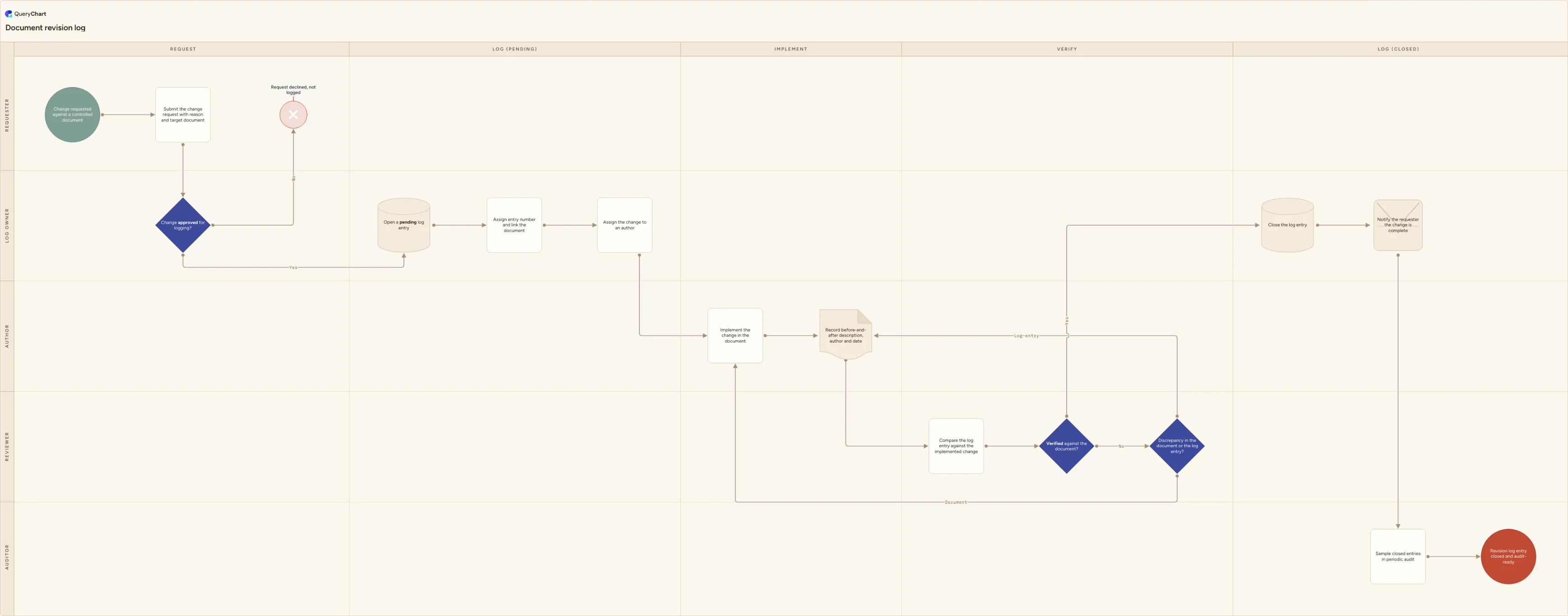
- Five swimlanes for the people who touch a revision, Requester, Log owner, Author, Reviewer and Auditor, laid out across five phases: Request, Log (Pending), Implement, Verify and Log (Closed).
- Intake and gating: a change is requested against a controlled document and submitted with a reason and the target document named, then a "Change approved for logging?" decision either opens a pending entry or ends the request at "Request declined, not logged".
- The pending entry itself: "Open a pending log entry", assign it an entry number linked to the document, and assign the change to an author, so a change exists in the log before it exists in the document.
- Implementation and evidence: the author implements the change in the document, then "Record before-and-after description, author and date" captures what changed, who changed it and when, the entry that lets someone reconstruct the change without opening the document's own history.
- Verification: the reviewer compares the entry against the implemented change, and a "Verified against the document?" decision either closes the entry or routes to "Discrepancy in the document or the log entry?", which sends the fix back to re-implementation or back to correcting the entry rather than always assuming the author was wrong.
- Closure and audit: "Close the log entry", notify the requester, and a periodic audit samples closed entries in the Auditor lane rather than reviewing every one.
When to use this template
- You need a single log that tracks changes across many controlled documents, policies, procedures, forms, drawings, templates, rather than a revision history embedded separately inside each file.
- Your current change log is a loose column added to a spreadsheet register, and you want it modelled as its own lifecycle with a gate before logging and a check before closing.
- An auditor or process owner keeps asking when a change was made, who made it, and whether it was checked, and today the honest answer is that it is scattered across email threads.
- You are setting up change tracking for a document type that has no formal drafting-and-approval workflow of its own, a reference table, a supplier list, a policy, and need a lightweight log rather than a full document control process.
How it works
Rename the lanes to your own roles
Replace Requester, Log owner, Author, Reviewer and Auditor with the roles you actually have. In a small team the log owner and reviewer are often the same person; keep them as one lane rather than drawing a review that never happens. If more than one person can author a change, keep Author as a role rather than naming individuals, so the chart survives staff turnover.
Decide what counts as a loggable change
Not every edit needs an entry: fixing a typo is different from changing a control limit. Set a threshold at the "Change approved for logging?" decision, for example material changes to scope, responsibility, numbers or requirements get logged and formatting or spelling fixes do not, and write the threshold down, because "material" is the word every argument about this decision comes back to.
Fix your entry-numbering scheme
At "Assign entry number and link the document", decide whether entry numbers run per document, change #4 to this policy, or as one sequence across the whole log. Per-document numbering reads better inside a single document's own history; a single sequence is easier to search and report on across the whole register.
Write the before-and-after standard
"Record before-and-after description, author and date" is only useful if every entry meets the same bar. Require the previous wording or value, the new wording or value, who made the change and the date, in that order, so an auditor sampling entries reads the same shape of record every time regardless of who wrote it.
Set what verification actually checks
Give the reviewer a concrete test at "Compare the log entry against the implemented change": open the document, find the change, and confirm the entry's before-and-after text matches what is actually there. A check that only proofreads the log entry is not verification against the document.
Define your audit sampling rule
"Sample closed entries in periodic audit" needs a stated frequency and sample size, for example ten entries a quarter or every entry above a defined risk tier, set in your audit programme rather than decided ad hoc whenever someone asks for evidence.
Frequently asked questions
What is a document revision log?
It is a chronological record of every change made to a controlled document, separate from the document itself: who requested the change, who implemented it, a before-and-after description of what changed, the date, and whether it was verified against the actual document. Some organisations call the same record a change log; both terms describe a running history of changes rather than the document's current content.
Is a document revision log the same as a change log?
Yes, in the sense that both describe a running record of changes rather than current content. "Revision log" is more common in quality and regulatory settings tied to a specific controlled document; "change log" is used more broadly, from a single policy to a shared reference table. This template models the generic lifecycle behind either name: request, pending entry, implementation, verification, closed entry.
How is this different from a document's own version history?
A document's version history usually lives inside the file or its metadata and shows the sequence of numbered versions issued. A revision log is a separate register that can sit across many documents at once and records the change activity itself, who touched what and when, rather than only the resulting version number. Many organisations keep both: the document carries its version number and effective date, and the log carries the narrative of every change that produced them.
Who should verify a logged change?
Someone other than the person who implemented it. The point of the "Verified against the document?" decision is an independent check that the before-and-after description in the entry actually matches what changed in the document, not a second opinion from the same person who wrote both. In a very small team this can be the log owner rather than a dedicated reviewer, but it should not be the author checking their own entry.