Revision control vs version control: what's the real difference?
Revision control and version control are near-synonyms most practitioners use interchangeably. This page names the one real nuance between them without inventing a distinction that isn't actually there in practice.
Revision control and version control are two names for the same underlying practice (tracking dated changes to a document over time), and the difference that does exist is one of emphasis, not two competing systems.
The short version
- "Revision control" and "version control" describe the same practice; most practitioners use the two terms interchangeably with no loss of meaning.
- Where a real nuance exists: a revision is usually the individual dated change entry, a version is usually the resulting state of the whole document.
- Don't build two logs for one idea: one version history, called either name, is enough.
- QueryChart's free version history (Change Log, Compare Versions, restore) works the same regardless of which word your organisation prefers: see /features/version-control.
- This nuance matters most for a standalone change log; see /guides/how-to-create-document-revision-history for building one.
One record, described two ways
A quality manager asks whether their register should be titled a "revision log" or a "version history" and gets three confident, contradictory answers from three colleagues. All three are describing the same document. That is not a terminology gap worth fixing: it is a sign that both words are doing real work in the same sentence, just naming different grain sizes of the same activity, not two different activities.
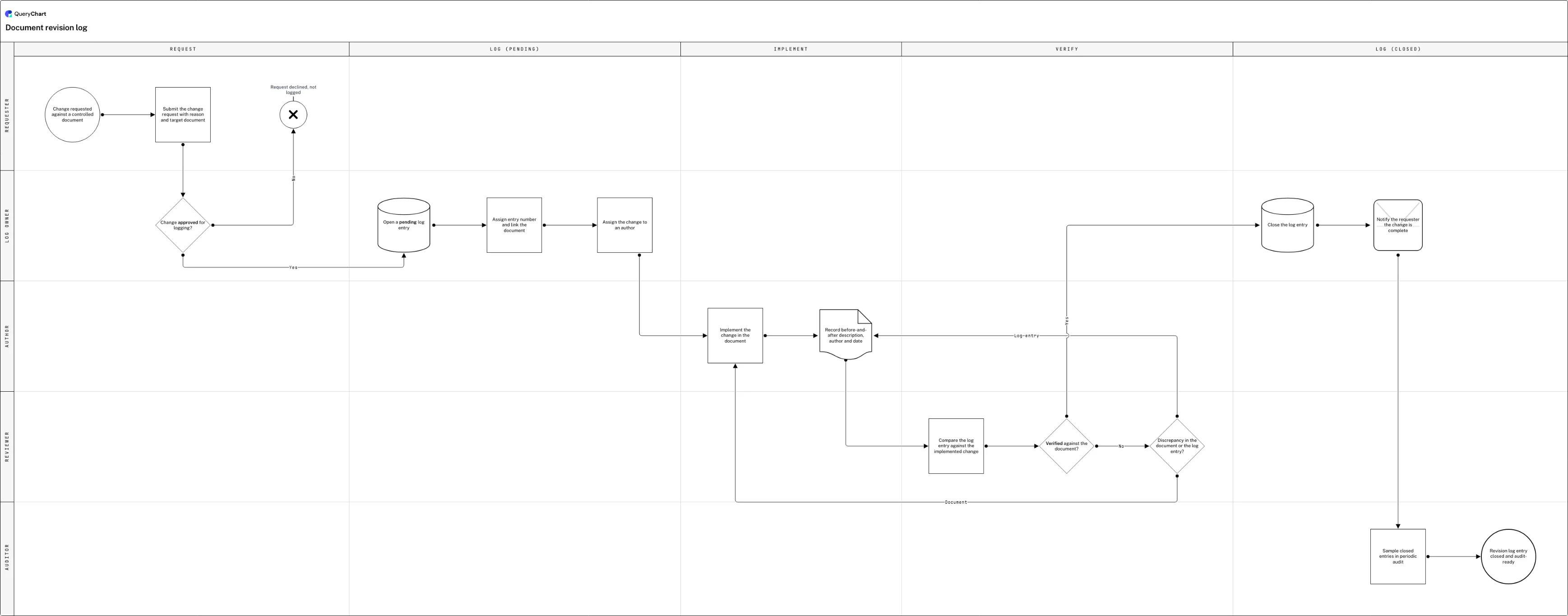
The grain size is the one distinction worth keeping. "Revision" is the more natural word for a single dated, attributed change: the thing a row in a change log records. "Version" is the more natural word for the resulting state of the whole document after that change is applied: the thing a reader opens and reads. A revision is a step; a version is where the steps have gotten to. The chart below is titled a document revision log for exactly this reason: every row in it is one revision, and "the current version" is simply what the document is once its most recent revision has closed.
This is a narrower question than the other pairings in this cluster. Change control and document control are genuinely broader processes that use versioning as one mechanism inside them; see /guides/version-control-vs-change-control and /guides/version-control-vs-document-management for those. Revision control and version control are not that kind of pair: most practitioners, most standards and most software use the two words interchangeably with no loss of meaning, and QueryChart's own free version history (a Change Log, a Compare Versions view, one-click restore, at /features/version-control) works identically regardless of which noun your organisation prefers.
If the general definition is what you actually came for, /guides/what-is-version-control covers it in full. This page assumes that definition and answers the narrower question underneath it: does the word choice matter, and where.
A revision log, row by row
Watch a single change move through five lanes as a dated, attributed revision, and see where the log stops talking about the entry and starts talking about the document's current version.
A request, before it's a revision
The chart opens on "Change requested against a controlled document", moves to "Submit the change request with reason and target document", and reaches the gate "Change approved for logging?": a "No" here ends at "Request declined, not logged" instead of ever becoming an entry.
Opening the entry, not editing the document
"Open a pending log entry" starts the record, "Assign entry number and link the document" gives this revision its own identifier separate from the document's, and "Assign the change to an author" names who will make it: this is the log gaining a row, before anything about the document itself has changed.
The change, then a check against its own description
"Implement the change in the document" and "Record before-and-after description, author and date" are the revision itself; "Compare the log entry against the implemented change", "Verified against the document?" and "Discrepancy in the document or the log entry?" catch a mismatch between what the entry claims and what the document shows.
Closing the entry produces the current version
"Close the log entry" and "Notify the requester the change is complete" finish this revision, "Sample closed entries in periodic audit" is how the log earns trust over time, and "Revision log entry closed and audit-ready" is the state a reader would now call the document's current version.
How it works
Pick one word for your own register and stop relitigating it
Decide "revision log" or "version history" for your organisation's register, put it in the register's own title and column headers, and move on. Letting different teams argue past each other in different vocabulary for identical rows wastes more time than the choice itself is worth.
Give each revision its own row, never a bumped field
In the example chart every revision is its own File-shaped row with its own number, assigned in "Assign entry number and link the document", rather than a counter you overwrite. Build your log the same way: a change is a new record, not an edit to the last one.
Record what changed in the entry, not just that something did
"Record before-and-after description, author and date" is the row worth copying literally: name the field or clause, its old value, its new value, who made the change, and when. A dated row that doesn't say what moved is not a revision entry, it's a timestamp.
Verify the entry against the document before you close it
"Compare the log entry against the implemented change" and its "Verified against the document?" gate exist because entries and documents drift: a description written before the edit finished, or an edit that went further than the request said. Route the mismatch back to whichever side is wrong before closing the row.
Let the log record itself where the document already lives in QueryChart
If the controlled document is itself a QueryChart chart, its Change Log already records who changed which field and what it changed from and to, on every edit, with no setup. You don't have to hand-maintain the revision rows above as a separate table: see /features/version-control.
Mistakes to avoid
Two logs for one idea
Keeping a separate "revision register" and a separate "version history spreadsheet" for the same document guarantees the two disagree the first time someone updates only one of them. Keep one log; call it whichever name your organisation prefers.
Treating the vocabulary debate as the deliverable
An hour spent deciding whether a column should read "Revision" or "Version" is an hour not spent recording the before-and-after values an auditor or a colleague actually needs. Pick either word and log the field.
Skipping verification because the entry 'obviously' matches
"Verified against the document?" exists because the entry and the document sometimes disagree: the description was drafted before the edit was finished, or the edit went further than the request. Skipping the check turns the log into an aspiration rather than a record.
Deleting a wrong entry instead of correcting it with a new one
A revision entry that turns out to be wrong should be corrected with a new dated entry that says so, not removed. A revision log missing its own mistakes stops being trustworthy the moment someone notices something is absent.
Related QueryChart feature
Build your own revision log in QueryChart
Every chart in QueryChart keeps this record automatically, whichever word you use for it: open one and see the Change Log for yourself.
Related guides
Frequently asked questions
Is a "revision" the same thing as a "version"?
In most usage, yes: the two words describe the same underlying record, and switching between them changes nothing about the mechanics. Where a real difference surfaces, it's a difference of grain: a revision is usually the individual dated change, and a version is usually the resulting state of the whole document once that change is applied: in the chart above, each row is a revision, and the document that comes out the other end is the current version.
Should I call my log a "revision log" or a "version history"?
Whichever your organisation, standard or software already uses: ISO 9001 documentation typically says "revision," while most SaaS products say "version" (QueryChart included, at /features/version-control), and consistency inside your own register matters far more than which noun you pick. Don't run both terms in parallel for the same artifact.
Does this distinction matter for an audit?
Not in the way people expect. An auditor checks that every change is dated, attributed and retrievable, not which noun labels the register. What matters more is not conflating "revision control" with the full document control lifecycle: see /guides/how-to-create-a-document-control-process for the difference between numbering a change and controlling a document end to end.
Where does this nuance actually matter in practice?
Most directly in a standalone change log or revision register: an artifact whose entire purpose is to list dated, individual entries, which "revision" describes more precisely than "version" does. See /guides/how-to-create-document-revision-history for building one, and /guides/what-is-version-control for the broader definition this page assumes.