Document version control template
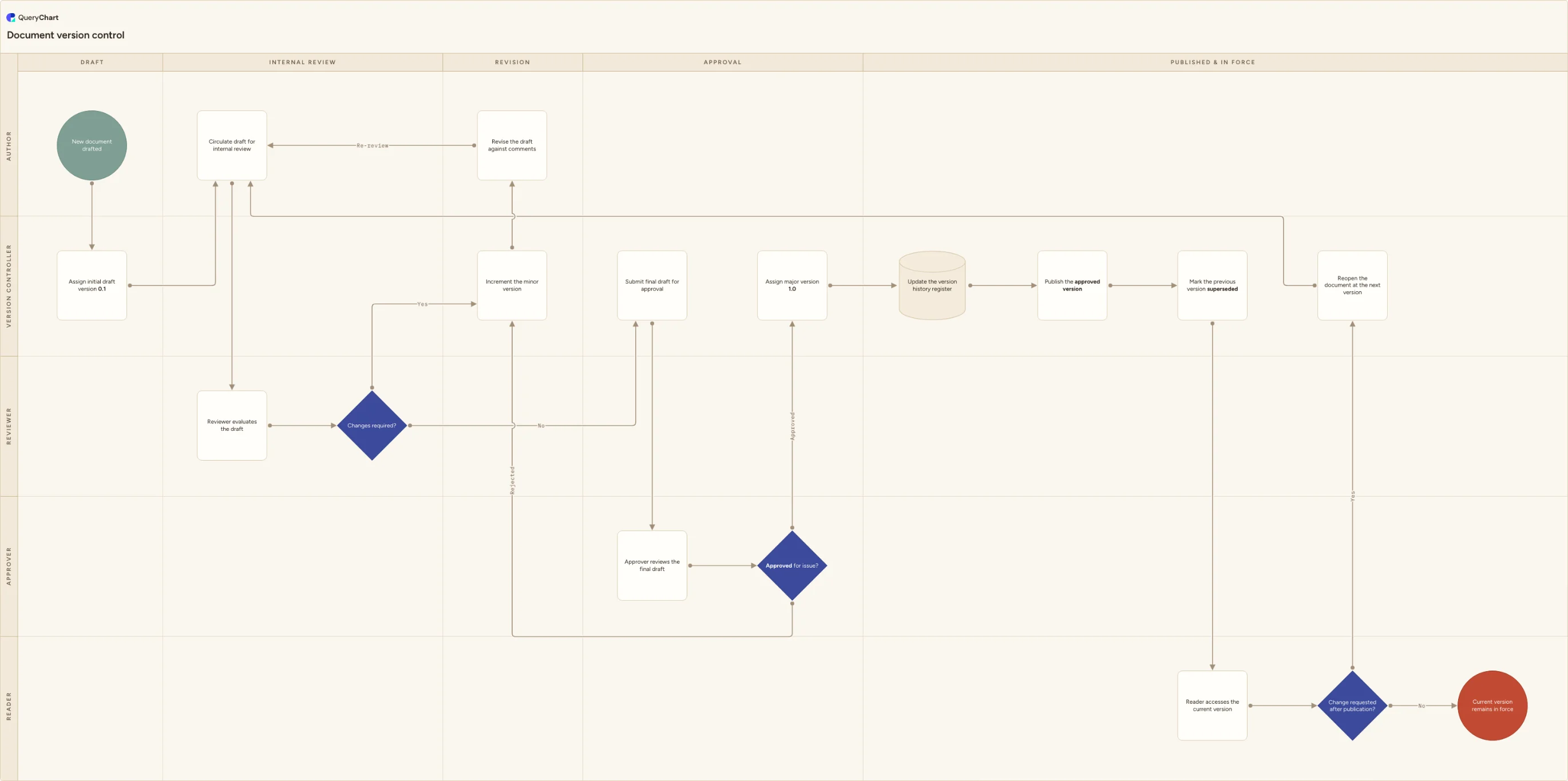
A document version control template showing how a draft moves from minor versions (0.1, 0.2...) through review, gets a whole number only at formal approval, and how later revisions supersede the version they replace.
What the document version control process is
A version number is the shorthand that tells everyone which copy of a document they are holding and whether it can be trusted. The convention this template follows is the one most quality and document-control systems use: a decimal number, 0.1, 0.2, 0.3 and so on, marks a draft still moving through internal review, and a whole number, 1.0, 2.0, 3.0, marks a version that has actually been approved and issued. The rule is simple to state and easy to break in practice, since nothing stops someone calling a draft the next whole number out of habit, which is exactly the confusion a numbering scheme exists to prevent.
This chart is not the document control lifecycle. Request, drafting, formal approval, publication and periodic review, the whole procedure a document goes through end to end, is the document control process flowchart at /templates/document-control-process, and this template assumes that procedure already exists around it. What this chart isolates is one mechanic inside that lifecycle: how the version number itself moves, and it is deliberately narrower than a revision log. Recording who changed what line and when belongs in a flat change register; this chart is only concerned with which number a document is entitled to carry at each point in its life.
The numbering does not stop at first publication. A published document that needs a further change goes back through the same review-and-approval cycle at the next version rather than starting a new document, and the version it replaces is marked superseded rather than deleted, so anyone who later opens an old saved or printed copy can see at a glance that it is no longer current.
What this flowchart covers
In this template
- Five swimlanes for the people who touch a version number, Author, Reviewer, Version controller, Approver and Reader, laid out across five phases: draft, internal review, revision, approval, and published and in force.
- Draft numbering: a new document is assigned draft version 0.1 before it is ever circulated, so the first copy anyone sees already carries a traceable number.
- The review-and-increment loop: a 'Changes required?' decision routes a draft through 'Increment the minor version' and 'Revise the draft against comments' before it goes back for re-review, so 0.1 becomes 0.2, 0.2 becomes 0.3, and the number itself records how many cycles a draft has been through.
- The major-version gate: 'Approved for issue?' is the only decision in the chart that leads to a whole number being assigned. A rejected draft loops back into the minor-version cycle rather than being issued anyway.
- Publication and supersession: the version history register is updated, the approved version is published to the controlled location, and the version it replaces is marked superseded, all before a reader ever opens the new copy.
- The post-publication loop: a 'Change requested after publication?' decision routes an in-force document back into the same review-and-approval cycle at the next version, rather than treating a live document as unchangeable.
When to use this template
- You are designing or documenting a version numbering scheme and need to show, not just state, the difference between a draft revision and an issued release.
- Reviewers keep citing an unissued draft as though it were the approved version, for example treating the third review cycle as if it were a formal release because both got called 'version 3' somewhere along the way.
- You are deciding where the major-version boundary sits, at formal approval, at a substantial content rewrite, or on a fixed release calendar, and want a concrete example to argue from before you fix the rule.
- You need to explain to an auditor or a new document controller why a superseded version is still findable in the register rather than deleted outright.
- You are configuring version numbering rules in a document management system or template library and want the mechanic mapped out before you build it.
How it works
Fix your decimal and whole-number convention
Decide, and write down, that draft versions take a decimal and issued versions take a whole number, or pick another convention if yours differs. The exact scheme matters less than that it is stated once and applied everywhere a version number appears, including headers, footers and the register.
Decide what counts as a new review cycle
Set the rule behind 'Increment the minor version': does every markup pass bump the number, or only a re-issue of the draft after changes are made? Teams that increment on every comment thread end up with drafts in the twenties; teams that increment only on re-issue keep the count meaningful.
Set the rule for what earns a major version
Formal approval is the trigger this chart uses at 'Assign major version 1.0', but some organisations also bump the major number on a substantial rewrite even without a full re-approval. Pick one rule and apply it consistently, since a mixed rule is what makes version numbers stop meaning anything.
Define what happens to a superseded version
At 'Mark the previous version superseded', decide where that prior version lives afterwards: archived in the register with its supersede date, or removed from the controlled location but retained for a fixed period. Either is defensible; an undocumented answer is not.
Decide how a post-publication change is numbered
At 'Reopen the document at the next version', fix whether a change to an in-force document restarts the minor-version drafting cycle at the next whole number or resumes decimals off the last major number. This is the rule most teams forget to write down until the second revision is already underway.
Frequently asked questions
What is the difference between a minor and a major document version?
A minor version, written as a decimal such as 0.1 or 0.2, marks a draft still inside internal review that has not been approved for use. A major version, written as a whole number such as 1.0 or 2.0, marks a version an approver has actually signed off and that has been published to the controlled location. The distinction exists so that citing 'version 2' always means an issued document, never a draft that happens to be on its second review cycle.
Does every round of review comments create a new version number?
That is a rule your organisation sets, not something the numbering scheme dictates on its own. Many teams increment the minor version only when a draft is re-issued for another round of review, not on every individual comment, so the number stays a meaningful count of drafting cycles rather than a count of edits.
What happens to a version once it is superseded, is it deleted?
No. A superseded version is marked as such in the version history register and normally kept for a defined retention period, since it is the record of what was in force on a given date. It is withdrawn from the controlled location so nobody works from it by mistake, but deleting it outright removes the evidence an auditor or an incident investigation might later need.
How is this different from a document control process or a revision log?
The document control process flowchart at /templates/document-control-process is the full lifecycle a document goes through, request, drafting, review, approval, issue, distribution and periodic review, and this template assumes that lifecycle already exists. A revision log is a flat register of individual changes, who edited what and when. This chart sits between the two: it is only the mechanic that decides which number, minor or major, a document is entitled to carry at each point in that lifecycle.
Where this process fits
In most operations this process follows Document control process flowchart and hands off to Document approval workflow decision tree template.
It is one step in Document control.
Step 1: Document control process flowchart
A document control process flowchart with Author, Reviewer, Approver, Document controller and End user lanes: drafting, approval, issue and periodic review.
Step 2: Document version control template You are here
A document version control template showing how a draft moves from minor versions (0.1, 0.2...) through review, gets a whole number only at formal approval, and how later revisions supersede the version they replace.
Step 3: Document approval workflow decision tree template
A document approval workflow decision tree: editorial or substantive change, mandatory reviewers by document type, second approver, and training on release.
Step 5: Policy review and approval process flowchart (trigger to attestation)