What is version control for documents, SOPs and processes?
Most "what is version control" results assume Git and source code. This defines it for documents, SOPs and processes instead, and separates it from revision control, change control and document control.
Version control is the practice of keeping one current, authoritative version of a document, SOP or process, together with a complete history of every version that preceded it and a record of who changed what.
The short version
- Version control = one current version, a full history of every prior one, and a record of who changed what: same idea for documents as for code.
- Revision control is the same practice under a different name; change control and document control are broader processes that use it as one part.
- QueryChart already keeps this history for every chart: a Change Log, a Compare Versions view, and one-click restore: see /features/version-control.
- A draft's minor version (0.1, 0.2…) moves every review cycle; a whole major version is assigned only once, at formal approval.
- Versioning a specific object? See /guides/version-control-for-sops, /guides/version-control-for-documents or /guides/version-control-for-flowcharts.
One current version, everything else is history
Search "what is version control" and almost every result assumes you are managing source code: commits, branches, Git. This page is about the older, plainer use of the phrase: controlling versions of documents, standard operating procedures and business processes, not code. The underlying idea does not change between the two: one current, authoritative version; a complete history of every version that came before it; and a record of exactly who changed what, and when. Only the object being versioned is different: paperwork instead of a codebase.
Concretely, that means every edit to a document produces a new, numbered version rather than overwriting the last one, so the previous version stays retrievable rather than gone. In QueryChart this already exists for every chart you build: a Change Log records who changed which field and what it changed from and to, a Compare Versions view sets any two revisions side by side, and restoring an old one is a single action rather than a re-type; see /features/version-control for the full picture. None of that has to be switched on; it runs on every chart from the moment it is created.
Revision control and version control are the same idea under two names: the terms are used interchangeably through most of this field, and nothing meaningful turns on which one your organisation prefers. Change control and document control are a different matter: they are broader governance processes that use versioning as one mechanism, not synonyms for it. A change control process (see /guides/how-to-create-a-change-control-process) decides whether a change should happen at all (impact, approval, rollback) and version control is simply how the approved result gets numbered and recorded afterward. A document control process (/templates/document-control-process, and the how-to at /guides/how-to-create-a-document-control-process) governs a document's whole lifecycle (draft, review, approve, publish, and withdraw the superseded copy from every place it lived) with version control as one clause inside it, not the whole of it. The three pairings each get a full comparison of their own at /guides/version-control-vs-change-control, /guides/version-control-vs-document-management and /guides/revision-control-vs-version-control; this page only needs you to see that they are not four words for the same thing.
If you already know which of those objects you are versioning, the general answer above is less useful than the specific one: see /guides/version-control-for-sops for standard operating procedures, /guides/version-control-for-documents for controlled documents generally, or /guides/version-control-for-flowcharts if what you are versioning is the process map itself. Everything below (the definition in miniature, the walkthrough, the how-to) is the general case those three build on.
Watch a version number get assigned, stage by stage
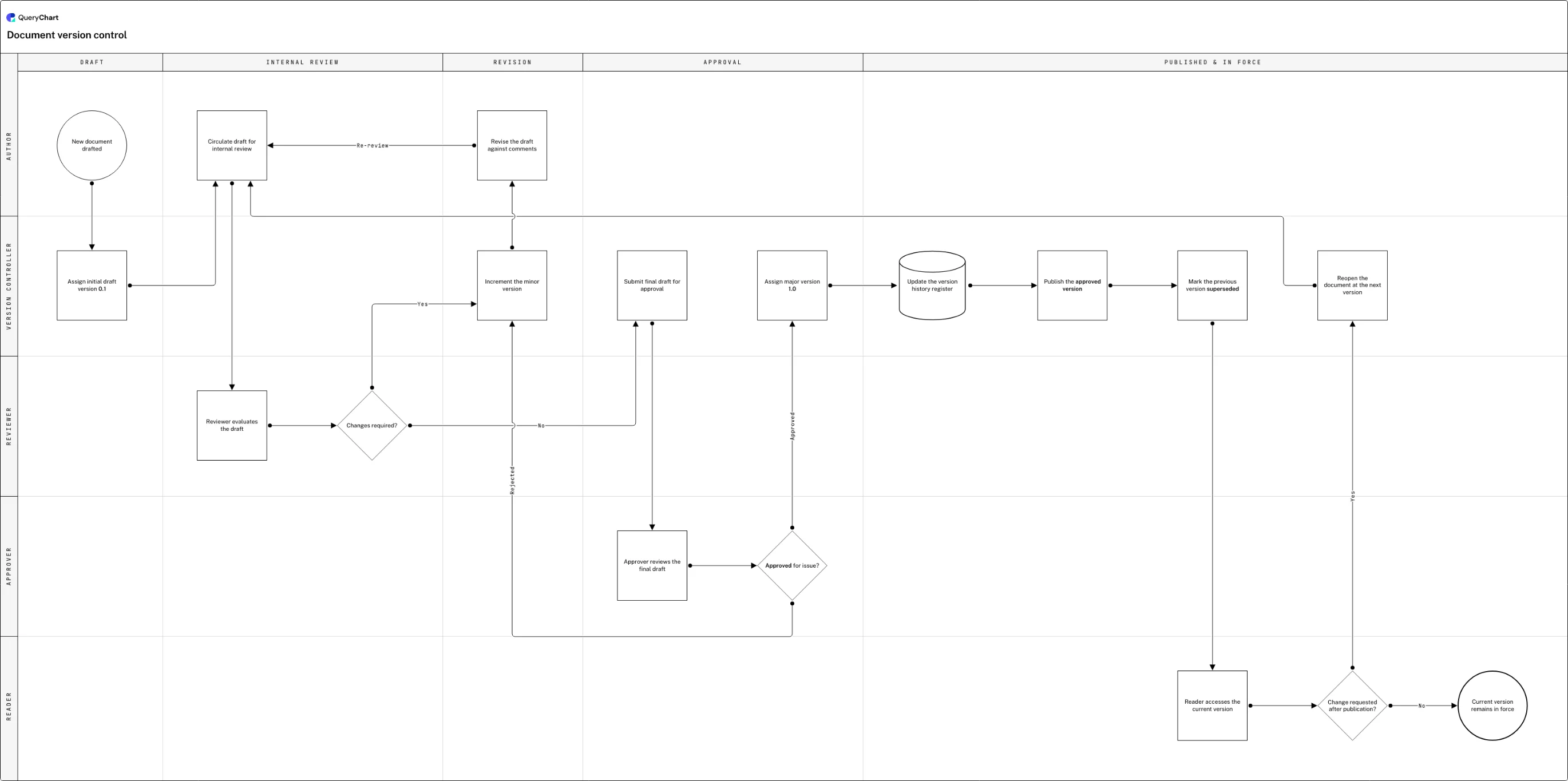
One document moves from a decimal draft through review, approval and publication: watch exactly where its version number changes, and where it doesn't.
A draft starts at 0.1, not 1.0
The chart opens on "New document drafted" and moves straight to "Assign initial draft version 0.1": a decimal, because nothing before formal approval is ever given a whole number in this scheme.
The review loop advances the minor version
"Circulate draft for internal review" and "Reviewer evaluates the draft" feed "Changes required?". A Yes routes through "Increment the minor version" (0.1 becomes 0.2) into "Revise the draft against comments", which loops back on a branch labelled "Re-review" for as many cycles as the draft needs.
A whole number is earned, not assumed
"Submit final draft for approval" and "Approver reviews the final draft" lead to "Approved for issue?". A rejection loops back to "Increment the minor version"; an approval reaches "Assign major version 1.0" and a File-shaped row, "Update the version history register", that logs it.
Publishing retires the old version on the same row
"Publish the approved version" is immediately followed by "Mark the previous version superseded", so the prior revision is retired the moment the new one goes live. A reader requesting a change re-enters at "Reopen the document at the next version"; everyone else reaches "Current version remains in force".
How it works
Pick one location as the authoritative version
Every other copy (a PDF emailed out, a printout, a page saved to a shared drive) is a copy of that one location, not a second original. If two places can both claim to be current, you do not have version control yet, whatever your numbering looks like.
Separate draft numbering from published numbering
Use decimals for anything still in review and reserve whole numbers for what has actually been approved, the way 0.1 through 0.3 lead up to 1.0 in the example chart above. A reviewer citing "the comments on 0.3" is then unambiguous about which draft they mean.
Log who changed what, not just that something changed
A date stamp on its own tells a reader nothing about what actually moved. Record the actor, the field, and the before-and-after value for every edit, which is what QueryChart's Change Log does automatically for every chart, with no setup required.
Make two versions comparable, not just viewable
Being able to open version 3 and open version 5 is not the same as being able to see what changed between them. QueryChart's Compare Versions view sets any two revisions side by side so the difference is the thing you're looking at, not a guess.
Treat restoring an old version as routine, not an emergency
If reverting a bad edit means asking someone with database access to intervene, your version control exists on paper only. Restoring a prior version should be an action any authorised editor can take themselves, the moment they notice the problem.
Mistakes to avoid
A filename standing in for a version number
"SOP_v2_FINAL_reviewed(1).docx" is not a version scheme, it is a filename that happens to contain digits: nothing enforces that the number goes up, or that two people don't produce their own "FINAL" at once. A version needs to live in a system that assigns it, not in whatever a person types before saving.
A history that only records the current state
Overwriting a document in place and calling the old copy "backed up somewhere" is not a version history, it's a hope. A real history keeps every prior version retrievable and comparable, not just recoverable by someone who remembers where they put it.
Treating "has a version number" as "is under control"
A number on a document tells you it was versioned once; it does not tell you the old copy was withdrawn, that anyone approved the change, or that the number even means what you think it means. Version control is the numbering and the log: document control and change control are what governs the process around it.
Renaming the vocabulary instead of fixing the practice
Standardising your organisation on "revision control" over "version control", or the reverse, changes nothing about whether changes are actually tracked. They're the same practice under two names; the fix that matters is the log, not the label.
Related QueryChart feature
See your chart's Change Log in QueryChart
Every chart in QueryChart already keeps this history: create one and open its Change Log to see it for yourself.
Related guides
Frequently asked questions
Is version control the same thing as revision control?
Yes, in practice. The two terms describe the same underlying idea (one current version plus a retrievable history of every prior one), and different organisations, tools and standards simply prefer one word over the other. Nothing about the mechanics changes depending on which term you use; see /guides/revision-control-vs-version-control for the full comparison.
What's the difference between version control and change control?
Change control decides whether a change should happen at all: its impact, who approves it, how to roll it back if it goes wrong. Version control is what records the result once that decision is made: the new number, the timestamp, the actor. A change control process can exist without version control, badly, and version control without change control just means nobody decided the change was a good idea before it was numbered. See /guides/version-control-vs-change-control and /guides/how-to-create-a-change-control-process for the CAB and rollback mechanics.
Does version control work the same way for documents as it does for code?
The core idea is identical (one authoritative current version, a full history of what preceded it, a record of who changed what) but the mechanics differ. Code version control such as Git is built around branching and merging concurrent lines of work; document and process version control is usually linear, one draft moving through review to a single approved version, which is closer to what this page and the example chart describe.
Is QueryChart's audit trail turned on by default?
The version history described on this page (Change Log, Compare Versions, restore) is free and runs automatically on every chart with no setup. QueryChart's compliance audit trail, a hash-chained record mapped to ISO 27001, SOC 2 and HIPAA controls, is a separate, paid capability an organisation turns on deliberately. It is not switched on by default and not something every account already has running.