How to version control a document
How to version control a document in practice: pick a decimal-versus-whole-number scheme, print version, date and approver on every page, define what counts as a major change, and keep exactly one current copy.
Document version control is the discipline of numbering, dating and storing every draft and issued copy of a document so that exactly one version is current and every prior one is identifiable and superseded rather than deleted.
The short version
- Draft versions take a decimal (0.1, 0.2...); issued versions take a whole number, never the reverse.
- Print the version, date and approver in the header of every page, not just the file name or file properties.
- Keep one authoritative current location; every other reference links to it instead of holding its own copy.
- Fix, in writing, what counts as a major version bump versus a minor one before the first document needs the rule.
- QueryChart's Change Log and Compare Versions view show exactly what changed between two revisions with no manual log; see /features/version-control.
A version number is a claim about trust
Two people editing the same document without a rule for numbering it end up in the same place: a file called Policy_v2_FINAL_reviewed_USE-THIS-ONE.docx, and nobody certain which of three open copies is actually current. Version control for a document solves that with three concrete decisions rather than a folder full of dated filenames: a numbering scheme, a place every page states its own version, and a single location that holds the copy everyone treats as authoritative.
Version control is not the same thing as change control, and it is narrower than document control. Change control is the mechanism that decides whether a proposed change is approved at all (impact assessment, a change board, a rollback plan) and it is walked as its own process at /guides/how-to-create-a-change-control-process. Document control is the complete lifecycle a document lives inside, from the request that starts it to the periodic review that keeps it current, covered end to end at /guides/how-to-create-a-document-control-process and /templates/document-control-process. This page is narrower than both: it is the numbering and traceability layer that runs underneath a document control process, not a replacement for one.
QueryChart keeps that numbering layer honest without a separate register kept by hand. Every edit to a chart is captured in a Change Log that names the actor and the field, a Compare Versions view sets any two revisions side by side and marks exactly what changed, and an old revision restores in one action: free, always-on version history described in full at /features/version-control.
Watching a version number move through five lanes
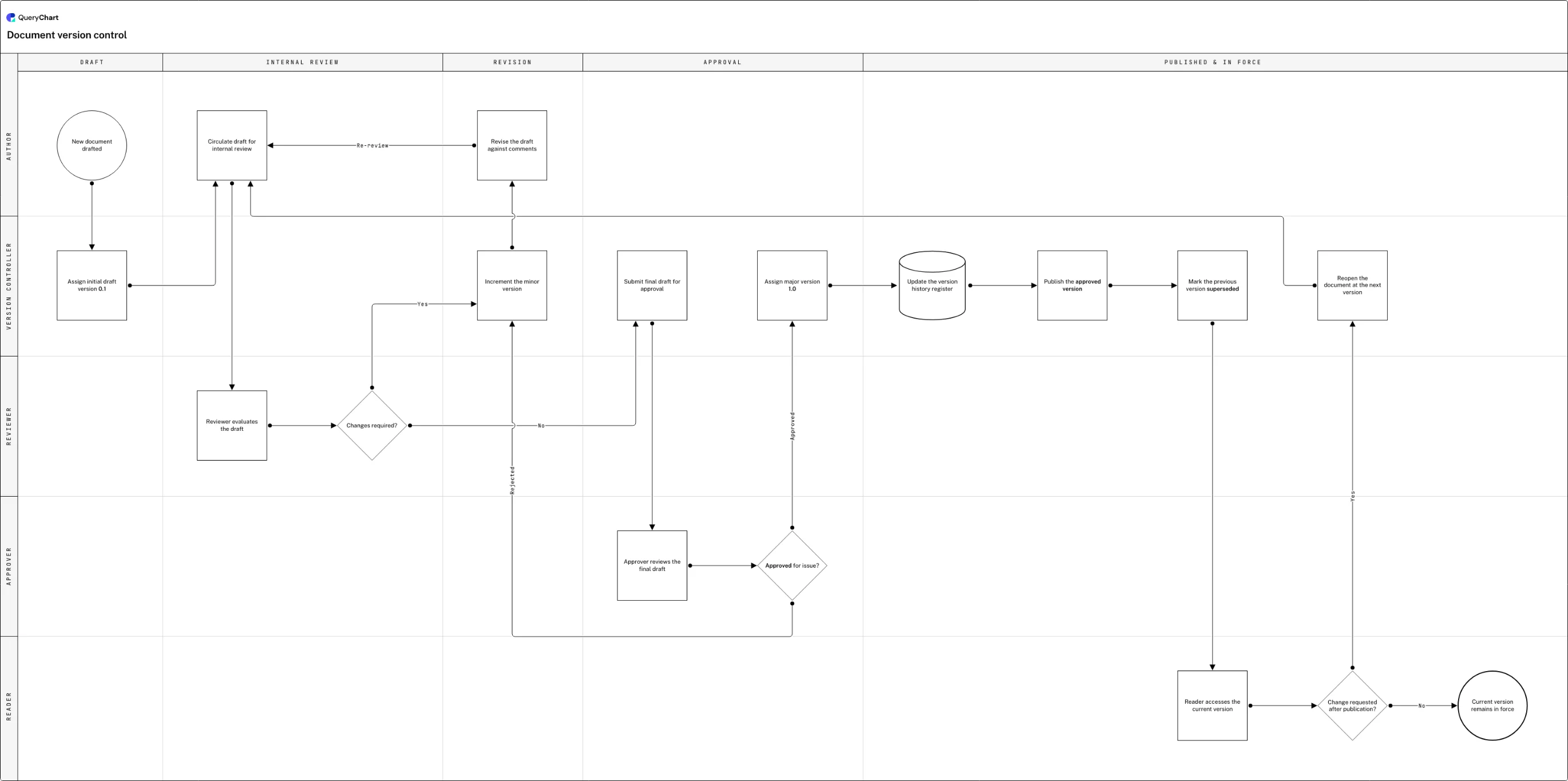
A new document is drafted, revised twice, approved, published and superseded: the version number changes at every one of those steps.
A draft is born at 0.1
The chart opens at "New document drafted", and before the file is ever circulated "Assign initial draft version 0.1" gives it a decimal number: the mark of a draft still inside internal review, not yet approved for use.
Every rework cycle earns a new decimal
"Changes required?" routes a draft needing rework through "Increment the minor version" to "Revise the draft against comments" before the reviewer sees it again (0.1 becomes 0.2), so citing "the comments on 0.3" names one exact draft.
Approval is the only door to a whole number
"Submit final draft for approval" and "Approver reviews the final draft" lead into "Approved for issue?": only the Approved branch reaches "Assign major version 1.0"; Rejected loops back into the minor-version cycle instead.
Publishing supersedes, it doesn't delete
"Update the version history register" is a File row rather than a Process one, then "Publish the approved version" and "Mark the previous version superseded" both run before any reader opens the new copy: the old number stays in the register.
A published document can reopen
"Reader accesses the current version" and "Change requested after publication?" show publishing isn't the end: Yes sends the document back through "Reopen the document at the next version" to review, while No reaches "Current version remains in force".
How it works
Pick your decimal-versus-whole-number rule
Decide, in writing, that a draft in review carries a decimal (0.1, 0.2, 0.3) and an issued copy carries a whole number (1.0, 2.0). The exact scheme matters less than that every document uses the same one, including the register and every page header.
Put version, date and approver on every page
A version number that lives only in a file name or in document properties is invisible the moment someone prints the page or forwards a screenshot. Put the version, the effective date and the approver's name in the header or footer of the document itself.
Define what earns a major version before you need it
Write down the trigger for the whole-number step (formal approval alone, or approval plus a substantial content rewrite) before the first document reaches it. A team that never agrees this ends up with two different documents both called version 2.
Type the numbering steps into a chart, in order
Open a chart and put each stage (draft, review, revise, approve, publish, supersede) in the Box text column, joining them with the Line to column. The layout renders itself, so the only real decision is the order the version number moves through.
Name the single authoritative location
Pick the one place the current version lives (a controlled folder, a document management system, or a live QueryChart link) and make every other reference point at it instead of holding a copy. A version number means nothing if two "current" copies can disagree.
Read the Change Log instead of asking who has the latest copy
Open the chart's version history and use Compare Versions to see exactly which field changed between two revisions, who changed it and when, rather than keeping a parallel changelog by hand. See /features/version-control for how the Change Log and restore work.
Mistakes to avoid
Decimals that never resolve
A draft stuck at 0.7 with no one willing to call it final is a sign the approval trigger isn't defined, not a numbering problem. Fix the rule for what earns a whole number, not the count of decimals.
The version number nobody can see
A version tracked only in a spreadsheet register, absent from the document itself, forces a reader to trust that whatever they're holding matches the register. Print it on the page instead.
Two locations both called current
A copy on a shared drive and a copy in a document management system drift the moment one is edited and the other isn't. Pick the single authoritative location and lock or retire the rest.
A manual changelog kept beside the document
A hand-maintained list of "what changed in v3" drifts out of sync with the document the moment someone forgets an entry. QueryChart's Change Log records every field change automatically, so compare two versions instead of trusting a note.
Related QueryChart feature
Create your own version-controlled document
Open the document version control example as your own chart, set your numbering scheme, and let the Change Log record every change from there.
Related guides
Frequently asked questions
What is document version control?
Document version control is the practice of assigning a distinct number to every draft and issued copy of a document, so that anyone holding a copy can tell how current it is and how it relates to every other copy that has existed. It typically pairs a decimal scheme for drafts still in review with whole numbers for versions that have been formally approved, and it depends on every page carrying that number rather than leaving it in a file name or a separate register.
How do I version control a document, step by step?
Fix a numbering scheme before you draft anything: decimals for drafts, whole numbers for issued copies is the common convention. Put the version, date and approver in the header of every page. Route every draft through the same review-and-approval cycle, incrementing the minor version on each rework pass and the major version only at formal sign-off. Keep exactly one authoritative current location, and mark (never delete) the version a new one replaces.
What's the difference between version control and revision control for a document?
In practice the two terms describe the same thing for a document (a scheme for numbering successive copies), and most quality systems use them interchangeably. Where a real distinction shows up is in software and engineering contexts, where "revision control" sometimes implies a full changeset history while "version control" is used more loosely for the numbering label alone. Pick one term and use it consistently rather than treating a difference that doesn't exist as meaningful; see /guides/revision-control-vs-version-control for the fuller comparison.
Do I need a separate change log if I already have version numbers?
Not if your version numbers are backed by something that already records who changed what field and when. QueryChart's Change Log does that automatically for every edit, and Compare Versions puts two revisions side by side and marks the difference, so a hand-maintained changelog duplicates work the platform already does. See /features/version-control.