SOP change control process flowchart
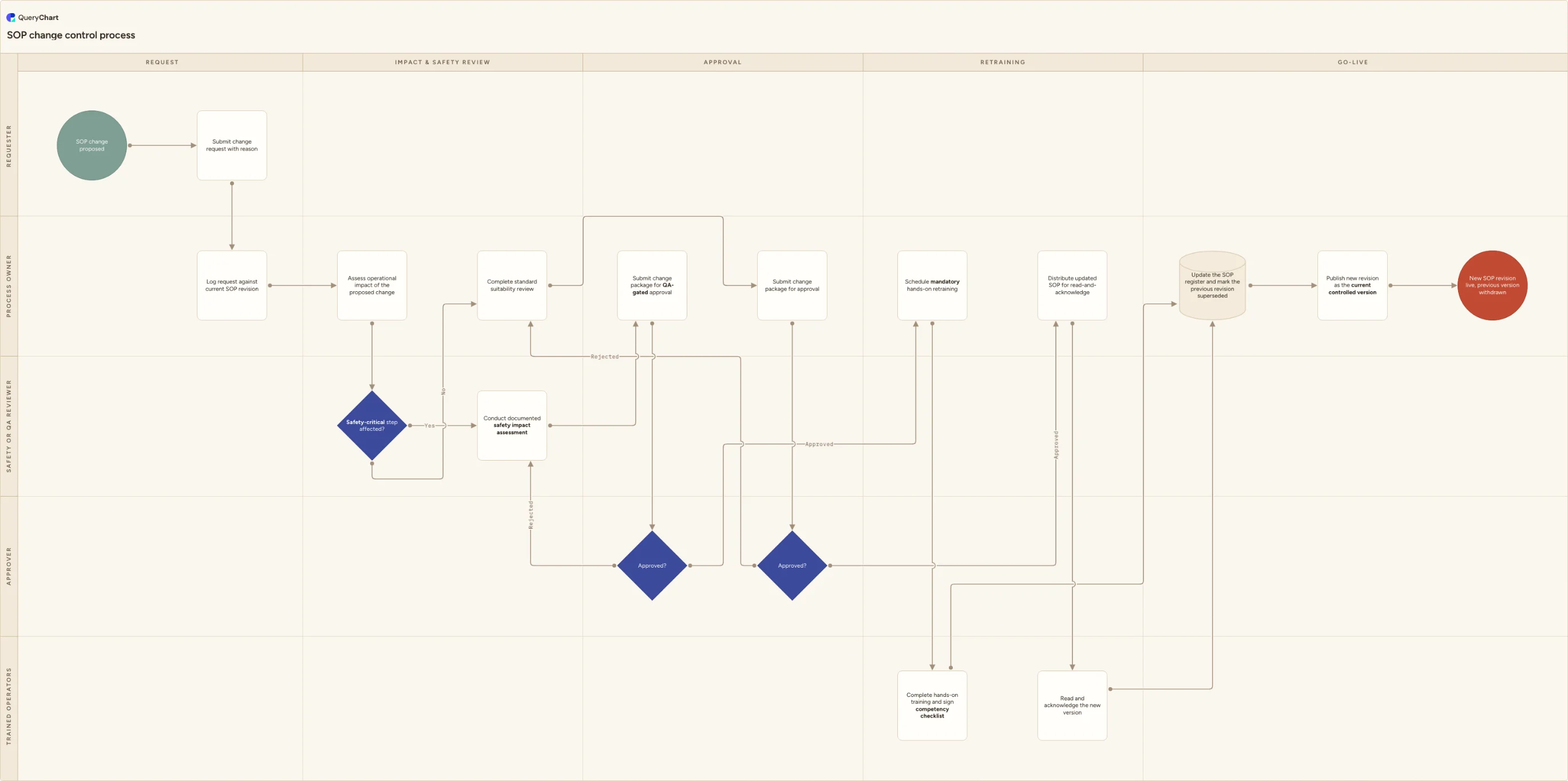
A SOP change control process flowchart with Requester, Process owner, Safety or QA reviewer, Approver and Trained operators lanes: safety-critical routing, QA-gated approval and mandatory hands-on retraining before go-live.
What the SOP change control process is
A change to a standard operating procedure is not the same risk as a change to a policy or a form. An SOP tells someone how to physically do a task, and if the new version reaches the floor before the people doing the task are ready for it, the gap is not paperwork, it is a safety or quality incident waiting to happen. This chart is the route a proposed SOP change takes from request to a live revision, and its defining feature is the gate between approval and go-live: a decision that asks whether the affected step is safety-critical, and if it is, blocks the new version from taking effect until every affected operator has completed hands-on retraining and signed a competency checklist.
That distinction matters because "read and acknowledge" is the default rollout method for most document changes, and it is not adequate evidence of competency on a step where a mistake causes injury, a nonconforming product or a regulatory breach. A signature on a read receipt proves someone opened the file. It does not prove they can still perform the step correctly under the new method. This chart keeps both routes, a mandatory hands-on track with a signed checklist for safety-critical changes and a read-and-acknowledge track for everything else, so the rollout effort is spent where the risk actually is.
The chart also separates the approval gate by track: a safety-critical change is submitted for QA-gated approval, while a standard change goes through a lighter suitability review and approval. Both tracks reject back into the assessment or review step rather than dead-ending the request, and both converge on the same close-out, updating the SOP register, marking the previous revision superseded, and publishing the new version as current.
What this flowchart covers
In this template
- Five swimlanes for the roles that carry the change, Requester, Process owner, Safety or QA reviewer, Approver and Trained operators, laid out across five phases: request, impact & safety review, approval, retraining and go-live.
- Intake and impact assessment: the requester submits a change request with a reason, the process owner logs it against the current revision and assesses operational impact, then a "Safety-critical step affected?" decision splits the process into two explicit tracks.
- The safety-critical track: a documented safety impact assessment, a QA-gated approval decision, and, if approved, mandatory hands-on retraining that ends in a signed competency checklist rather than a signature on a read receipt.
- The standard track: a lighter suitability review and approval, and, if approved, distribution of the updated SOP for read-and-acknowledge instead of hands-on retraining.
- Both tracks run their own "Approved?" decision with a rejected branch that loops back into the assessment or review step rather than closing the request, and both converge on the same close-out: update the SOP register, mark the previous revision superseded, and publish the new version as the current controlled version.
When to use this template
- You are formalising how changes to a standard operating procedure get approved and rolled out, and want the safety-critical gate to be an explicit step in the process rather than something a supervisor decides informally on the day.
- An incident, near-miss or audit finding has traced back to operators working from an SOP revision they were told about but never actually trained on, and you need a process that makes competency sign-off mandatory before go-live.
- You run a regulated or safety-sensitive operation, manufacturing, healthcare, laboratory or warehousing, where a change to a work instruction can create a hazard if it reaches the floor before the people doing the work are ready for it.
- You need to show an auditor or accreditation body how a proposed SOP change is risk-assessed, who signs off the safety impact, and how you can demonstrate every affected operator was retrained rather than merely notified.
How it works
Rename the lanes to your real roles
Replace Requester, Process owner, Safety or QA reviewer, Approver and Trained operators with the roles you actually have. If the same person assesses impact and grants approval on non-critical changes, merge those lanes rather than pretending they are separate; keep Safety or QA reviewer distinct if your operation expects an independent safety sign-off.
Define what makes a step safety-critical
Write the threshold next to the "Safety-critical step affected?" decision: a step is safety-critical if getting it wrong risks injury, a nonconforming product, an environmental release or a regulatory breach. Give two or three examples from your own operation so the reviewer is not making the call from a blank page every time.
Set the evidence a hands-on sign-off requires
At the hands-on training and competency checklist step, decide what counts as proof: a supervised run-through, a practical assessment, a trainer's signature, or all three. Record the SOP version the operator was trained against, since a competency record with no version number cannot prove they were trained on the current one.
Decide when read-and-acknowledge is enough
For the standard track, set the bar for what qualifies as a non-safety-critical change, for example clarifying wording, reordering steps with no change in method, or correcting a reference number. Store acknowledgements somewhere you can pull a completion list from, not an email thread.
Name who can reject and where the loop lands
Both approval decisions route a rejection back into the assessment or review step rather than closing the request. Confirm who has authority to reject on each track, since a QA-gated rejection on a safety-critical change should carry more weight than a rejection on the standard track.
Frequently asked questions
How is this different from a general change control process?
A general change control process is written for IT and engineering changes: it routes through a change advisory board, plans a rollback, and verifies a deployed system. This chart is written for a change to a written work instruction, and its distinguishing step is retraining: a safety-critical change cannot go live until the affected operators have completed hands-on training and signed a competency checklist, not merely acknowledged that a new version exists.
How is this different from the document control process?
The document control process is the general lifecycle every controlled document follows, draft, review, approval, versioning, issue, withdrawal of superseded copies and periodic review, and it applies to policies and forms as much as to SOPs. This chart assumes that machinery exists and adds what is specific to an SOP: a safety-critical gate that decides whether rollout requires supervised hands-on retraining with a signed competency checklist, or a lighter read-and-acknowledge.
Why does a safety-critical change need a signed competency checklist instead of just a read receipt?
A read receipt proves someone opened the document; it does not prove they can still perform the step correctly. For a step where a mistake risks injury, a nonconforming product or a regulatory breach, most quality and safety systems expect demonstrated competency: a supervised run-through, a practical check, or an equivalent sign-off recorded against the specific SOP version the operator was trained on.
Who decides whether a change is safety-critical?
Route the call to a safety or QA reviewer who is independent of the person requesting the change, not the requester or their direct manager. Write the threshold down next to the decision so the call stays consistent across reviewers, and default to the safety-critical track whenever it is genuinely unclear.