Flowchart version control: how it actually works
What flowchart version control means, why exporting a diagram to PDF or PNG for "versioning" throws away its actual structure, and how QueryChart's Change Log and Compare Versions track every box, connector, and label change automatically.
Flowchart version control is a record of every past state of a diagram's boxes, connectors, and labels (not of the file that contains it) so a reader can see exactly what changed, who changed it, and step back to any earlier state.
The short version
- A filename like "v3_FINAL_reviewed(2)" is a guess, not a version history.
- PDF or PNG export keeps a picture of the flowchart, not its editable structure.
- Cloud storage's file versioning tracks the file, not the boxes and connectors inside it.
- Real flowchart version control diffs box, connector, and label changes between any two saved states.
- QueryChart's Change Log and Compare Versions do this automatically on every chart, free: see /features/version-control.
A file name is not a revision history
Somewhere on a shared drive right now sits Process_Map_v3_FINAL_reviewed(2).vsdx, next to Process_Map_v3_FINAL_reviewed.vsdx and a Process_Map_v2.pdf a stakeholder still has attached to an old email thread. Between the three of them there is no record of which box moved, which decision branch got relabelled, who made either change, or whether anyone actually signed off on it: only a filename doing the job a version history is supposed to do.
Exporting a flowchart to an image or a PDF for archiving does capture what it looked like, but it throws away the one thing a later reader needs: the editable structure underneath. A PNG cannot be diffed against another PNG to show that a decision box gained a third branch: a person has to eyeball two pictures and guess. A cloud drive's own "version history" doesn't solve this either: it versions the file, not the diagram inside it. It can hand back yesterday's .vsdx or .pptx, but it has no idea a specific box moved lanes or that a connector's label changed from "Escalate" to "Auto-approve" between two snapshots.
A diagramming tool with real version control does three things a filename and a shared drive cannot: it lets you browse every past revision of the diagram itself, it shows exactly which box, connector, or label changed between any two of them, and it restores an old state without losing the work done since. QueryChart does this on every chart, live, automatically, for free: the Change Log records every edit with who made it and which field it touched, and Compare Versions puts any two saved versions side by side. The full mechanism is at /features/version-control.
That distinction matters because a flowchart isn't the same object as the process document it might be embedded in. This page is about version-controlling the diagram's own structure (boxes, lanes, connectors) inside a tool built to track that structure. If you're instead managing revisions of a longer process document that happens to contain a diagram, the tool-agnostic version of this problem is covered at /guides/version-control-for-process-documentation.
How this document earns its own version number, row by row
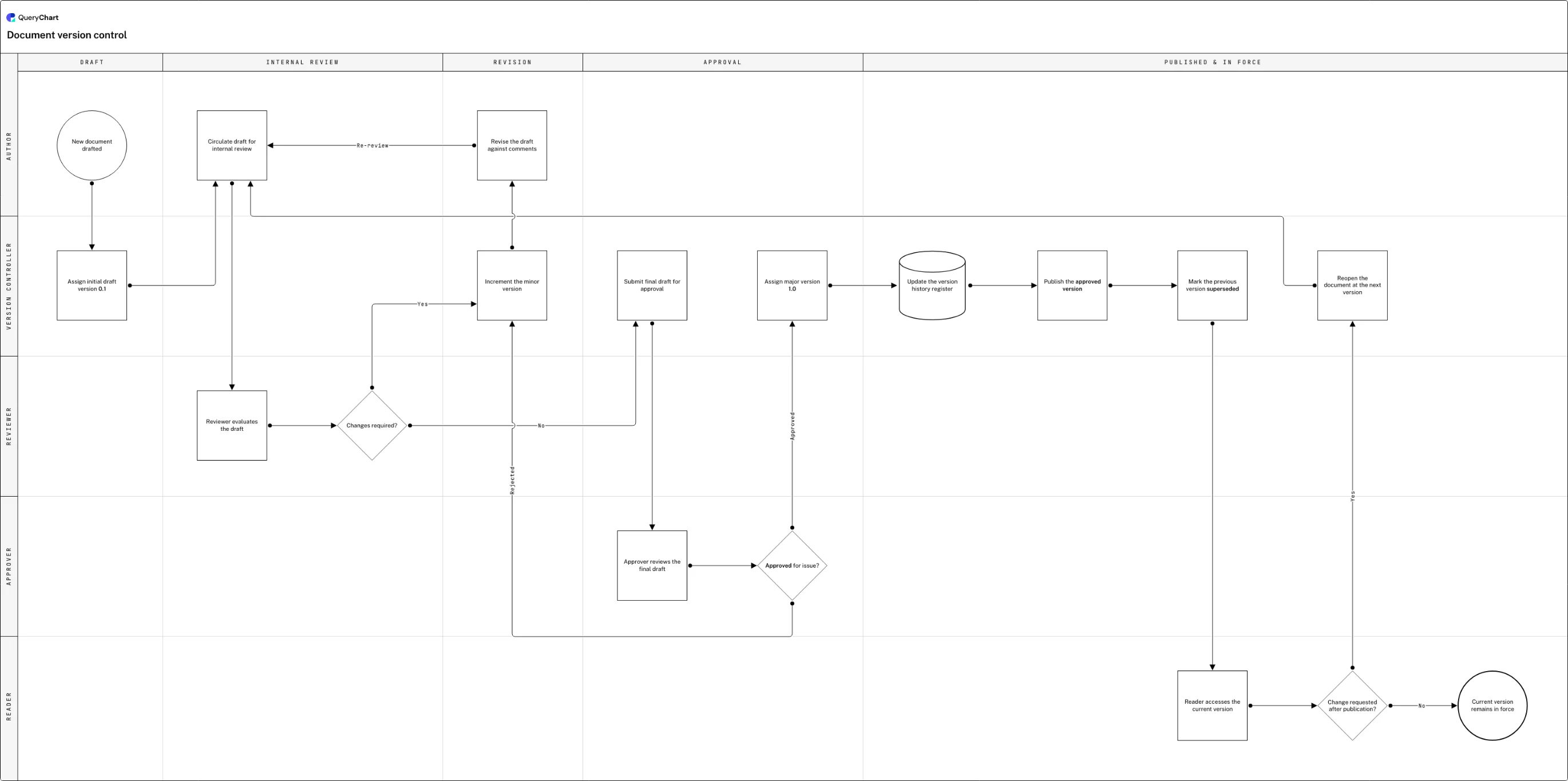
The version-numbering scheme below is exactly the discipline a document owner enforces by hand (decimals for drafts, whole numbers for approvals), the same distinction QueryChart's Change Log tracks automatically for the chart itself, without anyone typing a number.
Draft picks up a decimal, not a guess
The Start row is "New document drafted," and the very next row is "Assign initial draft version 0.1": the decimal identifies exactly how many review cycles the draft has been through, before "Circulate draft for internal review" and "Reviewer evaluates the draft" even happen.
Every rework bumps the number, not the guesswork
At "Changes required?" a Yes answer routes to "Increment the minor version" before "Revise the draft against comments" begins, so a reviewer citing comments on a specific decimal is naming an exact, addressable draft rather than a vague "latest" file.
Approval is the one event that earns a whole number
"Submit final draft for approval" and "Approver reviews the final draft" lead to "Approved for issue?": only the Approved branch reaches "Assign major version 1.0", so nothing before that point, however many decimal drafts it passed through, is ever mistaken for version 1.0.
Publication updates the register before anyone reads it
"Update the version history register" runs before "Publish the approved version", and "Mark the previous version superseded" follows immediately after, so the register listing every past number, not just the live one, is current before a single reader reaches "Reader accesses the current version".
A later change reopens the record, it doesn't overwrite it
"Change requested after publication?" either sends the process back to "Reopen the document at the next version" (restarting the numbered chain rather than editing the current file in place), or ends at "Current version remains in force", with every prior number still on record.
How it works
Stop naming versions in the file
Retire the "v3_FINAL_reviewed(2)" convention entirely: a decimal or a colour typed into a filename is a label somebody added, not a record of what changed. Model the flowchart in a tool that keeps its own revision history, and let the filename go back to being just a filename.
Give every review submission a named version
In QueryChart, submitting a chart for review saves a named version automatically, and nothing is ever overwritten. That one habit replaces the whole "Save As" trail of duplicate files, because the prior state is preserved whether or not anyone remembers to rename anything.
Open the Change Log before you ask what changed
The Change Log lists every edit to the chart, who made it, and which field it touched, so "what changed since Tuesday" is a scroll through a list, not a memory exercise or a side-by-side squint at two exported images.
Diff two versions instead of eyeballing two exports
Use Compare Versions to pick any two saved versions and see the difference field by field: box, connector, and label changes are called out individually as added, removed, or modified, rather than left for a reader to spot across two flattened PDFs.
Restore instead of rebuilding from memory
If a revision turns out to be wrong, restore the earlier version rather than manually redrawing it from an old export. The restore itself becomes a new entry in the history, so nothing about the current draft's origin gets lost.
Keep the diagram as the master, not its export
Treat the PDF or PNG you circulate as a snapshot for readers, never as the record you'd rebuild from: the editable chart with its version history is the one copy that can answer "what did this look like in March," and the export cannot.
Mistakes to avoid
The (2) in the filename is the tell
A parenthesised number appended to an already-versioned filename means two people edited the same "latest" copy at once with no way to merge them. The fix isn't a better naming convention, it's removing the need for one: one chart, one history, no copies to collide.
An exported PDF outlives the chart it came from
A PDF pinned to a wall or attached to an old email keeps circulating long after the chart it was exported from has moved on, and nothing about the PDF itself signals that. Treat every export as dated the moment it's created, and link back to the live chart rather than re-sharing the file.
Confusing file versioning with diagram versioning
OneDrive, Google Drive, and Dropbox can hand back yesterday's file, but none of them can tell you a decision box gained a branch or a connector's label changed: they version the container, not its contents. A diagramming tool's own history is the only place that diff exists.
Restoring silently instead of on the record
Pasting an old export's content back into the current file erases the fact that a restore happened at all. A restore that creates its own new, dated entry (as QueryChart's does) keeps the reason for the rollback visible to the next reader instead of looking like the chart was always this way.
Related QueryChart feature
Create your own version-controlled flowchart
Open the version-numbering example as your own chart, then submit it for review once to see a named version, the Change Log, and Compare Versions appear for it automatically.
Related guides
Frequently asked questions
Is flowchart version control different from document version control?
Not in principle: both mean keeping every past state of something so you can see what changed and step back to it, but a flowchart's "changed" is structural: which box moved, which connector was added, which label was reworded. A document version control process built around prose and page numbers won't diff a decision branch. See /guides/version-control-for-process-documentation for the version of this problem scoped to a full process document rather than a single diagram.
Does exporting a flowchart to PDF count as version control?
No: it's a snapshot, not a history. A PDF captures one moment but can't be compared automatically against another PDF to show what changed, can't be edited back into, and carries no record of who made the prior change or why. It's useful for sharing a fixed copy with a reader; it isn't a substitute for the diagram's own version history.
What's the difference between the Change Log and Compare Versions in QueryChart?
The Change Log is the timeline: every edit, who made it, and roughly when, read top to bottom. Compare Versions answers a narrower question: pick any two saved versions and see the field-by-field difference between them, box by box and connector by connector, instead of scrolling the whole log to reconstruct it yourself.
Can I restore an old version of a flowchart without losing current work?
Yes: restoring a prior version in QueryChart creates a new version rather than deleting the ones that came after it, so the work done since stays in the history even though it's no longer the active state. Nothing about a restore is destructive.