Change management process flowchart (ITIL)
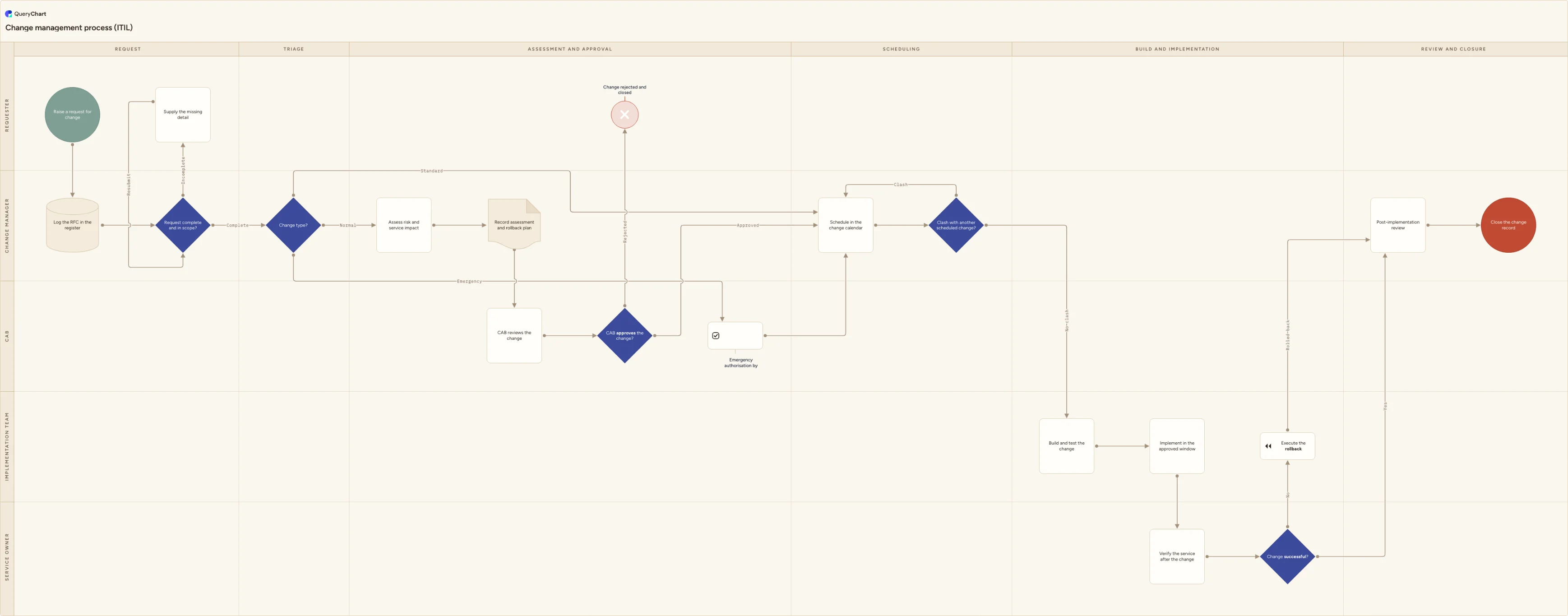
An ITIL change management process flowchart covering RFC intake, standard, normal and emergency triage, CAB approval, scheduling, rollout and rollback.
What the change management process flowchart (ITIL) process is
Change management in this template means IT service change management: the standing process every change to a live service passes through, from a request for change being raised to the change record being closed. It is not organisational change management, the people-side discipline associated with models such as ADKAR or Kotter's eight steps, even though both are commonly called "the change management process". The version drawn here is the ITIL-style operational one, run continuously by a change manager and a change advisory board.
Most of the value sits in a single decision near the front: what type of change is this? Routing everything through the same full assessment and the same weekly board creates a queue, and a queue is what pushes people to make changes outside the process. So the chart triages once, early. Standard changes are pre-authorised against a documented change model and go straight to scheduling. Normal changes get a risk and impact assessment and go to the CAB. Emergency changes get expedited authorisation from an emergency CAB and then rejoin the identical scheduling, implementation and review path, so an urgent fix is never an unrecorded one.
The other thing a diagram settles is ownership, which is why this one is drawn as swimlanes: Requester, Change manager, CAB, Implementation team and Service owner. The service owner has a lane of its own because verification is the step teams most often skip. "It deployed" and "the service works" are different claims, and the difference between them is the whole reason the rollback path exists. In this chart a failed verification triggers the rollback plan, and both the successful and the rolled-back change still reach post-implementation review and closure.
What this flowchart covers
In this template
- Intake across the Requester and Change manager lanes: raise a request for change, log the RFC in the register, then a completeness filter at "Request complete and in scope?" that returns thin requests to the requester to supply the missing detail before re-entering the same check.
- The three-way triage at "Change type?", which sends standard changes straight to the change calendar, normal changes into risk and impact assessment, and emergency changes to ECAB authorisation.
- Assessment and approval: assess risk and service impact, capture the assessment and rollback plan as one record rather than a ticket thread, then CAB review and an approve or reject decision, with rejected changes ending at a "Change rejected and closed" terminator in the requester lane.
- Scheduling, where the approved, emergency and standard paths converge on the change calendar and hit a clash check against other scheduled changes that sends collisions back to be rebooked.
- Build and implementation in the Implementation team lane: build and test the change, then implement it inside the approved window.
- Verification and closure: the service owner verifies the service and answers "Change successful?", a failure runs the rollback plan, and both outcomes converge on post-implementation review and closure of the change record.
When to use this template
- Writing or refreshing an ITIL-style change management procedure for a service desk, platform or infrastructure team that currently runs on habit and chat threads.
- Agreeing what counts as standard, normal and emergency before configuring change types in ServiceNow, Jira Service Management or Freshservice, so the tool encodes a decision you have already made rather than inventing one.
- Inducting new change managers, CAB members or on-call engineers who need to know which changes need approval, who gives it and what happens out of hours.
- Documenting how changes are assessed, authorised, tested and reversed for an auditor or customer, for example against SOC 2 criterion CC8.1 or ISO/IEC 27001:2022 Annex A control 8.32. The diagram documents the procedure; the evidence is the change records it produces.
- Cutting your failed-change rate after a bad quarter, when you need to see exactly where verification and rollback sit and who owns them.
How it works
Rename the lanes to the roles you actually have
Replace Requester, Change manager, CAB, Implementation team and Service owner with your real functions. Plenty of organisations have one person acting as both change manager and CAB chair, and smaller teams have no separate implementation team at all. Merge those lanes rather than drawing a structure you do not have, and keep it to five lanes or fewer or the chart stops being readable at a glance.
Define your three change types at the triage decision
Write down what qualifies as standard, normal and emergency next to the "Change type?" decision, and set the boundaries by risk and blast radius rather than by effort or ticket size. Keep the pre-authorised standard change list short enough that someone genuinely maintains it, and give each standard change a documented change model it has to follow.
Name the change authority, its cadence and its emergency equivalent
At the CAB review step, record who the approvers are, how often they meet and the cut-off for getting on the agenda. Define the ECAB separately: the person who can authorise an out-of-hours fix is rarely the full board. The rule most teams settle on is authorise verbally within minutes, write the record the same day, review it at the next CAB.
Specify what the assessment record must contain
Turn "Record assessment and rollback plan" into a real checklist: affected services and users, risk rating, dependencies, downtime window, test approach, rollback steps and who executes them. The CAB decision is only as good as this record, and it is the document an auditor will ask for months later.
Make the scheduling and clash rules explicit
State your freeze periods, minimum lead times and who owns the change calendar. The clash check in this chart is deliberately a decision rather than a formality, because most collisions are two teams touching a shared dependency rather than the same system. Decide up front whether a clash means rebooking or escalation.
Define success, then publish and version the procedure
Say what "Change successful?" means for you: which smoke tests, how long the service owner watches, and what triggers the rollback call. Then share the chart where the work happens, next to the change request form or in the runbook, capture approval from the people named in it, and keep the earlier versions so you can show when the procedure changed and why.
Frequently asked questions
Is this IT change management or organisational change management?
IT change management. The two share a name and almost nothing else. This flowchart is the ITIL-style operational process for changes to live services: an RFC is raised, triaged, assessed, authorised, scheduled, implemented, verified and closed. Organisational change management is the people-side discipline for helping staff adopt a new way of working, usually structured around models such as ADKAR or Kotter's eight steps, and it has no CAB, no change calendar and no rollback plan. If you are looking for stakeholder analysis and communications planning, this is the wrong diagram.
What is the difference between a standard, a normal and an emergency change?
A standard change is low risk, performed often and pre-authorised against a documented change model, so it needs no individual approval and goes straight to scheduling. A normal change is anything that has to be assessed and approved on its own merits, which is the path through risk and impact assessment to the CAB. An emergency change is one where waiting for the next CAB would cause more damage than the change itself, so it gets expedited authorisation from an emergency CAB. In this chart all three converge on the same change calendar, implementation and review, because the category changes the approval route, not the record.
Does every change need to go to the CAB?
No, and sending everything there is the fastest way to make people work around the process. The CAB exists to review changes whose risk is not already understood. Once a change type has been performed enough times to have a reliable procedure and a known failure mode, promote it to a standard change with a documented model and take it off the agenda. A CAB that spends its meeting rubber-stamping routine work is not reviewing anything, and the queue it creates pushes genuinely risky changes towards the emergency route.
What should happen when a change fails?
It follows the same path to closure as a successful one. In this chart a failed verification at "Change successful?" triggers the rollback plan in the implementation team lane, and the rolled-back change then goes to post-implementation review and closure exactly like a successful one. Two things make that work in practice: the rollback plan was written and approved before the change ran rather than improvised during the incident, and the review asks whether the change type was right as well as whether the change worked. A second attempt is a new RFC, so the failed attempt keeps its own record.
Where this process fits
In most operations this process follows Disaster recovery process flowchart (IT systems) and hands off to Software deployment process flowchart: build to production.
It is one step in IT service management.
Step 1: Incident management process flowchart
A cross-functional incident management process flowchart covering logging, prioritisation, major incident escalation, SLA breach, resolution and closure.
Step 2: Change management process flowchart (ITIL) You are here
An ITIL change management process flowchart covering RFC intake, standard, normal and emergency triage, CAB approval, scheduling, rollout and rollback.
Step 3: Software release process flowchart
A software release process flowchart covering scope freeze, the automated test gate, staging and UAT, go/no-go approval, deployment, rollback and hotfixes.