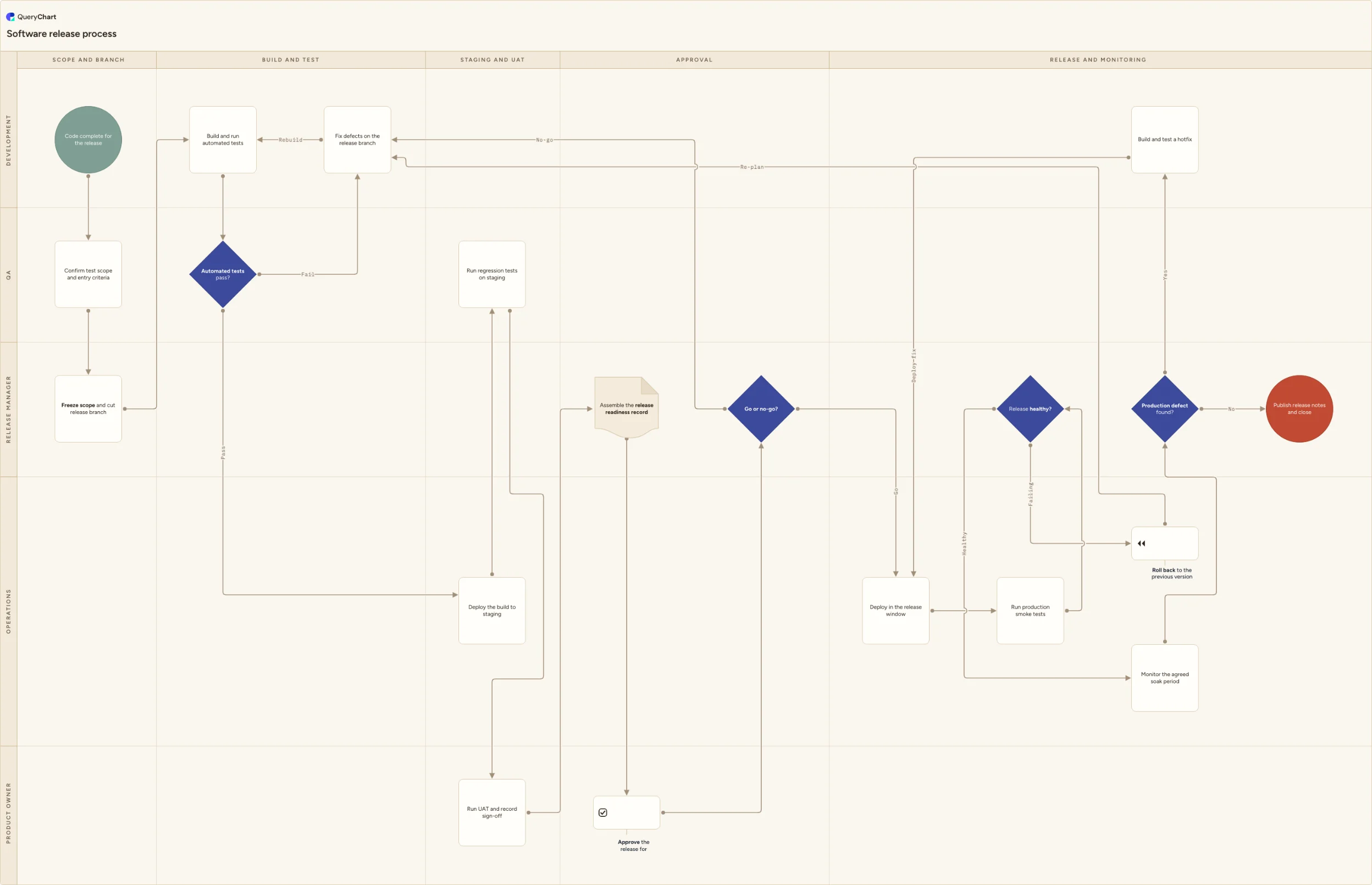
Software release process flowchart
A software release process flowchart covering scope freeze, the automated test gate, staging and UAT, go/no-go approval, deployment, rollback and hotfixes.
What the software release process is
A software release process is the set of gates between a code-complete build and a stable production system. The steps themselves are familiar (cut a branch, build it, test it, ship it), but the value of writing the process down sits in the gates: the point where scope stops changing, the point where a failing test suite sends work back to development rather than forward, the point where someone with the authority to do so says go, and the point where a bad release is rolled back rather than debated. Each gate leaves a record of what was in the release, what was tested, who approved it and what happened after it went live.
Most release problems are handoff problems rather than engineering problems. A branch gets cut while three more merges are still in flight, so nobody can say what is actually in the build. QA runs a regression pack against a staging environment that drifted away from production months ago. The go/no-go call happens on a video call with no written criteria, so the loudest opinion wins. A release goes out late in the afternoon with no agreed monitoring period, and the first sign of trouble is a customer email the next morning. Drawing the flow as swimlanes makes each handoff explicit and shows who is holding the release at any given moment.
This template is a working release flow across five lanes: Development, QA, Release manager, Operations and Product owner, laid out over five phases from scope freeze to closure. It includes the three loops teams usually leave undrawn, namely the automated test gate that returns failures to the release branch, the no-go decision that sends a release back for rework rather than out of the door, and the hotfix path that lets a post-release defect re-enter deployment and verification without anyone inventing a parallel process.
What this flowchart covers
In this template
- Scope and branch across the first three lanes: code complete in Development, QA confirming test scope and entry criteria, then the release manager freezing scope and cutting the release branch.
- The automated test gate: Development builds and runs the automated tests, then QA owns the "Automated tests pass?" decision, which sends failures to "Fix defects on the release branch" and back into the build rather than forward.
- Staging and UAT as three distinct handoffs: Operations deploys the build to staging, QA runs regression tests against it, and the product owner runs UAT and records sign-off.
- Approval as a record plus a decision: the release manager assembles a release readiness record, the product owner approves the release for production, and the "Go or no-go?" decision either releases it or returns it to the defect-fixing step.
- The production path in the Operations lane: deploy in the release window, run production smoke tests, then a "Release healthy?" decision that routes a failing release to "Roll back to the previous version" and back into defect fixing.
- Monitoring and closure: a defined soak period, a "Production defect found?" decision feeding the hotfix loop back through deployment and smoke tests, and a final step publishing the release notes and closing the release.
When to use this template
- Writing or rewriting a release procedure for a team that has been shipping on habit and chat threads, and needs one agreed picture before it gets encoded in a pipeline.
- Onboarding new engineers, QA analysts or on-call staff who need to know which gate they own and what happens downstream if they hold it up.
- Settling who actually makes the go/no-go call, and against what criteria, before the next release forces the argument.
- Answering a customer security questionnaire or an internal audit request about how changes are tested, approved and rolled back.
- Reviewing the process after a bad release, so the discussion is about which gate was skipped rather than a reconstruction from memory.
How it works
Rename the lanes to your real roles
Replace Development, QA, Release manager, Operations and Product owner with the roles you actually have. Plenty of teams have no dedicated release manager, in which case merge that lane into engineering leadership rather than leaving an empty band. If you have no separate operations team, fold deployment into Development and say so on the chart.
Define what the scope freeze means
Write your freeze rule next to the branch-cut step: what may still land on the release branch after the cut, who authorises an exception, and how the branch is tagged. Record the commit the branch came from, because that is what makes the build reproducible and lets you generate release notes from the diff.
Define what "pass" means at each test gate
The "Automated tests pass?" decision is only as good as its definition. State which suites must be green, what flake or coverage threshold you accept, and who may override a red build. Do the same for the staging regression pack and for UAT, so the product owner knows what they are signing off.
Write the go/no-go criteria before you need them
Replace the generic decision with your own checklist: no open critical defects, rollback rehearsed, on-call cover confirmed, dependent teams notified, and a stated cut-off time. Name who chairs the call and who can veto. Agreeing this while a release is already waiting is how bad releases get approved.
Set the rollback trigger, the soak period and the hotfix route
Say what makes "Release healthy?" answer failing: a specific error rate, latency threshold or failed smoke test, not a judgement call. Set how long the soak period runs and what is watched. Then decide what approval a hotfix needs, who can authorise one out of hours, and how it is merged back to the mainline, since a fix that lives only on the release branch is a common source of the next regression.
Publish it and keep one current version
Share the diagram where the work happens, next to the release checklist or in the runbook, and capture sign-off from the people named in it. Keep the earlier versions so you can show when the procedure changed and why, and review it after any release that went badly.
Frequently asked questions
What are the stages of a software release process?
Five stages cover most teams. First, scope and branch: agree what is in the release, confirm test entry criteria, freeze scope and cut the release branch. Second, build and test: produce a release candidate, run the automated suite, and send failures back to the branch instead of forward. Third, staging and UAT: deploy to a staging environment, run regression tests, and get UAT sign-off from the product owner. Fourth, approval: assemble a readiness record and make an explicit go/no-go decision. Fifth, release and monitoring: deploy in the agreed window, run smoke tests, watch for a defined soak period, then publish release notes and close the release.
What is the difference between a release process and a deployment pipeline?
A deployment pipeline is the automation: it builds, tests and ships code on a trigger. The release process is the decision-making around it, including who agreed the scope, who confirmed the tests were meaningful, who approved production, what happens when the release goes wrong and when the team can stand down. A mature pipeline removes manual steps but it does not remove the decisions. This chart deliberately shows the decisions as decisions, so you can see which of them your pipeline already enforces and which still rely on someone remembering.
Who should make the go/no-go decision, and what should it be based on?
One named person should chair it, usually the release manager or whoever owns production, with the product owner's approval already recorded as an input rather than debated on the call. Base it on criteria written before the release: no open critical defects, regression and UAT complete, rollback rehearsed, on-call cover confirmed, dependent teams notified. Record who attended and what was decided, not just the outcome. If you are audited under SOC 2, the relevant criterion is CC8.1, which expects changes to be authorised, tested, approved and documented; the readiness record and the approval trail are what evidence that, and the diagram shows where they are produced.
How should hotfixes be handled without bypassing the release process?
A hotfix compresses the process, it does not skip it. In this template a defect found during the monitoring period routes to "Build and test a hotfix" in the Development lane, then re-enters at deployment and goes through the same production smoke tests and the same "Release healthy?" check as a planned release. What changes is the approval speed, not the verification. Two rules keep it honest: agree in advance who can authorise a hotfix out of hours, and merge the fix back to the mainline the same day, because a fix that exists only on the release branch reappears as a regression in the next release.
Where this process fits
In most operations this process follows Change management process flowchart (ITIL).
It is one step in IT service management.
Step 2: Change management process flowchart (ITIL)
An ITIL change management process flowchart covering RFC intake, standard, normal and emergency triage, CAB approval, scheduling, rollout and rollback.
Step 3: Software release process flowchart You are here
A software release process flowchart covering scope freeze, the automated test gate, staging and UAT, go/no-go approval, deployment, rollback and hotfixes.