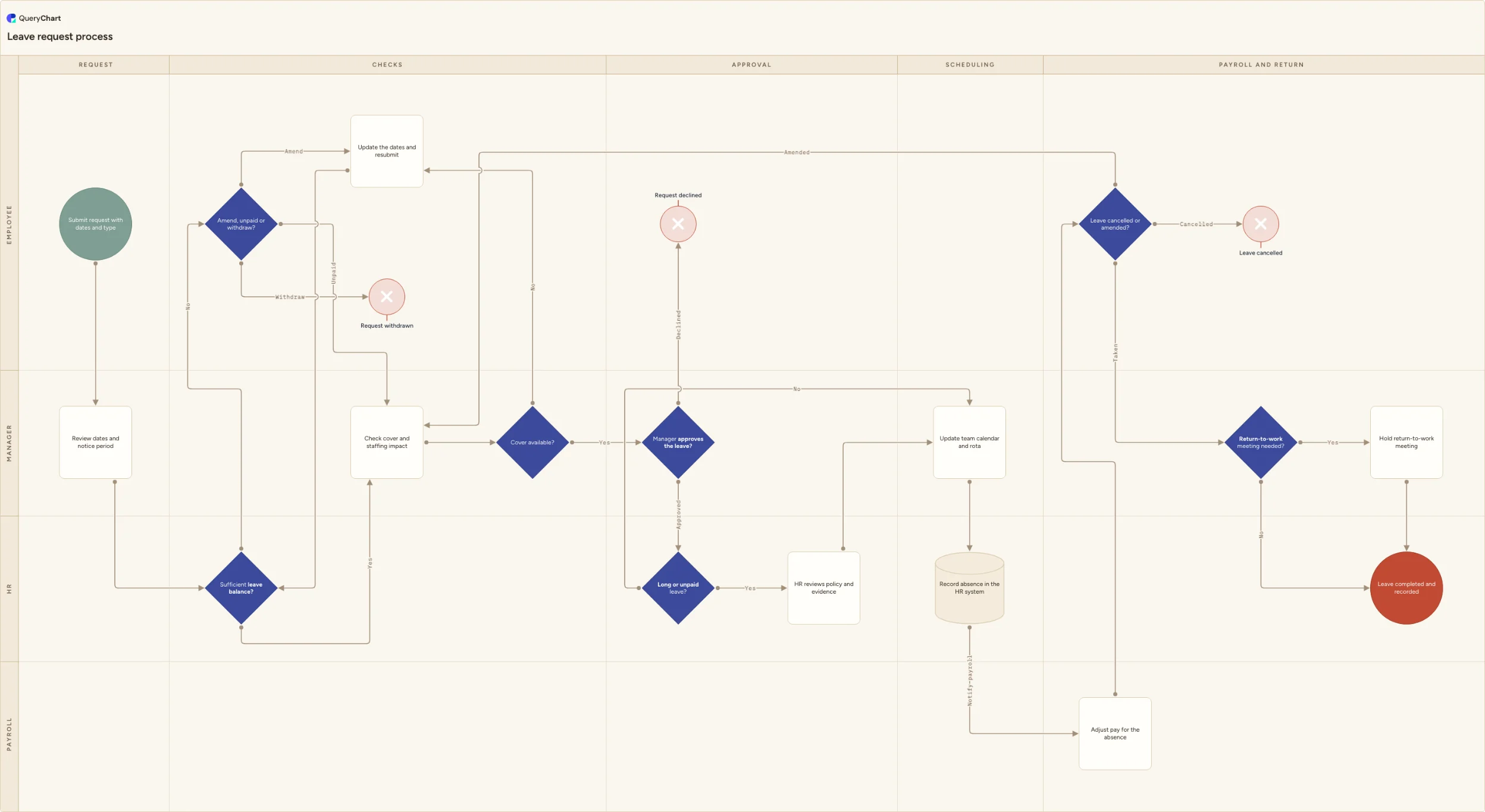
Leave request process flowchart
Leave request process flowchart: submission with dates and leave type, balance and cover checks, manager approval, HR escalation, payroll and return to work.
What the leave request process is
A leave request looks like a single action, but it lands on four sets of records. The employee owns the dates, the manager owns cover and the team rota, HR owns entitlement and policy, and payroll owns whatever the absence does to pay. Almost all the trouble in this process comes from the gaps between those four: leave agreed in a corridor conversation and never recorded, an approval granted against a balance that was already spent, or unpaid days that reach payroll after the cut-off and have to be corrected in the next run.
Drawing it as swimlanes makes the order of the checks explicit, and the order matters more than most policies admit. Checking the balance before the cover check stops a manager rebuilding a rota around days the employee does not have. Checking cover before the approval decision stops an approval that has to be retracted a week later. Routing long or unpaid absences to HR before anything is booked keeps parental, sick and unpaid leave on the right footing instead of being processed as ordinary annual leave by whoever happened to receive it.
The chart below runs from submission to one of four outcomes: leave completed and recorded, or a request withdrawn, declined or cancelled. It keeps the awkward paths visible rather than noting them as exceptions, including an insufficient balance that turns into unpaid days, amended dates that re-enter the checks, a cancellation after the booking has already reached payroll, and the return-to-work meeting a long absence triggers.
What this flowchart covers
In this template
- Four swimlanes (Employee, Manager, HR, Payroll) across five phases: Request, Checks, Approval, Scheduling, and Payroll and return.
- Intake in the Request phase: the employee submits dates, half days and the leave type, and the manager reviews the dates against the notice period before any check is run.
- A 'Sufficient leave balance?' decision in the HR lane, with an insufficient-balance branch giving the employee three explicit routes: take the days unpaid, amend the dates and resubmit, or withdraw the request outright.
- A cover and staffing impact check followed by a 'Cover available?' decision, where a clash sends the request back to the employee to rebook rather than being declined, and a separate 'Manager approves the leave?' gate whose declined branch ends the request.
- A 'Long or unpaid leave?' escalation that routes extended and unpaid absences to an HR review of policy and evidence, while ordinary annual leave continues straight to scheduling.
- Booking through payroll and return: the manager updates the team calendar and rota, HR records the absence and notifies payroll, payroll adjusts pay, then a 'Leave cancelled or amended?' decision loops amendments back to the cover check, and a 'Return-to-work meeting needed?' gate handles long absences before the record is closed.
When to use this template
- You are writing or rewriting an absence and annual leave policy, and need the operating process behind it rather than only the entitlement rules.
- Leave keeps being agreed verbally and reaching the HR system late, so rota gaps and payroll corrections are found after the fact.
- Managers approve requests without seeing the balance or the rota, and HR spends its time unwinding negative balances and clashing bookings.
- You are configuring leave in an HR system such as BambooHR, Personio, HiBob or Workday, and the approval routing, escalation threshold and payroll handoff need to be agreed before anyone builds them.
- New managers need to know what they are actually deciding when a request arrives, and at what point HR has to be involved.
How it works
Rename the lanes to your real roles
Replace Employee, Manager, HR and Payroll with the functions you actually have. In smaller organisations HR and Payroll are one lane and should be merged rather than drawn as a handoff that never happens; in shift-based teams a scheduling or rota lead usually deserves a lane of its own, because that is who really decides whether cover exists.
Set the rules the balance check uses
Decide what 'Sufficient leave balance?' tests: balance accrued at the leave dates or full-year entitlement, how carry-over and half-days count, whether TOIL sits in the same pot, and whether a negative balance is ever permitted. Put the answer in the step notes so approvers are not each applying their own version.
Define the escalation threshold
Give 'Long or unpaid leave?' a number and a list. Typical triggers are any unpaid day, any statutory leave (parental, adoption, long-term sickness), or an absence beyond a set count of consecutive working days. Record which evidence HR needs for each type, so the HR review step has a defined input.
Name the payroll cut-off and the trigger for return-to-work
State the date payroll needs the absence by and who sends it, then set the condition that makes a return-to-work meeting mandatory, for example any sickness absence beyond a defined length or any long-term leave. Both are the steps teams most often leave implicit.
Add the leave types you actually run
Annual, sick, parental, compassionate, unpaid and study leave rarely follow the same route. Either add the ones that diverge as branches from the leave type captured at submission, or keep this chart as the general path and hold the exceptions in separate, linked maps.
Review it with managers, then version the approved map
Walk the chart with two or three managers and HR before publishing; the arguments will be about the escalation threshold and who tells payroll. Once agreed, approve and version the map in QueryChart so the process managers are trained on is the same one you can point at later, and so amendments are tracked rather than circulated as new attachments.
Frequently asked questions
What steps should a leave request process include?
At minimum: a request carrying dates, half days and leave type; an entitlement and balance check; a cover and staffing impact check; a manager approve or decline decision; an escalation route for long or unpaid absences; a calendar and rota update; notification to payroll before the cut-off; and, for long absences, a return-to-work meeting. The steps most often missing are the exception paths, namely what happens when the balance is short, when cover is not available, and when an approved request is later amended or cancelled.
What happens when an employee does not have enough leave left?
Give it three named routes rather than letting the approver improvise. The employee can take the days unpaid, which should be a policy decision and normally an HR one because it changes pay; amend the dates to fit the accrued balance and resubmit; or withdraw the request. Silently approving into a negative balance is the common failure, and it usually surfaces at year end or when the person leaves and the balance is recovered from final pay.
Who approves a leave request, the manager or HR?
The line manager normally approves ordinary annual leave, because the real decision is whether the team has cover. HR involvement is triggered by type and length rather than by seniority: unpaid days, statutory leave such as parental or long-term sickness, and absences beyond your defined threshold need HR to confirm policy, entitlement and evidence before the leave is booked. Writing that threshold down is what keeps the escalation consistent between managers.
How should cancelled or amended leave be handled?
Treat an amendment as a new request against the same record: re-check cover, update the calendar and the HR system, and tell payroll. The step that gets skipped is the payroll one, because deleting a calendar entry notifies nobody. If the change lands after the payroll cut-off it cannot be pulled from that run, so it is corrected in the following period. Keeping cancellations on the record, rather than deleting them, also keeps the absence history accurate for later reporting.
Where this process fits
In most operations this process hands off to Payroll Process Flowchart Template: Review, Approval and Payment.
Comes after
- Payroll Process Flowchart Template: Review, Approval and Payment — Edit a payroll process flowchart covering cut-off, approved inputs, gross-to-net checks, independent review, bank release, payslips and filing.