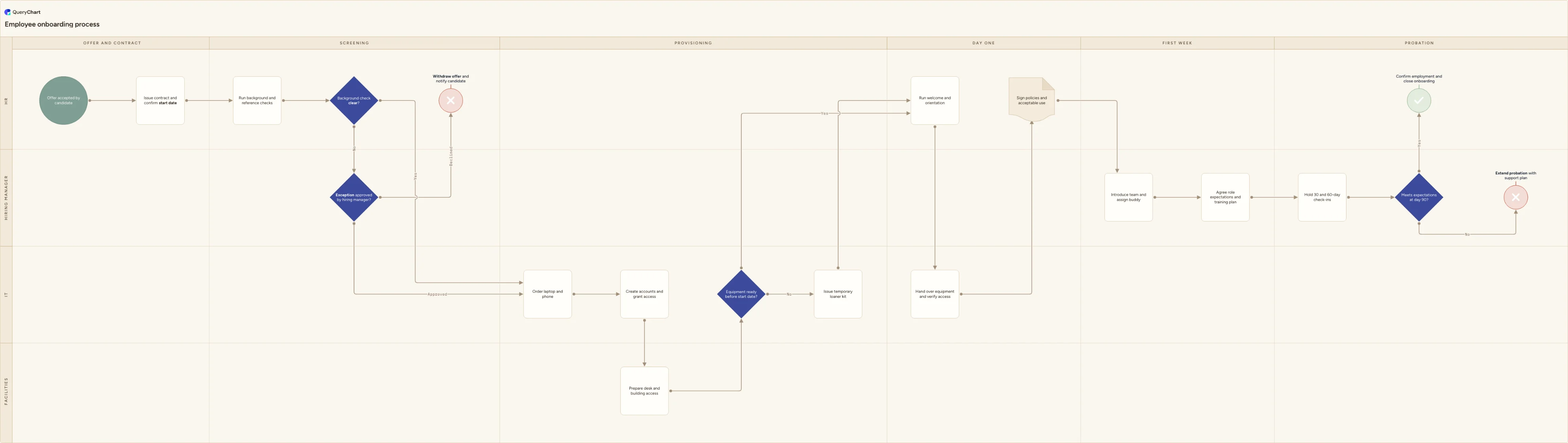
Employee onboarding process flowchart
A cross-functional employee onboarding process template covering pre-boarding checks, IT provisioning, day one, first week and the day-90 probation review.
What the employee onboarding process is
Employee onboarding is not an HR process. It is four processes that have to finish on the same morning. HR issues the contract and runs screening, IT orders hardware and provisions accounts, Facilities prepares a desk and building access, and the hiring manager sets expectations and runs the probation checkpoints. Each team can execute its own part perfectly and the new hire still spends day one waiting for a login.
That is why the useful version of this process is drawn as swimlanes rather than a checklist. Once the work is split by owner you can see the two places it actually breaks: the handoff from screening to provisioning (IT cannot order anything until the start date is confirmed and the background check is settled), and the gap between the start date and equipment lead times. Both appear in this chart as real decisions with a remediation branch, not as a happy path with a note attached.
The chart below runs from an accepted offer to either a confirmed employment or an extended probation. It covers six phases across four lanes, and it keeps the failure routes visible: a flagged background check goes to a hiring manager exception decision before anyone withdraws an offer, and equipment that will not arrive in time triggers a loaner kit rather than a blocked first day.
What this flowchart covers
In this template
- Four swimlanes (HR, Hiring manager, IT, Facilities) across six phases: Offer and contract, Screening, Provisioning, Day one, First week and Probation
- Pre-boarding: issue contract and confirm start date, then run background and reference checks, with the start date pushed to IT and Facilities the same day it is agreed
- A background check decision that routes a flag to an 'Exception approved by hiring manager?' review, so an offer is only withdrawn after a documented human judgement
- The provisioning chain that has to finish before day one: order laptop and phone, create accounts and grant access, then prepare desk and building access, handed between the IT and Facilities lanes
- An 'Equipment ready before start date?' gate with a genuine fallback, issuing a temporary loaner kit so day one still goes ahead
- Day one through probation: welcome and orientation, equipment handover with access verified live, policy and acceptable-use sign-off, team intro and buddy, role expectations, 30 and 60-day check-ins, and a day-90 decision that either confirms employment or extends probation with a support plan
When to use this template
- You are writing or rewriting an onboarding SOP and need one picture showing who does what, instead of four separate team checklists
- New hires keep arriving without a laptop, an account or a desk and you need to see which handoff is actually failing
- HR, IT and Facilities work from different tools and nobody owns the end-to-end timeline between offer acceptance and day one
- You hire often enough that onboarding has to run the same way regardless of which manager is involved
- Someone has asked how access is granted and how policy sign-off is evidenced, and you need a documented process to point at
How it works
Rename the lanes to match your org
Replace HR, Hiring manager, IT and Facilities with the teams that genuinely do the work. If Payroll, Security or a shared services desk owns a step in your company, give it its own lane rather than burying the handoff inside HR.
Set the real lead times
Change 'Equipment ready before start date?' to the lead time your IT team actually quotes, and note that threshold on the node. If your hardware takes three weeks, the check has to happen at contract signature, not the week before.
Rewrite the screening branch to your policy
Swap 'Background check clear?' and the exception decision for the checks you are legally allowed and required to run in your jurisdiction, and name who signs off an exception. Delete the branch entirely if you do not run background checks.
Name your systems explicitly
Split 'Create accounts and grant access' into the systems a new hire needs on day one. Listing them by name is what turns the diagram into something IT can execute without asking a follow-up question.
Add an owner and a due offset per step
Use the comment field on each node to record who is accountable and when it is due relative to the start date (start minus 10 days, day one, day 30). The diagram then doubles as the timeline.
Review it after the next few hires
Ask each new hire what was missing on day one and update the chart. Onboarding maps go stale quickly because tooling and access requirements change faster than the document does.
Frequently asked questions
What are the main stages of an employee onboarding process?
Most onboarding processes have five: pre-boarding (contract, screening, equipment order, account provisioning), day one (welcome, workspace, systems access, policy sign-off), the first week (team introductions, role expectations, training plan), the first 30 to 60 days (structured check-ins), and a probation or 90-day review that formally confirms the hire. The chart above splits pre-boarding into two phases, Offer and contract and Screening, because the screening outcome is what unblocks IT and Facilities.
What is the difference between pre-boarding and onboarding?
Pre-boarding is everything between offer acceptance and the start date: contract, background and reference checks, hardware ordering, account creation, desk and building access. Onboarding starts on day one. The distinction matters operationally because pre-boarding is where all the lead times sit. A laptop ordered on day one arrives in week three, so any onboarding process that begins on the start date is already late.
Who owns the employee onboarding process, HR or the hiring manager?
HR usually owns the process and the compliance steps (contract, screening, policy acknowledgements, payroll), while the hiring manager owns the outcome: role expectations, training, check-ins and the probation decision. IT and Facilities own their provisioning steps but are rarely accountable for the timeline. That split is why the process needs a named end-to-end owner, most often HR, who can chase the other lanes when a start date moves.
How do I show what happens when a step fails?
Draw the failure route rather than describing it in a footnote. In this template, a flagged background check goes to a hiring manager exception decision that either rejoins the main flow or terminates in a withdrawn offer, and equipment that will not arrive on time routes to a temporary loaner kit that rejoins at day one. Every branch either rejoins the flow or ends in an explicit terminator, so there is no path where the process just stops.
Where this process fits
In most operations this process follows Recruitment process flowchart: vacancy to offer accepted and hands off to Payroll Process Flowchart Template: Review, Approval and Payment.
It is one step in Employee lifecycle.
Step 1: Recruitment process flowchart: vacancy to offer accepted
A swimlane recruitment process flowchart from approved headcount to accepted offer, covering screening, shortlisting, interviews, checks and offer approval.
Step 2: Employee onboarding process flowchart You are here
A cross-functional employee onboarding process template covering pre-boarding checks, IT provisioning, day one, first week and the day-90 probation review.
Step 3: Employee performance review process flowchart template
A swimlane flowchart of the employee performance review process, from cycle launch through self-assessment and calibration to rating, appeal and outcome.