How to create an employee onboarding process
How to design an employee onboarding process: work backwards from day one, put the lead times where they belong, name the owner of each provisioning step, and end at a probation decision.
An employee onboarding process runs from an accepted offer to a confirmed hire, and it works when the pre-boarding lead times are planned backwards from day one rather than started on it.
The short version
- Plan backwards from the start date: pre-boarding is where the lead times sit.
- One end-to-end owner, usually HR, distinct from the owners of each lane.
- Provisioning depends on screening; draw the dependency rather than assuming it.
- Have a fallback for equipment and access, because the fallback is what will be used.
- End at a probation decision, not at day one.
Onboarding is four processes with one deadline
Onboarding fails in a specific and repeatable way: everybody does their part correctly and the new hire still spends the first morning without a laptop. That happens because onboarding is not one process. HR runs contracts and screening, IT orders hardware and provisions accounts, facilities prepares a desk and access, and the hiring manager sets expectations: four workstreams that have to converge on one date, with no single owner of the convergence.
The design consequence is that the process has to be built backwards. A laptop ordered on the start date arrives in week three, so the ordering step belongs before the start date by whatever your supplier's real lead time is. Access provisioning depends on the screening outcome, which depends on the candidate returning documents. Every one of those dependencies is a date offset, and writing the offsets down is most of the work.
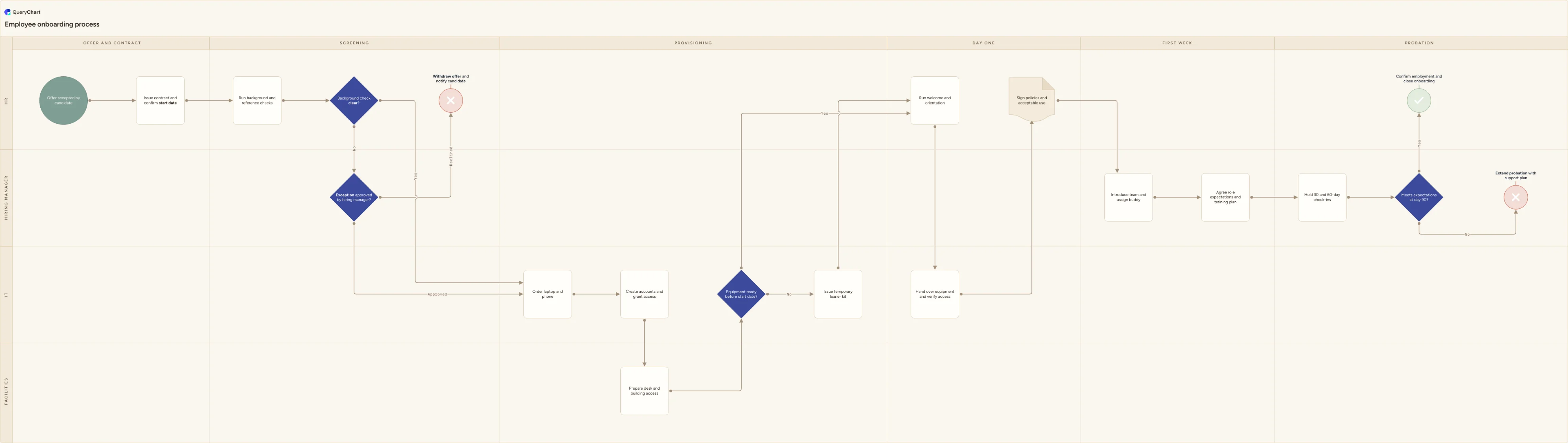
The example below is a cross-functional onboarding flow across four owners and six phases. It keeps two branches that most onboarding documents leave out: a flagged background check routed to a hiring manager exception decision, and an equipment-not-ready path issuing a loaner rather than blocking day one.
Onboarding across four owners
From an accepted offer to a day-90 decision. Watch where the dependencies between lanes actually bite.
The date that drives everything
Contract issued and start date confirmed. Every downstream offset (order equipment, create accounts, prepare a desk) is measured from this, so the step that communicates it to IT and facilities is the highest-leverage one in the process.
Screening gates provisioning
A background check with an exception route to the hiring manager. The dependency matters: IT often cannot provision before screening clears, so a slow check silently consumes the hardware lead time and nobody notices until day one.
Three teams, one morning
Order hardware, create accounts and grant access, prepare desk and building access, with an equipment-readiness decision that issues a loaner kit. Design the fallback deliberately: without one, the answer to "not ready" is an apology.
Day one and the first week
Orientation, equipment handover with access verified live, policy sign-off, buddy and expectations. Verifying access in front of the new hire rather than assuming it is what turns a checklist into a control.
Finish at the probation decision
Check-ins at 30 and 60 days, then a day-90 decision that confirms employment or extends probation with a support plan. Onboarding processes that end on day one have no way of telling whether they worked.
How it works
Name one end-to-end owner
Four teams each own their steps and none owns the date. Appoint a single owner (usually HR) accountable for the new hire being productive on day one, with the authority to chase the other lanes. Without that role, a moved start date is communicated by whoever remembers.
Work backwards from the start date
Write each pre-boarding step as an offset: contract at minus 14 days, hardware ordered at minus 10, accounts created at minus 2. Use the lead times your suppliers actually quote, not the ones in the policy, and put the offset in the step's comment so the diagram doubles as the timeline.
Draw the screening dependency explicitly
If provisioning cannot start until checks clear, that is a serial dependency consuming your lead time. Decide whether anything can start in parallel (ordering hardware often can) and draw the exception route for a flagged check with a named decision-maker.
List the systems by name
"Create accounts and grant access" is not executable. Split it into the systems a new hire needs on day one, in the order they are needed, and record who requests and who grants each. This single change removes most of the day-one follow-up questions.
Design the fallback for late equipment
Hardware will occasionally be late, so decide in advance what happens: a loaner kit, a shared machine, a delayed start. A drawn fallback is a decision made once; an undrawn one is a decision made under pressure on the morning.
Extend to the probation decision and review it
Add the 30, 60 and 90-day checkpoints and a real decision at the end. Then ask each new hire what was missing on their first week and update the chart: onboarding decays faster than most processes because tooling and access requirements change constantly.
Mistakes to avoid
Starting the process on day one
Everything with a lead time sits before the start date. A process that begins on the start date is already three weeks late on hardware.
Four checklists, no owner
Each team's list can be complete while the overall outcome fails. Someone has to own the convergence.
Access granted but never verified
Provisioning that is not confirmed in front of the new hire produces a first day spent raising tickets.
Ending at the welcome session
Without check-ins and a probation decision there is no feedback loop, and the process cannot tell you it is broken.
Create your own onboarding process
Open the onboarding example as your own chart, rename the lanes, and set the offsets your suppliers actually quote.
Related guides
Frequently asked questions
What are the stages of an employee onboarding process?
Five in most organisations: pre-boarding (contract, screening, equipment ordering, account creation), day one (welcome, workspace, access, policy sign-off), the first week (team introductions, expectations, training plan), the first 30 to 60 days (structured check-ins), and a probation review that formally confirms the hire. The example above splits pre-boarding into offer-and-contract and screening, because the screening outcome is what unblocks IT and facilities.
How far in advance should onboarding start?
As soon as the offer is accepted, and the specific lead time is set by your slowest dependency, usually hardware, sometimes background screening or building access. Ask IT what they actually quote rather than what the policy says, and set the ordering step that far before the start date. Organisations that measure this are routinely surprised: the gap between the policy lead time and the real one is where most first-day failures live.
Who owns the employee onboarding process?
HR usually owns the process and the compliance steps, while the hiring manager owns the outcome: expectations, training and the probation decision. IT and facilities own their provisioning steps but are rarely accountable for the overall date. That split is exactly why a single named end-to-end owner matters: someone has to notice when a start date moves and re-drive the four workstreams that depend on it.
How do I measure whether onboarding is working?
Three measures cover most of it: the proportion of new hires who have full access on day one, time to first meaningful contribution as judged by the manager, and retention through probation. Collect the first from IT rather than from the new hire, and ask the new hire in week two what was missing: they will tell you accurately then, and diplomatically six months later.