Purchase order process flowchart
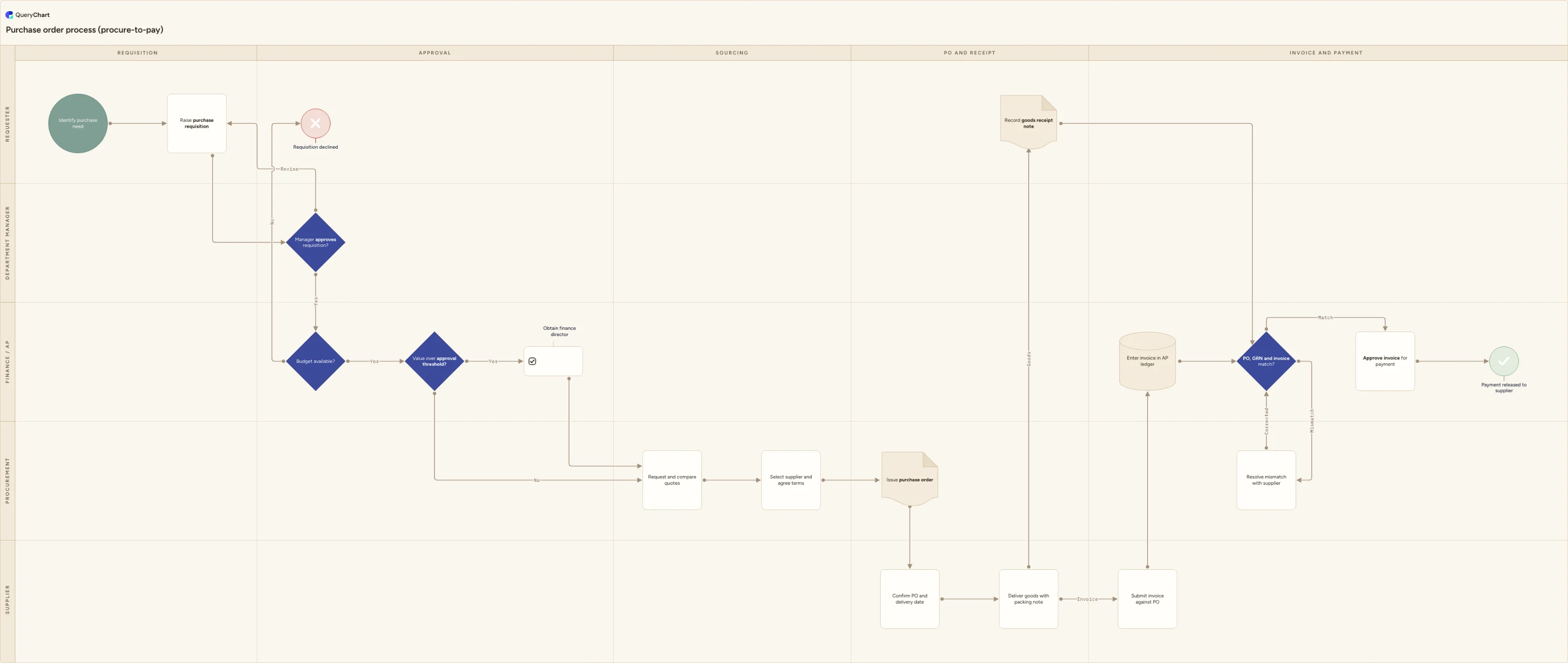
Purchase order process flowchart: requisition, budget check, approval thresholds, supplier quotes, PO issue, goods receipt, three-way match and payment.
What the purchase order process is
The purchase order process, usually called procure-to-pay or P2P, turns an informal need into a committed, traceable spend. It starts when someone raises a requisition and ends when accounts payable releases payment against a matched invoice. The controls sit in the middle: a budget check before the commitment is made, a value-based approval route, a purchase order that fixes price and quantity in writing, and a goods receipt note that records what actually arrived.
Most of the friction in a purchase order process comes from the handoffs rather than the steps. A requisition without a cost centre stalls in a manager's inbox. A PO issued before the budget check becomes an unfunded commitment. An invoice that arrives with no matching goods receipt sits in the AP exception queue while the supplier chases payment and someone re-raises the order. Mapping the flow across lanes makes each handoff explicit and shows who is holding the work at any point.
This template is a working procure-to-pay flow across five lanes: requester, department manager, finance and AP, procurement, and supplier. It includes the two branch points teams argue about most, namely the approval threshold that routes high-value requests to a second approver, and the three-way match exception path used when the PO, the goods receipt note and the invoice disagree.
What this flowchart covers
In this template
- Requisition in the Requester lane: identify the purchase need, then raise a requisition carrying cost centre, GL code, quantity and need-by date.
- Two sequential gates before any money is committed: the department manager approves or returns the requisition for revision, then Finance and AP confirm budget availability and decline the requisition outright if funds are not there.
- Value-based routing at the "Value over approval threshold?" decision, which sends high-value requests to finance director approval and lets everything below the threshold continue straight to sourcing.
- Sourcing in the Procurement lane: request and compare quotes, select the supplier and agree terms, then issue the purchase order to the supplier.
- A fork after delivery into two independent arms, with the requester recording the goods receipt note while the supplier submits the invoice against the PO and AP enters it in the ledger.
- The three-way match decision comparing PO, GRN and invoice, with a mismatch branch that goes back to procurement to resolve with the supplier and re-enters the match, and a clean match that runs through invoice approval to payment release.
When to use this template
- Documenting the as-is P2P flow before an ERP rollout or finance system migration, where the process has to be agreed before anyone configures approval rules.
- Onboarding new requesters and approvers who need to see where their step sits, what triggers it and what happens downstream if they sit on it.
- Reviewing spend controls after an audit finding or a maverick spend problem, particularly unfunded commitments and POs raised after the invoice arrived.
- Setting or resetting approval thresholds, when you need one picture of who signs what at which value.
- Reducing invoice exception volume by making the goods receipt step visible and owned rather than assumed.
How it works
Name the roles you actually have
Rename the five swimlanes to your real functions. Smaller teams often merge Procurement into Finance and AP; larger ones split receiving out of the Requester lane. Use one lane per decision-maker, not per person, or the chart stops matching reality the moment someone changes job.
Set your approval thresholds
Replace the generic "Value over approval threshold?" decision with the figures from your delegation of authority schedule, and state the currency. Add a second threshold decision only if you genuinely have three tiers, and set it high enough that it triggers rarely.
Put the budget check where the system enforces it
Move the budget check earlier if your system blocks a requisition at submission, or leave it after manager sign-off if finance validates afterwards. Also decide whether it tests committed spend (open requisitions and open POs) or only posted actuals, and note that on the step.
Adapt the sourcing rules
Add a branch that lets catalogue items or contracted rates skip the quote step, and record how many quotes your policy requires at each value band. If purchasing cards or framework agreements bypass the PO entirely, draw that as its own path rather than pretending it does not happen.
Define the match tolerance and the exception owner
Write your price and quantity tolerance into the three-way match decision, for example 2 percent or 50, and name who owns the mismatch queue. Without a stated tolerance the exception branch absorbs every rounding difference and the queue becomes the real process.
Circulate the map and keep one current version
Share the chart with procurement, finance and every approver named in it, capture their sign-off, and link the approved version from your purchasing policy so people work from the current flow rather than a screenshot in an old training deck.
Frequently asked questions
What is the difference between a purchase requisition and a purchase order?
A requisition is an internal request to buy. It carries the cost centre and coding, is routed for budget and management approval, and creates no obligation to the supplier. A purchase order is the external commitment sent once the requisition is approved, fixing item, quantity, price and delivery terms. In this chart the requisition is raised in the Requester lane, and Procurement issues the PO only after both the manager approval and the budget check have passed.
What is a three-way match?
A three-way match compares the purchase order (what you agreed to buy), the goods receipt note (what actually arrived) and the supplier invoice (what you are being asked to pay). If all three agree within tolerance, the invoice can be approved for payment without further review. It is the main control against paying for goods never received, or at a price never agreed. In this template it is the decision node that gates payment, with a mismatch branch back to procurement.
What should happen when the invoice does not match the PO or the receipt?
Send it to a named owner rather than leaving it in the AP queue. The usual causes are a price change the supplier applied without a PO amendment, a short or partial delivery, or a goods receipt nobody recorded. The template routes mismatches to procurement to resolve with the supplier, then returns to the match decision once the PO, GRN or invoice has been corrected, so nothing gets paid on the strength of an email.
How many approval levels should a purchase order process have?
Fewer than most organisations run. Two covers the majority of spend: the budget holder for everything, plus a second approver above a value threshold taken from your delegation of authority schedule. Each extra level adds cycle time and encourages people to split orders to stay under a limit, which is exactly the behaviour the threshold is meant to prevent.
Where this process fits
In most operations this process follows Purchase approval process flowchart (approval matrix by threshold) and hands off to Purchase order change process.
It is one step in Procure-to-pay.
Step 1: Purchase requisition process flowchart
Purchase requisition process flowchart: specification and GL coding, budget check, manager and threshold approval, procurement review and an urgent fast track.
Step 2: Purchase order process flowchart You are here
Purchase order process flowchart: requisition, budget check, approval thresholds, supplier quotes, PO issue, goods receipt, three-way match and payment.
Step 3: Goods receiving process flowchart (goods-in to GRN)
A goods receiving process flowchart for the goods-in dock: booking-in, PO paperwork check, count and damage check, carrier claim, GRN and put-away to stock.