How to create a flowchart from an SOP
How to convert a written SOP into a flowchart: split the prose into one action per step, turn every conditional sentence into a decision, assign owners, and reconcile what the text left out.
Turning a written SOP into a flowchart means splitting the prose into one action per step, converting every conditional sentence into a labelled decision, and resolving the gaps that surface.
The short version
- One action per step; a sentence with two verbs is usually two steps.
- Every conditional word in the prose is a decision that needs labelled exits.
- Vague qualifiers ("where appropriate", "as required") mark a missing criterion.
- Expect to find unanswered questions. That is the value, not a side effect.
- Keep one source and generate both views, or the two documents will drift.
What converting an SOP actually involves
Converting an SOP is not a formatting exercise. Prose lets an author be vague in ways a diagram cannot: "the change is assessed and, where appropriate, referred to the change advisory board" hides a decision, a criterion and an owner in fourteen words. Drawing it forces all three into the open, and the usual result of converting a written procedure is not a prettier document but a list of questions nobody had noticed were unanswered.
The mechanical part is straightforward. Every sentence with a verb and an actor becomes a step. Every "if", "unless", "where", "depending on" and "in the event that" becomes a decision with labelled exits. Every "the X team then" becomes a lane change. Numbered procedure steps map almost one to one; the trouble is always in the narrative paragraphs between them, which is where the exceptions were buried.
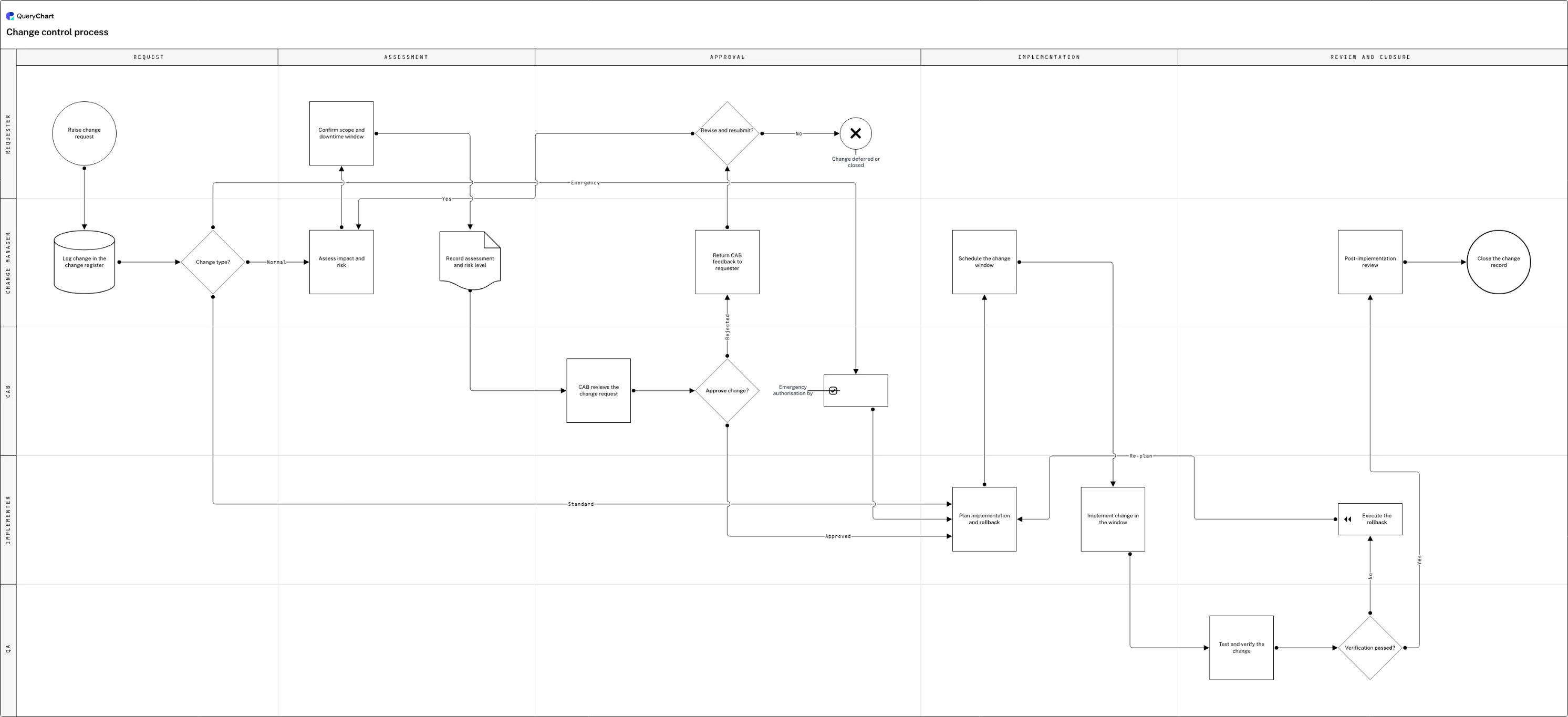
The example below is a change control procedure. Read the generated procedure text under the canvas next to the diagram: same rows, two renderings. That is the target state, not a flowchart that replaces the SOP, but one document with a diagram view and a text view, so a change to the process cannot update one and leave the other behind.
A written procedure, converted
A change control SOP as a flowchart, in four stages. The procedure text underneath is generated from the same rows.
Split the prose into steps
"Raise a change request, which is logged in the register and triaged by type" is three steps, not one sentence. The triage is a decision with three exits (standard, normal, emergency), and each of those words was a whole branch hiding in a subordinate clause.
Turn every conditional into a decision
Assessment, CAB review, and the approve/reject decision with its resubmit loop. The written version said rejected changes "may be revised and resubmitted", which is a decision with two exits: one back into assessment, one to a deferred terminator.
Give every step an owner
Requester, change manager, CAB, implementer. The prose used the passive voice throughout ("the change is scheduled"), and assigning lanes is what forces the question of who actually does it, including the emergency authorisation that bypasses the board.
Close the loops the text left open
Verification fails, the rollback runs, and the flow returns to planning rather than stopping. Written procedures routinely end at "if verification fails, the change is rolled back" and never say what happens next; a chart cannot leave that line hanging.
How it works
Number every action in the text
Go through the SOP and mark each distinct action, including the ones buried in narrative paragraphs. Sentences with two verbs joined by "and" are usually two steps. This pass alone typically turns a five-page procedure into thirty candidate steps, several of which will turn out to be duplicates.
Highlight every conditional word
Search the document for "if", "unless", "where", "when", "depending", "in the event", "otherwise" and "as necessary". Each one is a decision. Write it out as a question and note both answers, including the answer the text does not give, which is the whole reason for doing this.
Type the steps into rows and connect them
Put each action into a row's Box text, set the conditional ones to Shape Decision, and connect them with the Line to column using row numbers. Label the exits in Line text. At this point you have a flowchart of what the SOP literally says, gaps included.
Assign an owner to every step
Passive voice is the standard register of written procedures, and it hides the actor: "the assessment is recorded" names nobody. Put each step in the lane of the role that performs it. Any step you cannot assign is a question for the process owner, not a formatting problem.
Resolve the dangling branches
Follow every unhappy exit to a conclusion. Written SOPs habitually stop at the failure ("the change is rolled back") without saying what follows. Take the list of unresolved branches back to the owner; that list is the most valuable output of the conversion.
Retire the old document
Once the chart is agreed and approved, make it the source and generate the text view from it rather than maintaining both. Two documents describing one procedure will diverge, and the divergence is invisible until an auditor or an incident puts them side by side.
Mistakes to avoid
Transcribing instead of converting
Copying paragraph headings into boxes produces a diagram with the same vagueness as the text. The conversion is only worth doing if the conditionals and the owners come out of hiding.
Silently inventing the missing branch
When the text does not say what happens on failure, the temptation is to draw something sensible. Mark it as a question and ask the owner instead: a guess that has been drawn looks exactly like a fact.
Keeping both documents
The written SOP and the chart will drift the first time someone updates one of them in a hurry. Pick one source; generate the other view.
Converting three procedures at once
A long SOP is often several procedures in one file. Convert them as separate charts that reference each other, or you will produce a diagram too large to use.
Turn your SOP into a flowchart
Open the change control example as your own chart, or start blank and work through your procedure step by step.
Related guides
Frequently asked questions
Should the flowchart replace the written SOP?
It should replace it as the source, not necessarily as the only view. Some detail belongs in text (exact field values, safety warnings, regulatory references), and some readers prefer prose. The rule that matters is single-source: keep the process in one place and generate the text and diagram views from it, so an update cannot land in one document and miss the other.
What do I do when the SOP does not say who performs a step?
Leave it unassigned and raise it. Passive-voice procedures hide the actor as a matter of style, and the answer is often genuinely contested: two teams each assume the other does it. Assigning a lane yourself buries a real finding under a plausible-looking diagram. The list of unassignable steps is one of the two most useful outputs of a conversion; the other is the list of unresolved branches.
Can AI convert an SOP into a flowchart?
It can do the first pass well: splitting prose into steps, spotting conditionals, proposing shapes and a sequence. QueryChart's AI will draft a chart from pasted procedure text. What it cannot do is resolve what the document does not say (the missing owner, the branch that stops at a failure), and those are exactly the parts worth a human's attention. Treat the generated chart as a draft with questions attached, not as a finished procedure.
How long does it take to convert an SOP?
A tightly written five-page procedure takes an hour or two to turn into a first-draft chart. The conversion itself is quick; what takes the time is the follow-up conversation about the gaps it surfaces, which is typically a handful of unassigned steps and unresolved branches. Budget for that conversation, because skipping it means shipping the same ambiguity in a new format.