Change management Gantt chart: plan the workstreams of a change on one timeline
How to plan organisational change as a Gantt chart: stakeholder, communications, training and process workstreams on one timeline, joined at a pilot and a go / no-go, with dependencies that show the joins.
Most changes at work are several plans running side by side: the project team's, the communications team's and the training team's. A change management Gantt chart puts them on one timeline so the joins between them become visible and can be scheduled.
The short version
- Give each workstream its own group so owners can see their own part of the plan.
- Join the workstreams at a few real points: a signed case, a pilot and a go / no-go.
- Use start-to-start links with a lag where work genuinely overlaps, such as training design and process design.
- Plan the people tasks, impact assessment, briefings and adoption review, as tasks; a Gantt chart does not measure how people respond.
- Durations are estimates. Check them with the people who will do the work.
Why put the workstreams of a change on one timeline
A change to how people work has a technical or procedural half and a people half. The first is a new process, system or structure. The second is making sure the right people know about it, understand what it means for them, can do the new thing and are supported when they try. Each half has its own owners and often its own schedule, and the failures tend to sit between the schedules: training delivered before the process was settled, announcements made before managers had been briefed, a go-live date set without a pilot.
A Gantt chart helps with exactly that problem, and only that one. It shows which tasks depend on which, which can overlap, and where the plan has a fixed decision in it. It does not tell you how people will respond, how big the impact of the change is, or whether the change has stuck. Those need judgement and evidence from your own organisation. What the chart can do is leave room for them as tasks, such as an impact assessment at the start and an adoption review at the end, and make clear what waits for them.
The useful structure is a handful of workstreams, one group each, joined at a few points. Typical joins are a signed-off case for change that everything else waits for, a pilot that needs trained people, a finished process and a first round of briefings, and a go / no-go milestone after the pilot. Between the joins, the workstreams overlap using start-to-start links and lags, because communications, training design and process design are never strictly one after another.
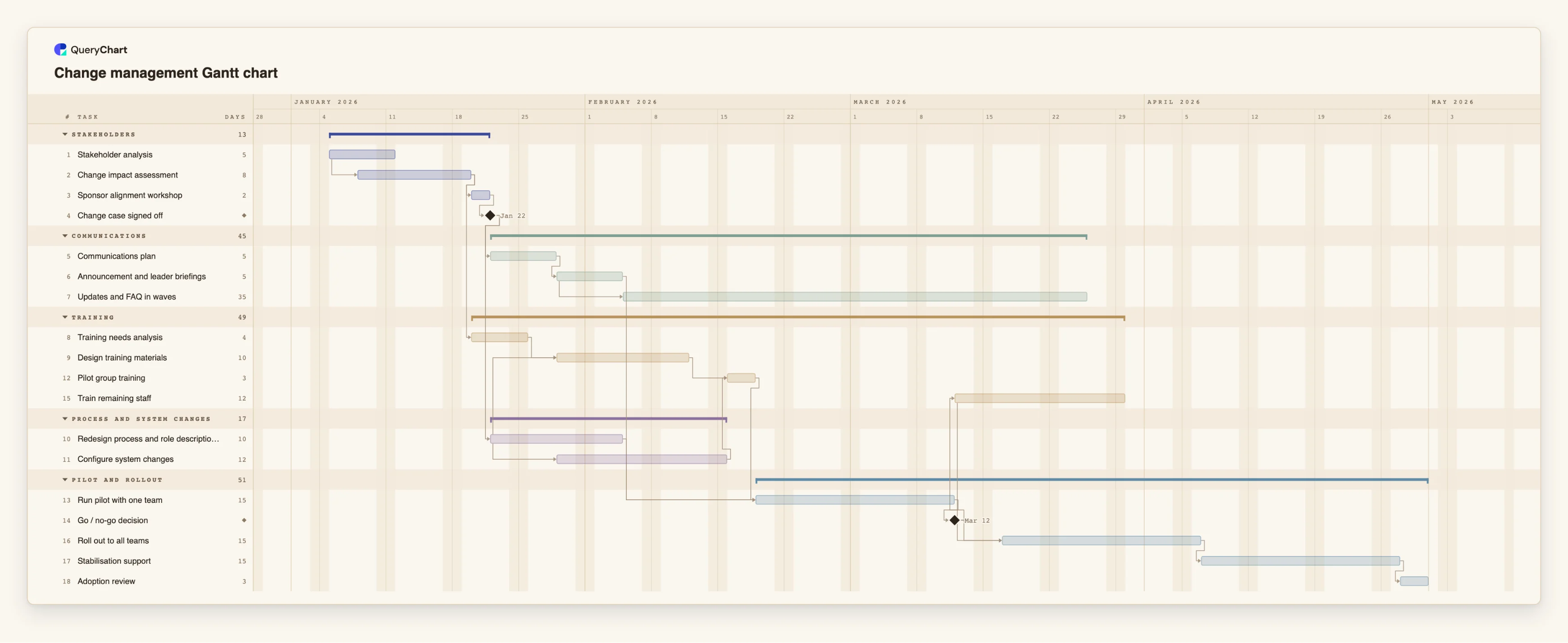
This guide does not follow a named change framework, and it makes no claims about which approach works best. You can use the vocabulary of whatever framework your organisation uses for the task names. The example is the change management template, built up in four stages. Open the spreadsheet panel to see the table behind the bars.
A change plan with five workstreams, built stage by stage
Eighteen tasks in five groups. Open the spreadsheet panel to see the rows behind each stage.
Understand who is affected, then sign off the case
"Stakeholder analysis" takes 5 working days and "Change impact assessment" starts 3 days into it, so they overlap. "Sponsor alignment workshop" follows the assessment, and "Change case signed off" has a length of 0, which makes it a milestone.
Fan out into communications, training and process work
"Communications plan" and "Redesign process and role descriptions" both wait for "Change case signed off". "Configure system changes" starts 5 days into the redesign, and "Design training materials" does too, once "Training needs analysis" is done. "Updates and FAQ in waves" starts 5 days into "Announcement and leader briefings" and runs for 35 days.
Join the workstreams at a pilot
"Pilot group training" waits for the training materials and the system changes. "Run pilot with one team" waits for that training, for "Redesign process and role descriptions" and for "Announcement and leader briefings". "Go / no-go decision" is a milestone after it.
Train, roll out and review adoption
After the go / no-go, "Train remaining staff" takes 12 working days and "Roll out to all teams" starts 3 days into it. "Stabilisation support" lasts 15 days and "Adoption review" takes 3, a place in the plan to look at evidence you have gathered elsewhere.
How it works
Write down the change and who it touches
Start with the stakeholders and the impact. Add tasks for the analysis and the impact assessment, give them owners in People, and link the second to the first with a start-to-start dependency, for example 1SS+3, so they overlap.
Add a milestone for the signed-off case
Create a task of length 0 for the decision that releases the rest of the plan, and make the communications and process tasks depend on it. If the sponsor changes scope later, the effect on dates shows at once.
Give each workstream a group
Set Group to Communications, Training, Process and system changes, and so on. The chart draws each as a phase band, and each owner can read their own part.
Link the workstreams where they truly depend on each other
Training design cannot finish before the process is defined, but it can start while the process is being drawn up. Use start-to-start with a lag for that, and finish-to-start where one thing really must be complete first.
Put a pilot and a go / no-go before the rollout
Make the pilot depend on trained pilot staff, the new process and the first briefings, and add a milestone after it. The rollout tasks wait for that milestone, so a delay in any of those joins moves the rollout.
Keep the support period in the plan
Add tasks for support after rollout and for a review of how the change is being used. Enter progress as the work happens. Share the chart with the sponsor as a link or export it as a PDF.
Mistakes to avoid
Treating the communications as one announcement
A single "announce" task hides the real work, which is briefing leaders first, announcing, then repeating and answering questions over weeks. Several tasks, some overlapping, show what is actually being asked of the communications owner.
Planning training as if the process were finished
If the process is still changing, training content written early will be wrong. Make training design depend on, or start partway through, the process work, and keep the dependency on the chart where everyone can see it.
Filling in every duration with false precision
Durations in whole working days are estimates, and the chart does not know about holidays or absences, since it uses a Monday to Friday week. Check the estimates with the people doing the work, and treat the end date as a forecast.
Expecting the chart to show adoption
The chart records tasks and progress against them. It does not say whether people use the new way of working. Gather that evidence elsewhere and use the review task to act on it.
Plan a change
Open the change management plan as your own chart, rename the tasks for your change and set the durations.
Related guides
Frequently asked questions
Does QueryChart follow a particular change management model?
No. The template is a generic sequence of stakeholder, communications, training, process and rollout tasks. You can rename tasks to match the framework your organisation uses.
Where do I put a communication plan or a training plan?
As groups in the same chart, each with its tasks and dependencies on the others. For a plan that is mostly one of them, start from a more specific template and bring in the others.
Can I track whether the change has been adopted?
Not in the chart. It tracks tasks and progress. You can add a review task for adoption, and hold the evidence in whatever tools you already use.
Should the plan have fixed dates?
Only where a date is truly fixed, such as a go-live date or an event. Otherwise leave starts unset and let the dependencies calculate the dates, so a delay moves everything that depends on it. A fixed start that conflicts with a dependency is flagged.
Can the sponsor see the plan without editing it?
Yes. Share the chart as a link with view access, or export it as a vector PDF, PNG or SVG.