How to turn CAPA and audit findings into a dated action plan
Turn corrective action requests and audit findings into a dated action plan: containment, root cause, approval, implementation and an effectiveness check, laid out on a Gantt chart with real dependencies.
A finding is not a plan until each action has an owner, a length and something it waits for. This guide takes a CAPA or an audit finding and turns it into a dated action plan you can show to the person who raised it.
The short version
- Order actions by what they wait for: containment, evidence, approval, implementation, verification.
- Run containment beside the investigation, not after it.
- Gate implementation on an approved plan so changes show up as changes to the dates.
- Plan the effectiveness check as a waiting period with its own length, not as the last task.
- A dated plan schedules the work; it does not prove the actions worked or make anyone compliant.
From a finding to a schedule
Most action plans start as a list: the finding, the action, an owner and a due date. The list is easy to write and hard to defend, because the dates were set one at a time. Nobody can see that the training is due before the procedure it teaches, or that the effectiveness check is due before the actions have had time to work. The usual result is a string of extended due dates.
The method here is to sort the actions by what they wait for, not by who raised them. Containment protects the customer and waits for nothing. Root cause waits for evidence. Corrective and preventive actions wait for an approved plan. The effectiveness check waits for the actions and then for a period in which the problem could have come back. Once those relationships are written down as dependencies, the dates are calculated and the earliest honest closure date is visible.
A dated plan is a schedule of commitments. It does not show that the actions work, and finishing every task on time does not make a process compliant with a standard or satisfy an auditor on its own. What proves effectiveness is the evidence you collect in the check, which is why that step is planned as its own task with its own window rather than assumed at the end.
The example below builds the CAPA action plan template in stages. If you want the process rather than the schedule, with the decisions about severity and escalation drawn out, use the CAPA flowchart at /templates/capa-process and the CAPA workflow at /templates/capa-workflow.
A CAPA action plan, built in stages
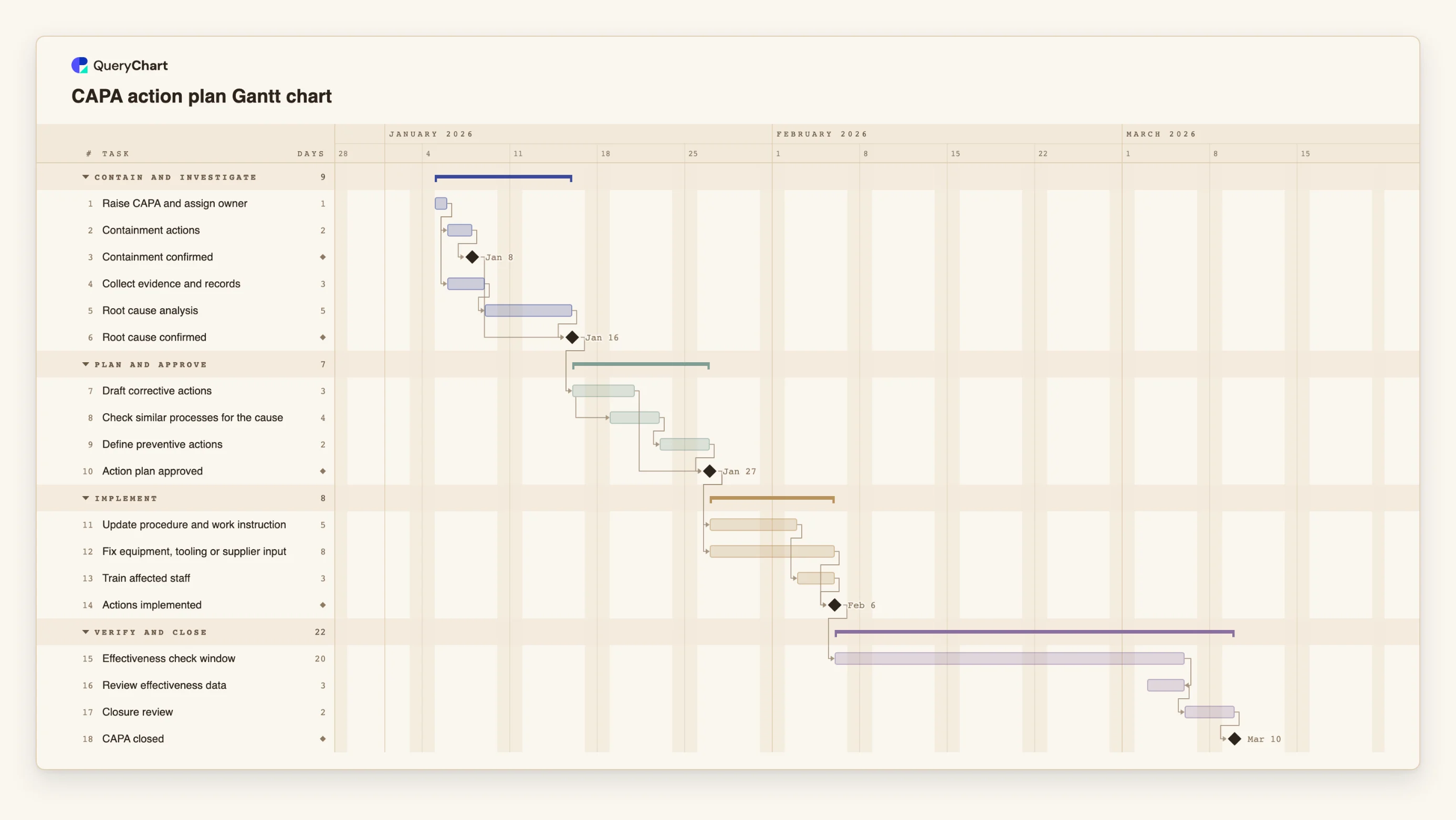
Eighteen tasks in four phases. Durations are illustrative; set your own. Open the spreadsheet panel to see the rows behind each stage.
Containment and evidence start together
"Containment actions" (2 working days) and "Collect evidence and records" (3) both follow "Raise CAPA and assign owner". "Root cause confirmed" is a milestone that waits for "Root cause analysis" and for "Containment confirmed".
Corrective and preventive actions, then approval
"Draft corrective actions" takes 3 days. "Check similar processes for the cause" starts one working day after it starts, and "Define preventive actions" follows it. "Action plan approved" waits for both the draft and the preventive actions.
Implementation in two streams
"Update procedure and work instruction" (5 days) is followed by "Train affected staff" (3), while "Fix equipment, tooling or supplier input" (8) runs beside them. "Actions implemented" waits for the fix and the training.
A real window, then closure
"Effectiveness check window" is 20 working days and is waiting time, not effort. "Review effectiveness data" is finish-to-finish with it, so it ends when the window ends. "Closure review" and the "CAPA closed" milestone follow.
How it works
List the actions and sort them by what they wait for
Write each action from the finding as its own task. Then ask of each one: what must be true before it can start? Containment: nothing. Corrective actions: an approved plan. Training: the changed procedure.
Separate containment from the cure
Give containment its own task and milestone. It follows the raising of the CAPA and runs beside the investigation. Link the root cause milestone to it if you do not want to call the cause understood while the problem is still spreading.
Enter lengths and dependencies
Give every task a length in working days and fill in Depends on. Use start-to-start for work that can begin when another starts, for example 8SS+1, and a milestone of length 0 for approvals.
Plan the effectiveness check as a window
Add a task for the waiting period and set its length from how often the problem could recur. Put the review of the data in a separate task that finishes with the window (FF), and write the criteria for effectiveness in the notes.
Group by finding or by phase and add owners
For a single CAPA, group by phase. For an audit with several findings, group by finding so each one has its own band, and put the responsible person in People.
Share it and keep progress current
Share the chart with the owners, update progress as work is done, and export a PDF when you need a copy for the CAPA record or for the auditor.
Mistakes to avoid
Closing on the date of the last action
If the effectiveness check starts the day the last action is done, there is no time for the problem to recur or for evidence to exist. Plan a window and give it a length that fits how often the problem happens.
Dating the plan before it is approved
Dates for implementation are only commitments once the plan is approved. Keep the approval milestone in the chart so a change in the plan moves the dates and does not get fixed by editing due dates.
Treating an on-time plan as an effective one
A chart that shows every task finished on time says the work was done. It does not say the cause was the real cause, or that the fix worked. Keep the evidence in your quality records and refer to it in the task notes.
Using the tool as a baseline
QueryChart does not keep an original plan to compare the current one with. If you need to show how the dates changed, export a PDF before you change them.
Open the CAPA Gantt chart
Open the CAPA action plan template, change the durations to yours and see the closure date move.
Related guides
Frequently asked questions
How do I turn an audit report into an action plan?
Make each finding a group, put its actions in as tasks with a length in working days, and link them to the approval and the verification. Paste a table of findings and owners into the sheet if you already have one.
Does the plan have to show root cause analysis?
It should if your process requires one, because the corrective actions depend on it. Keep the method, such as 5 Whys or a fishbone, in the task notes and the output in your quality records.
Can I use dates the auditor gave me?
Yes. Give a task a fixed Start where a date is genuinely fixed. The chart flags a fixed start that conflicts with a dependency, which shows early that the date cannot be met.
Can I see which action sets the closure date?
Yes. Switch on the critical path in the View menu to light the chain of tasks that decides the finish date. A waiting period such as the effectiveness window is usually on it.
Where is the process behind the plan?
In the flowchart templates. The CAPA process at /templates/capa-process draws the decisions, and the audit processes at /templates/internal-audit-process and /templates/audit-checklist-workflow cover the audit side.