Implementation plan timeline: a Gantt chart for ERP, CRM and software rollouts
Build an implementation timeline as a Gantt chart: design sign-off, configuration, data migration, integrations, testing, training, cutover and hypercare, with a readiness review as the gate to go live.
A business software rollout has one date everyone remembers: go-live. A Gantt chart shows what has to be true by then, and which streams can run in parallel until it is.
The short version
- Use a milestone for design sign-off and a milestone for the go-live readiness review.
- Let configuration, data and integration streams run in parallel between those two gates.
- Use start-to-start dependencies with a lag for work that can begin before its predecessor finishes.
- Make go-live depend on the readiness review, so the cutover cannot be scheduled before the decision.
- Include hypercare and handover so the plan ends when support takes over, not at go-live.
What an implementation timeline has to show
ERP, CRM and other business system rollouts are made of a few streams that run mostly in parallel: configuring the system, preparing and migrating data, building integrations, and preparing people. They only join at defined points, such as testing and the go-live decision. A good timeline makes those joins visible, because the join is where a late stream delays everything else.
The structure that works is a short run of gates. Requirements lead to a signed-off design, which releases the configuration, data and integration streams. Their output meets in system integration testing, then user acceptance testing, then a go-live readiness review. After that comes the cutover, the final data migration and a period of hypercare. The sign-off and the readiness review are zero-length milestones: they are decisions, not work, and the chart should show who is waiting for them.
Not every stream needs to wait for the previous one to finish. Data migration trials can start once configuration is half done, and training materials can be written while the system is still being configured. Start-to-start dependencies with a lag express exactly that. They shorten the plan honestly, as long as you name the lag in the dependency rather than quietly overlapping bars.
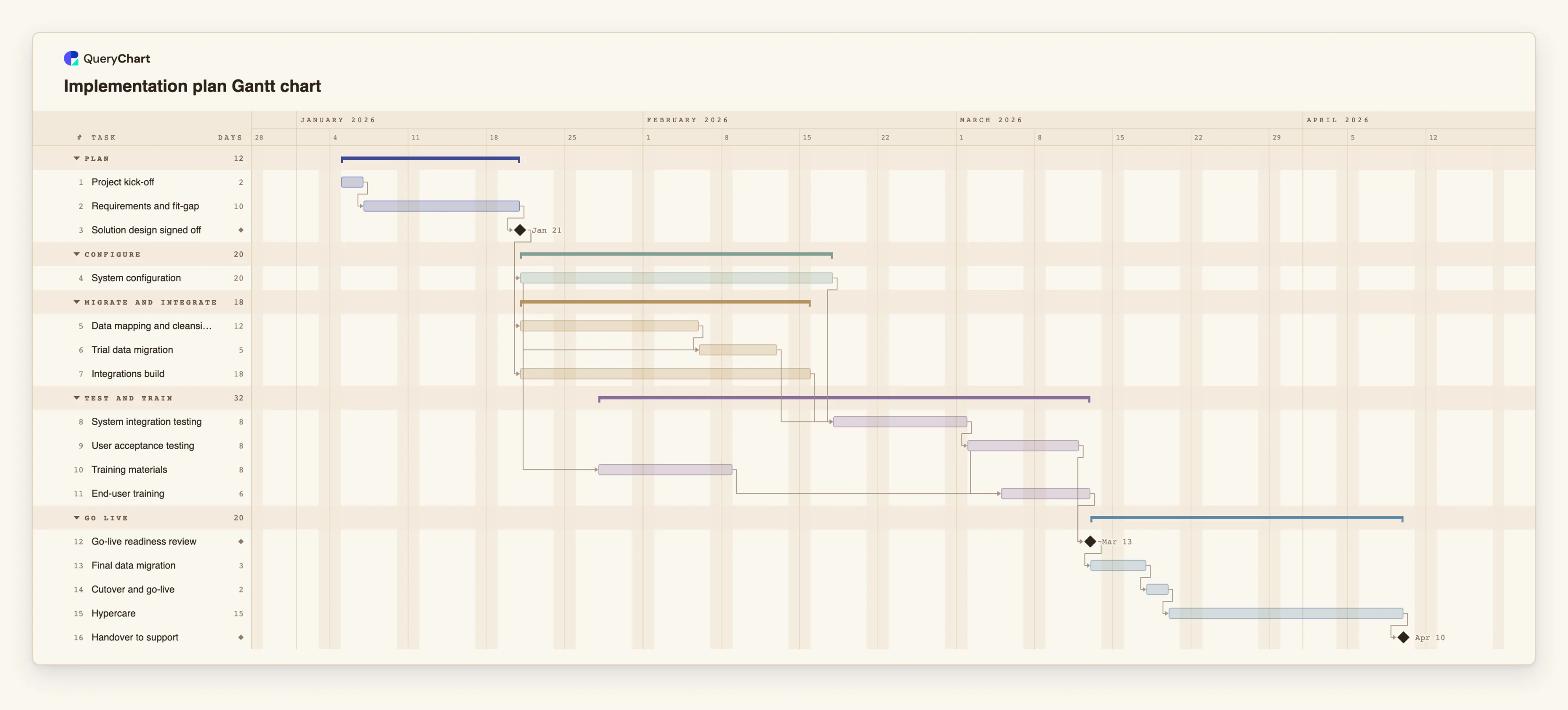
The example below is a complete implementation plan with sixteen tasks. Open the spreadsheet panel to see the dependencies, including the start-to-start links.
A system implementation plan from kick-off to handover
Sixteen tasks and three milestones. Open the spreadsheet panel to see the dependencies behind each stage.
Kick-off, requirements and the design gate
"Project kick-off" takes 2 working days and "Requirements and fit-gap" 10. "Solution design signed off" has a length of 0, so it is a milestone, and configuration, data mapping and the integrations build all wait for it.
Parallel streams into testing
"System configuration" takes 20 days, "Data mapping and cleansing" 12 and "Integrations build" 18. "Trial data migration" starts 10 days after configuration starts, and "System integration testing" waits for configuration, the trial migration and the integrations before "User acceptance testing" follows.
Training overlaps the build and testing
"Training materials" is linked start-to-start to configuration with a lag of 5 days. "End-user training" waits for the materials and starts 3 days after "User acceptance testing" starts. "Go-live readiness review" is a milestone that waits for both testing and training.
Cutover, hypercare and handover
"Final data migration" (3 days) and "Cutover and go-live" (2 days) cannot start before the readiness review. "Hypercare" runs for 15 days, and "Handover to support" is a milestone that closes the plan.
How it works
Start with the gates, not the tasks
Decide where the project needs a decision: design sign-off and the go-live readiness review are the usual two. Add them as tasks with a duration of 0, which draws them as milestones.
Add the work between the gates
List requirements before the first gate. Between the gates, list configuration, data mapping, integrations, training materials and the testing phases, each with an estimated length in working days.
Link the streams
In Depends on, point configuration, data and integrations at the design sign-off. Point system integration testing at all three, so it shows the longest stream as the one that sets the date.
Overlap where the work really overlaps
Use SS and a lag for work that can start early, for example 4SS+10 for a task that starts 10 working days after task 4 starts. Check each one with the person who owns the work.
Add the cutover and the aftercare
Make the final data migration and go-live depend on the readiness review, then add hypercare and a handover milestone. The plan is finished when support owns the system, not when it goes live.
Turn on the critical path and share it
View, Critical path lights the chain that sets the handover date. Share the chart as a link, or export a PDF for the steering group.
Mistakes to avoid
Treating data migration as one task
A trial migration finds problems that the final one must not. Draw both, and make the final one depend on the readiness review.
Scheduling training last
Training that begins after testing leaves no time to fix what the trainees find. Overlap it with a start-to-start link, as in the example, and make the go-live decision depend on it.
Leaving the go-live date to chance
If go-live is fixed by a contract or a financial year-end, pin only that start and look at the flagged conflict. Pinning every task hides the real problem.
Expecting resource or cost tracking
QueryChart records who owns a task, but it does not warn about overload, track cost or compare against a baseline. Keep budget and capacity in the tools that handle them.
Plan your rollout
Open the implementation plan as your own chart, replace the tasks with your own and share the timeline with your steering group.
Related guides
Frequently asked questions
Is this suitable for ERP and CRM projects?
Yes. The structure is the same for any business system: design, configuration, data, integrations, testing, training and cutover. Replace the example's task names with yours.
How do I show that two tasks can overlap?
Use a start-to-start dependency with a lag in Depends on, for example 4SS+10. The task starts 10 working days after task 4 starts, whether or not task 4 has finished.
Can I group tasks by workstream?
Yes. Give tasks a group and they are drawn as bands with a summary bar, so configuration, data and training can each be a band.
Can I show who is responsible?
Yes, by adding people to each task. The chart does not check workloads or resolve clashes.
Can I import from Microsoft Project?
No. Microsoft Project files are not supported. You can copy rows from a spreadsheet and paste them into the sheet.