RFP timeline: how long each step takes and how to schedule the waits
How to build an RFP timeline as a Gantt chart: estimate each step, treat the supplier response period as a fixed wait, run evaluation in parallel and compare the finish date with the date you need a contract.
An RFP timeline is mostly a few long waits with short tasks around them. This guide shows how to estimate each step in working days, schedule the fixed waits and read the finish date from the plan.
The short version
- Give each wait its own task, and make the deadline a milestone that waits for it.
- Overlap work that really overlaps with start-to-start links and lags.
- Run technical and commercial evaluation in parallel and shortlist when both end.
- Estimate in whole working days (Monday to Friday); holidays are not modelled.
- The chart schedules; it does not know your procurement rules or minimum periods.
Why an RFP timeline is different from a task list
Most project tasks take as long as the team takes. In an RFP, the longest block belongs to the suppliers: once the document is sent, the response period runs at its own pace and cannot be shortened by working harder. The same is true of the question window and, to a smaller degree, of legal review and approvals. A timeline that lists these as ordinary tasks hides which dates you control and which you only set by choice.
The way to handle this in a Gantt chart is to give each wait its own task with a length in whole working days, and to mark the decisions between phases as milestones, tasks of length zero. Then the buyer's work becomes the short tasks around the waits: requirements, drafting, review before issue, and compliance checks, evaluation, negotiation and contract after the deadline. The chart calculates the dates from those lengths, so a change to the response period moves everything that follows.
Lengths are your own estimates, and the ones in the example are illustrative. Some organisations and public bodies are bound by rules that fix minimum periods for questions or responses. QueryChart does not know those rules and does not check them, so take the numbers from your own procedures and advice, and treat the chart as a schedule only. A timeline does not make a tender compliant. The example below builds the buyer's side of an RFP in stages.
The buyer's side of an RFP, stage by stage
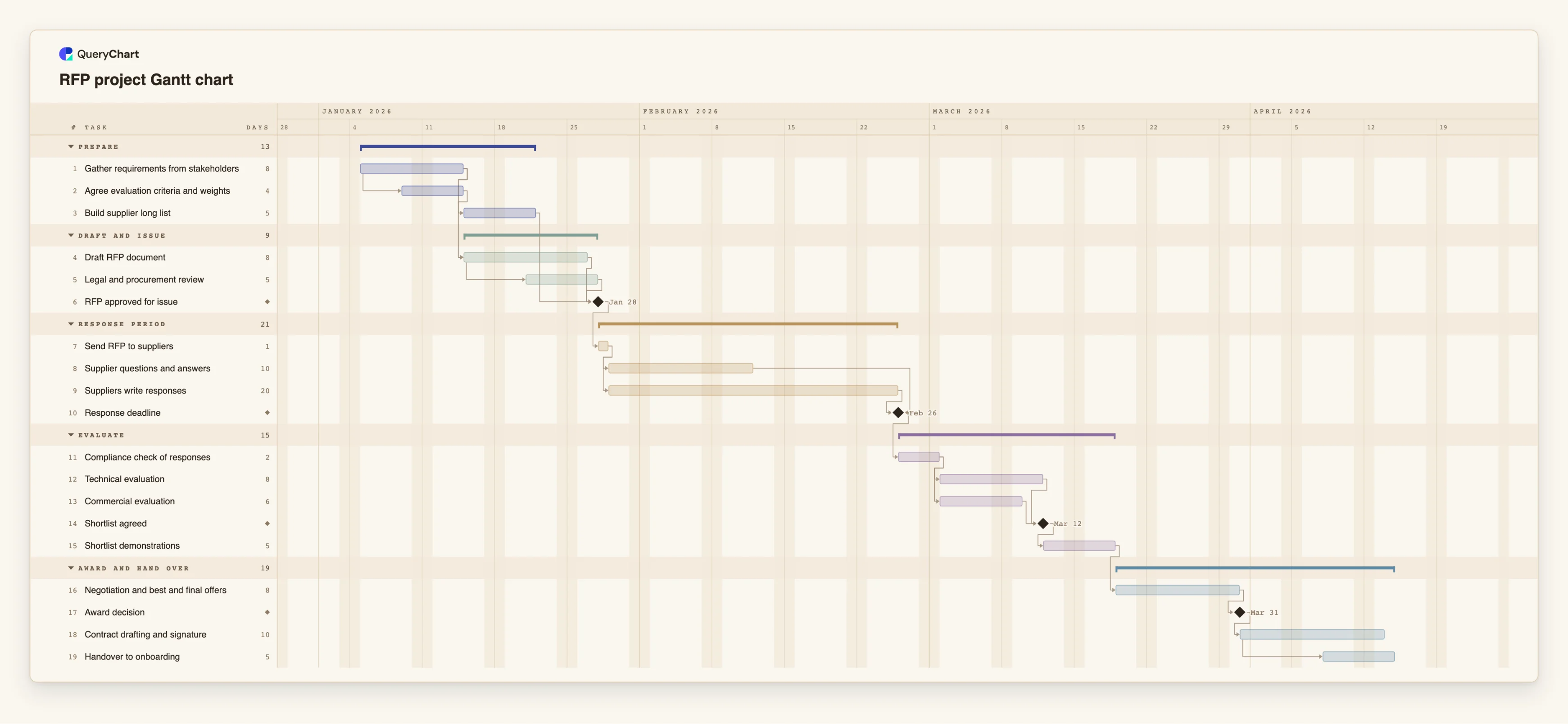
Nineteen tasks in five groups, from requirements to handover. Open the spreadsheet panel to see the rows behind each stage.
Preparation that overlaps
"Gather requirements from stakeholders" takes 8 working days. "Agree evaluation criteria and weights" starts 4 days into it, and "Legal and procurement review" starts 4 days into "Draft RFP document". The "RFP approved for issue" milestone waits for the review, the long list and the draft.
The fixed waits
"Send RFP to suppliers" takes 1 day. "Supplier questions and answers" (10 days) and "Suppliers write responses" (20 days) both start after it. "Response deadline" is a milestone that waits for the writing and is linked finish-to-finish to the questions, so answers cannot run past it.
Evaluation in parallel
After "Compliance check of responses" (2 days), "Technical evaluation" (8 days) and "Commercial evaluation" (6 days) start together. "Shortlist agreed" is a milestone that waits for both, and "Shortlist demonstrations" take 5 days.
Award, contract and handover
"Negotiation and best and final offers" takes 8 days and leads to the "Award decision" milestone. "Contract drafting and signature" takes 10 days, and "Handover to onboarding" starts 6 days into it.
How it works
Fix the date you need a contract
Decide when the supplier must be able to start. You can use it as a check at the end: if the chart's finish is later, something earlier has to be shorter, overlapped or cut.
List the buyer's tasks and the waits
Enter one row for each piece of work, and a separate row for each wait: the question window, the response period and any approval you do not control. Give each a length in working days.
Add dependencies
In Depends on, enter the number of the task each one waits for. Use a start-to-start link with a lag where work overlaps, for example 4SS+4, and a finish-to-finish link where something must not end after another.
Mark the decisions as milestones
Give approval to issue, the response deadline, the shortlist and the award a Duration of 0, so each is a diamond that later tasks wait for.
Group by phase and name owners
Use Group for preparation, response period, evaluation and award, and add the person responsible for each task in People.
Test the dates and share
Change the response period or the evaluation length and watch the award date move. Switch on the critical path in the View menu to see which tasks set the finish, then share the chart or export it.
Mistakes to avoid
Treating the response period as shrinkable
If the suppliers need a certain time, shortening it in the plan only moves the problem. Shorten what the buyer controls: drafting, review and evaluation.
Forgetting that evaluators have other jobs
Eight working days of evaluation on a chart does not say that the evaluators are free. QueryChart records who owns a task but does not check workload or availability.
Assuming the plan covers the rules
Minimum periods, approval thresholds and standstill requirements differ between organisations. The chart will schedule whatever lengths you type, so set them from your own rules.
Ignoring public holidays
Working days are Monday to Friday and holidays are not modelled. For a response period that spans a holiday, add the extra days to the duration.
Build an RFP timeline
Open the RFP project plan as your own chart, set the response period and evaluation lengths, and read the award date from the plan.
Related guides
Frequently asked questions
How long should an RFP take?
It depends on the scope, the number of suppliers and any rules that apply to you. Build the plan from your own estimates and compare the finish date with the date you need. The durations in the example are illustrative.
How do I schedule a fixed wait such as the response period?
Give it a task with a Duration in working days, and make the deadline a milestone that depends on it. Everything after the deadline then follows from that length.
Can the chart tell me the legal minimum period?
No. QueryChart does not know procurement rules and does not check periods. Take them from your own procedures or advisers and enter them as durations.
How do I show technical and commercial evaluation in parallel?
Make both tasks depend on the same earlier task, for example the compliance check, and let the shortlist milestone depend on both. The longer of the two sets the date.
Is there a template to start from?
Yes. The RFP project template at /templates/rfp-project-gantt contains the plan used in the example, and /templates/procurement-project-gantt-chart covers the stage before it.