RFP project Gantt chart template for a buyer-side tender
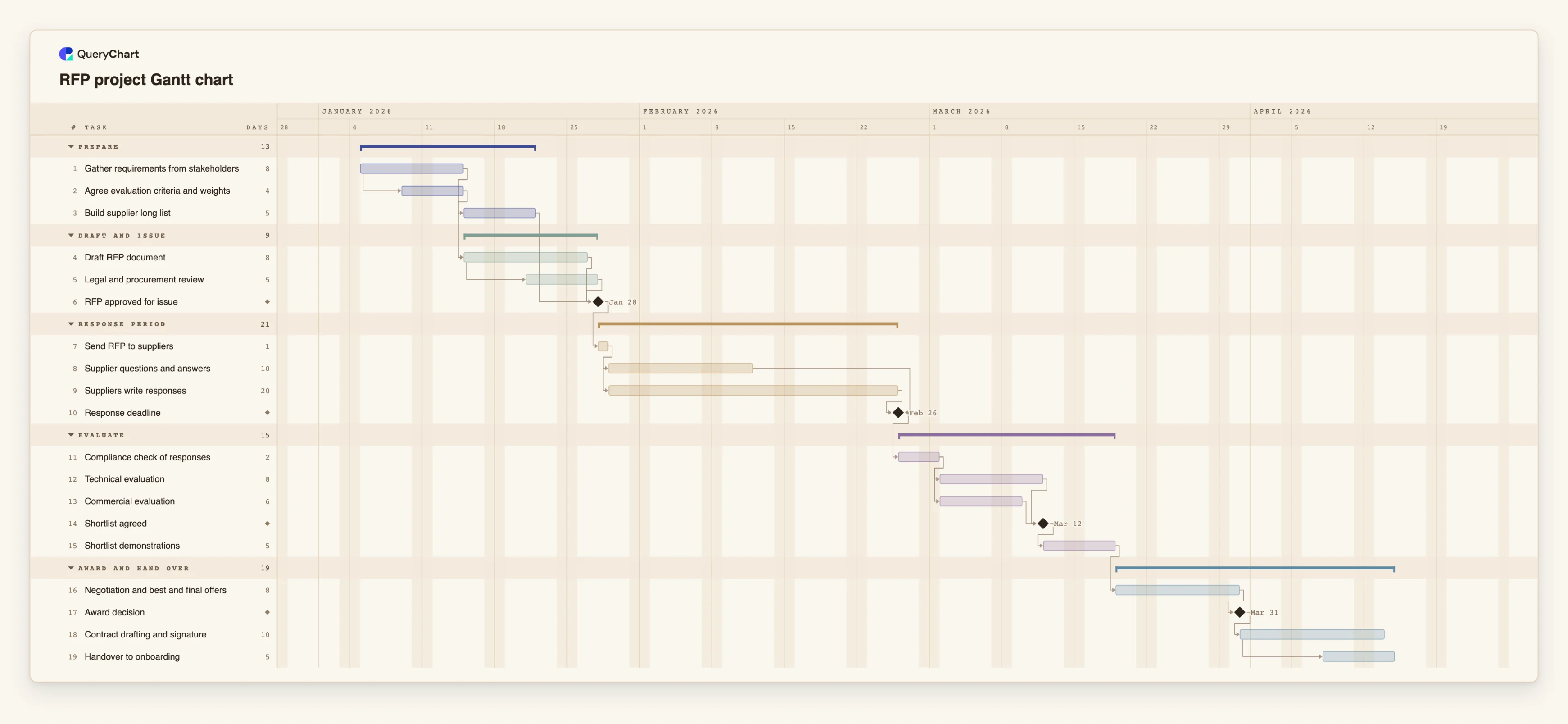
An editable RFP project Gantt chart for the buyer: requirements, drafting and legal review, issue, the supplier question window, a fixed response period, parallel evaluation, demos, negotiation, award and handover.
What the RFP project gantt chart template for a buyer-side tender process is
A request for proposals looks like a sequence, but a large part of its calendar belongs to other people. Once the RFP is sent, the buyer cannot make suppliers write faster, so the response period is a fixed wait, and the dates on either side of it are only as good as the length you choose for it. A schedule that makes the wait explicit lets you see how much preparation time you really have before the issue date and how much evaluation time you have after the deadline.
This template has five groups: Prepare, Draft and issue, Response period, Evaluate, and Award and hand over. It starts with "Gather requirements from stakeholders" (8 working days). "Agree evaluation criteria and weights" starts 4 days into it, because the weights are easier to agree once requirements are visible, and "Build supplier long list" follows the requirements. "Draft RFP document" waits for the criteria and the requirements, and "Legal and procurement review" starts 4 days into the draft, so reviewers read finished sections instead of waiting for the whole document. "RFP approved for issue" is a milestone that waits for the review, the long list and the draft.
After "Send RFP to suppliers" (1 day), two things start together: "Supplier questions and answers" (10 days) and "Suppliers write responses" (20 days). "Response deadline" is a milestone that waits for the writing and is linked finish-to-finish to the question window, so the window cannot end after the deadline. Then "Compliance check of responses" (2 days) leads into "Technical evaluation" (8 days) and "Commercial evaluation" (6 days), which run in parallel. "Shortlist agreed" waits for both, and "Shortlist demonstrations" (5 days), "Negotiation and best and final offers" (8 days) and "Award decision" follow. "Contract drafting and signature" takes 10 days, and "Handover to onboarding" starts 6 days into it so the supplier's onboarding team is not briefed after the signature.
All durations are illustrative. Some organisations are bound by procurement rules that fix minimum periods for questions or responses; this chart does not know about them, so set those lengths from your own rules and advice. For a version that starts earlier with the business case and market engagement, see /templates/procurement-project-gantt-chart. For the decisions and handoffs inside the RFP, see /templates/rfp-process.
For the decisions inside the tender itself, see the procurement tender process at /templates/procurement-tender-process, and for how suppliers are scored, the supplier selection process at /templates/supplier-selection-process.
What this flowchart covers
In this template
- Five groups, Prepare, Draft and issue, Response period, Evaluate and Award and hand over, with 19 tasks and four milestones: "RFP approved for issue", "Response deadline", "Shortlist agreed" and "Award decision".
- Overlapping preparation: "Agree evaluation criteria and weights" starts 4 days into "Gather requirements from stakeholders", and "Legal and procurement review" starts 4 days into "Draft RFP document".
- A fixed wait: "Suppliers write responses" takes 20 days and "Supplier questions and answers" 10, both starting after "Send RFP to suppliers", with "Response deadline" linked finish-to-finish to the question window.
- Parallel evaluation: "Technical evaluation" (8 days) and "Commercial evaluation" (6 days) both start after "Compliance check of responses", and "Shortlist agreed" waits for both.
- A late start on the next phase: "Handover to onboarding" starts 6 days into "Contract drafting and signature".
When to use this template
- You are the buyer running an RFP and need a calendar to agree with stakeholders, legal and the approver.
- You need to choose a response deadline and see what it does to evaluation and award dates.
- Evaluators ask how much time they have and you want to show where it comes from.
- You want a reusable skeleton for each tender, to adapt per category.
The plan, task by task
Every task in the chart with its length in working days and what it waits for. A dependency is a step number; SS is start-to-start, FF is finish-to-finish, and +n is a lag in working days.
| # | Task | Group | Working days | Depends on |
|---|---|---|---|---|
| 1 | Gather requirements from stakeholders | Prepare | 8 | |
| 2 | Agree evaluation criteria and weights | Prepare | 4 | 1SS+4 |
| 3 | Build supplier long list | Prepare | 5 | 1 |
| 4 | Draft RFP document | Draft and issue | 8 | 1, 2 |
| 5 | Legal and procurement review | Draft and issue | 5 | 4SS+4 |
| 6 | RFP approved for issue | Draft and issue | Milestone | 3, 4, 5 |
| 7 | Send RFP to suppliers | Response period | 1 | 6 |
| 8 | Supplier questions and answers | Response period | 10 | 7 |
| 9 | Suppliers write responses | Response period | 20 | 7 |
| 10 | Response deadline | Response period | Milestone | 8FF, 9 |
| 11 | Compliance check of responses | Evaluate | 2 | 10 |
| 12 | Technical evaluation | Evaluate | 8 | 11 |
| 13 | Commercial evaluation | Evaluate | 6 | 11 |
| 14 | Shortlist agreed | Evaluate | Milestone | 12, 13 |
| 15 | Shortlist demonstrations | Evaluate | 5 | 14 |
| 16 | Negotiation and best and final offers | Award and hand over | 8 | 15 |
| 17 | Award decision | Award and hand over | Milestone | 16 |
| 18 | Contract drafting and signature | Award and hand over | 10 | 17 |
| 19 | Handover to onboarding | Award and hand over | 5 | 18SS+6 |
How it works
Set the response period first
Decide how many working days suppliers need or must be given, and enter it as the Duration of "Suppliers write responses". Everything after the deadline depends on it.
Overlap criteria and requirements
Link "Agree evaluation criteria and weights" to "Gather requirements from stakeholders" with a start-to-start link and a lag, rather than waiting for requirements to be final.
Review the draft while it is being written
Start "Legal and procurement review" a few days into "Draft RFP document" so that sections are reviewed as they are finished.
Keep the question window inside the response period
Link "Supplier questions and answers" finish-to-finish to "Response deadline" so that answers cannot be planned after suppliers have to submit.
Evaluate in parallel, then shortlist
Give technical and commercial evaluation their own tasks with their own owners, and make "Shortlist agreed" wait for both.
Plan the handover before the signature
Start "Handover to onboarding" partway through contract drafting, with a start-to-start link, so delivery teams hear about the award early.
Frequently asked questions
How long does an RFP take?
It depends on the scope, the organisation and any rules that apply. In this template the illustrative plan has about 17 working days of preparation, a 20-day response period, then evaluation, demonstrations, negotiation and contract. Replace every duration with your own.
How do I schedule the supplier response period?
Give it a task with a Duration in working days and make the deadline a milestone that waits for it. If your rules fix a minimum period, use at least that.
Does this chart make my RFP compliant with procurement rules?
No. It is a schedule. It does not know your legal minimum periods or approval thresholds, and a timeline does not make a tender compliant.
How is it different from the procurement project template?
The procurement project chart at /templates/procurement-project-gantt-chart starts with the business case and market engagement. This one is centred on the RFP itself, with parallel evaluation, a fixed response wait and a handover.
Can several people work on it?
Yes. Share the chart with edit or view access, and add the owner of each task in the People column.