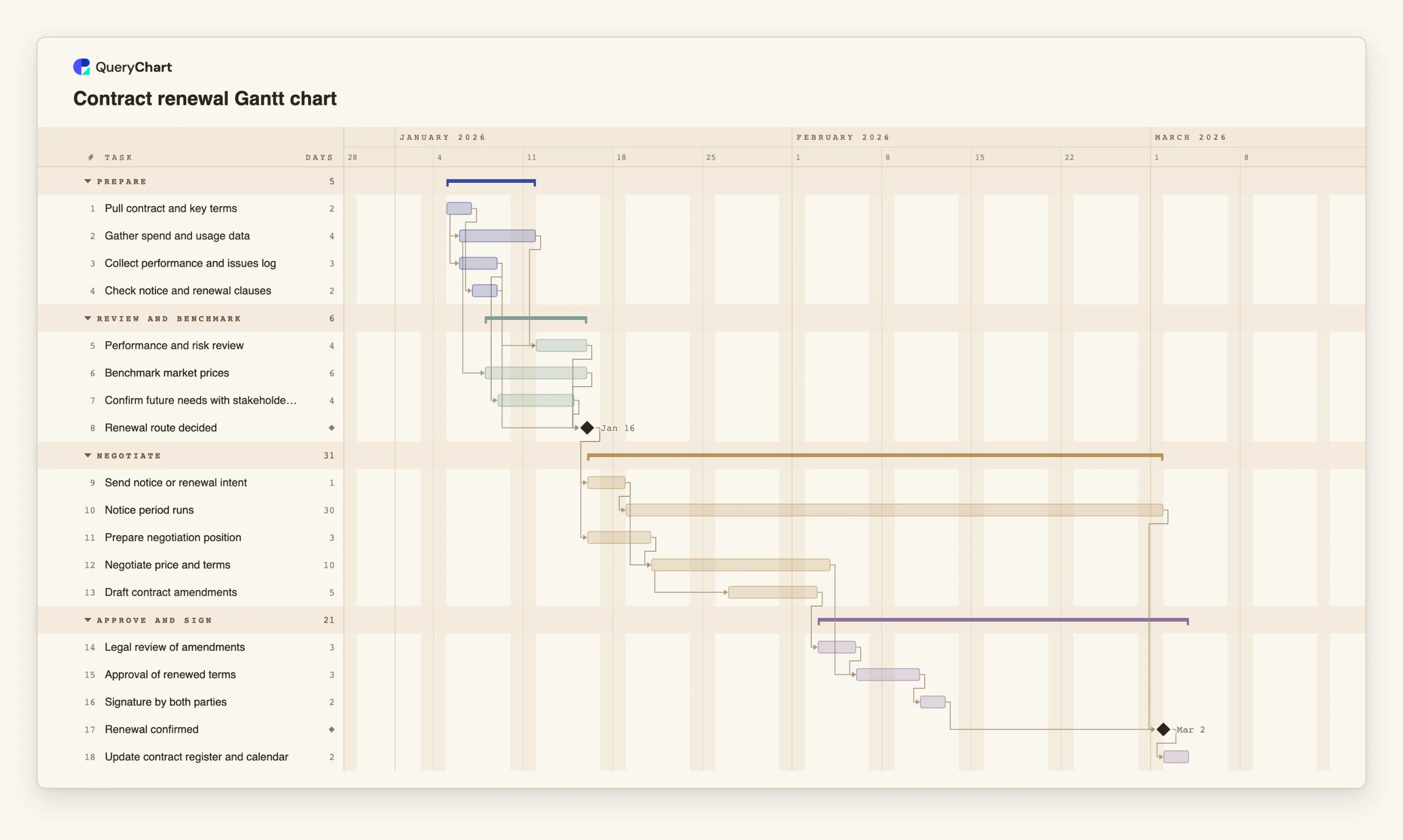
Contract renewal Gantt chart template with notice period
An editable contract renewal Gantt chart: review, benchmark, negotiate, approve and sign, with the notice period as a fixed wait, dependencies and milestones for the renewal route and confirmation.
What the contract renewal gantt chart template with notice period process is
Renewals go wrong quietly. The contract has an expiry date and, usually, a notice date before it, and nothing in between reminds anyone to start. By the time the review is done, the notice date is close and the negotiation is rushed, or the contract renews on its old terms. A timeline makes the waits visible: the review, the benchmark and the stakeholder input that must finish before a decision, and the notice period that runs whether or not the negotiation is finished.
This template has four groups: Prepare, Review and benchmark, Negotiate, and Approve and sign. "Pull contract and key terms" is the only starting task. Two tasks start one working day into it: "Gather spend and usage data" (4 working days) and "Collect performance and issues log" (3). "Check notice and renewal clauses" (2) follows "Pull contract and key terms". "Benchmark market prices" (6) starts two days into the spend data, and "Performance and risk review" and "Confirm future needs with stakeholders" wait for the performance log. The "Renewal route decided" milestone waits for the review, the benchmark, the stakeholder input and the clause check.
After the decision, "Send notice or renewal intent" (1) starts the notice period and, together with the position, the negotiation. "Notice period runs" (30) is waiting time, not effort: it takes the calendar time you enter, and nothing you do shortens it. "Prepare negotiation position" (3) follows the decision, and "Negotiate price and terms" (10) waits for the position and for the notice to be sent. "Draft contract amendments" (5) starts four days into the negotiation. "Legal review of amendments" (3), "Approval of renewed terms" (3) and "Signature by both parties" (2) follow. "Renewal confirmed" is a milestone that waits for the signature and for the end of the notice period. "Update contract register and calendar" closes the plan.
The notice period in the template is an illustration. The real period, and what must be sent and how, is in your contract and may be shaped by law that varies by place; this chart does not know it. Enter the period from your contract and take advice where you are unsure. Because scheduling runs forward from a start, compare the finish date with the date you need, and if the result is too late, shorten tasks or overlap more. For the process, see the supplier contract renewal process at /templates/supplier-contract-renewal-process and the contract renewal process at /templates/contract-renewal-process.
What this flowchart covers
In this template
- Four groups, Prepare, Review and benchmark, Negotiate and Approve and sign, with 18 tasks and two milestones: "Renewal route decided" and "Renewal confirmed".
- Evidence gathered in parallel: "Gather spend and usage data" and "Collect performance and issues log" both start one day into "Pull contract and key terms", and "Benchmark market prices" starts 2 days into the spend data.
- A decision that waits for four inputs: "Renewal route decided" follows "Performance and risk review", "Benchmark market prices", "Confirm future needs with stakeholders" and "Check notice and renewal clauses".
- A fixed wait: the 30-day "Notice period runs" starts after "Send notice or renewal intent", beside "Negotiate price and terms" (10 days), and "Renewal confirmed" waits for both it and the signature.
- An overlap in drafting: "Draft contract amendments" starts 4 days after "Negotiate price and terms" starts, then "Legal review of amendments", "Approval of renewed terms" and "Signature by both parties".
When to use this template
- A contract is coming up for renewal and you need to see when the review must start to leave time to negotiate.
- You are renewing several contracts and want a repeatable plan for each, with the notice period shown.
- A budget owner asks how long a renewal takes and you want to compare the finish date with the date you need.
- You want to show stakeholders why the review has to start earlier than the expiry date suggests.
The plan, task by task
Every task in the chart with its length in working days and what it waits for. A dependency is a step number; SS is start-to-start, FF is finish-to-finish, and +n is a lag in working days.
| # | Task | Group | Working days | Depends on |
|---|---|---|---|---|
| 1 | Pull contract and key terms | Prepare | 2 | |
| 2 | Gather spend and usage data | Prepare | 4 | 1SS+1 |
| 3 | Collect performance and issues log | Prepare | 3 | 1SS+1 |
| 4 | Check notice and renewal clauses | Prepare | 2 | 1 |
| 5 | Performance and risk review | Review and benchmark | 4 | 2, 3 |
| 6 | Benchmark market prices | Review and benchmark | 6 | 2SS+2 |
| 7 | Confirm future needs with stakeholders | Review and benchmark | 4 | 3 |
| 8 | Renewal route decided | Review and benchmark | Milestone | 4, 5, 6, 7 |
| 9 | Send notice or renewal intent | Negotiate | 1 | 8 |
| 10 | Notice period runs | Negotiate | 30 | 9 |
| 11 | Prepare negotiation position | Negotiate | 3 | 8 |
| 12 | Negotiate price and terms | Negotiate | 10 | 9, 11 |
| 13 | Draft contract amendments | Negotiate | 5 | 12SS+4 |
| 14 | Legal review of amendments | Approve and sign | 3 | 13 |
| 15 | Approval of renewed terms | Approve and sign | 3 | 12, 14 |
| 16 | Signature by both parties | Approve and sign | 2 | 15 |
| 17 | Renewal confirmed | Approve and sign | Milestone | 10, 16 |
| 18 | Update contract register and calendar | Approve and sign | 2 | 17 |
How it works
Enter the dates the contract fixes
Read the notice and renewal clauses and enter the notice period as the duration of "Notice period runs". If a renewal or notice date is genuinely fixed, give the task a fixed Start.
Run the evidence in parallel
Keep spend, performance, benchmark and stakeholder tasks overlapping, as in the template, and replace the durations with what your data sources need.
Make the decision a milestone
"Renewal route decided" waits for every input. Add an input, such as a security review, as a task that leads into it.
Let the notice period run beside the negotiation
"Send notice or renewal intent" starts both. If you do not want to send notice until you have an offer, change that dependency and see how the dates move.
Gate the signature on approval and legal review
Keep "Legal review of amendments" and "Approval of renewed terms" before "Signature by both parties", and add your own approvers as tasks if they need time.
Add owners, share and export
Put the contract owner and approvers in People, share the chart, and export a PDF or CSV for the contract file.
Frequently asked questions
How do I show a notice period in a Gantt chart?
As a task with the notice period as its duration, started by the task that sends the notice. It is waiting time, so nothing shortens it. Take the length from your contract, not from this example.
Does the chart know my legal notice period?
No. The 30 working days are illustrative. The real period is set by your contract and possibly by law where you are, so check both. A timeline only shows how the dates fall once you enter it.
What if the renewal date is fixed?
Give the signature task a fixed Start. If the tasks before it cannot be done by then, the chart flags the conflict and names the earliest date that works, which tells you early that the plan is too long.
Can I use this for a lease, an insurance policy or a software subscription?
Yes, with changes to the tasks. Keep the review, the decision, the notice period and the approval. For a supplier-specific process, see /templates/supplier-contract-renewal-process.