How to schedule a contract renewal around its notice period
Schedule a contract renewal on a Gantt chart: review, benchmark, negotiate, approve and sign, with the notice period as a fixed wait, so you can see how early the review has to start.
A renewal has two clocks: the work your team does and a notice period that runs on its own. This guide shows how to put both on one timeline so you can see how early the review has to begin.
The short version
- Schedule forward from the start of the review and compare the finish date with the date you need.
- Model the notice period as a fixed wait with the length from your contract.
- Run evidence gathering in parallel and make the renewal route a milestone.
- Let the negotiation run beside the notice period instead of after it.
- A schedule does not state your legal position; take the notice terms from the contract.
Two clocks on one timeline
Renewal reminders usually fire on the expiry date or a set number of days before it. That is later than it feels. The review, the benchmark and the stakeholder conversations all have to finish before you can decide anything, the negotiation has to fit in the time that is left, and the notice, if there is one, has its own period. A reminder that fires when the notice date is already close leaves no choice but to accept the old terms.
The way to see this is to schedule the work forward from the start of the review and compare the finish date with the date you need. Scheduling in QueryChart only runs forward from the start, so you do not subtract anything: you enter the lengths, read the date the renewal would be confirmed, and see how much later or earlier that is than your expiry or notice date. If it is too late, you shorten or overlap tasks, or you start the review earlier next time.
The notice period is the unusual part. It is not effort; it is a wait with a fixed length, and the renewal cannot be confirmed before it ends. Model it as a task whose length is the period, started by the task that sends the notice, and let the negotiation run beside it. The length comes from your contract. Notice requirements can also be affected by law, which varies by place, and this guide does not state any as fact. Take advice where you are unsure.
The example follows the contract renewal template. For the process and its decisions, see the supplier contract renewal process at /templates/supplier-contract-renewal-process and the contract renewal process at /templates/contract-renewal-process.
A contract renewal, built in stages
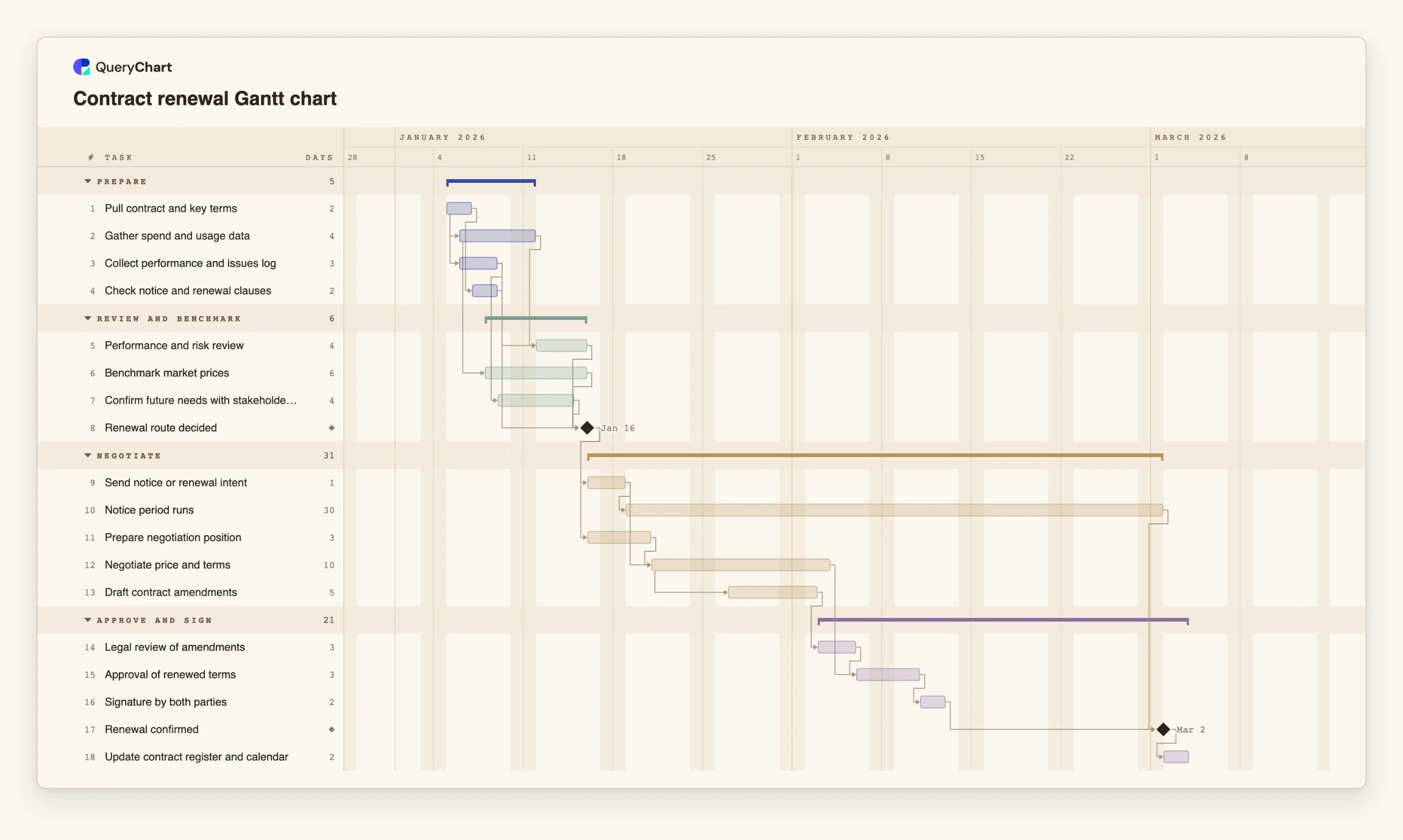
Eighteen tasks in four groups. Durations are illustrative; set your own. Open the spreadsheet panel to see the rows behind each stage.
Gather the evidence in parallel
"Gather spend and usage data" (4 working days) and "Collect performance and issues log" (3) both start one day into "Pull contract and key terms", and "Check notice and renewal clauses" (2) follows it.
Review, benchmark and decide
"Benchmark market prices" (6) starts 2 days into the spend data. "Performance and risk review" (4) and "Confirm future needs with stakeholders" (4) follow, and the milestone "Renewal route decided" waits for all of them and for the clause check.
Notice period and negotiation overlap
"Send notice or renewal intent" (1) starts "Notice period runs", a 30-day wait. "Negotiate price and terms" (10) waits for "Prepare negotiation position" and the notice, and "Draft contract amendments" (5) starts 4 days into it.
Approve, sign and confirm
"Legal review of amendments" (3), "Approval of renewed terms" (3) and "Signature by both parties" (2) run in order. "Renewal confirmed" is a milestone that waits for the signature and for "Notice period runs"; "Update contract register and calendar" follows.
How it works
Read the contract for its dates and obligations
Find the term, the renewal mechanism and the notice requirement. Enter the notice period as the length of its own task. If a date is truly fixed, give that task a fixed Start.
List the evidence you need before deciding
Spend, performance, market prices, future needs and the clause check. Give each a length and let them overlap with start-to-start links where one can begin while another is under way.
Add the decision as a milestone
Create a task of length 0 that depends on every input. Everything after it, including the notice, waits for it.
Add the notice period and the negotiation
Start the notice period from the task that sends the notice, and let negotiation and drafting run beside it. Link the confirmation to both the signature and the end of the notice period.
Compare the finish date with the date you need
Read the finish date from the chart. If it falls after the date you need, switch on the critical path in the View menu and shorten or overlap the tasks on it, or start the review earlier.
Share it and export a copy
Put the contract owner and approvers in People, share the chart, and export a PDF or CSV for the contract file.
Mistakes to avoid
Starting the review at the notice date
If the review starts when the notice is due, the decision is made without evidence. Put the review first in the plan and see what it does to the finish date.
Treating the notice period as work
No effort shortens it. Enter it as a wait with its contractual length, and do not count it among the tasks you can compress.
Using the example's lengths as legal fact
The 30 working days are illustrative. Take the real period and the way notice must be given from the contract, and from advice where law may apply.
Forgetting the weekend and holiday rules
QueryChart counts Monday to Friday and does not know public holidays, so a contract measured in calendar days or business days with holidays needs the length adjusted by hand.
Open the contract renewal Gantt chart
Open the contract renewal template, enter your notice period and see how early the review has to start.
Related guides
Frequently asked questions
How do I plan a renewal against the expiry date?
You do not need to. Enter the tasks and their lengths, read the finish date, and compare it with the date you need. If it is later, change lengths or overlaps, or start earlier.
Can I track several contract renewals together?
Yes. Add each contract as a group in one chart, or copy the chart per contract. Paste a list of contracts and tasks from a spreadsheet if you already have one.
What if we decide not to renew?
Change the tasks after the decision to an exit plan, such as transition and handover, and keep the notice period. For the offboarding process, see /templates/supplier-offboarding-process.
Does the chart remind me when notice is due?
No. It shows the dates the plan implies. A today line is drawn on the canvas, but reminders are outside the chart, so set your own in your calendar or contract system.