How to build a recovery plan for a project that is running late
Rebuild the plan of a late project on a Gantt chart: take stock of what is left, cut scope, find and shorten the longest chain of tasks and deliver the priority scope first. No baselines; compare dates instead.
A late project needs a new plan made from what remains, not an old plan with new dates. This guide takes you through taking stock, cutting scope, finding the longest chain and shortening it, using a Gantt chart that recalculates as you change it.
The short version
- Rebuild the plan from the work that is left; do not shift the old dates.
- Cut scope before you re-sequence, because scope is the lever that changes the length of the work.
- The longest chain of dependent tasks sets the finish date; shorten that chain, not the others.
- Deliver the priority scope first, and start the rest as soon as it can truly start.
- There are no baselines: export the old plan as a PDF and compare finish dates with the date you need.
Rebuild, do not re-date
The usual response to a late project is to move the dates. The old plan is opened, every remaining task is pushed out by the amount of the slip, and a new finish date is announced. It is then late again, because the plan still contains work that is done, work that is no longer wanted, and estimates that were wrong for the same reason as before.
A recovery plan is a different document. It starts from what is actually left, asks what the sponsor still wants, and only then sequences the work. The order matters. Take stock first, because you cannot cut what you cannot see. Cut scope next, because it is the one lever that changes the length of the work and not only its arrangement. Then find the longest chain of tasks that must run in order, since that chain sets the finish date, and shorten it by overlapping tasks and removing waiting.
QueryChart does not keep a baseline and cannot show you how late the project is against the original plan. What it does well here is recalculate: change a duration, a dependency or the scope and the finish date moves. Compare that finish date with the date you need. If the chart finishes later, more scope has to go or the chain has to shorten. Export a PDF of the old plan before you change it, if you need it for the record.
The example builds the recovery template in stages. All durations are illustrative. The template is at /templates/project-recovery-gantt; for the project as planned from scratch see /guides/project-management-gantt-chart.
A recovery plan, built in stages
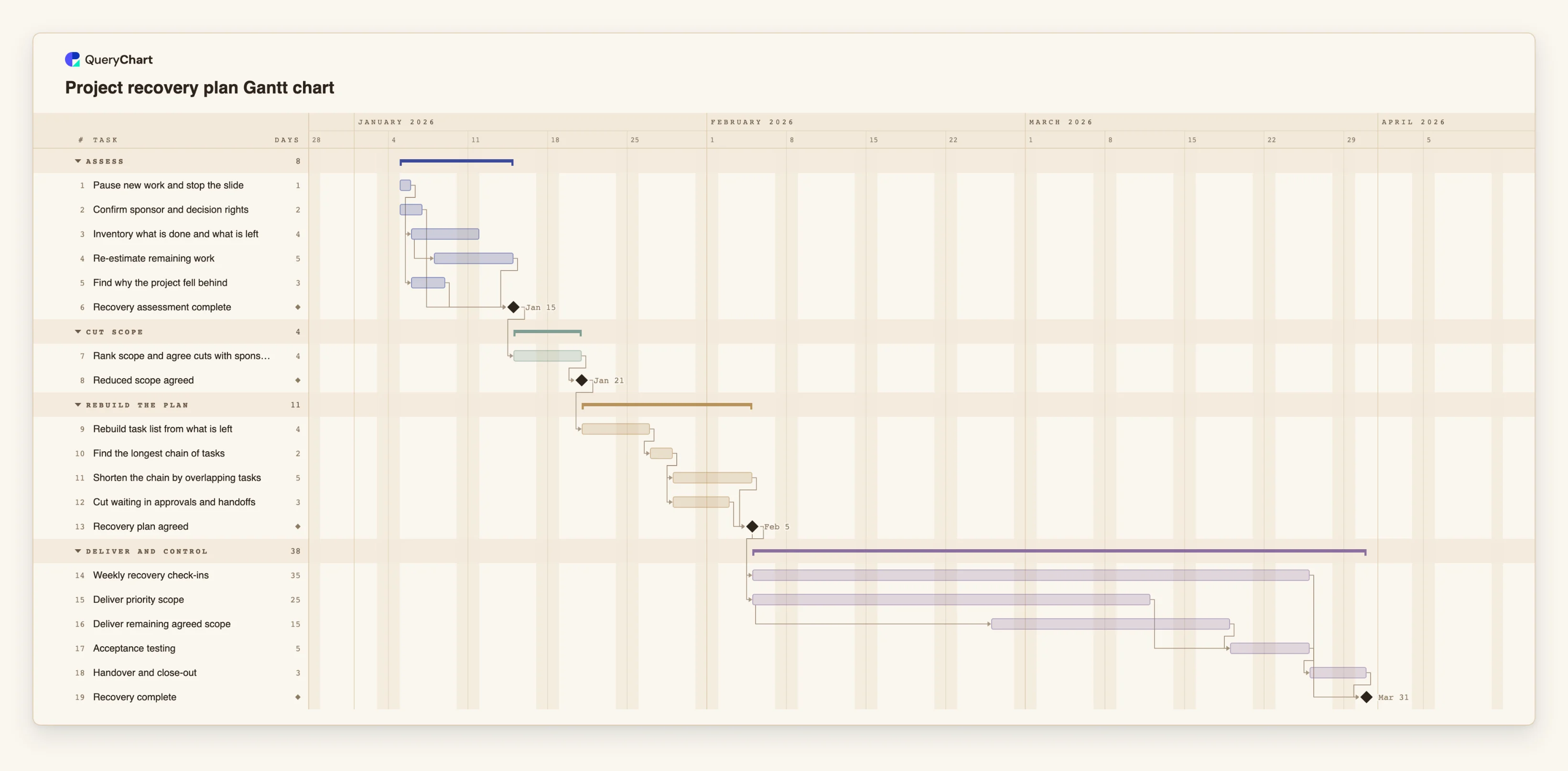
Nineteen tasks in four phases. Durations are illustrative; use your own estimates. Open the spreadsheet panel to see the rows behind each stage.
Assess what is left
"Pause new work and stop the slide" (1 working day) and "Confirm sponsor and decision rights" (2) start together. "Re-estimate remaining work" (5) starts two working days after "Inventory what is done and what is left" starts. "Recovery assessment complete" is a milestone that waits for the estimates, the cause and the decision rights.
Cut scope
"Rank scope and agree cuts with sponsor" takes 4 working days and follows "Recovery assessment complete". The "Reduced scope agreed" milestone follows it, and nothing in the rebuilt plan can start until it is passed.
Rebuild and shorten the chain
"Rebuild task list from what is left" (4) leads to "Find the longest chain of tasks" (2). Then "Shorten the chain by overlapping tasks" (5) and "Cut waiting in approvals and handoffs" (3) run together, and "Recovery plan agreed" waits for both.
Deliver the priority scope first
"Deliver priority scope" is 25 working days. "Deliver remaining agreed scope" (15) starts 15 days into it. "Weekly recovery check-ins" (35) start with the agreed plan. "Acceptance testing", "Handover and close-out" and the "Recovery complete" milestone close the plan.
How it works
Take stock before you plan
List what is done, what is partly done and what has not started. Re-estimate only what is left, in whole working days, and write the reason the project fell behind in the notes.
Decide who can say yes
Name the person who can approve scope cuts and a new date. Without them the plan cannot be agreed, so put it in the chart as a task or a milestone.
Rank the scope and cut
Order what remains by value. Agree with the sponsor what is removed, and remove those tasks from the chart. The cut is a decision, so keep a note of what was removed and why.
Switch on the critical path
Enter the remaining tasks and their dependencies, then switch on the critical path in the View menu. The chain it lights is the one that sets the finish date.
Shorten that chain
Look for tasks on the chain that can overlap with a start-to-start link, for example 12SS+2, tasks that can be split, and waiting that comes from approvals and handoffs. Change one thing at a time and see whether the date moves.
Compare and agree
Compare the finish date with the date you need. Share the chart for agreement, and export a PDF of the old plan and of the agreed one. Keep progress current from then on.
Mistakes to avoid
Re-dating the old plan
Moving every task by the size of the slip keeps all the old assumptions. Rebuild the task list from what is left.
Shortening tasks that are not on the chain
Only the longest chain sets the finish date. Speeding up other tasks changes nothing until the chain changes, so check the critical path after each edit.
Overlapping tasks that really depend on each other
A start-to-start link is honest only if the second task can start on partial output. Where it cannot, the dates look better and the delay comes back at the handoff.
Expecting a before-and-after view
There is no baseline in QueryChart and no planned versus actual. Export the old plan as a PDF and compare the finish dates yourself.
Open the project recovery Gantt chart
Open the recovery template, cut the scope and see how far shortening the critical chain moves the finish date.
Related guides
Frequently asked questions
How do I show a sponsor what the recovery means?
Share the chart and the PDF of the old plan, and point at the finish date, the removed scope and the critical path. Keep the explanation of the cuts in the task notes.
Can I keep the old tasks in the chart?
You can keep done tasks to show progress, with progress set to 100%. Remove tasks that have been cut, or the chart will schedule work nobody will do.
What if the sponsor will not cut scope?
Then the only lever left is the chain. Show how far shortening it gets and how far the finish date remains from the date needed, so the choice is visible.
Can I paste the old plan in?
Yes, from Excel, Sheets or a CSV. Copy the rows and paste them into the sheet. There is no file upload for Gantt charts yet, and no import from Microsoft Project.
Where is the governance side of this?
In the flowchart templates: /templates/project-governance-process, /templates/project-risk-management-process and /templates/project-change-request-process.