How to plan a consulting project on a Gantt chart with client waits
Plan a consulting engagement on a Gantt chart: onboarding, kick-off, discovery, client review waits, workshops, deliverable acceptance and a final readout, with the client-owned tasks shown as dependencies.
Half of a consulting timeline belongs to the client. This guide shows how to plan an engagement so the client's data, reviews and acceptance sit in the schedule as tasks, and the readout date comes from them.
The short version
- Give client-owned work its own tasks, with durations agreed at kick-off.
- Start analysis and drafting on partial inputs with start-to-start links.
- Gate delivery on a milestone for agreed findings.
- Put fixed client dates, such as a booked readout, in as fixed starts.
- A Gantt chart shows timing, not scope, fees or the contract.
Show the waits you do not control
Most consulting plans list the consultants' activities and then add a delivery date. The date then looks like a commitment about the consultants' speed. In practice it depends on when the data arrives, how quickly the client reviews findings and the draft, and when decision-makers are in the same room. Those waits are the usual reason an engagement slips, and they are invisible if they are not in the plan.
The method is to give every client-owned step a task, a duration and an owner. 'Client supplies data and access', 'Client review of findings' and 'Client review of draft' become rows, not assumptions in a footnote. Link the next piece of work to each one, and the schedule moves when the client's wait changes. Agree the lengths at kick-off, put them in the contract or the statement of work if you can, and use the chart in the conversation when one runs over.
The second idea is to start work on partial inputs. Analysis does not need every interview done, and a draft does not need every workshop finished. Start-to-start links with a short lag express that without cutting the durations. Keep the gates, though. Nothing in delivery should start before the findings are agreed, and the final readout should depend on an accepted deliverable.
This guide covers a single engagement. Onboarding a new client, with access, data requests and a kick-off, is the first phase of the example rather than a separate plan. For the surrounding process see /templates/it-consulting-project-lifecycle, and for governance see /templates/project-governance-process. For the general method see /guides/project-management-gantt-chart.
A consulting engagement, built in stages
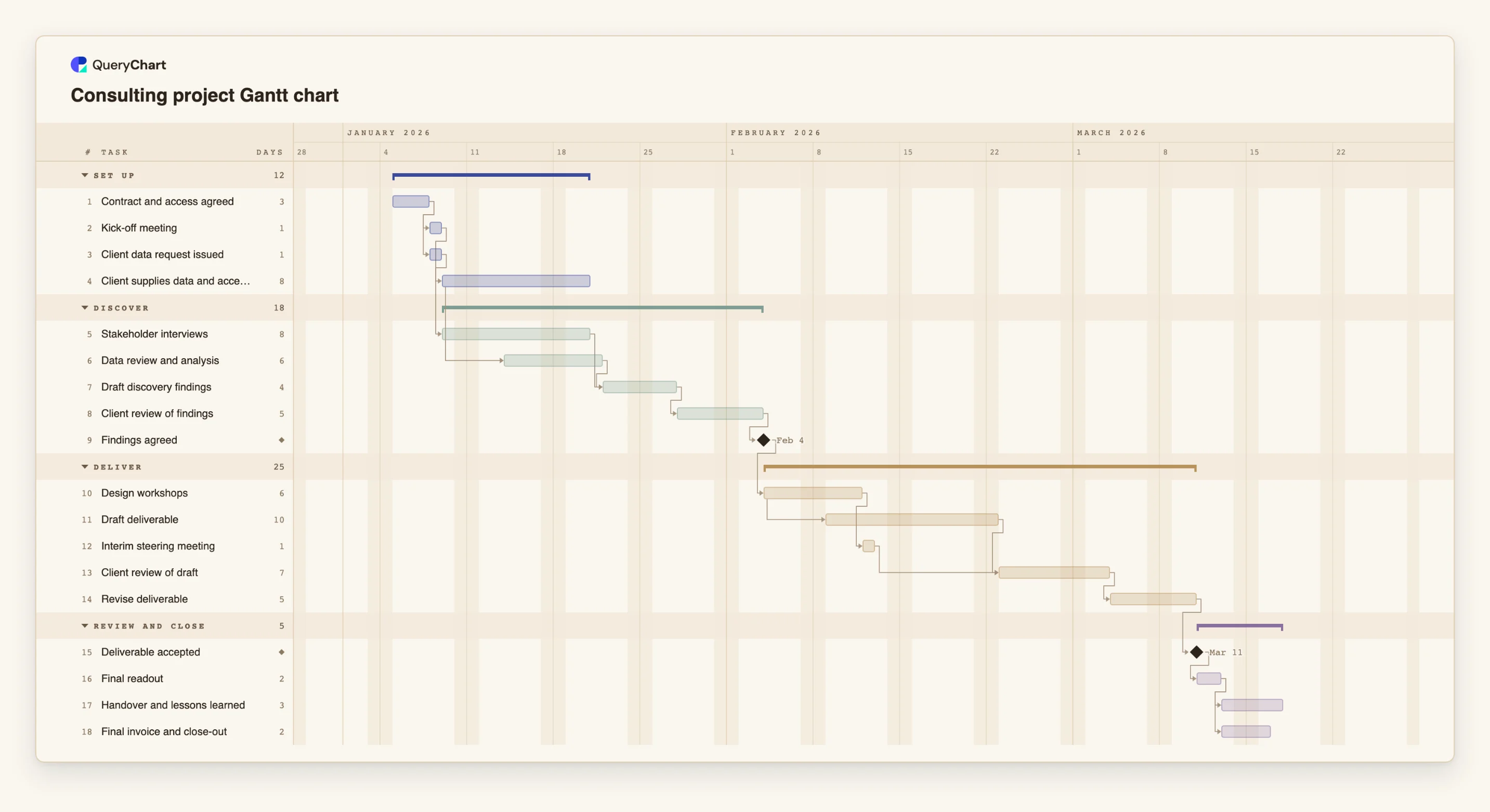
Eighteen tasks in four phases. Durations are illustrative; set your own. Open the spreadsheet panel to see the rows behind each stage.
Onboarding the client
"Contract and access agreed" (3 working days) is the only starting task. "Kick-off meeting" and "Client data request issued" both follow it, and "Client supplies data and access" takes 8 days of the client's time.
Discovery and the first client wait
"Stakeholder interviews" (8 days) follow the kick-off. "Data review and analysis" starts three working days after the interviews and the data supply start. "Client review of findings" is 5 days of waiting before the "Findings agreed" milestone.
Delivery with a second wait
"Design workshops" (6 days) follow "Findings agreed". "Draft deliverable" (10) starts three working days after the workshops start, and "Client review of draft" (7) waits for it and for "Interim steering meeting". "Revise deliverable" follows.
Acceptance, readout, close
"Deliverable accepted" is a milestone. "Final readout" (2 days) follows it, and "Handover and lessons learned" and "Final invoice and close-out" both follow the readout.
How it works
List what you need from the client and when
Write each input as a task with the client contact in People: access, data, review of findings, review of the draft, acceptance. Give each a duration you have agreed.
Link your work to those waits
Make analysis depend on the data task and findings on the interviews and analysis. Where work can begin early, use a start-to-start link such as 4SS+3.
Add a milestone for agreed findings
Make delivery depend on it. If the client has not agreed, the chart shows the delivery tasks moving, not you running late.
Fix the dates the client controls
If the readout or a steering meeting is already booked, give that task a fixed Start. The chart flags it if earlier work cannot meet that date.
Compare the finish date with the date promised
Switch on the critical path from the View menu. If the finish date is later than the date you need, shorten a review wait by agreement, not by editing the number.
Share it at kick-off and update as you go
Share the chart with the client so they can see their own tasks, update progress weekly and export a PDF for the steering pack.
Mistakes to avoid
Hiding client time inside your own tasks
If 'analysis' includes the week spent waiting for data, nobody sees the wait. Give it its own task and an owner.
Unagreed review lengths
A review with no agreed length takes as long as it takes. Agree 5 or 7 working days, or whatever fits the client, at kick-off, and record it in the task notes.
Starting delivery before findings are agreed
Workshops that start on disputed findings produce rework. Gate them on the findings milestone.
Using the chart for fees or scope
QueryChart does not track cost, budget or effort. Keep fees and scope in the contract and your finance tool; use the chart for sequence and dates.
Open the consulting project Gantt chart
Open the consulting template, set your own review lengths and see the final readout date move.
Related guides
Frequently asked questions
Should the client see the plan?
Usually yes. Showing their tasks with owners and durations makes the dependencies clear to both sides. Share a link, and export a PDF for the steering pack.
How do I show a booked client date?
Give the task a fixed Start. The chart flags the task if the earlier work cannot meet that date and tells you the earliest date the dependencies allow.
Where does client onboarding fit?
In the first phase as contract, access, data request and kick-off. If you also run a longer onboarding process for each client, see /templates/customer-onboarding-process for the process view.
What if the client review overruns?
Change the duration of the review task, and every later date moves with it. Export a PDF first if you want to keep the earlier version, since there is no baseline to compare against.