CAPA Gantt chart template for corrective and preventive action plans
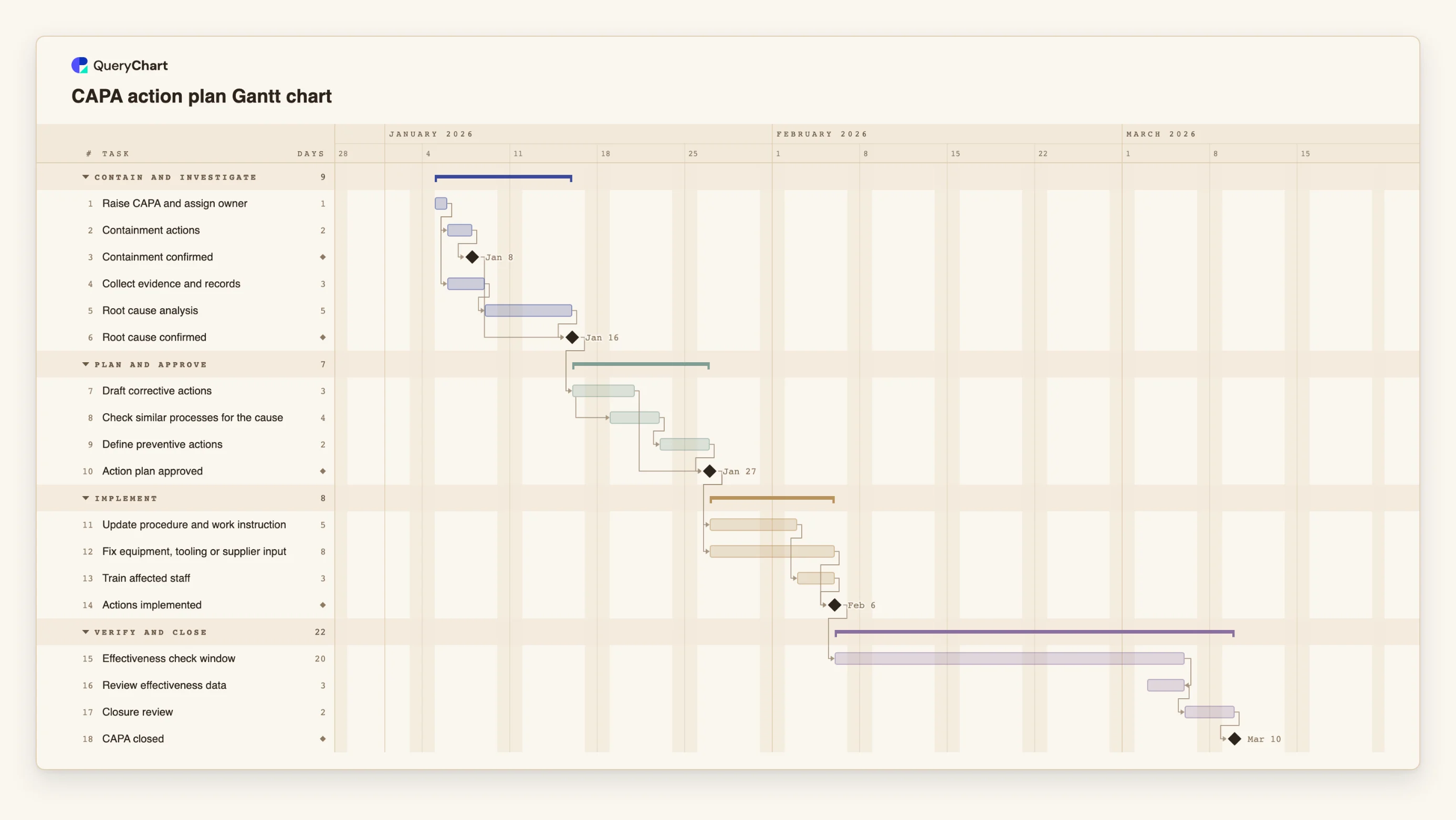
An editable CAPA Gantt chart: containment, evidence and root cause, an approved action plan, corrective and preventive actions, an effectiveness check window and closure review, with dependencies and milestones.
What the CAPA gantt chart template for corrective and preventive action plans process is
A CAPA plan is a sequence of commitments, and most of them are dated by someone other than the quality team. Containment has to happen now, the investigation takes as long as the evidence allows, the actions wait for approval, and the effectiveness check cannot start until the actions are in place and some production, orders or audits have gone by. A list of actions with due dates hides how these depend on each other. A timeline shows which date moves when another one does.
This template has four phases: Contain and investigate, Plan and approve, Implement, and Verify and close. "Raise CAPA and assign owner" is the only starting task. "Containment actions" and "Collect evidence and records" then run side by side, so containment does not wait for the investigation. "Root cause confirmed" is a milestone that waits for both "Root cause analysis" and "Containment confirmed", which keeps the problem from being declared understood while it is still spreading.
In the plan phase, "Check similar processes for the cause" starts one working day after "Draft corrective actions" starts, because looking elsewhere for the same cause does not need the draft to be finished. "Define preventive actions" follows it, and the "Action plan approved" milestone waits for the corrective and the preventive actions. Implementation is two parallel streams: "Update procedure and work instruction" followed by "Train affected staff", and "Fix equipment, tooling or supplier input". The "Actions implemented" milestone waits for both.
The "Effectiveness check window" is 20 working days and is a waiting period, not work: it is the time you allow for evidence to build up. "Review effectiveness data" is finish-to-finish with the window, so it ends when the window ends and is planned for the last three working days of it. "Closure review" and the "CAPA closed" milestone follow. All durations are illustrative. Set the window from your process, not from this example: a rare defect may need a longer one than a daily one.
A timeline schedules the work. It does not make an action effective, it does not make the organisation compliant with a standard or a regulator's expectations, and a closed task is not evidence that the problem is gone. The record of what was found, decided and verified belongs in your quality system; this chart shows when each part is meant to happen. For the process logic, including the decisions, see the CAPA flowchart at /templates/capa-process and the CAPA workflow at /templates/capa-workflow.
What this flowchart covers
In this template
- Four phases, Contain and investigate, Plan and approve, Implement and Verify and close, with 18 tasks and five milestones, including "Containment confirmed", "Root cause confirmed", "Action plan approved", "Actions implemented" and "CAPA closed".
- Containment in parallel with the investigation: "Containment actions" and "Collect evidence and records" both follow "Raise CAPA and assign owner", and "Root cause confirmed" waits for "Root cause analysis" and "Containment confirmed".
- A start-to-start overlap in planning: "Check similar processes for the cause" starts one working day after "Draft corrective actions" starts, and "Define preventive actions" follows it.
- Two implementation streams that join at "Actions implemented": "Fix equipment, tooling or supplier input" (8 working days) and "Update procedure and work instruction" followed by "Train affected staff".
- A waiting period that is part of the plan: the 20-day "Effectiveness check window", "Review effectiveness data" finishing with it, then "Closure review".
When to use this template
- You have a CAPA, audit finding or non-conformance and need dated commitments that owners and an auditor can see.
- You are turning an audit report into an action plan and want the dependencies between the actions, not just a due-date list.
- A supplier or customer is waiting for a corrective action timeline and you need to show when containment, actions and the effectiveness check fall.
- You want to see how a late root cause or a late approval moves the earliest closure date.
The plan, task by task
Every task in the chart with its length in working days and what it waits for. A dependency is a step number; SS is start-to-start, FF is finish-to-finish, and +n is a lag in working days.
| # | Task | Group | Working days | Depends on |
|---|---|---|---|---|
| 1 | Raise CAPA and assign owner | Contain and investigate | 1 | |
| 2 | Containment actions | Contain and investigate | 2 | 1 |
| 3 | Containment confirmed | Contain and investigate | Milestone | 2 |
| 4 | Collect evidence and records | Contain and investigate | 3 | 1 |
| 5 | Root cause analysis | Contain and investigate | 5 | 4 |
| 6 | Root cause confirmed | Contain and investigate | Milestone | 3, 5 |
| 7 | Draft corrective actions | Plan and approve | 3 | 6 |
| 8 | Check similar processes for the cause | Plan and approve | 4 | 7SS+1 |
| 9 | Define preventive actions | Plan and approve | 2 | 8 |
| 10 | Action plan approved | Plan and approve | Milestone | 7, 9 |
| 11 | Update procedure and work instruction | Implement | 5 | 10 |
| 12 | Fix equipment, tooling or supplier input | Implement | 8 | 10 |
| 13 | Train affected staff | Implement | 3 | 11 |
| 14 | Actions implemented | Implement | Milestone | 12, 13 |
| 15 | Effectiveness check window | Verify and close | 20 | 14 |
| 16 | Review effectiveness data | Verify and close | 3 | 15FF |
| 17 | Closure review | Verify and close | 2 | 16 |
| 18 | CAPA closed | Verify and close | Milestone | 17 |
How it works
Start containment and evidence together
Keep "Containment actions" and "Collect evidence and records" as separate tasks that both follow raising the CAPA. Containment should not wait for the investigation.
Make root cause a milestone with a condition
"Root cause confirmed" waits for the analysis and for containment. Change the durations to your own and see when the earliest approval is possible.
Gate the actions on approval
Both implementation streams depend on "Action plan approved". Replace the 0-day milestone with an approval task if your approvers need time to review.
Size the effectiveness window deliberately
Set the duration of "Effectiveness check window" from how often the problem could recur, and write the criteria for effectiveness in the task notes before the window opens.
Add owners and notes
Put the responsible person in People and the evidence or reference number in the task notes. The chart then shows who is due to do what and when.
Share, export and update progress
Share the chart for the owners to see, record progress as work happens, and export a PDF for the CAPA file when you need a snapshot.
Frequently asked questions
Does a CAPA timeline make us compliant?
No. A timeline schedules the work. Compliance and effectiveness depend on what is done, how it is verified and what is recorded in your quality system, not on a plan having dates.
How long should the effectiveness check window be?
It depends on how often the problem could occur and how you will know it has not. The 20 working days in the template are an illustration. Set your own from your process and your standard or customer requirement.
Can I use this for an audit action plan?
Yes. Put each finding's actions in as tasks, group them by finding or by owner, and link them to the approval and the verification. Rename the phases to suit. For the audit process itself, see /templates/internal-audit-process and /templates/audit-checklist-workflow.
What if the corrective action is owned by a supplier?
Add the supplier's actions as tasks with the supplier as the person, and make your review of their evidence depend on them. See /templates/supplier-corrective-action-process for the process side.
Can I change the dates when the plan slips?
Change a duration or a dependency and the dates move. QueryChart does not keep a baseline to compare against, so export a PDF if you want to keep the earlier version.