Process implementation timeline: how to sequence a rollout
How to put a redesigned process into use in the right order: baseline, sign-off, documents, training, pilot, a go/no-go gate, rollout and review, with the overlaps that are safe and the ones that are not.
A process implementation timeline answers one question: what has to be true before the next group of people is asked to work the new way. This guide gives the order, shows where work can overlap, and builds it as a Gantt chart.
The short version
- Write each activity as a condition it waits for, not as a date.
- Measure a baseline before the change, or the pilot cannot be judged.
- Put a sign-off milestone before documents and a go/no-go milestone before rollout.
- Overlap with start-to-start links and a lag only where the earlier task has settled the part the later one needs.
- A timeline shows when approvals are needed; it does not replace them.
The order of a process rollout, and why it matters
Most rollouts that go wrong were planned as a list of activities rather than a chain of conditions. Announcing the new process, writing the SOPs, training the teams and switching over all happen, but if they happen in the wrong order people are trained on documents that change, or switched over before anyone knows whether the process works. A timeline is useful here because it forces each activity to say what it waits for.
A reliable order has six parts. Measure the current state, so you can tell later whether anything improved. Get the future process signed off by the people who will run it. Update the documents, the forms and any system settings, and prepare training from them. Pilot at one site or with one team. Make a go/no-go decision from the pilot, not from the calendar. Then roll out, withdraw the old documents, and keep checking adoption until it is stable. The Gantt chart shows these as groups, with the sign-off and the decision as milestones.
Some overlaps are safe and save real time. Training materials can start when the SOP sections they describe are settled, which is a start-to-start link with a lag. Comparing pilot results can begin partway through the pilot. Training the remaining teams can run just ahead of the site-by-site switch. Other overlaps are not safe: nothing downstream of the sign-off should start before it, and no rollout task should start before the decision.
A timeline shows order and timing. It does not make a process compliant, validated or safe; where a document needs formal approval, the schedule can only show when that approval is needed and who must give it. The durations in the example below are illustrative.
A process implementation timeline, built stage by stage
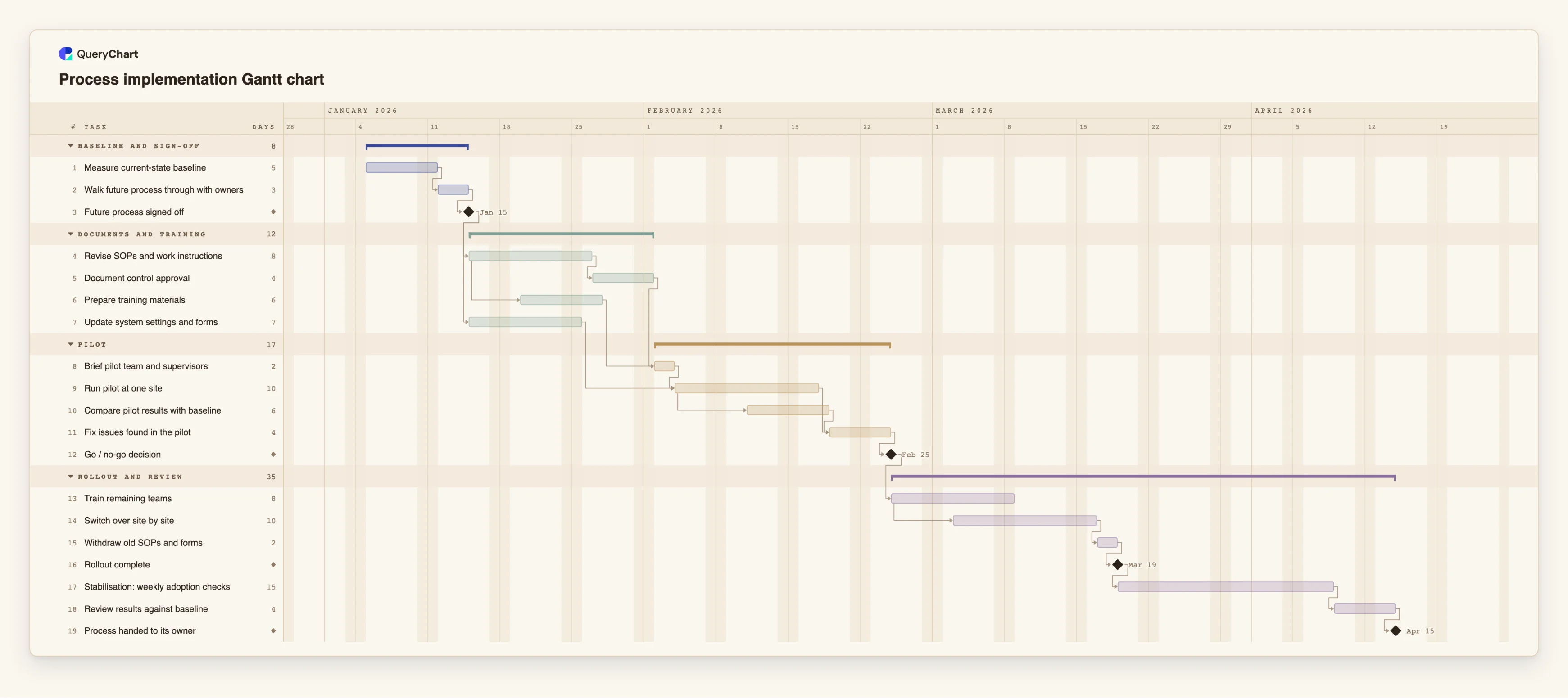
Nineteen tasks in four groups. The durations are illustrative; open the spreadsheet panel to see the rows behind each stage.
Baseline, then sign-off
"Measure current-state baseline" takes 5 working days and "Walk future process through with owners" follows it for 3. "Future process signed off" has a length of 0, so it is a milestone, and the documents wait for it.
Documents, training and system changes
"Revise SOPs and work instructions" takes 8 working days. "Prepare training materials" starts 3 working days into it, while "Document control approval" waits for the revision to finish. "Update system settings and forms" runs alongside, waiting only for the sign-off.
Pilot and the gate
"Brief pilot team and supervisors" waits for the approval and the training materials. "Run pilot at one site" lasts 10 working days, and "Compare pilot results with baseline" starts 5 working days into it. "Go / no-go decision" waits for "Fix issues found in the pilot".
Rollout, stabilisation and review
"Train remaining teams" starts after the decision, and "Switch over site by site" starts 4 working days into it. After "Rollout complete", "Stabilisation: weekly adoption checks" runs 15 working days, then "Review results against baseline" and the milestone "Process handed to its owner".
How it works
List the conditions, not the activities
For each piece of work, write what must be true before it can start: design signed off, documents approved, pilot evidence reviewed. Each condition becomes a dependency in the Depends on column.
Create the chart and enter the tasks
Open the process implementation template, or a blank Gantt chart, and type one task per row. Give each a length in whole working days and a group such as Documents and training or Pilot.
Add the two gates as milestones
Add a task of length 0 for the sign-off and another for the go/no-go decision. Make everything downstream of each one depend on it, so a slipped decision moves the whole rollout.
Overlap deliberately
Where the later task needs only part of the earlier one, enter a start-to-start link with a lag, for example 4SS+3. Check each overlap against the question: what would have to be redone if the earlier task changed?
Mark approvals and owners
Put the person or role who approves documents in the People column of the approval task, and write the approval requirement in its notes. The chart shows when it is needed, not whether it is given.
Switch on the critical path and test a delay
Turn on View, Critical path and double the length of the pilot or the SOP revision. The finish date shows which tasks the whole rollout is waiting for.
Mistakes to avoid
Starting documents before the design is signed off
Every change to the design then reopens the SOPs and the training. Linking both to a sign-off milestone makes the cost of late changes visible.
Piloting without a baseline
If the current state was never measured, the pilot can only be judged by impressions. Give the baseline its own task and finish it before the pilot starts.
A go/no-go decision that can only be yes
If the criteria are written after the pilot, the milestone is decoration. Write them first, and let the decision hold the rollout tasks when it is a no.
Ending the plan at go-live
Adoption is usually decided in the weeks after. Keep the old documents' withdrawal, a stabilisation period and a review against the baseline in the plan.
Plan a process rollout
Open the process implementation plan as your own chart, replace the sites and documents with yours and share it with the team.
Related guides
Frequently asked questions
How long should a process implementation take?
It depends on how many sites and people are affected and on how long the process takes to run through once. The template's durations are illustrations only; replace them with your own and the dates follow.
Should training come before or after the pilot?
The pilot team needs a briefing before it starts, so a short version comes first. The wider training can be adjusted using what the pilot shows, which is why the template schedules it after the go/no-go decision.
Where do I start if the new process is a flowchart?
Duplicate the flowchart as a Gantt chart: each step becomes a task and each arrow a dependency. You then add the rollout tasks that are not steps of the process. See /guides/turn-flowchart-into-gantt-chart.
Does a timeline make the new process compliant?
No. It shows the order and timing of the work. Compliance is decided by the people responsible for the relevant rules or standards.
How is this different from a system implementation plan?
A system implementation centres on configuration, data migration and testing. A process implementation centres on documents, training and adoption. For software, see /guides/implementation-plan-timeline-gantt-chart.