Construction Gantt chart template: design to handover
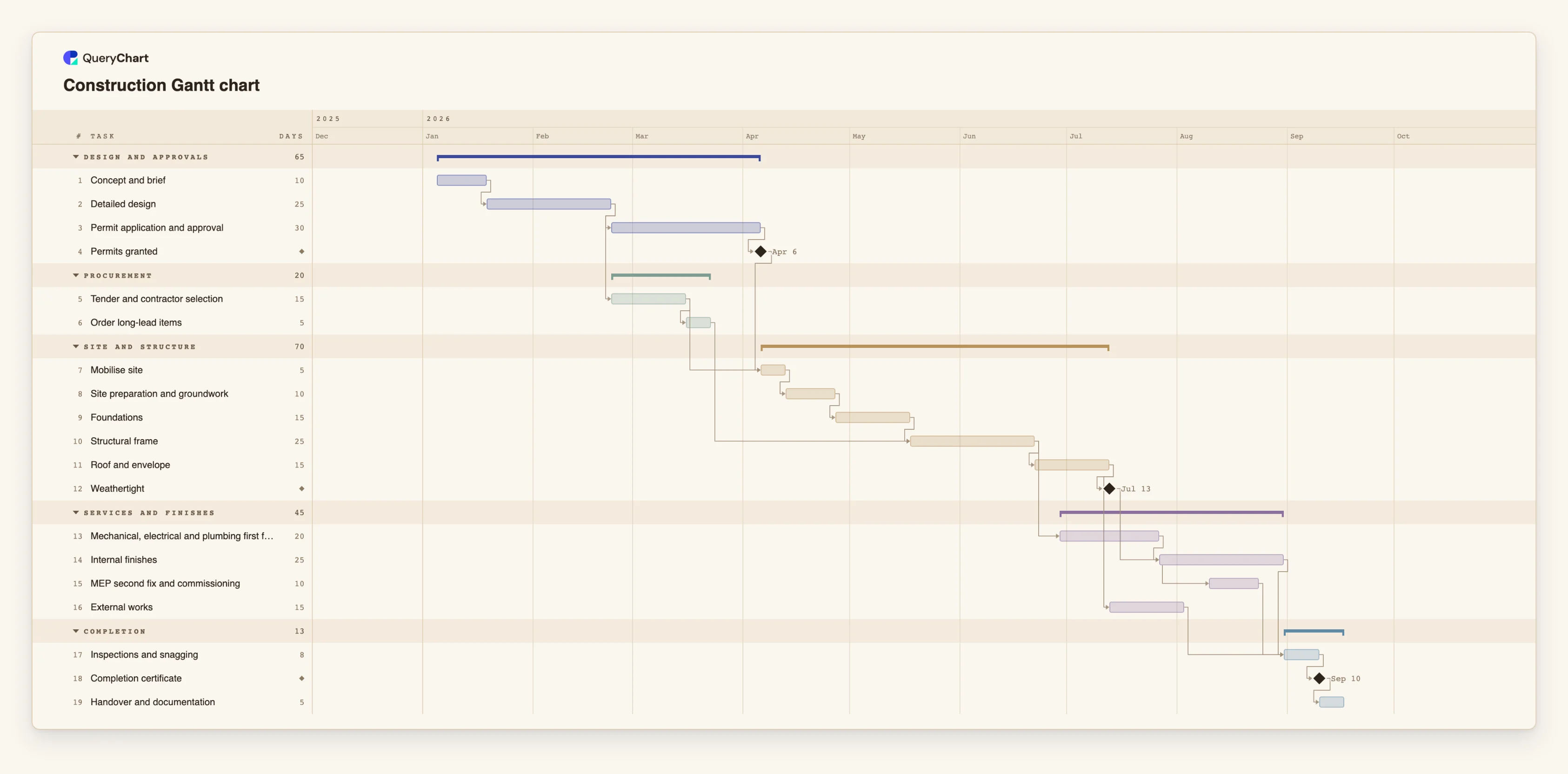
An editable construction schedule Gantt chart: design, permits, procurement, site preparation, structure, building services, finishes, inspection and handover, with dependencies and milestones.
What the construction gantt chart template: design to handover process is
A construction schedule is a sequence of trades, and the trades overlap in specific ways. The frame cannot start before the foundations are cured. The services cannot be installed before the frame is up. Finishes cannot begin until the building is weathertight. Those constraints are what a Gantt chart is for, and a plan that ignores them gives a date that no one believes.
This template follows a generic building from design to handover in five phases: Design and approvals, Procurement, Site and structure, Services and finishes, and Completion. It includes the things that tend to set the real date: the permit approval, which depends on the authority and not the contractor, and long-lead items such as steel or switchgear, which are ordered early so they are on site when the frame needs them. "Weathertight" is a milestone because it is the point at which interior work becomes safe from the weather.
Treat every duration as an example. Real durations depend on the size and type of the building, the site, the season and the contractor, and approval times vary widely between authorities and jurisdictions. The chart is a way to see how those uncertainties combine. Change "Permit application and approval" from 30 days to 60 and see what moves.
This is a planning aid, not an engineering or contractual programme. A contractor's programme, with resource levelling and weather allowances, belongs in dedicated scheduling software. The chart does not track cost.
What this flowchart covers
In this template
- Five phases, Design and approvals, Procurement, Site and structure, Services and finishes and Completion, with 19 tasks and four milestones: "Permits granted", "Weathertight", "Completion certificate" and the handover that follows.
- Permits as a dependency outside the contractor's control: "Mobilise site" waits for both "Permits granted" and "Tender and contractor selection".
- Long-lead items ordered early: "Order long-lead items" follows the tender and is needed by "Structural frame".
- Trades that overlap: "Mechanical, electrical and plumbing first fix" starts five days after the frame, and "MEP second fix and commissioning" starts ten days into "Internal finishes".
- A sequence to completion: "Inspections and snagging", "Completion certificate" and "Handover and documentation".
When to use this template
- You need a rough programme for a building project before a contractor provides one.
- A client asks how long the project takes and what the date depends on.
- A permit or a delivery is late and you want to see its effect on later trades.
- You are comparing how the schedule changes if the design takes longer.
The plan, task by task
Every task in the chart with its length in working days and what it waits for. A dependency is a step number; SS is start-to-start, FF is finish-to-finish, and +n is a lag in working days.
| # | Task | Group | Working days | Depends on |
|---|---|---|---|---|
| 1 | Concept and brief | Design and approvals | 10 | |
| 2 | Detailed design | Design and approvals | 25 | 1 |
| 3 | Permit application and approval | Design and approvals | 30 | 2 |
| 4 | Permits granted | Design and approvals | Milestone | 3 |
| 5 | Tender and contractor selection | Procurement | 15 | 2 |
| 6 | Order long-lead items | Procurement | 5 | 5 |
| 7 | Mobilise site | Site and structure | 5 | 4, 5 |
| 8 | Site preparation and groundwork | Site and structure | 10 | 7 |
| 9 | Foundations | Site and structure | 15 | 8 |
| 10 | Structural frame | Site and structure | 25 | 6, 9 |
| 11 | Roof and envelope | Site and structure | 15 | 10 |
| 12 | Weathertight | Site and structure | Milestone | 11 |
| 13 | Mechanical, electrical and plumbing first fix | Services and finishes | 20 | 10+5 |
| 14 | Internal finishes | Services and finishes | 25 | 12, 13 |
| 15 | MEP second fix and commissioning | Services and finishes | 10 | 14SS+10 |
| 16 | External works | Services and finishes | 15 | 11 |
| 17 | Inspections and snagging | Completion | 8 | 14, 15, 16 |
| 18 | Completion certificate | Completion | Milestone | 17 |
| 19 | Handover and documentation | Completion | 5 | 18 |
How it works
Replace the phases with your project's
Keep the order: design, approvals, procurement, site and structure, services and finishes, completion. Rename and add trades as your project needs.
Use realistic durations
Replace the sample durations with those from similar projects or from your contractor. Remember that these are working days, so a calendar month is about 20.
Treat approvals and deliveries as tasks
Give the permit and each long-lead item their own tasks. They are the dependencies you do not control, so they should be visible.
Overlap trades with a lag
Where one trade follows another with a gap or overlap, use a lag, or a start-to-start link, rather than finishing one before starting the next.
Mark the physical milestones
Keep "Weathertight" and the completion certificate. They tell everyone when conditions change.
Check the critical path
Switch it on in the View menu. In most buildings it runs through approvals, structure and finishes; delays there move handover.
Frequently asked questions
How do I make a construction Gantt chart?
List the phases and trades in building order, give each task a length in working days and link each to what it depends on. This template does that for a generic building. Edit it and the schedule is recalculated.
Is this a replacement for a contractor's programme?
No. It is a planning chart to understand sequence and sensitivity. A contractor's programme includes resources, weather and contract-specific constraints that this chart does not model.
Why are some trades linked start-to-start?
Because they really overlap. Second-fix services begin partway through finishes, not after them. A start-to-start link with a lag shows that overlap.
Are the durations realistic?
They are illustrative. Real durations depend on the building, the site, the season, the contractor and the local authority, and permit times in particular vary widely.