Work breakdown structure on a Gantt chart: groups and tasks
Use groups and tasks as a work breakdown structure on a Gantt chart: split the scope, give every task an owner and a duration, and check the 100 percent rule before you add dates.
A Gantt chart can only schedule work that has been named. This guide shows how to break a project into groups and tasks, so that every task has an owner and a length in working days, and nothing in scope is missing from the chart.
The short version
- In QueryChart the breakdown is two levels: a group, then the tasks inside it. There is no indentation or sub-group.
- A task should have one owner and a duration you can state in whole working days. If it has neither, break it down further.
- A group's bar runs from its earliest task start to its latest task finish. It is not the sum of its durations.
- The 100 percent rule is checked by you: the tasks in a group should cover all of that group's scope, once.
- A group is a phase or a deliverable, never a task. It has no duration of its own.
Break the work down before you date it
A work breakdown structure, or WBS, divides the whole scope of a project into smaller and smaller pieces until each piece can be estimated, given to one person and checked off. It describes what has to be produced or done, not when. The dates come later, when the pieces are given lengths and dependencies. Plans go wrong at this step more often than at the scheduling step: a piece of work that was never named has no row, so it has no duration and no owner, and it appears in the schedule only when it is late.
QueryChart has two levels for this: a group and a task. A group is a band with a summary bar, and a task is a row with a name, a duration in whole working days, optional people and optional notes. There is no outline with indentation and no sub-groups. That is a limit, and it suits most plans. If you need more levels, carry the level in the group name, such as "Site and structure", or split the project into two charts. Sub-process rows are not drawn on a Gantt chart at all.
The usual test for a breakdown is the 100 percent rule: the pieces under a parent must add up to all of the parent's scope and nothing outside it. QueryChart does not check the rule, because it cannot know the scope. You apply it by reading the group names top to bottom and asking whether anything is missing, duplicated or in the wrong band. This guide uses the construction template, which groups work by phase, as the example. For the dependencies and the critical path that come after the breakdown, see /guides/gantt-chart-dependencies and /guides/gantt-chart-critical-path.
A construction plan as a work breakdown
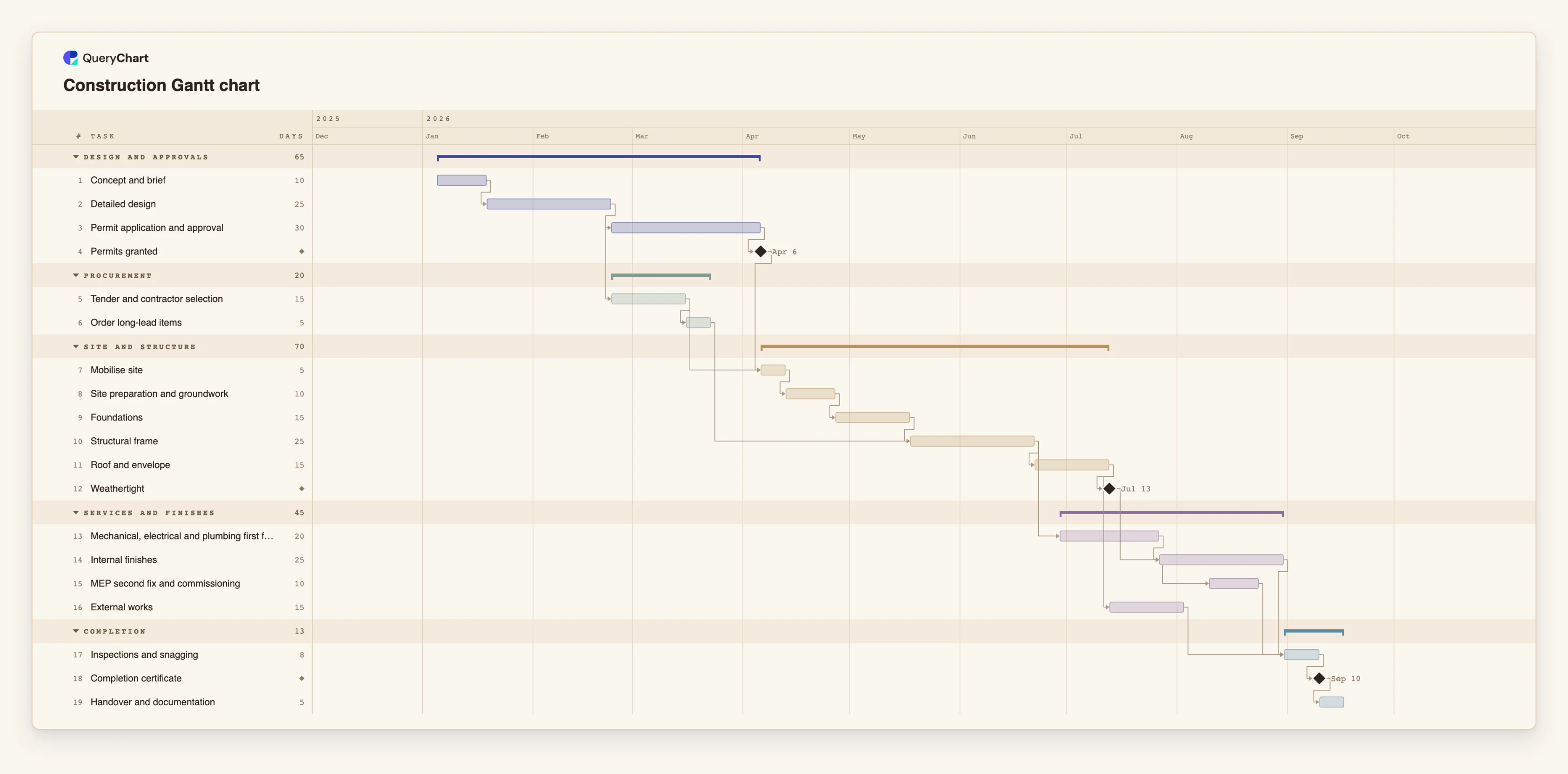
Nineteen tasks in five groups. Durations are illustrative; set your own. Open the spreadsheet panel to see the Group column behind each stage.
The first group, closed by a milestone
"Design and approvals" holds "Concept and brief" (10 working days), "Detailed design" (25) and "Permit application and approval" (30), and ends with the milestone "Permits granted", which has a duration of 0. The three tasks run one after another, so the group bar covers 65 working days.
A second group that overlaps the first
"Procurement" holds "Tender and contractor selection" (15) and "Order long-lead items" (5). Tender starts when "Detailed design" ends, on the same day as "Permit application and approval", so this band sits inside the span of the first one. Groups are breakdown categories, not stages that must follow each other.
A group with its own milestone
"Site and structure" has five tasks from "Mobilise site" (5) to "Roof and envelope" (15), and the milestone "Weathertight". "Mobilise site" waits for "Permits granted", so the two groups are tied by a dependency, not just by their order in the list.
A group is a span, not a sum
"Services and finishes" has four tasks whose durations add up to 70 working days (20, 25, 10 and 15), but its bar covers 45, because "Mechanical, electrical and plumbing first fix" starts 5 working days after "Structural frame" ends and "External works" runs beside the finishes.
The whole breakdown
"Completion" closes the plan with "Inspections and snagging" (8), the milestone "Completion certificate" and "Handover and documentation" (5). Five groups and nineteen tasks cover the project from brief to handover. Add the owner of each task in the People column.
How it works
Write the scope and list the deliverables
Start outside the chart with one sentence for the scope and a list of what the project must produce. Anything that is not on this list is out of scope. The list is what you will check the breakdown against.
Choose the groups
Aim for three to five groups. Group by phase, as the construction template does, or by deliverable if the pieces are mostly independent. Pick one way and keep it for the whole chart. Enter the name in the Group column of each task.
Break each group into tasks
Split until a task has one owner and a length you can estimate in whole working days. Name each task with a verb and an object, such as "Order long-lead items". A task with no duration is drawn as one day, so fill the Duration column in rather than leave it blank.
Apply the 100 percent rule
Read each group's tasks and ask: do these cover everything this group is for, and nothing else? Look for a task that sits in two places, work that belongs to no group and tasks that are really groups in disguise. Fix the names before you add dates.
Add owners and milestones
Put the responsible person in People. Close each group with a milestone of 0 days, such as "Permits granted", so the end of the group is a visible event that other work can depend on.
Link the tasks and read the group bars
Fill in Depends on. The dates are calculated and each group bar is drawn from its earliest start to its latest finish. If a bar is far longer or shorter than you expected, the breakdown or the links need another look. You can paste a table with Task, Group, Duration and Owner columns from a spreadsheet to start.
Mistakes to avoid
Treating a group as a task
A group has no duration. Its bar is derived from its tasks, so you cannot make it longer by editing it. If something needs time of its own, such as an approval wait, give it a task.
Tasks that are too coarse to own
A task such as "Build" has no one owner and no honest duration. If two people would give two different answers to who is responsible and how long it takes, split it.
Expecting an outline
QueryChart has groups and tasks, not an indented outline with numbering and roll-ups. Do not simulate levels with spaces in task names. Carry the level in the group name or use a second chart.
Reading the breakdown as a complete plan
A breakdown that passes the 100 percent rule is complete as a list, but nobody has checked it against the real scope but you. Review it with the people who will do the work, and expect to add tasks later.
Open the construction Gantt chart
Open the construction template, look at how the groups and tasks are split, then replace them with your own breakdown.
Related guides
Frequently asked questions
Is a Gantt chart the same as a work breakdown structure?
No. A work breakdown structure says what the work is. A Gantt chart says when it happens. The groups and tasks in the chart can serve as the breakdown, but the chart also carries durations and dependencies that a breakdown does not.
How many levels can I have?
Two: a group and a task inside it. A task belongs to one group. For a deeper breakdown, put the extra level in the group name or split the work into several charts.
Where do I record who owns each task?
In the People column of the sheet. It is optional and can hold more than one name. Pasting a column headed Owner, Assigned to or Resource fills it.
Can I paste a breakdown from a spreadsheet?
Yes. Copy the rows with their header line and paste them into the sheet. Columns named Task, Group (or Phase or Section), Duration and Owner are matched by name, in any order. There is no file upload for Gantt charts yet.
Where do I start if I only have a process?
Draw it as a flowchart first, for example from the process templates, then use Duplicate as Gantt. Each step becomes a task and each line a finish-to-start dependency. No durations are copied, so add them next.