Overlapping tasks in a Gantt chart: start-to-start, lag and lead
Overlap tasks on a Gantt chart with start-to-start and finish-to-finish links, lag and lead. See when overlap is real, when it shortens the plan, and when a link changes nothing.
Two tasks overlap when the second can start before the first has finished. This guide shows how to draw that honestly with start-to-start and finish-to-finish links, how lag and lead work, and how to check that an overlap actually shortens the plan.
The short version
- Overlap is real only when the second task needs something that exists part-way through the first.
- SS holds the second task until the first has started. FF stops it finishing before the first does. A negative lag is a lead.
- A task starts at the latest date its links allow, so an overlap only helps when its link is the one that decides.
- Only one link is used between a given pair of tasks. A second link between them is flagged as listed twice.
- Overlap saves time by taking on risk. State the assumption in the task notes.
Overlap is a claim about the work
Most tasks in a plan are linked finish-to-start: the second starts when the first ends. Overlap is the exception, and it should be one. It is only real if the second task needs something that exists part-way through the first. Training can begin once testing has started and found the first screens stable. An inspection can begin the day after a build has started if the first units are available. If the second task needs the finished result, there is no overlap, and drawing one only moves the problem to the date it goes wrong.
QueryChart has four link types and a lag on each. Start-to-start (SS) holds the second task until the first has started. Finish-to-finish (FF) stops the second from finishing before the first does. A lag is a number of working days added to the link, and a negative number is a lead, which lets the second task start earlier than the link would. In the Depends on cell they read like `5SS+2`, `8FF-1` or `4-1`. Working days are Monday to Friday, so a lag of 5 is one week.
An overlap shortens the plan only if the link was the one setting the second task's start, and only if that task is on the path that decides the finish. The example below shows both: one overlap that moves the go-live review five working days earlier, and two that move nothing because another link was already the later one. Check yours by switching on the critical path in the View menu and comparing the finish date with the date you need. For the other link types, see /guides/gantt-chart-dependencies; for the path itself, /guides/gantt-chart-critical-path.
Overlaps in an implementation plan
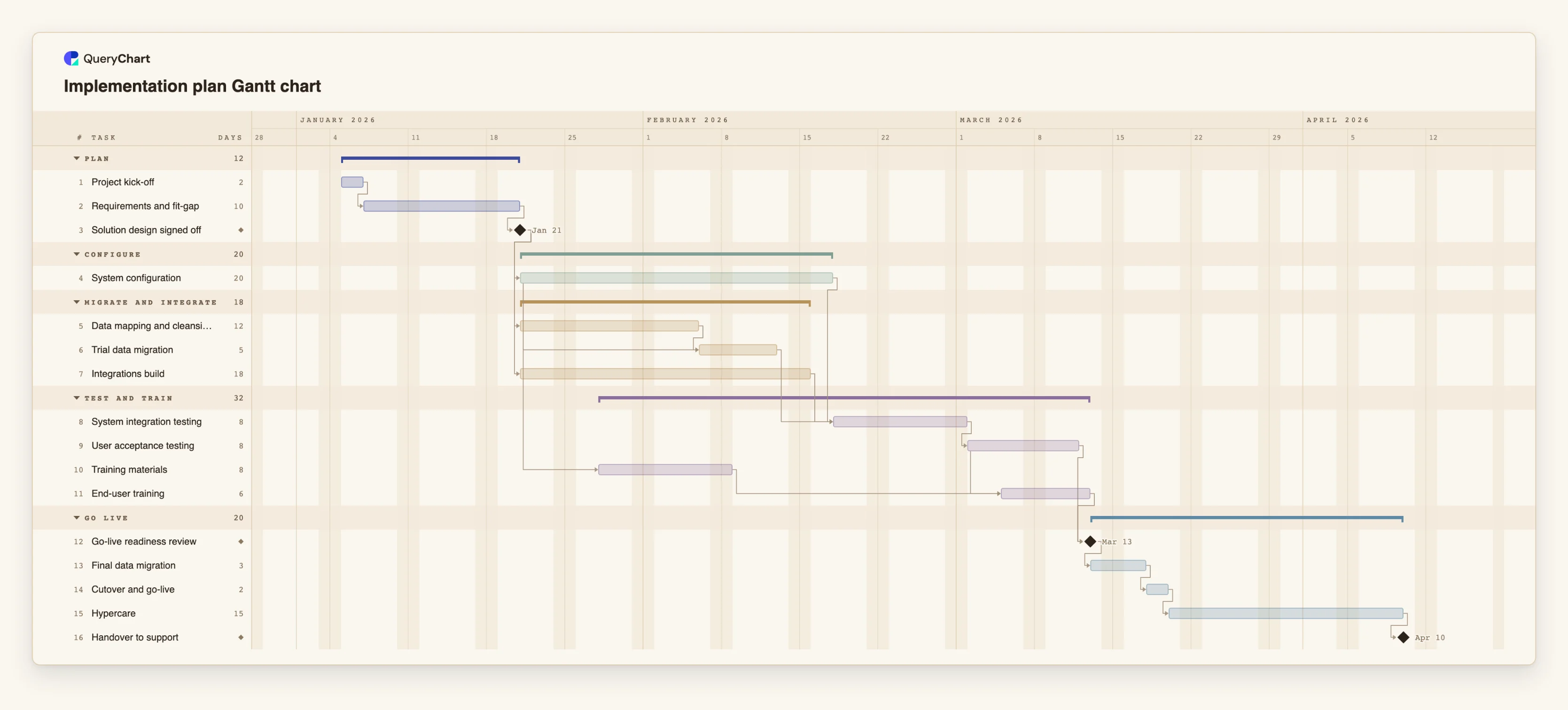
Sixteen tasks in five groups. Durations are illustrative; set your own. Open the spreadsheet panel to see the Depends on column behind each stage.
Parallel is not overlap
"Project kick-off" (2 working days) leads to "Requirements and fit-gap" (10), then to the milestone "Solution design signed off". That milestone opens several streams on the same day. Tasks that start together have no link to each other, so this is parallel work, not an overlap.
An overlap that changes nothing
"Trial data migration" has a start-to-start link from "System configuration" with a lag of 10 days. But it also waits for "Data mapping and cleansing" (12 days), which finishes later, so that link decides. The SS link is in the chart but moves no date.
Training starts while testing runs
"End-user training" (6 days) is start-to-start with "User acceptance testing" (8) and a lag of 3, so it starts 3 working days into testing. "Training materials" (8) starts 5 days after "System configuration" starts. The materials are done long before training begins, so that link is early but not tight.
What the overlap saves
"Go-live readiness review" waits for testing and training. With the 3-day lag it lands one working day after testing ends. Had training followed testing finish-to-start it would land 5 working days later. The rest runs in order: "Final data migration" (3), "Cutover and go-live" (2), "Hypercare" (15) and "Handover to support".
How it works
Start with finish-to-start for everything
Link tasks in order and read the finish date first. That is the plan without overlap. Note it, because it is the figure you compare against when you add overlaps.
Ask what the second task needs
For each pair on the longest chain, ask whether the second task needs the finished result of the first, or only something that exists part-way through. Only the second case is an overlap. Write the assumption in the task notes.
Choose start-to-start or finish-to-finish
Use SS when the second task can begin once the first is under way, such as 11SS+3. Use FF when it can run beside the first but cannot finish until the first does, such as 7FF+1. Each pair gets one link, so choose the one that matters most.
Set the lag in working days
Use a positive lag for a delay after the point, for example three days into testing. Use a negative lag on a finish-to-start link, such as 4-1, for a lead of one working day. Lags count Monday to Friday.
Check the link decides
Select the second task and read its start. If another link is later than the one you added, the dates will not move. Switch on View, Critical path to see whether the overlap is on the chain that sets the finish.
Compare the finish with the date you need
Compare the new finish date with the date you need. If the overlap does not close the gap, the options are shorter tasks, more people or less scope, not more overlap. Change the Start of a task only where a date is truly fixed.
Mistakes to avoid
Overlapping to fit a date
If a gap to a deadline is closed only by overlapping tasks that need each other's output, the chart will look fine and the work will not. Overlap what can really be done at the same time.
Start-to-start without a finish guard
With SS alone the second task can end before the first, if it is shorter. If that cannot happen in real life, check the durations, or split the first task so the second can link to the part it needs.
Links that never bind
A start-to-start link is ignored for dates when another link allows a later start. It is harmless, but it makes the chart look more overlapped than it is. Remove it, or accept it as documentation.
Stacking leads
A lead on every link makes the plan short and brittle. One slip near the start has to be absorbed by every task after it. Use leads where the work really allows it, and keep a task or a lag as a buffer where it does not.
Open the implementation plan Gantt chart
Open the implementation plan template, change the lag on the training link and watch the readiness review move.
Related guides
Frequently asked questions
What is the difference between overlapping and parallel tasks?
Parallel tasks have no link between them and may be started at any time. Overlapping tasks are linked, with the second starting or finishing relative to the first before it is done.
What is the difference between lag and lead?
A lag is a positive number of working days added to a link, so the second task waits longer. A lead is a negative number, so it starts earlier than the plain link would allow. Both are written after the type, as in 5SS+2 or 4-1.
Can I count lag in calendar days?
No. Lag is counted in working days, Monday to Friday. A lag of 5 is one week of working days.
Can two tasks have both an SS and an FF link?
No. Only one link is used between a given pair, and the second is flagged as listed twice. If you need both constraints, split the first task into two, for example a start and a completion task, and link each separately.
How do I see the effect of an overlap?
Compare the finish date before and after you add it, and switch on the critical path in the View menu. If the overlap is not on the path that decides the finish, the finish does not move. For a full example, see /templates/production-ramp-up-gantt, which uses a finish-to-finish link between a first-article build and its inspection.