Construction schedule Gantt chart: plan phases, permits and long-lead items
Build a construction schedule as a Gantt chart: design, permits, procurement, site works, structure, services, finishes, inspection and handover, with the permit and long-lead constraints shown as dependencies.
A construction schedule is mostly a chain of waiting: for a permit, for a delivery, for the frame to be ready. A Gantt chart makes those waits visible so you can see which ones set the completion date.
The short version
- Model permits and long-lead orders as tasks with their own dependencies; they are the usual constraints.
- Use start-to-start links with a lag for genuine overlaps such as finishes and second fix.
- Milestones such as permits granted and weathertight mark the hand-offs between phases.
- Durations are whole working days, Monday to Friday, with no weather or holiday calendar.
- This is a planning aid, not a contractor's programme or a resource plan.
What a construction Gantt chart is good for at planning stage
At the planning stage a construction project has a small number of hard constraints and a lot of work that fits around them. The permit cannot be issued early, the site cannot open until it is, and an item with a long delivery time has to be ordered well before the work that needs it. A Gantt chart puts those constraints in the same picture as the trades, so you can see what the completion date actually depends on, rather than adding up durations in your head.
Build it in phases: design, permits and procurement, site works, structure, building services, finishes, then inspection and handover. Give each task a length in working days and list what it waits for. The two things worth modelling carefully are the approvals and the long-lead items, because they are where a schedule really slips. Treat them as tasks with their own dependencies, not as notes in a margin.
Overlaps are where a construction plan earns its keep. Internal finishes rarely wait for every service to be fully complete, and second-fix work often starts part-way through finishes. Use start-to-start links with a lag for those, and a plain lag where something needs time between two activities, such as a gap after the frame is complete before services begin.
Be clear about what this is. It is a planning aid for explaining the sequence and the order of magnitude to a client, a lender or a team. It is not a contractor's programme: QueryChart schedules in whole working days, Monday to Friday, with no holidays, no weather and no resource or crew modelling, so it will not tell you how many people a trade needs or when rain stops work. The example below shows a mid-sized building project, stage by stage.
A mid-sized building project from brief to handover
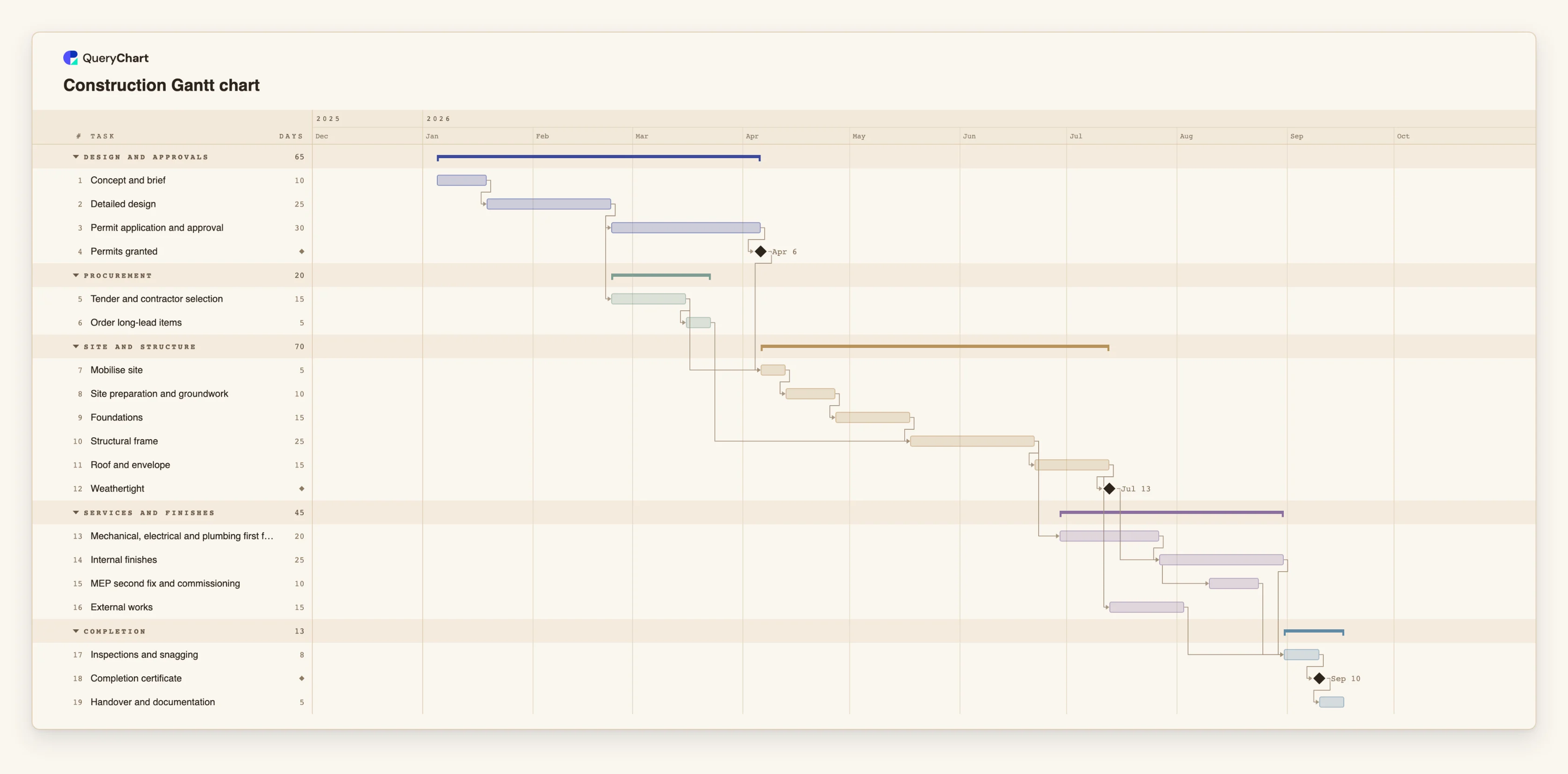
Nineteen tasks. Open the spreadsheet panel to see the durations and dependencies behind each stage.
Design and the permit gate
"Detailed design" takes 25 working days and "Permit application and approval" 30. "Permits granted" has a length of 0, so it is a milestone, and it is the gate that site work will wait for.
Procurement runs beside the permit
"Tender and contractor selection" (15 working days) runs while the permit is pending. "Mobilise site" waits for both "Permits granted" and the tender, then "Site preparation and groundwork" and "Foundations" follow in sequence.
Structure, with a long-lead item feeding in
"Order long-lead items" (5 working days) must finish before "Structural frame" (25) can start. "Mechanical, electrical and plumbing first fix" starts 5 working days after the frame finishes, a lag rather than an immediate hand-off.
Finishes, overlap and handover
"MEP second fix and commissioning" starts 10 working days after "Internal finishes" starts, a start-to-start overlap. "Inspections and snagging" waits for finishes, second fix and "External works", and "Completion certificate" is a milestone before "Handover and documentation".
How it works
List the phases first
Write the phases in order: design, permits, procurement, site works, structure, services, finishes, inspection and handover. Group the tasks under them so each phase draws as a band with a summary bar.
Add the permit and approval gates as tasks
Enter the application period as a task with a realistic length, followed by a zero-length task for the approval itself. That milestone is what site work depends on, so a late permit moves everything after it.
Schedule the long-lead items backwards from the need
Add the order as its own task and make the work that needs the item depend on it. Set its length to the delivery time you have been quoted, in working days, so a late order shows up as a late start.
Link the trades, and model the overlaps
Use finish-to-start by default. Where a trade can begin while the previous one is part-done, write a start-to-start link with a lag in Depends on, for example 14SS+10. Where something needs a gap, such as a curing or settling period, write a positive lag.
Switch on the critical path
Use View, Critical path to light the chain that sets the finish date. Shortening a task off that chain will not bring the completion date forward.
Export for the people who need it
Share the chart as a link, or export a PDF or PNG for a client or lender. The CSV export gives you the tasks and ISO dates for a cost or procurement spreadsheet.
Mistakes to avoid
Treating the plan as a contractor's programme
Whole working days, Monday to Friday, with no weather, holidays or crew sizes. Use this chart to explain sequence and constraints, and let the contractor's own programme carry the detail.
Burying the permit in a note
If the permit is not a task with a dependency, nothing moves when it is late. Model the approval period and the milestone explicitly.
Overlapping everything to hit a date
Start-to-start links make a plan shorter on paper. Each one should reflect work that can really begin early; otherwise the schedule is only optimistic.
Pinning start dates on every phase
A fixed start does not move when its predecessors do. Pin a date only where it is truly fixed, such as a site possession date.
Open the construction template
Open the construction schedule as your own chart, replace the tasks and durations with your project's and share or export it.
Related guides
Frequently asked questions
Can I use this as my construction programme?
It is a planning aid. It schedules in whole working days, Monday to Friday, and has no weather, holiday, resource or cost modelling, so a contractor's detailed programme is still needed for site management.
How do I show two trades overlapping?
Use a start-to-start dependency with a lag, for example 14SS+10, which means the task starts 10 working days after task 14 starts. A finish-to-finish link with a lead, such as 8FF-1, makes a task finish one working day before task 8 finishes.
How do I handle a fixed possession or completion date?
Pin a Start on the task where the date is fixed. If the dependencies would make it later, the conflict is flagged. QueryChart schedules forward from the start and has no as-late-as-possible setting.
Can I track cost or progress against a baseline?
You can record progress as a percentage on each task. There is no cost tracking and no baseline or planned-versus-actual comparison.
Can I import a programme from another scheduling tool?
Copy the rows and paste them into the sheet; if the first line names the columns they are matched by name. Native project files are not supported and there is no file upload for Gantt charts yet.