Software development Gantt chart: plan a release from discovery to review
Plan a software project as a Gantt chart: discovery, design, build, QA, deployment, release and post-release review, with parallel streams and decision gates, and where it fits alongside Agile sprints.
A software project Gantt chart shows how streams of work depend on each other and when a release can land. It answers a question a sprint board does not: given the dependencies, what is the earliest date for the release?
The short version
- Plan at release level: streams, gates and dependencies, not individual tickets.
- Parallel streams are shown by tasks that wait for the same predecessor; the longer one sets the date.
- Decision points such as scope agreed and go / no-go belong in the chart as milestones.
- A build stream can be sized in sprints converted to working days.
- Capacity and effort are not modelled; use your tracker for those.
Where a Gantt chart helps a software team, and where it does not
Most software teams already run sprints, and a sprint board is the right place to manage the work inside them. A Gantt chart sits above that. It covers the whole release: what has to finish before design can start, which streams can run in parallel, where testing has to wait for integration, and which decisions gate the deployment. It is a view of the shape of the project, not a replacement for the backlog.
What a Gantt chart shows that a board does not is time and dependency together. A board tells you what is in progress. A Gantt chart tells you that frontend and backend must both finish before integration, that testing cannot start until then, and that the longer of two parallel builds decides the date. That makes it useful for release planning, for talking to people outside the team, and for spotting the one stream that is holding everything up.
Keep the tasks coarse. Plan at the level of discovery, design, build streams, integration, testing, release and review, in working days, and leave the stories and tickets to your tracker. If you work in sprints, a build stream can simply be a task whose length is a number of sprints expressed in working days. Do not try to model each sprint's scope here; the chart goes stale the moment the backlog moves.
Add the decision points as zero-length milestones: scope agreed, design review, go or no-go. They are where a schedule is really decided, and putting them in the chart makes the question of who decides, and when, hard to skip. QueryChart does not track effort or capacity, so team size is not modelled. The example below is a full release plan, stage by stage.
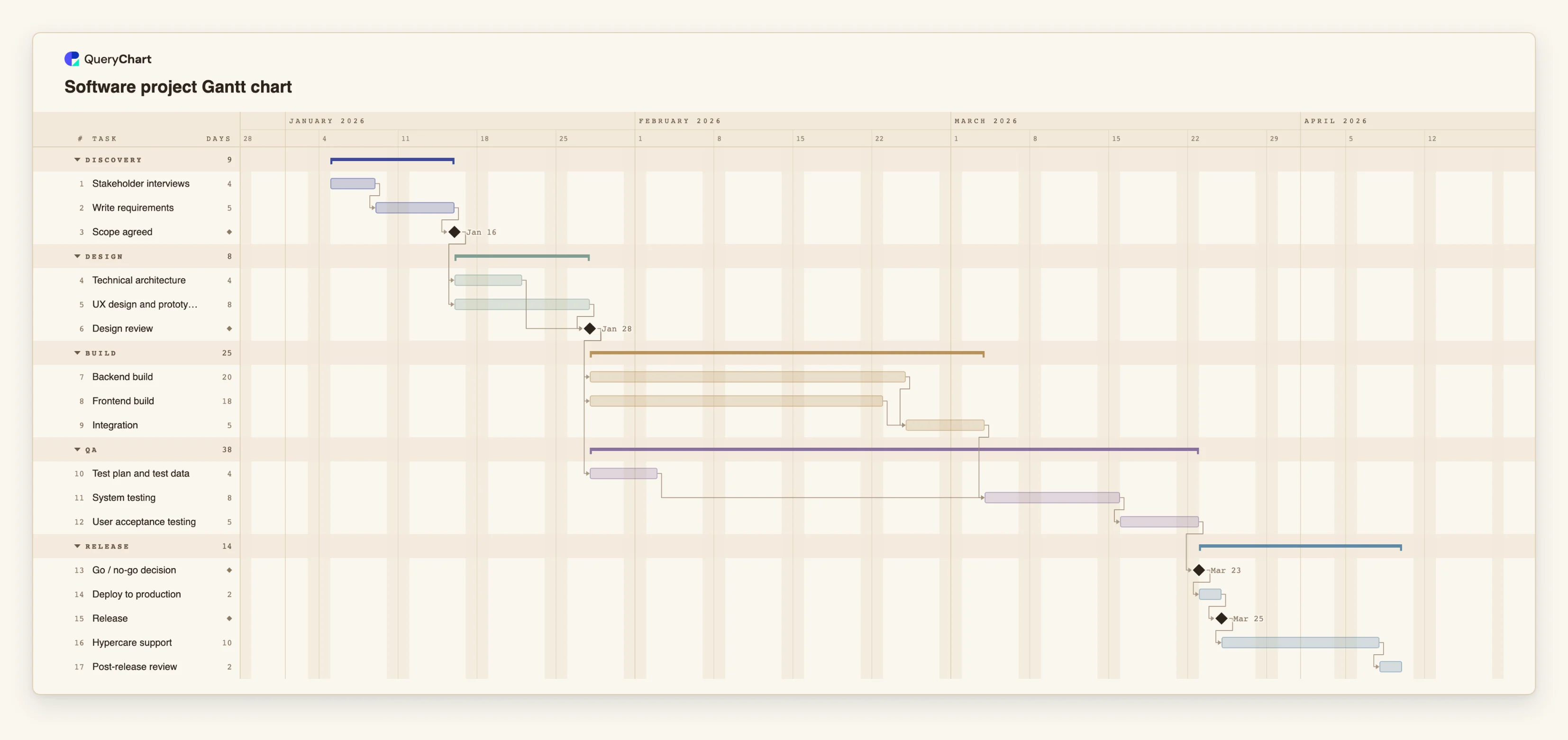
A software release from interviews to post-release review
Seventeen tasks. Open the spreadsheet panel to see the dependencies behind each stage.
Discovery ends in a scope decision
"Stakeholder interviews" (4 working days) leads to "Write requirements" (5). "Scope agreed" is a milestone of length 0, and both design streams wait for it.
Two design streams, one review
"Technical architecture" (4 working days) and "UX design and prototype" (8) both start after "Scope agreed". "Design review" waits for both, so the UX work, as the longer stream, decides when it happens.
Build streams and test preparation
"Backend build" (20 working days) and "Frontend build" (18) start after "Design review" and meet at "Integration" (5). "Test plan and test data" (4) also starts after the review, so it is ready well before testing needs it.
Test, decide, release, review
"System testing" waits for "Integration" and the test preparation. "Go / no-go decision" is a milestone before "Deploy to production" (2 working days), then "Release", "Hypercare support" (10) and "Post-release review" (2).
How it works
Decide the level of detail
Plan at release level. Each task should be a stream or a stage that takes days or weeks, not a ticket. If a task is shorter than a couple of days, fold it into its parent.
Enter discovery and design, with the decision milestones
Add discovery and design tasks with lengths in working days, and add zero-length milestones for scope agreed and design review. Make the next stage depend on the milestone, not on the last task.
Put parallel streams on the same predecessor
Backend, frontend and test preparation should all depend on the design review. Do not chain them one after another; the point of the chart is to show what can overlap.
Convert sprints to working days
If a stream takes four two-week sprints, enter 40 working days. Add a lag only where there is a real wait, such as a release freeze.
Add the release gates
Add go / no-go as a milestone before deployment, and give hypercare and the post-release review their own tasks so the plan covers the weeks after launch.
Light the critical path and share
Turn on View, Critical path to see the chain that sets the release date, then share the chart as a link or export a PDF for stakeholders.
Mistakes to avoid
Planning at ticket level
A Gantt chart with hundreds of small tasks is out of date within a sprint. Keep it at stream level and let the tracker hold the detail.
Chaining parallel streams
Putting frontend after backend because one person is doing both hides the real dependency structure. Link tasks by what they truly need, and note shared people in the People field.
Forgetting that capacity is not modelled
Two tasks given to the same person can overlap without warning. QueryChart records owners but does not check workload.
Omitting the weeks after release
Hypercare and a review are real work. Leave them out and the plan finishes on release day, which is rarely when the team is free.
Open the software project template
Open the software project plan as your own chart, replace the streams with yours and share the release timeline.
Related guides
Frequently asked questions
Does a Gantt chart fit an Agile team?
Yes, at release level. Use it for the shape of the project, its dependencies and its gates, and keep sprint scope in your backlog tool. The two answer different questions.
What does a Gantt chart show that a board does not?
Time and dependency together: which streams run in parallel, which must finish before the next can start, and which chain sets the release date.
How do I plan a sprint in the chart?
You generally do not. Express a build stream as a task whose length is its number of sprints in working days, and leave sprint scope to the board.
Can I link it to my issue tracker?
No. QueryChart has no integrations with issue trackers. You can paste rows from a spreadsheet export into the sheet.
Can I show who is working on what?
Yes, each task has a People field. There is no workload or overload check.