Research and thesis Gantt chart: plan a thesis or PhD from proposal to defence
Plan a thesis, dissertation or PhD as a Gantt chart: chain proposal, literature, data collection, analysis and chapters, add supervisor feedback and approval waits, then test the plan against your submission date.
A thesis is a long plan with few people in it. A Gantt chart shows which chapters can be written while data is still being collected, and where you are simply waiting for someone else.
The short version
- Link each chapter to the work that produces its content, so writing starts as early as the inputs allow.
- Overlap data collection and analysis with a start-to-start dependency and a lag, instead of waiting for collection to finish.
- Draw approvals, feedback rounds and other waits as tasks with an estimated length.
- Mark proposal approval, full draft and submission as milestones, which have a length of 0.
- Test a fixed submission date by pinning only that task: if the work before it needs more working days than remain, it is flagged with the earliest date its dependencies allow.
Why a thesis plan needs dependencies, not just dates
Most thesis timelines fail in the same place: the plan is a list of months, and the real constraints are not months. You cannot analyse data you have not collected, you cannot collect it before your methods are approved, and you cannot revise until your supervisor has read the full draft. A Gantt chart makes those links explicit, so a delay in one step visibly moves the steps that depend on it.
The useful trick is that writing does not have to wait for everything. The introduction can be drafted once the proposal is approved, the literature chapter once the review is done, and the methods chapter once the methods are settled. Only the results chapter has to wait for analysis. In the chart this shows up as chapters that start as soon as their own inputs exist, instead of one long block called 'writing' at the end.
Waiting is part of research, and it belongs on the chart. Ethics or committee approval, a supervisor's feedback round, an examiner's reading period: QueryChart schedules in whole working days, Monday to Friday, with no calendar of holidays or absences, so enter each wait as a task with a realistic length, and add a few days to it. A wait you drew is a wait you planned for.
The example below is a complete thesis plan, from agreeing the topic to the defence. Open the spreadsheet panel to see the task numbers and the Depends on column behind each stage.
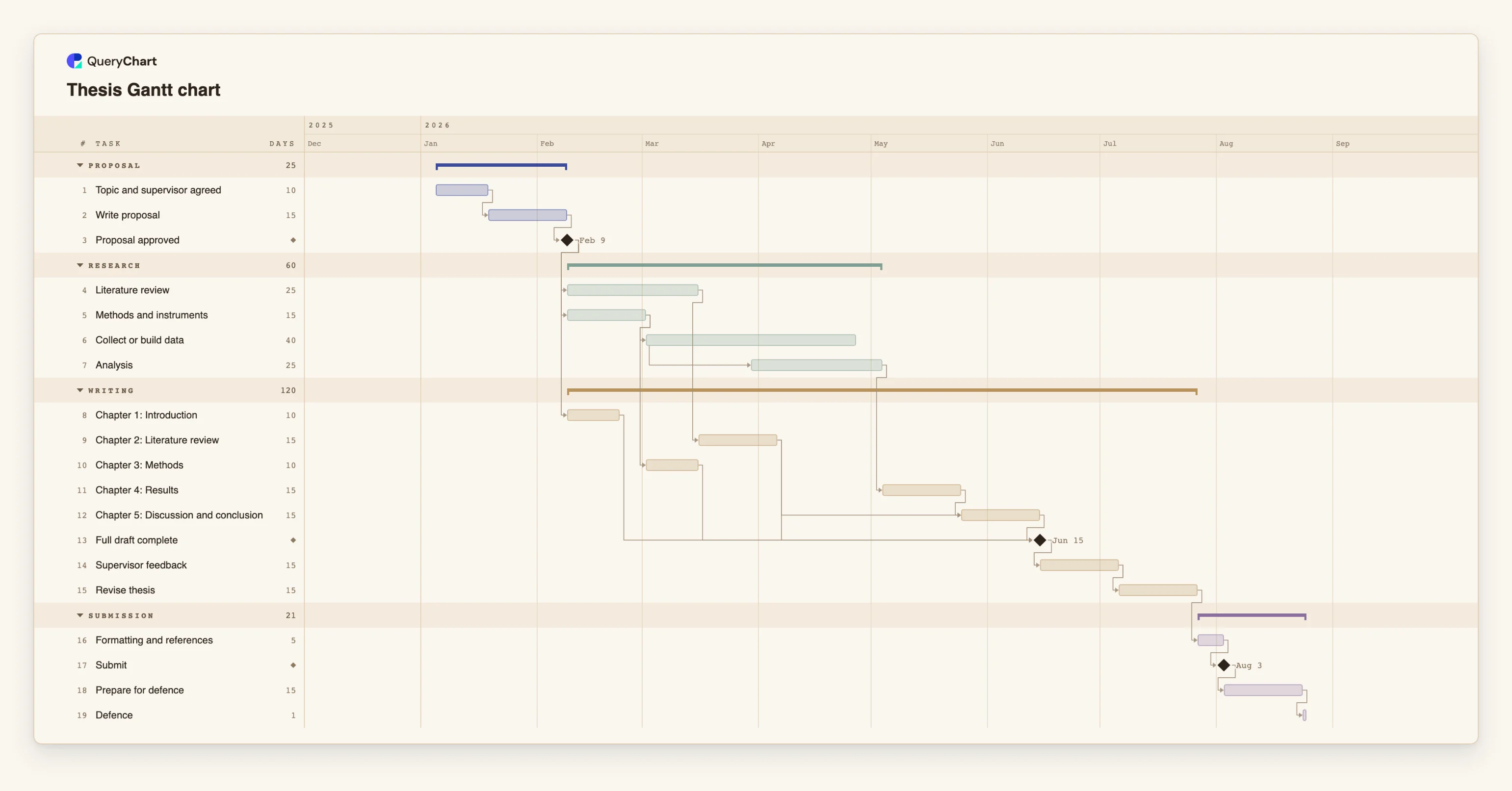
A thesis plan from topic to defence
Nineteen tasks: planning, research, five chapters, feedback and defence. Open the spreadsheet panel to see the rows behind each stage.
Agree the topic and get the proposal approved
"Topic and supervisor agreed" takes 10 working days and "Write proposal" 15. "Proposal approved" has a length of 0, so it is a milestone, and the literature review, the methods and the introduction all wait for it.
Research runs in two streams that overlap
"Literature review" takes 25 days. "Methods and instruments" takes 15 and leads to "Collect or build data" (40 days). "Analysis" is linked start-to-start with a lag of 20 days, so it begins while collection is half done.
Chapters start when their own inputs exist
"Chapter 1: Introduction" waits only for the proposal approval, "Chapter 2: Literature review" for the review and "Chapter 3: Methods" for the methods. "Chapter 4: Results" waits for "Analysis", and "Chapter 5: Discussion and conclusion" waits for chapters 2 and 4.
Feedback, revision and submission
"Full draft complete" is a milestone that waits for all five chapters. "Supervisor feedback" (15 days) and "Revise thesis" (15 days) follow, then "Formatting and references", the "Submit" milestone, "Prepare for defence" and a one-day "Defence".
How it works
List the fixed points first
Write down the dates you do not control: submission deadline, defence slot, any funding end date. You will pin only these. Everything else should be calculated from durations and dependencies.
Break the research into stages with a milestone between them
Add the proposal, the literature review, the methods, data collection and analysis as tasks, and put a zero-length milestone such as 'Proposal approved' after the proposal. Milestones give your supervisor something concrete to agree to.
Add one task per chapter and link it to its source
In Depends on, point each chapter at the task that produces its content. Where a chapter can be drafted before the work is finished, link it start-to-start with a lag, for example 6SS+20 means the task starts 20 working days after task 6 starts.
Draw the waits
Add approval, feedback and reading periods as tasks with an estimated length in working days. Because holidays and absences are not modelled, add margin to the waits that matter most.
Turn on the critical path
Use View, Critical path to light the chain of tasks that sets your finish date. In a thesis it is usually proposal, data collection, analysis, results and the full draft. Those are the tasks to protect.
Track progress and share the chart with your supervisor
Enter progress as a percentage as chapters are written, and share the chart as a link or export a PDF for a supervision meeting.
Mistakes to avoid
Putting all the writing at the end
A single block called 'write thesis' hides the fact that three chapters can start months earlier. Give each chapter its own task and link it to its own inputs.
Planning feedback as if it were instant
A supervisor, a committee or an ethics board has its own queue. A feedback round drawn as two days will move the whole end of the plan when it takes two weeks.
Pinning too many dates
A task with a fixed start does not move when what it depends on moves, and a fixed date that conflicts with a dependency is flagged. Pin the submission-side dates that are real and let the rest be calculated.
Expecting the chart to track effort or absences
QueryChart does not record hours, plan around holidays or compare against an original baseline. If your fieldwork depends on a season or a term break, build that wait into the task length.
Plan your thesis
Open the thesis plan as your own chart, replace the tasks with your chapters and milestones, and share it with your supervisor.
Related guides
Frequently asked questions
Can I plan a PhD that runs for several years?
Yes. Use the month time scale and group the tasks by year or by study. Durations are in whole working days, so a long task is simply a large number.
How do I show waiting for ethics approval?
Add it as a task with the number of working days you expect it to take, and make the data collection depend on it. There is no calendar for holidays, so allow extra days.
Can I start from a template?
Yes. The thesis template is the plan shown above, and it opens in the editor without an account. Replace the task names and durations with your own.
Can I paste my existing timeline from a spreadsheet?
You can paste rows. If the first line names the columns, for example Task, Duration and Depends on, they are matched by name. Dates such as 3/4 are read in your locale's order, so use ISO dates.
Can I export it for my department?
Yes. You can export a PDF, PNG, SVG or a CSV with the tasks, ISO dates, durations and dependencies, or share the chart as a link.