Onboarding and training Gantt chart: plan a 30/60/90-day schedule
Plan onboarding and training as a Gantt chart: preparation before day one, introductions, training waves, check-ins and a 90-day review, kept alongside the onboarding checklist.
An onboarding checklist says what must happen. A schedule says when, in what order and what has to be ready first. For a new hire or a training programme you usually want both.
The short version
- Use the Gantt chart for timing and the checklist for the individual steps; link the two by task name.
- Plan preparation before day one as its own set of tasks, all feeding a 'First day' task.
- Pin only the first day's start date, and let the rest of the plan be calculated.
- Run introductions, training and shadowing in parallel, and start the first project before role training ends.
- Use lags to space check-ins, and a milestone for the final review or confirmation.
A schedule next to the checklist
A checklist is the right tool for the steps themselves: accounts created, policies read, forms signed. It does not show time. It cannot tell you that the laptop has to be ordered a week before day one, or that the first project can start while role training is still running. A Gantt chart carries that information, and it can sit next to the checklist process rather than replace it.
Onboarding has two halves that people often plan as one. The first is preparation, before the new person arrives: paperwork, equipment, accounts and a workspace. These tasks depend on the accepted offer and all have to be done before the first day. The second is the ramp: introductions, compliance training, role training, shadowing, a first project and the check-ins at roughly 30, 60 and 90 days. Drawing both makes it obvious which preparation task is on the critical path to day one.
The same structure works for a training programme with several waves. Treat each wave as a group, give each module a length in working days and link a module to the one it builds on. Because the chart is calculated from lengths and links, you can reuse a plan for the next hire or cohort by copying the chart and pinning the new start date.
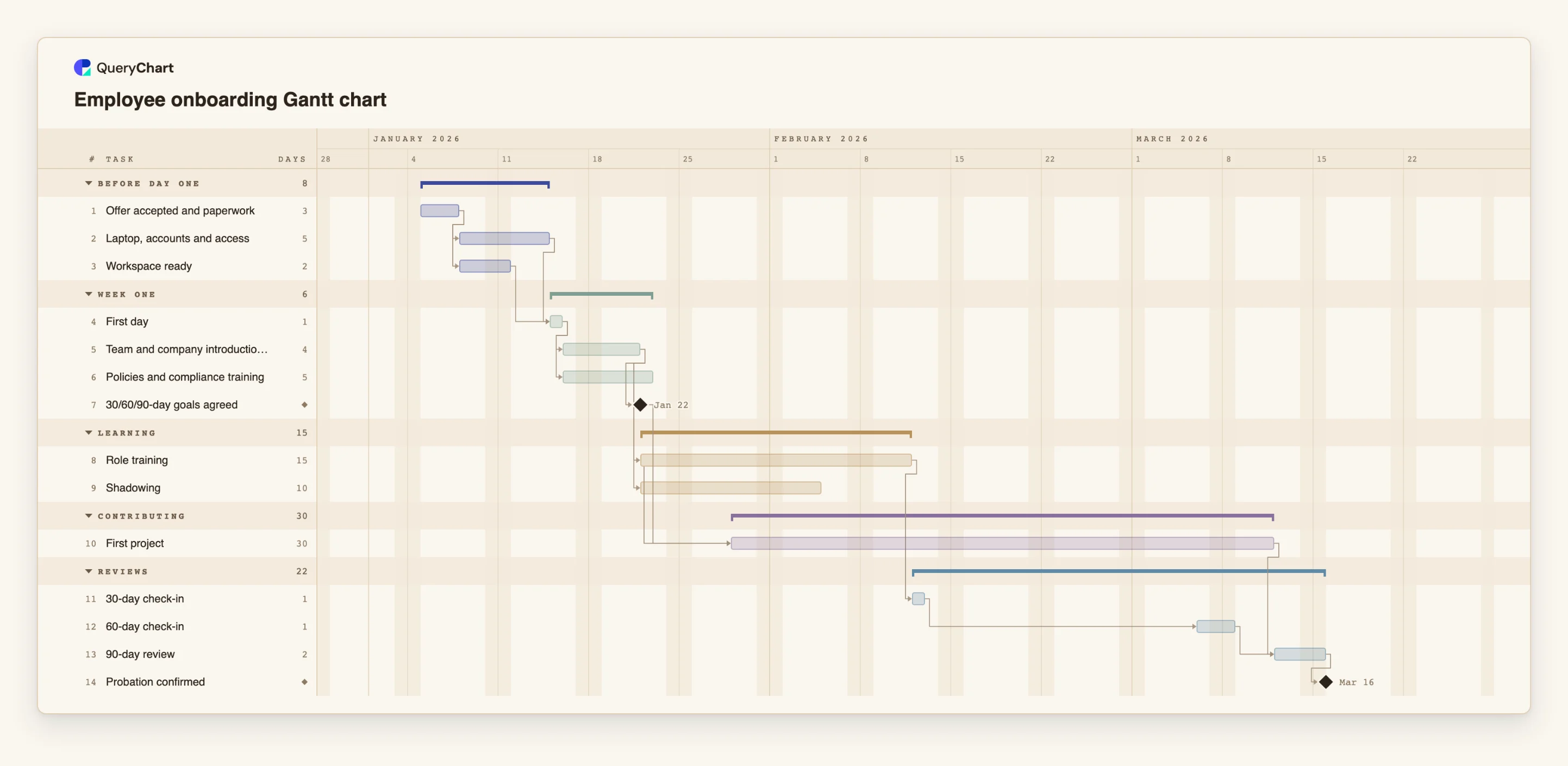
The example below is a 90-day plan. Open the spreadsheet panel to see the task numbers and how the check-ins are linked.
A 30/60/90-day onboarding plan
Fourteen tasks from the accepted offer to the confirmed probation. Open the spreadsheet panel to see the rows behind each stage.
Preparation before day one
"Offer accepted and paperwork" takes 3 working days. "Laptop, accounts and access" (5 days) and "Workspace ready" (2 days) both wait for it and run side by side, and "First day" waits for both.
The first weeks run in parallel
After "First day", "Team and company introductions" (4 days) and "Policies and compliance training" (5 days) start together. Introductions lead to the "30/60/90-day goals agreed" milestone, "Role training" (15 days) and "Shadowing" (10 days).
First project and the check-ins
"First project" (30 days) is linked start-to-start to "Role training" with a lag of 5 days, so it begins during training. "30-day check-in" waits for role training, and "60-day check-in" starts 15 working days after it.
Review and confirmation
"90-day review" (2 days) waits for both the first project and the 60-day check-in. "Probation confirmed" has a length of 0, so it is a milestone that closes the plan.
How it works
Fix the first day
Pin the Start of the 'First day' task to the real date. Everything before it should then be scheduled to finish by that date, and the chart will flag a preparation task that cannot.
Add the preparation tasks
List paperwork, equipment, accounts and workspace as separate tasks, all depending on the accepted offer, and make 'First day' depend on all of them. The longest one shows what to start first.
Add the ramp-up as parallel tasks
After the first day, add introductions, compliance training, role training and shadowing. Give each a length in working days and group them as 'Weeks 1-2' or 'Training'.
Start the first project early
Use a start-to-start dependency with a lag for the first project, for example 8SS+5 for a task that starts 5 working days after role training starts. Real onboarding overlaps like this.
Space the check-ins
Add the check-ins as one-day tasks and link each to the previous one with a lag. The names say 30, 60 and 90, but the dates come from the links, so check them against the calendar.
Reuse the plan
Duplicate the chart for the next hire, pin the new first day and adjust names and people. Share the chart as a link with the manager and the new starter, or export a PDF.
Mistakes to avoid
Believing the labels over the dates
A task called '30-day check-in' is on day 30 only if the links and lengths put it there. Look at the calculated date and adjust the dependencies, not the name.
Planning in calendar days
Durations are working days, Monday to Friday, with no calendar of public holidays. A plan for 90 calendar days is roughly 64 working days, and a holiday in the period will not be removed for you.
Forgetting the manager's side
Add tasks for the manager and buddy, such as agreeing goals, as well as for the new hire. Use the People field to show who owns each one.
Duplicating the checklist inside the chart
Thirty tiny tasks make the chart unreadable. Keep one task per block of work in the Gantt chart and the detailed steps in the checklist.
Plan an onboarding
Open the onboarding plan as your own chart, pin the first day and replace the tasks with your own.
Related guides
Frequently asked questions
How is this different from an onboarding checklist?
A checklist lists steps and who must do them. The Gantt chart adds time: order, overlap and the date each block should start and finish. Use both.
Can I use it for a training programme?
Yes. Use one group per wave or week, one task per module and link modules that build on each other. A training plan template is also available.
How do I show training for several people at once?
Add a task for the training session and put the participants in the People field. The chart does not check availability, so confirm it separately.
Can I paste an existing schedule?
You can paste rows from a spreadsheet. If the first line names the columns, such as Task, Start, Duration and Owner, they are matched by name.
Can I reuse the plan for each new hire?
Yes. Duplicate the chart, pin the new first day and update the names. Because dates are calculated, the rest of the plan moves with it.