Software project Gantt chart template: discovery to release
An editable software development Gantt chart: discovery, design, build, QA, deployment, release and a post-release review, with dependencies and milestones. Change a duration and the dates follow.
What the software project gantt chart template: discovery to release process is
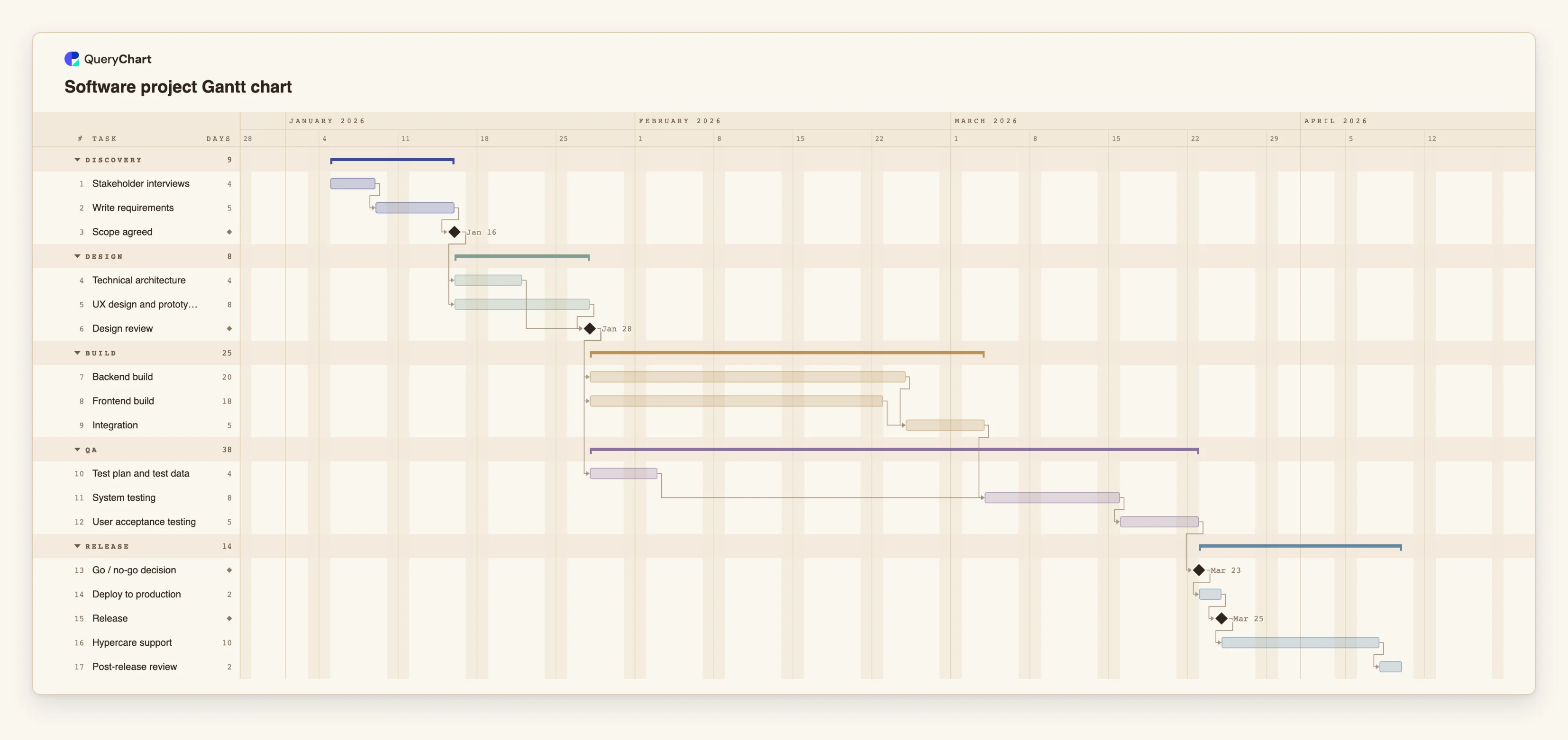
Software schedules go wrong in a particular order. Requirements are written, design starts on the first draft, the build begins before the design is reviewed, and testing is squeezed into whatever time is left at the end. A Gantt chart does not stop that, but it makes the squeeze visible early, because the dependencies are on the page: testing cannot finish before integration does, and release cannot happen before the go / no-go decision.
This template has five stages: Discovery, Design, Build, QA and Release, with 17 tasks. Backend and frontend build run side by side and join at "Integration", and "Test plan and test data" is prepared during build so that "System testing" can start the day integration ends. It is deliberately not tied to a method. If you work in sprints, treat the build tasks as a block of sprints and keep the rest as the release envelope; the chart is for the plan around the iterations, not each iteration.
The durations are working days and are placeholders. A real estimate comes from the team, and the useful habit is to change the numbers and watch what moves. If the frontend takes 25 days instead of 18, "Integration" moves, and so does everything after it. The plan carries no fixed dates, so it starts on the day you create it.
The release itself is a separate process: the software release process at /templates/software-release-process and the deployment process at /templates/software-deployment-process draw the steps inside the "Deploy to production" and "Release" tasks.
What this flowchart covers
In this template
- Five stages, Discovery, Design, Build, QA and Release, with 17 tasks and three decision milestones: "Scope agreed", "Design review" and "Go / no-go decision".
- Parallel build: "Backend build" and "Frontend build" both start after "Design review" and meet at "Integration".
- Test preparation off the critical path: "Test plan and test data" runs while the build is under way, so "System testing" is not waiting for it.
- A staged release: "User acceptance testing" leads to "Go / no-go decision", then "Deploy to production" and the "Release" milestone.
- Support and learning after launch: "Hypercare support" followed by "Post-release review", so the project closes with a decision about what to change next time.
When to use this template
- You need to tell a stakeholder when a release can ship and what that date depends on.
- A feature is late and you need to see which later tasks move and which do not.
- Testing keeps being compressed at the end and you want the effect of a late build on it shown plainly.
- You are starting a project and want a standard shape for discovery through release to adapt.
The plan, task by task
Every task in the chart with its length in working days and what it waits for. A dependency is a step number; SS is start-to-start, FF is finish-to-finish, and +n is a lag in working days.
| # | Task | Group | Working days | Depends on |
|---|---|---|---|---|
| 1 | Stakeholder interviews | Discovery | 4 | |
| 2 | Write requirements | Discovery | 5 | 1 |
| 3 | Scope agreed | Discovery | Milestone | 2 |
| 4 | Technical architecture | Design | 4 | 3 |
| 5 | UX design and prototype | Design | 8 | 3 |
| 6 | Design review | Design | Milestone | 4, 5 |
| 7 | Backend build | Build | 20 | 6 |
| 8 | Frontend build | Build | 18 | 6 |
| 9 | Integration | Build | 5 | 7, 8 |
| 10 | Test plan and test data | QA | 4 | 6 |
| 11 | System testing | QA | 8 | 9, 10 |
| 12 | User acceptance testing | QA | 5 | 11 |
| 13 | Go / no-go decision | Release | Milestone | 12 |
| 14 | Deploy to production | Release | 2 | 13 |
| 15 | Release | Release | Milestone | 14 |
| 16 | Hypercare support | Release | 10 | 15 |
| 17 | Post-release review | Release | 2 | 16 |
How it works
Replace the tasks with your own
Rename the 17 tasks and the five stages. Add tasks inside a stage rather than new stages unless your process really has one more.
Estimate the build in parallel streams
Give each build stream its own task, as the template does for backend and frontend, so the schedule shows the longer of the two as the one that sets the date.
Make the decision milestones real
Treat "Design review" and "Go / no-go decision" as gates with an owner and criteria. A milestone with no one who can say no is only a date.
Start testing as soon as its inputs exist
Link test preparation to the design, not to the end of the build. Link system testing to integration. Use start-to-start links where testing overlaps the end of a task.
Add the time after the release
Keep "Hypercare support" and "Post-release review" in the plan. Teams that end the schedule at release find the next project starting with the same unplanned support.
Turn on the critical path
Use the View menu to see which tasks set the release date. Shortening a task off the path does not move the date.
Frequently asked questions
How do I make a Gantt chart for a software project?
List the stages your release goes through, break each into tasks, give every task a length in working days and say which tasks it waits for. This template does that for a generic project from discovery to a post-release review. Edit the tasks and lengths, and the dates are calculated from them.
Can I use this with Agile or Scrum?
Yes, for the plan around the sprints. Show the build as one task or a short series of sprint-sized tasks and keep the release milestones, testing and hypercare in the chart. A Gantt chart is not a sprint board: it does not track stories or velocity.
What should the milestones be?
Milestones mark decisions, not work: scope agreed, design review and the go / no-go decision in this template. Add one wherever someone has to approve before the next stage can start.
Can I import tasks from a spreadsheet?
You can paste a table of tasks, lengths and dependencies into the sheet beside the chart. There is no file upload for Gantt charts yet, so copy the rows from your spreadsheet and paste them into the sheet beside the chart.