Website project Gantt chart template: audit to go-live
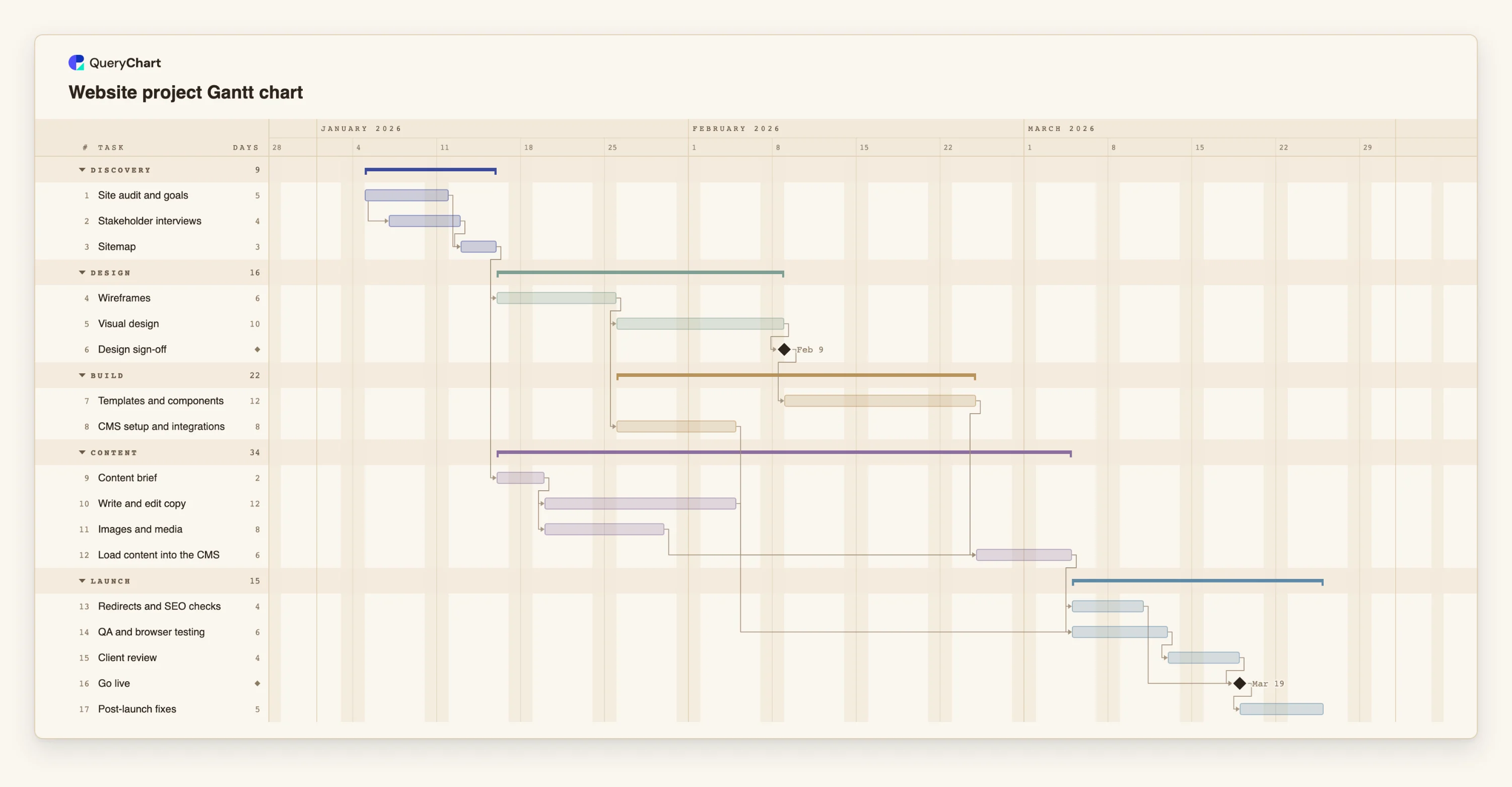
An editable website project Gantt chart: audit, sitemap, wireframes, design, build, content, QA and go-live, with dependencies and milestones. Change a duration and the dates follow.
What the website project gantt chart template: audit to go-live process is
Website projects are late for the same reason: the design is finished and the pages are empty. Writing is slower than anyone expects, it depends on people outside the project, and it is usually started after the design is approved instead of before. A Gantt chart makes that wait visible, and shows what changes if the content starts earlier.
This template runs five phases: Discovery, Design, Build, Content and Launch. The key choice is that the content brief depends on the sitemap, not on the finished design, so copy and images are produced while the wireframes and visual design are still being made. "Load content into the CMS" then waits for the templates, the copy and the media, so the longest of the three sets the date.
The audit and the stakeholder interviews overlap, with interviews starting two days into the audit. "Redirects and SEO checks" run before "Go live" rather than after, because migrating from an existing site without redirects loses traffic that is hard to recover.
Durations are working-day placeholders. For a large site, the content and the load can be the longest tasks in the plan; see how the schedule moves if they double.
What this flowchart covers
In this template
- Five phases, Discovery, Design, Build, Content and Launch, with 17 tasks and two milestones: "Design sign-off" and "Go live".
- Content that starts early: "Content brief" follows "Sitemap", so "Write and edit copy" and "Images and media" run while "Wireframes" and "Visual design" are in progress.
- A join before loading: "Load content into the CMS" waits for "Templates and components", the copy and the media.
- Overlapping discovery: "Stakeholder interviews" starts two days into "Site audit and goals".
- Migration work before launch: "Redirects and SEO checks" and "Client review" both finish before "Go live".
When to use this template
- A site redesign has a launch date and you need to see whether content will be ready in time.
- A client asks why the site is not live when the design is approved.
- You are replacing an existing site and need redirects in the plan.
- You want a standard website schedule to adapt for each client.
The plan, task by task
Every task in the chart with its length in working days and what it waits for. A dependency is a step number; SS is start-to-start, FF is finish-to-finish, and +n is a lag in working days.
| # | Task | Group | Working days | Depends on |
|---|---|---|---|---|
| 1 | Site audit and goals | Discovery | 5 | |
| 2 | Stakeholder interviews | Discovery | 4 | 1SS+2 |
| 3 | Sitemap | Discovery | 3 | 1, 2 |
| 4 | Wireframes | Design | 6 | 3 |
| 5 | Visual design | Design | 10 | 4 |
| 6 | Design sign-off | Design | Milestone | 5 |
| 7 | Templates and components | Build | 12 | 6 |
| 8 | CMS setup and integrations | Build | 8 | 4 |
| 9 | Content brief | Content | 2 | 3 |
| 10 | Write and edit copy | Content | 12 | 9 |
| 11 | Images and media | Content | 8 | 9 |
| 12 | Load content into the CMS | Content | 6 | 7, 10, 11 |
| 13 | Redirects and SEO checks | Launch | 4 | 12 |
| 14 | QA and browser testing | Launch | 6 | 8, 12 |
| 15 | Client review | Launch | 4 | 14 |
| 16 | Go live | Launch | Milestone | 13, 15 |
| 17 | Post-launch fixes | Launch | 5 | 16 |
How it works
Start with the sitemap
Link content, wireframes and CMS setup to the sitemap so they can start as soon as it is agreed.
Plan content as a project of its own
Give writing and media their own tasks and estimate them from the page count, not from the design effort.
Set the sign-off as a milestone
Keep "Design sign-off" as the gate for the build. Changes after it are changes to the plan.
Join at the load
Link the load into the CMS to templates, copy and media, so the slowest of them is visible.
Keep redirects and checks before launch
Link them before "Go live" and give them real time.
Plan the fixes after launch
Keep "Post-launch fixes" in the plan so someone is booked for them.
Frequently asked questions
How long does a website project take?
It depends on the size, the number of pages and how fast content is produced. The template uses placeholder durations. Replace them with your own and read the finish date from the plan.
Why does content start before the design is finished?
Because content is usually the slowest part and depends on the sitemap, not on the visual design. Starting it early shortens the whole project.
Can I use it for an e-commerce site?
Yes, as a skeleton. Add tasks for catalogue loading, payment and shipping set-up, and testing, and link go-live to them.
How do I import my existing plan?
Paste the rows of tasks, lengths and dependencies into the sheet beside the chart. There is no file upload for Gantt charts yet, so copy the rows from your spreadsheet and paste them into the sheet beside the chart.